Fscalendar: How to capitalize the first letter of month's name?
How to capitalize the first letter of month's name?
I would like to do as in the photo, but when I set the Locale to "pt_BR" it only gets the lowercase month's name.
Sorry if I didn't explain it well.

 DaniloJrC
All 5 comments
@DaniloJrC
By this trick you can do this:
override func viewDidLoad() {
    super.viewDidLoad()

    ...

    self.calendar.locale = Locale.init(identifier: "pt_BR")
}

override func viewDidAppear(_ animated: Bool) {
    super.viewDidAppear(animated)

    changeMonthName()
}

func changeMonthName(){
    let collectionView = self.calendar.calendarHeaderView.value(forKey: "collectionView") as! UICollectionView

    collectionView.visibleCells.forEach { (cell) in
    let c = cell as! FSCalendarHeaderCell

    c.titleLabel.text = c.titleLabel.text?.capitalizingFirstLetter()
    }
}

// MARK:- FSCalendarDelegate

func calendarCurrentPageDidChange(_ calendar: FSCalendar) {
    changeMonthName()
}

...

// Out of your class add String extension class
extension String {
    func capitalizingFirstLetter() -> String {
        let first = String(characters.prefix(1)).capitalized
        let other = String(characters.dropFirst())
        return first + other
    }
}
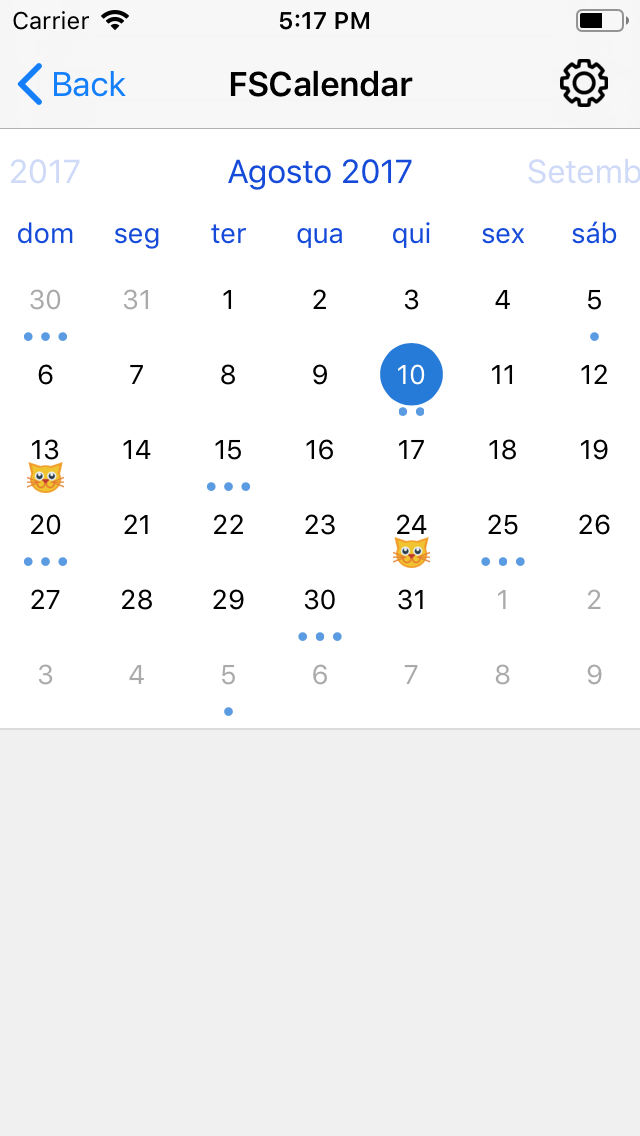
 Husseinhj
on 21 Feb 2019
Husseinhj
on 21 Feb 2019
@Husseinhj
works perfectly, thanks you.
DaniloJrC
on 21 Feb 2019
@Husseinhj Its not work on v.2.8.1: collectionView.visibleCells is always 0.
 RareScrap
on 2 Oct 2020
RareScrap
on 2 Oct 2020
@RareScrap
You should call visibleCells method when the calendar has finished creating month views.
An array of UICollectionViewCell objects. If no cells are visible, this method returns an empty array.
This issue can help you out.
Husseinhj
on 3 Oct 2020
@Husseinhj
I think I figured out why I had such a problem. The fact is that with pagging disabled, the calendar does not have such a view as calendarHeaderView. You should use visibleStickyHeaders instead:
// will work with disabled pagging
func changeMonthName(){
    for header in calendarView.visibleStickyHeaders {
    let h = header as! FSCalendarStickyHeader
    h.titleLabel.text = h.titleLabel.text?.capitalizingFirstLetter()
    }
}
Related issues
 TomWang1
·
5Comments
TomWang1
·
5Comments
 adavan2107
·
5Comments
adavan2107
·
5Comments
 denikaev
·
5Comments
denikaev
·
5Comments
 bizibizi
·
3Comments
bizibizi
·
3Comments
 garudaonekh
·
4Comments
garudaonekh
·
4Comments
Most helpful comment
@Husseinhj
works perfectly, thanks you.