Fscalendar: Date selection and Header title displaying wrong dates, months and year in arabic
Hi @WenchaoD ,
I am using your awesome library again but this time in Arabic in xcode 9 ios 11. I am facing this issue in RLT. When i change the system language the header title is displaying irrelevant date.

This is the code for initial calendar setup.
 func setupCalendar(calendarView : FSCalendar){
        calendarView.allowsMultipleSelection = false
        calendarView.scrollDirection = .horizontal
        calendarView.scrollEnabled = true
        calendarView.swipeToChooseGesture.isEnabled = true
        calendarView.calendarHeaderView.backgroundColor = UIColor.init(hex: "131114")
        calendarView.bottomBorder.backgroundColor = UIColor.clear
        calendarView.appearance.headerDateFormat = "MMMM - YYYY"
        calendarView.appearance.caseOptions = [.headerUsesUpperCase,.weekdayUsesSingleUpperCase]
        calendarView.appearance.borderRadius = 0.2
        calendarView.appearance.todayColor = currenDateColor
        calendarView.appearance.todaySelectionColor = currenDateColor
         calendarView.today = nil
}

  func minimumDate(for calendar: FSCalendar) -> Date {
        return Date()
    }

 func moveBack(calendarView : FSCalendar){


          var val = -1
        if language.currentAppleLanguage() == "ar"{
            val = 1
        }


        let gregorian = NSCalendar.init(calendarIdentifier: .gregorian)

        let mmdate = gregorian?.date(byAdding: .month, value: val, to: calendarView.currentPage, options: [])
        calendarView.setCurrentPage(mmdate!, animated: true)

     //   let previousMonth = self.gre

//        let previousMonth = calendarView.date(bySubstractingMonths: val, from: calendarView.currentPage)
//        calendarView.setCurrentPage(previousMonth, animated: true)
//
    }

    func moveForward(calendarView : FSCalendar){

        var val = 1
        if language.currentAppleLanguage() == "ar"{
            val = -1
        }
        let gregorian = NSCalendar.init(calendarIdentifier: .gregorian)
        let mmdate = gregorian?.date(byAdding: .month, value: val, to: calendarView.currentPage, options: .matchLast)
        calendarView.setCurrentPage(mmdate!, animated: true)


    }
As you can see the date in header is not correct. When i select a date from the calendar it is displaying wrong date value.
Need help urgently please. Thanks
 hamzakhanfcb10
All 18 comments
had the same issue.
that's how I ended up fixing it :
    if  isCurrentLanguageRTL() {
        calendar.locale = Locale(identifier: "ar")
        calendar.calendarHeaderView.calendar.locale = Locale(identifier: "ar")


    }else {
        calendar.locale = Locale(identifier: "en_EN")
        calendar.calendarHeaderView.calendar.locale =  Locale(identifier: "en_EN")

     }
you need to change headerView locale too.
 oenama
on 20 Dec 2017
oenama
on 20 Dec 2017
Same issue here. I have tried above solution but still facing same issue in year.
Header year display wrong.
The main calendar display correct date while select the date but problem with only above header date(Horizontal scroll view).

 MehulSojitra16
on 27 Dec 2017
MehulSojitra16
on 27 Dec 2017
any one got a solution?
 tarikhs
on 10 Apr 2018
tarikhs
on 10 Apr 2018
@tarikhs You can use my forked version full support RTL languages
https://github.com/Husseinhj/FSCalendar
It’s all really support persian, if you want to support arabic i will give you 1 hour
 Husseinhj
on 11 Apr 2018
Husseinhj
on 11 Apr 2018
@Husseinhj Hi, Is your calendar support both English and arabic languages? I'm working on multilingual app and need both languages.
 rehannali
on 12 Apr 2018
rehannali
on 12 Apr 2018
@rehannali yeah dude, it’s support RTL (Persian, Arabic ,...) and LTR (English ,...)
Husseinhj
on 12 Apr 2018
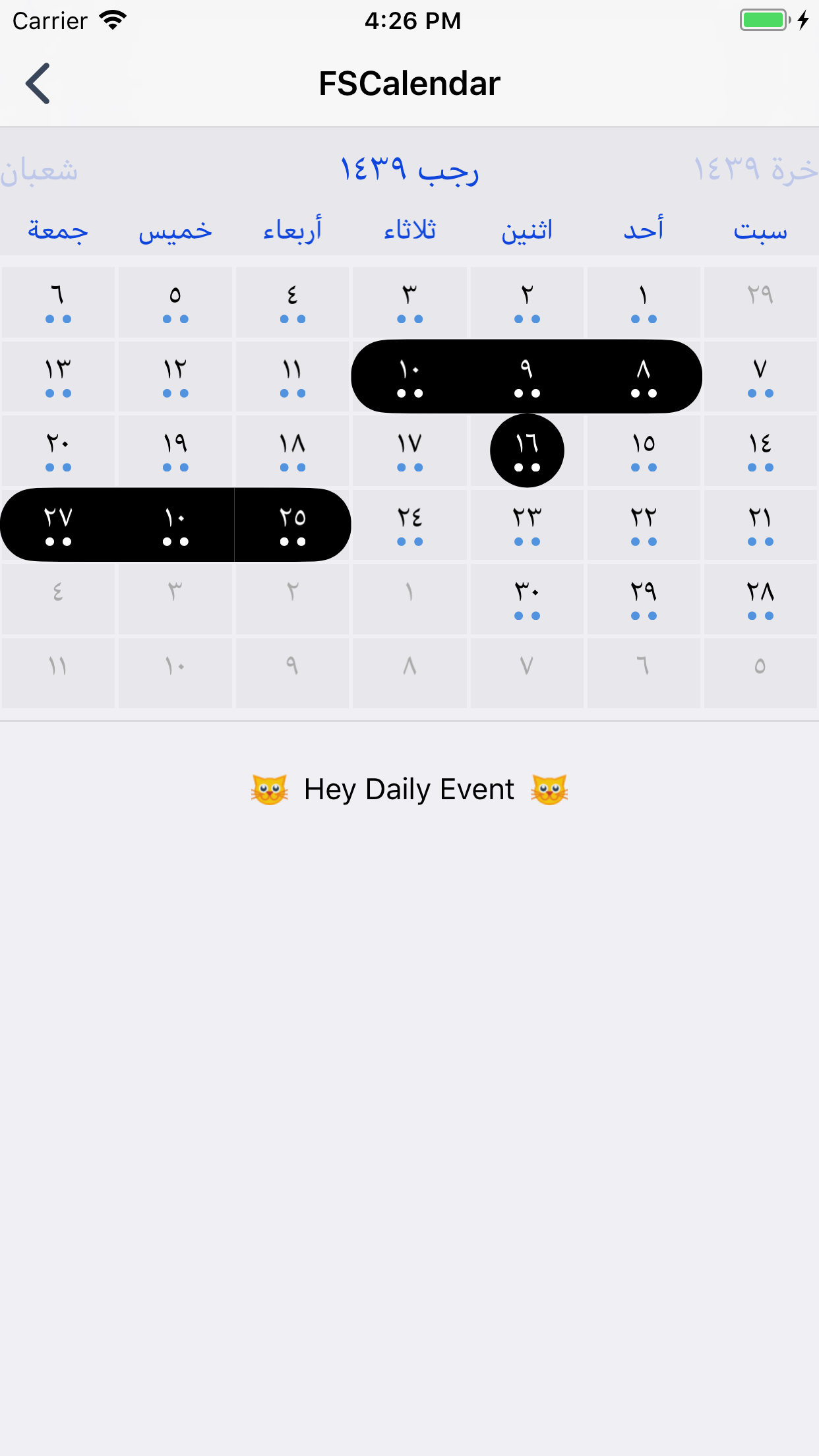
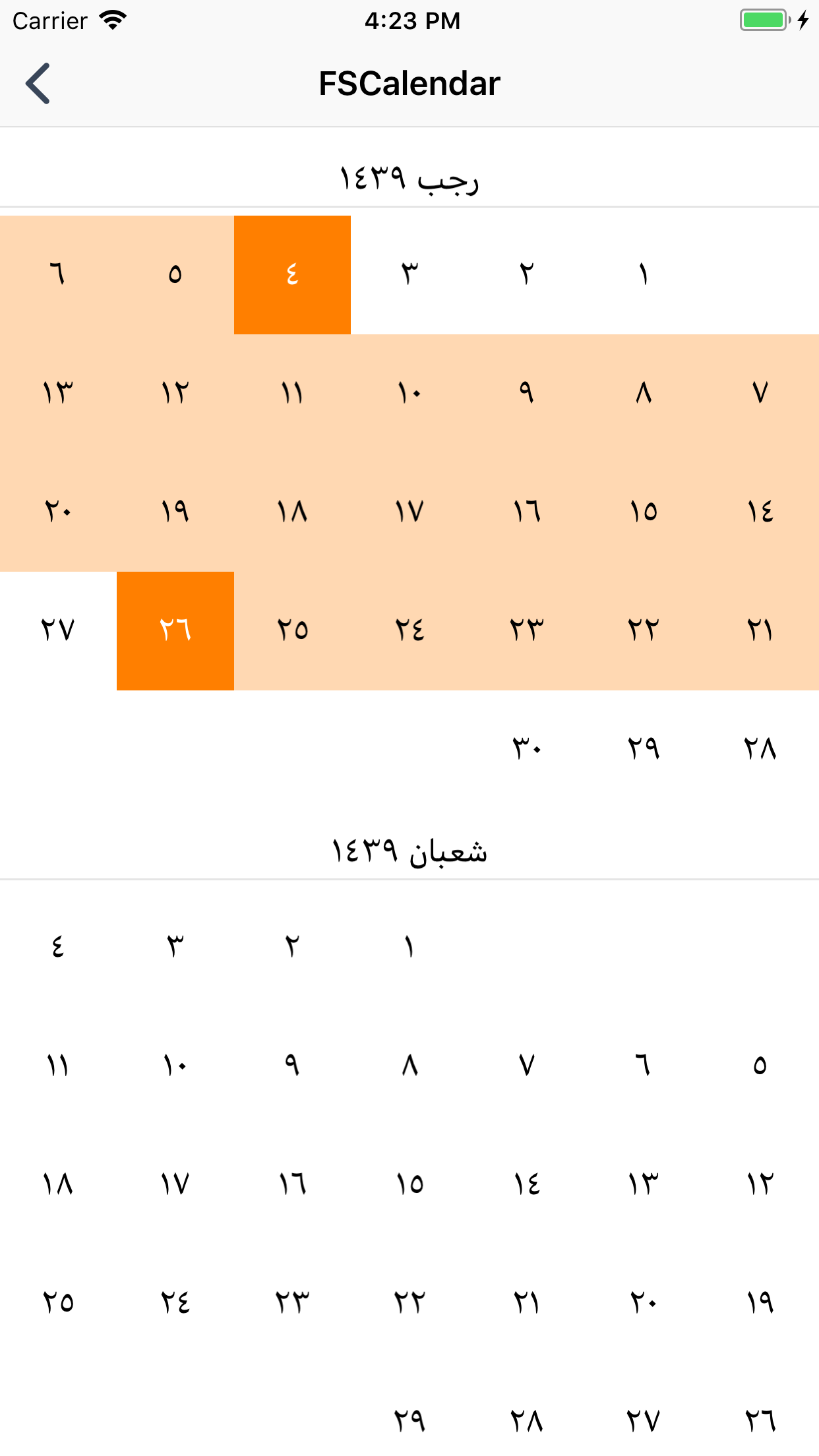 Husseinhj
on 12 Apr 2018
Husseinhj
on 12 Apr 2018
@Husseinhj Shukran Brother!
tarikhs
on 22 Apr 2018
@Husseinhj , The app is crashed when i select any calendar from your app. The reason is : -[__NSCFConstantString isRTLCalendar]: unrecognized selector sent to instance. I have downloaded it from your
v2.8.0
 VidyaRajan7
on 25 Jul 2018
VidyaRajan7
on 25 Jul 2018
I did fix this at commit
@VidyaRajan7 Use the last version of FSCalendar+Persianv2.8.1
Husseinhj
on 25 Jul 2018
Ok Thank You @Husseinhj
VidyaRajan7
on 25 Jul 2018
@Husseinhj
If i want to display calendar in Arabic, how can i do it?
VidyaRajan7
on 25 Jul 2018
@VidyaRajan7
It's really simple, Look at the example and use your locale and calendar except for Persian. Like this :
- (void)loadView
{
    UIView *view = [[UIView alloc] initWithFrame:[[UIScreen mainScreen] bounds]];
    view.backgroundColor = [UIColor whiteColor];
    self.view = view;

    FSCalendar *calendar = [[FSCalendar alloc] initWithFrame:CGRectMake(0, CGRectGetMaxY(self.navigationController.navigationBar.frame), view.frame.size.width, view.frame.size.height - CGRectGetMaxY(self.navigationController.navigationBar.frame))];

    calendar.locale = [NSLocale localeWithLocaleIdentifier:@"ar_SA"];
    calendar.identifier = NSCalendarIdentifierIslamic; //or NSCalendarIdentifierIslamicCivil
    calendar.firstWeekday = 7;

. . . . . .  . .

}

- (void)viewDidLoad
{
    [super viewDidLoad];

    self.gregorian = [NSCalendar calendarWithIdentifier:NSCalendarIdentifierIslamic];
    self.dateFormatter = [[NSDateFormatter alloc] init];
    self.dateFormatter.dateFormat = @"yyyy-MM-dd";

    // Uncomment this to perform an 'initial-week-scope'
    // self.calendar.scope = FSCalendarScopeWeek;

    // For UITest
    self.calendar.accessibilityIdentifier = @"calendar";
}
@Husseinhj
find error in year when use pod 'FSCalendar+Persian'

my code
if L102Language.currentAppleLanguage()=="ar"{
ClanderDate.locale=Locale(identifier: "ar_DZ")
//ClanderDate.calendarHeaderView.calendar.locale = Locale(identifier: "ar_DZ")
ClanderDate.identifier = NSCalendar.Identifier.islamic.rawValue
    }
    else{
    ClanderDate.locale=Locale(identifier: "en_US_POSIX")
  //  ClanderDate.calendarHeaderView.calendar.locale = Locale(identifier: "en_US_POSIX")
    }
 omarhassansadek
on 30 Sep 2018
omarhassansadek
on 30 Sep 2018
@omarhassansadek Did you use implement FSCalendar delegate method?
#pragma mark - FSCalendarDataSource

- (NSDate *)minimumDateForCalendar:(FSCalendar *)calendar
{
    return [self.dateFormatter dateFromString:@"2016-07-08"];
}
self.calendar.scope = FSCalendarScopeWeek
@VidyaRajan7
It's really simple, Look at the example and use your locale and calendar except for Persian. Like this :- (void)loadView { UIView *view = [[UIView alloc] initWithFrame:[[UIScreen mainScreen] bounds]]; view.backgroundColor = [UIColor whiteColor]; self.view = view; FSCalendar *calendar = [[FSCalendar alloc] initWithFrame:CGRectMake(0, CGRectGetMaxY(self.navigationController.navigationBar.frame), view.frame.size.width, view.frame.size.height - CGRectGetMaxY(self.navigationController.navigationBar.frame))]; calendar.locale = [NSLocale localeWithLocaleIdentifier:@"ar_SA"]; calendar.identifier = NSCalendarIdentifierIslamic; //or NSCalendarIdentifierIslamicCivil calendar.firstWeekday = 7; . . . . . . . . } - (void)viewDidLoad { [super viewDidLoad]; self.gregorian = [NSCalendar calendarWithIdentifier:NSCalendarIdentifierIslamic]; self.dateFormatter = [[NSDateFormatter alloc] init]; self.dateFormatter.dateFormat = @"yyyy-MM-dd"; // Uncomment this to perform an 'initial-week-scope' // self.calendar.scope = FSCalendarScopeWeek; // For UITest self.calendar.accessibilityIdentifier = @"calendar"; }
Hi I m using v2.9.2. I want calendar in arabic . When i used this code, I'm not getting current year with current month calender. I checked in your example LoadViewExampleViewController by changing it to this code:
    calendar.locale = Locale(identifier: "ar_SA")
    calendar.calendarIdentifier = NSCalendar.Identifier.islamic.rawValue
    calendar.calendarHeaderView.calendar.calendarIdentifier = NSCalendar.Identifier.islamic.rawValue
    calendar.firstWeekday = 7
It's not showing the current date month. Please help me.
 anjusr
on 13 May 2019
anjusr
on 13 May 2019
@anjusr Fixed in v2.9.3
Husseinhj
on 23 May 2019
wrong year in arabic language it is not fixed
note : i add FSCalendar in UIView not in code
 mostafawanni94
on 14 Jun 2020
mostafawanni94
on 14 Jun 2020
Related issues
 vishal-iosdeveloper
·
5Comments
vishal-iosdeveloper
·
5Comments
 GDXRepo
·
3Comments
GDXRepo
·
3Comments
 csimmons0
·
4Comments
csimmons0
·
4Comments
 StanleySathler
·
5Comments
StanleySathler
·
5Comments
 denikaev
·
5Comments
denikaev
·
5Comments
Most helpful comment
had the same issue.
that's how I ended up fixing it :
you need to change headerView locale too.