Frp: Why logs "do http proxy request error: no such domain:"?
[REQUIRED] hat version of frp are you using
Version: 0.34.3
[REQUIRED] What operating system and processor architecture are you using
OS: client: Win10 + server: Centos 7.6 by docker compose
CPU architecture: x64
[REQUIRED] description of errors
I want to make my home computer acts a http proxy to access public internet. In other words, I use my home computer as a http proxy, so I can use my home IP address to do something.
confile
frps:
[common]
bind_port = 8080
vhost_http_port = 8080
frpc:
[common]
server_addr = mydomain.com
server_port = 8080

[http_proxy]
type = tcp
plugin = http_proxy
remote_port = 6000
docker-compose.yml
version: "3.3"

services:
  frps:
    restart: always
    container_name: frps
    image: snowdreamtech/frps:0.34.3
    volumes:
      - ./frps.ini:/etc/frp/frps.ini
    network_mode: host
log file
frps:
frps    | 2020/12/09 17:26:34 [I] [service.go:190] frps tcp listen on 0.0.0.0:8080
frps    | 2020/12/09 17:26:34 [I] [service.go:232] http service listen on 0.0.0.0:8080
frps    | 2020/12/09 17:26:34 [I] [root.go:215] start frps success
frps    | 2020/12/09 17:26:40 [I] [service.go:444] [3f3465ca6799f43c] client login info: ip [220.114.*.*:*] version [0.34.3] hostname [] os [windows] arch [amd64]
frps    | 2020/12/09 17:26:40 [I] [tcp.go:63] [3f3465ca6799f43c] [http_proxy] tcp proxy listen port [6000]
frps    | 2020/12/09 17:26:40 [I] [control.go:446] [3f3465ca6799f43c] new proxy [http_proxy] success
frps    | 2020/12/09 17:26:43 [W] [http.go:86] do http proxy request error: no such domain: www.baidu.com
frps    | 2020/12/09 17:26:43 [W] [http.go:86] do http proxy request error: no such domain: www.baidu.com
frps    | 2020/12/09 17:26:43 [W] [http.go:86] do http proxy request error: no such domain: www.baidu.com
frps    | 2020/12/09 17:26:43 [W] [http.go:86] do http proxy request error: no such domain: www.baidu.com
frps    | 2020/12/09 17:26:43 [W] [http.go:86] do http proxy request error: no such domain: www.baidu.com
frps    | 2020/12/09 17:26:43 [W] [http.go:86] do http proxy request error: no such domain: www.baidu.com
frpc:
2020/12/10 01:26:39 [I] [service.go:288] [3f3465ca6799f43c] login to server success, get run id [3f3465ca6799f43c], server udp port [0]
2020/12/10 01:26:39 [I] [proxy_manager.go:144] [3f3465ca6799f43c] proxy added: [http_proxy]
2020/12/10 01:26:39 [I] [control.go:180] [3f3465ca6799f43c] [http_proxy] start proxy success
Steps to reproduce the issue
- Setup as above my config
- Use any other client device set
mydomain.com:8080as http proxy, In my case I use my iPhone. - Access
baidu.com
Supplementary information
Can you guess what caused this issue
Checklist:
- [x] I included all information required in the sections above
- [x] I made sure there are no duplicates of this report (Use Search)
 GF-Huang
All 10 comments
you make www.baidu.com (dns or /etc/hosts) resolved to the address of frps binding ? Then frps know nothing about www.baidu.com, because the domain is not in its configuration.
 yuyulei
on 10 Dec 2020
yuyulei
on 10 Dec 2020
you make
www.baidu.com(dns or /etc/hosts) resolved to the address of frps binding ? Then frps know nothing aboutwww.baidu.com, because the domain is not in its configuration.
No, I want the frpc acts a standard http proxy server, but it is behind NAT. Is this possible?
My intent is that using my home IP address to access some website when I'm not at home.
GF-Huang
on 10 Dec 2020
frp has no plan to support "standard http proxy", because some tools(like nginx)is good enough.
for your purpose, your can try frpc + nginx, just handle nginx as a tcp service, ref: https://github.com/fatedier/frp#access-your-computer-in-lan-by-ssh.
yuyulei
on 10 Dec 2020
@GF-Huang Try mydomain.com:6000
 fatedier
on 10 Dec 2020
fatedier
on 10 Dec 2020
@GF-Huang Try
mydomain.com:6000
What the mean?
GF-Huang
on 10 Dec 2020
@GF-Huang Try
mydomain.com:6000What the mean?
"[http_proxy]" is tcp proxy, it make frps listens port: 6000 and put traffic to frpc's plugin: http_proxy.
"vhost_http_port" is for http proxy.
so the two will not share traffic, you just try
curl -x 'http://mydomain.com:6000' 'http://www.baidu.com'
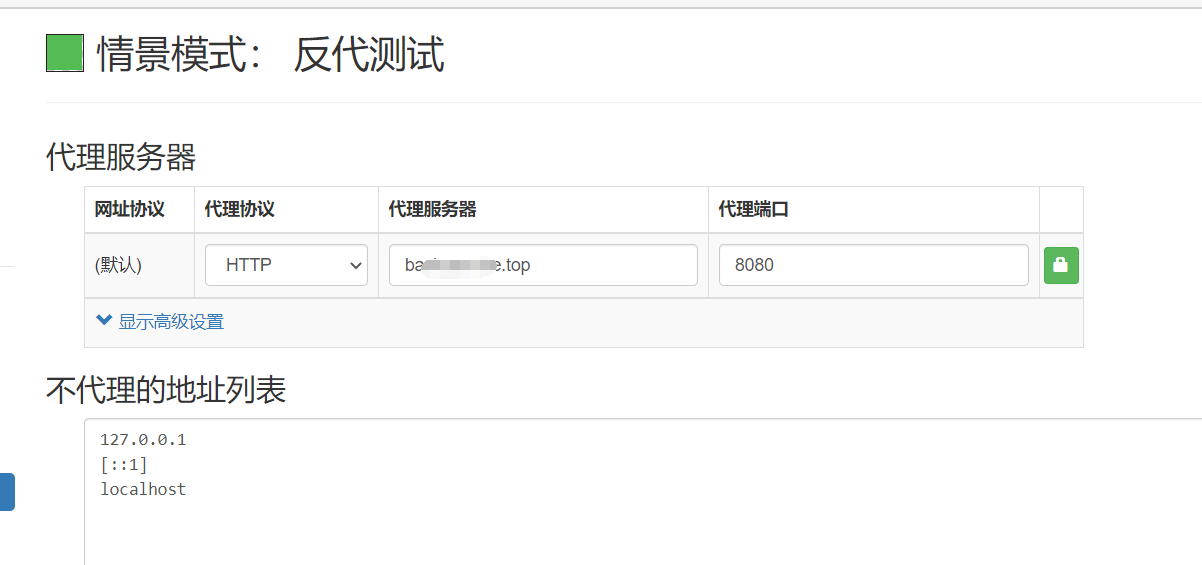
What's the equivalent of the follow command in browser? I set proxy explicit in my browser. The ba***.top is my mydomain.com in above config.
curl -x 'http://mydomain.com:6000' 'http://www.baidu.com'
GF-Huang
on 10 Dec 2020
What's the equivalent of the follow command in browser? I set proxy explicit in my browser. The
ba***.topis mymydomain.comin above config.curl -x 'http://mydomain.com:6000' 'http://www.baidu.com'
8080 -> 6000, use remote_port.
yuyulei
on 10 Dec 2020
It works! Thank you all. 🌹
GF-Huang
on 10 Dec 2020
By the way, what difference between vhost_http_port and remote_port of [http_proxy]?
It's hard to understand.
GF-Huang
on 10 Dec 2020
Related issues
 mmmyoung
·
3Comments
mmmyoung
·
3Comments
 235832289
·
4Comments
235832289
·
4Comments
 zhanghu663
·
4Comments
zhanghu663
·
4Comments
 ssdphp
·
3Comments
ssdphp
·
3Comments
 wztx
·
3Comments
wztx
·
3Comments