Frontend: Rearranging and configuring sidebar menu
The request
I would love to see the ability to configure sidebar menu items and rearrange them in user way, not the alphabetical order.
By configuring menu items I mean the ability to add custom panel from UI, not from panel_iframe: part of yaml config file.
By rearranging them I mean the ability to specify the order in which they are rendered. This would include:
- native HA items (Lovelace UIs, Map, Logbook, History),
- all
panel_iframe:defined (preferably from UI, not config) - all panels provided by Add-ons.
Next feature would be the ability to pin such an item to the bottom group including items such as Developer tools, Supervisor and Configuration. It would make sense if items such as File editor (add-on) or ESPHome were grouped with these admin-dev tools.
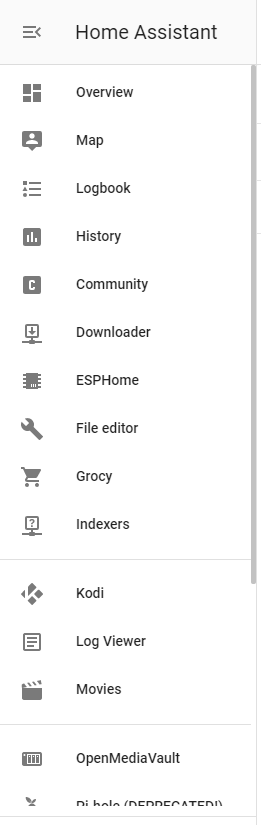
Speaking of groups of items, another great feature would be welcome. When items are sorted in a user-defined order, a simple horizontal line separator would be awesome to mark and differentiate related sections of items. Horizontal separators with discreet section names would be even better.
Last feature would be to hide and unhide an item (maybe section?). If for some reason, someone does not need/want to use e. g. Map, or temporarily one of installed add-ons, it would be possible to simply turn off the visibility of this item in configuration menu.
The alternatives
I do not use this yet, but I know there is a custom plugin that offers some of the features mentioned above, I believe it would be a good start to look at.
Additional information
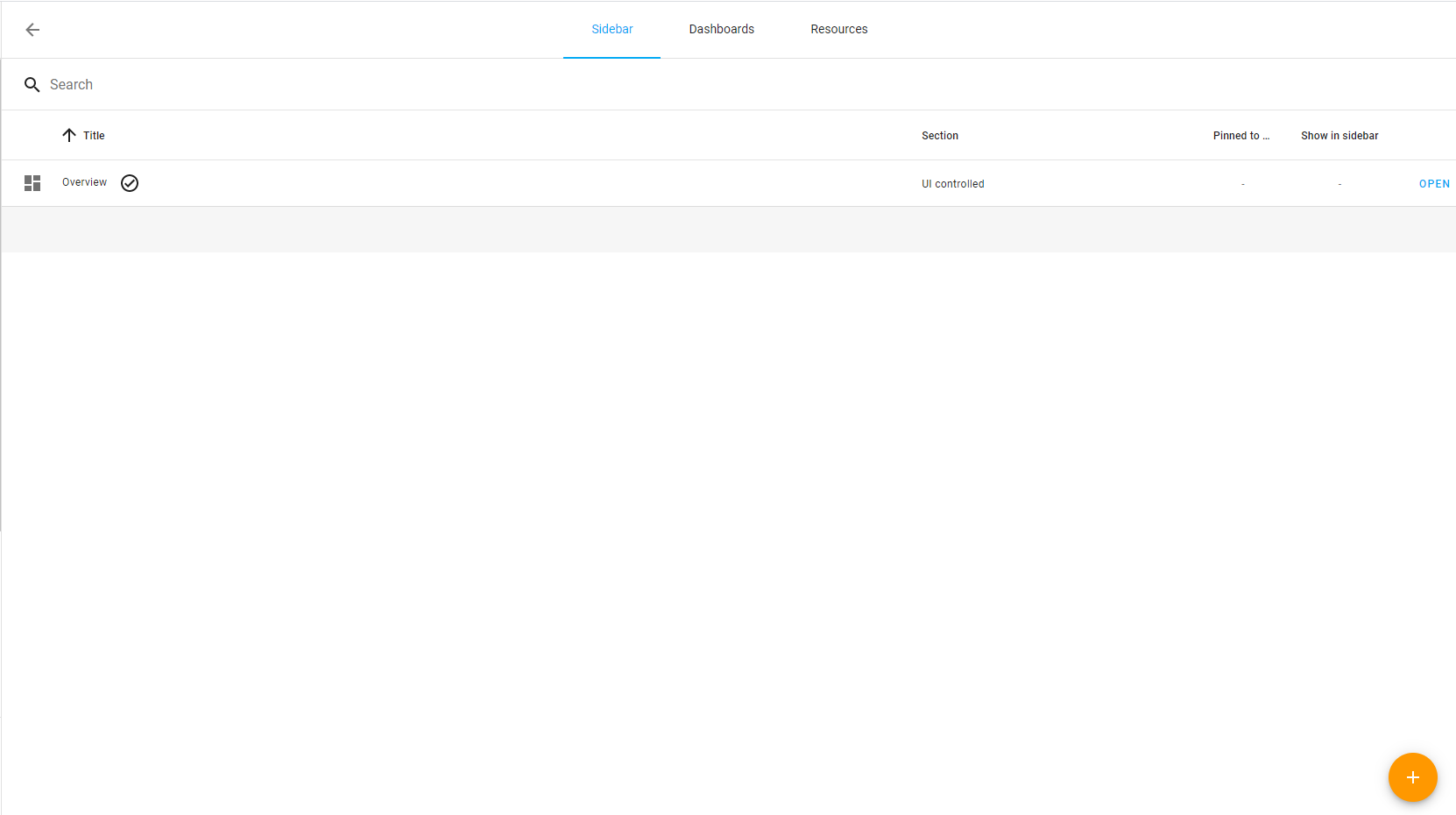
I believe this configuration menu could be implemented in Configuration -> Lovelace Dashboards -> Sidebar.
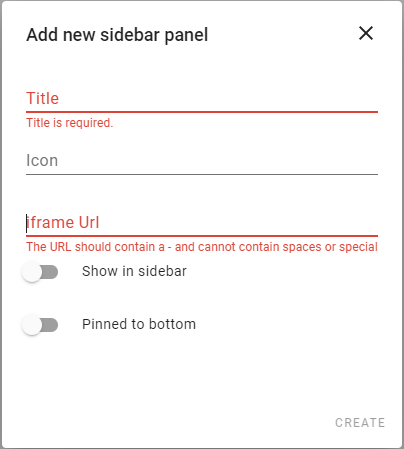
I made a quick sketch below (done by editing rendered html code, not enough skills to implement those features myself):
Sidebar config tab
Add new sidebar panel - popup
This of course would also require a drop-down list with selecion of section this item is affiliated with.
A few items separated with a divider as section
 wojtek14a
All 5 comments
I shared this mockup last Summer when the new sidebar was originally released:

The idea is when you enter Configure UI mode, it would show little grab bars next to each sidebar item and you'd just re-arrange them to your liking using drag and drop.
And now that drag-and-drop is being worked on for Lovelace cards currently (https://github.com/home-assistant/frontend/pull/4804) I think it makes even more sense. You'd be able to re-arrange cards and sidebar items the same way and without needing to navigate to another panel. You'd also have real-time feedback of what your changes look like.
Doesn't quite address your other feature requests (adding / removing panels) though.
 SeanPM5
on 7 May 2020
SeanPM5
on 7 May 2020
I quite like this concept, indeed real-time feedback would be good. I believe that adding/editing/removing panels could be addressed by the pop-up proposed by me after clicking plus button at the very bottom of the panel (adding) or pencil button (editing) and removing would be inside the pop-up with the red DELETE button.

This would leave grouping panels but I believe it could be done by placing one item onto another, they would merge and the result would be a separator-differentiated section (something like the process of grouping apps in Android/iOS, not the resulting group).
wojtek14a
on 7 May 2020
(slightly related to your feature request)
You can create an iframe_panel completely in the UI, create a new Lovelace dashboard and add a webview card in panel mode.
 bramkragten
on 12 May 2020
bramkragten
on 12 May 2020
This would leave grouping panels but I believe it could be done by placing one item onto another, they would merge and the result would be a separator-differentiated section (something like the process of grouping apps in Android/iOS, not the resulting group).
Maybe when clicking on plus button the user could choose what type of element he wants to add to the menu? Then he could choose a regular item or a divider (https://www.home-assistant.io/lovelace/entities/#divider) that would allow specifying a label (similar to https://www.home-assistant.io/lovelace/entities/#section)
I think this will simplify the management and allow easy configuration.
 Misiu
on 9 Jun 2020
Misiu
on 9 Jun 2020
0.115
 zsarnett
on 19 Sep 2020
zsarnett
on 19 Sep 2020
Related issues
 wangyt123ng
·
3Comments
wangyt123ng
·
3Comments
 andriej
·
3Comments
andriej
·
3Comments
 KennethLavrsen
·
3Comments
SeanPM5
·
3Comments
KennethLavrsen
·
3Comments
SeanPM5
·
3Comments
 TheZoker
·
3Comments
TheZoker
·
3Comments
Most helpful comment
I shared this mockup last Summer when the new sidebar was originally released:
The idea is when you enter Configure UI mode, it would show little grab bars next to each sidebar item and you'd just re-arrange them to your liking using drag and drop.
And now that drag-and-drop is being worked on for Lovelace cards currently (https://github.com/home-assistant/frontend/pull/4804) I think it makes even more sense. You'd be able to re-arrange cards and sidebar items the same way and without needing to navigate to another panel. You'd also have real-time feedback of what your changes look like.
Doesn't quite address your other feature requests (adding / removing panels) though.