Frontend: Conditional cards issue in 0.108.0b0
Checklist
- [x] I have updated to the latest available Home Assistant version.
- [x] I have cleared the cache of my browser.
- [x] I have tried a different browser to see if it is related to my browser.
The problem
I use a lot of conditional cards in my setup, these are only shown when certain input_boolean are toggled on. Always worked fine until 0.108.0b0 when most of them are non-functional now or acting really weird.
Initially I thought this was the custom button card (which is definitely borked), but it appears to happen on the core cards too. Have been testing it a bunch and trying to isolate things and see what might be causing it, but honestly have no clue. _Think_ it might have to do with vertical stacks? Need sleep now but here is some observations:
This seems to only happen in Lovelace views, because:
- When I have the Conditional Card editor opened and I toggle the input_booleans, they show/hide in the preview window as expected there.
- When I use the "Delete card" option and have _that_ preview open, it's seemingly always 100% reliable there too...
It is seemingly just the lovelace views where it's being weird.
Expected behavior
Show conditional cards correctly
Steps to reproduce
Environment
- Home Assistant release with the issue: 0.108.0b0
- Last working Home Assistant release (if known): 0.107.7
- Browser and browser version: Chrome
- Operating system: macOS
Problem-relevant configuration
    cards:
      - type: vertical-stack
        cards:
          - type: horizontal-stack
            cards:

              - type: picture-glance
                title: Sean
                entities:
                  - sensor.seans_iphone_battery_level
                state_image:
                  "on": /local/images/users/Sean.png
                  "off": /local/images/users/Sean_nothome.png
                entity: binary_sensor.sean_presence
                tap_action:
                  action: call-service
                  service: input_boolean.toggle
                  service_data:
                    entity_id: input_boolean.ui_display_sean

              - type: picture-glance
                title: Gail
                entities:
                  - input_datetime.gail_left
                  - sensor.gail_phone_battery_level # I want this to display charging status icons just like the HA iOS app, this is not good enough
                state_image:
                  "on": /local/images/users/Gail.png
                  "off": /local/images/users/Gail_nothome.png
                entity: binary_sensor.gail_presence
                tap_action:
                  action: call-service
                  service: input_boolean.toggle
                  service_data:
                    entity_id: input_boolean.ui_display_gail


          - type: conditional
            conditions:
              - entity: input_boolean.ui_display_sean
                state: "on"
            card:
              type: vertical-stack
              cards:
                - type: entities
                  entities:
                    - input_boolean.sean_present
                    - sensor.seans_iphone_battery_state
                    - sensor.seans_iphone_battery_level
                    - sensor.seans_iphone_connection_type
                    - sensor.seans_iphone_ssid
                    - sensor.seans_iphone_activity
                    - sensor.seans_iphone_last_update_trigger
                    - person.sean
                    # If Sean is home, hide this entity row
                    - type: conditional
                      conditions:
                        - entity: binary_sensor.sean_presence
                          state_not: 'on'
                      row:
                        entity: proximity.sean_home
                    - entity: script.ios_request_location_update_sean
                      name: Refresh Location
                      icon: mdi:refresh

          - type: conditional
            conditions:
              - entity: input_boolean.ui_display_gail
                state: "on"
            card:
              type: vertical-stack
              cards:
                - type: entities
                  entities:
                    - type: conditional
                      conditions:
                        - entity: binary_sensor.gail_presence
                          state_not: 'off'
                      row:
                        entity: input_datetime.gail_returned
                    - input_boolean.gail_present
                    - sensor.gail_phone_battery_level
                    - sensor.gail_battery_status
                    - person.gail
                    - type: conditional
                      conditions:
                        - entity: binary_sensor.gail_presence
                          state_not: 'on'
                      row:
                        entity: proximity.gail_home
Not sure if this is important, I also use this automation (with dozens more input_booleans though) so that when I toggle one input_boolean on it hides all the others.
automation:
  - alias: UI - Lovelace Toggles
    initial_state: 'on'
    trigger:
      - platform: state
        entity_id:
          - input_boolean.ui_display_sean
          - input_boolean.ui_display_gail
        from: 'off'
        to: 'on'
    action:
      service: input_boolean.turn_off
      data_template:
        entity_id: >
          {% set booleans = [ 'input_boolean.ui_display_sean', 'input_boolean.ui_display_gail' ] | reject('equalto', trigger.entity_id) %}
          {{ booleans | list | join(', ') }}
Javascript errors shown in your browser console/inspector
Additional information
I realize button card / decluttering card is a custom card, but maybe this image of console errors has some info relevant to this issue? It's failing on conditional stuff too, and has worked fine prior to 0.108.0b0.
(Above code was all core stuff tho).

 SeanPM5
All 15 comments
I changed something on conditional, but that should not cause errors if the card checks if hass is defined... Could you check what cards causes this?
 bramkragten
on 2 Apr 2020
bramkragten
on 2 Apr 2020
Practically my entire UI causes it, so it's been difficult to pinpoint any cause 🤣
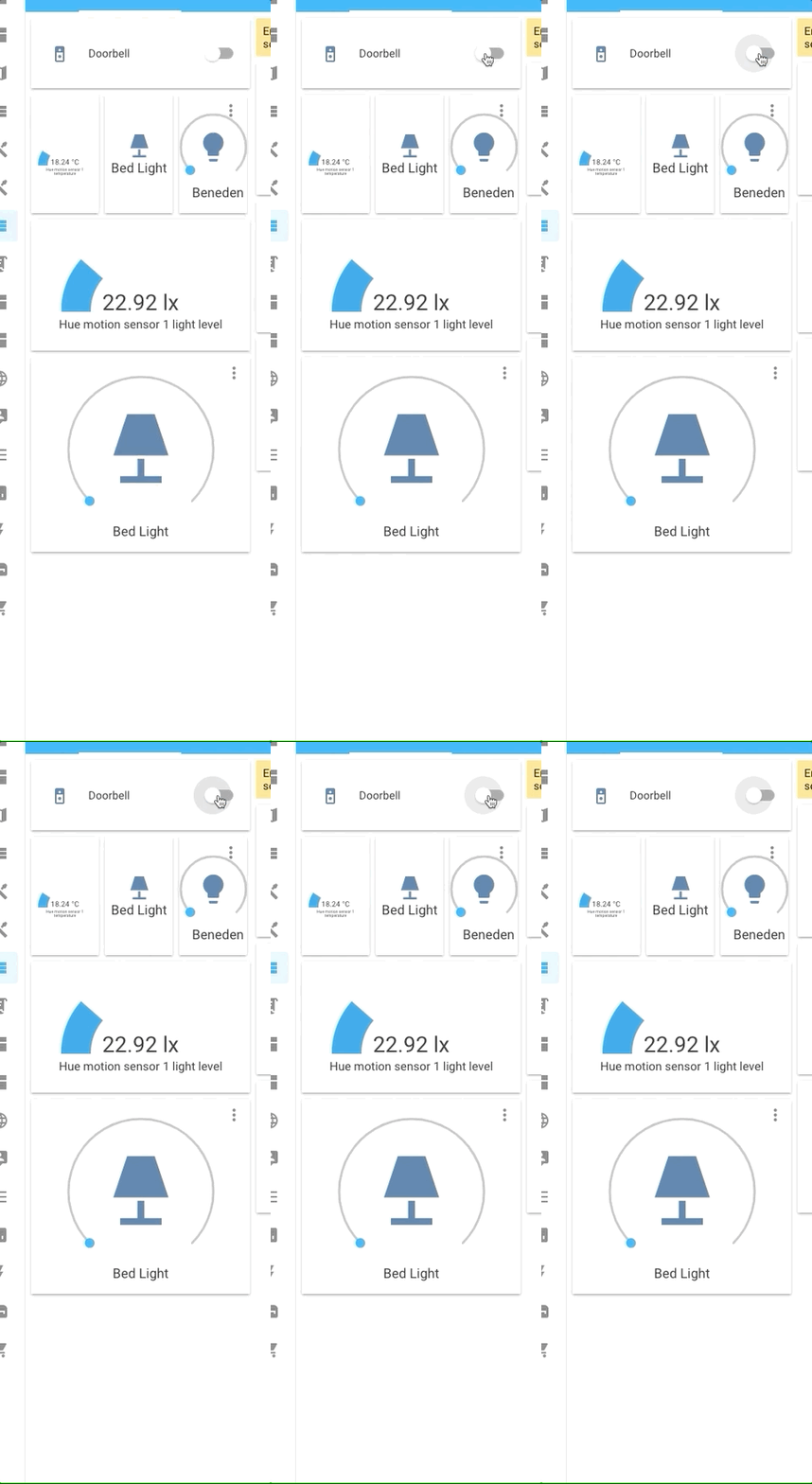
The reason I think that vertical stacks might have something to do with it, in this screenshot below it's supposed to show a vertical stack (with an entities card inside it) above the gauge card. Yet that is missing and the gauge displays fine:

And here is the YAML for the conditional card (the Sleep Status button just toggles the input_boolean):
    #### EXPANDED INFORMATION - SLEEP (CONDITIONAL)
    - type: conditional
      conditions:
        - entity: input_boolean.ui_display_sleep
          state: "on"
      card:
        type: vertical-stack
        cards:
          - type: entities
            show_header_toggle: false
            state_color: true
            entities:
              - input_select.ambient_sound
              - input_number.volume_ambientsounds
              - sensor.sleep_probability
              - binary_sensor.sleeping

              - type: divider
                style:
                  height: 1px
                  width: 80%
                  margin-left: auto
                  margin-right: auto
                  background: '#62717b'

              - sensor.time_slept_today
              - sensor.percentage_slept_today
              - input_datetime.sean_sleeping
              # Only show when I woke up after I've actually woken up
              - type: conditional
                conditions:
                  - entity: binary_sensor.sleeping
                    state: 'off'
                row:
                  entity: input_datetime.sean_awake
              # Only show how many times I got out of bed, after actually waking up
              - type: conditional
                conditions:
                  - entity: binary_sensor.sleeping
                    state: 'off'
                row:
                  entity: counter.got_out_of_bed

              - type: divider
                style:
                  height: 1px
                  width: 80%
                  margin-left: auto
                  margin-right: auto
                  background: '#62717b'

              - input_boolean.in_bed
              - input_boolean.withings_sleep_sensor
              - input_boolean.theater_mode
              - input_boolean.disable_morning_wakeup_tts
              - entity: automation.sleep_good_morning_routine
                state_color: false
              # - input_datetime.wakeup_time

          - type: gauge
            name: Time Slept
            unit: 'h'
            max: 10
            entity: sensor.time_slept
            severity:
              green: 7.0
              yellow: 5.0
              red: 3.0
I used to always get the same " 'replaceChild' of null`" error printed in browser console that was fixed in https://github.com/home-assistant/frontend/pull/5398 but everything would always work despite that error. Now they're not working.
I don't know if that helps at all? I will continue to look into it.
SeanPM5
on 2 Apr 2020
Yeah maybe, will have another look
bramkragten
on 2 Apr 2020
After doing a lot more testing, I think that I might (hopefully?) have some helpful information.
Despite the conditional card(s) not appearing when they should (when an input_boolean goes into the "on" state), If I refresh the browser, that conditional card will then appear where it's supposed to. Hitting "Refresh" from the Lovelace / 3 dots menu will make it appear as well.
And once the card becomes visible after that browser refresh, toggling the input_boolean on and off will show/hide the conditional card in real-time as it should. That is the behavior that is expected and how it worked prior to 0.108.0b0.
So basically it's not working "live" anymore initially, and I need to refresh the browser for the conditional card to become visible and work properly.


SeanPM5
on 3 Apr 2020
I do think it has something to do with a custom card you use, it all works fine here
bramkragten
on 3 Apr 2020
bramkragten
on 3 Apr 2020
I reverted some changes and solved it in another way. Can you try that in the next beta?
bramkragten
on 3 Apr 2020
Hi! I think i have the same problem. At first I thought was a problem regarding the new lazy-load feature after 0.107.* upgrade but it seems that, after using a lovelace-preloader plugin, that didn't work, my problem can be the same as this one. I run 0.107.7, not 0.108 or any beta...
I have no custom cards, just a vertical stack with two conditionals that used to work before upgrading to 0.107.7. Right now, everything works as expected after a refresh. If i switch the condition, the other conditional card does not appear, until i press the configure ui button at the top, or do a refresh. After that, everything works as expected from that moment on. So i thought that not all conditional were loaded after the refresh, but just the ones that were having a True state. Not updating in real-time...but...after pressing the configure UI button everything starts working as intended. It just feels like the configure button triggers a full loading of all the cards, no matter if they are visible or not. idk..
Any idea?
cards:
  - card:
      elements:
        - entity: switch.bar_lights
          icon: 'mdi:lightbulb'
          style:
            left: 63%
            top: 30%
          tap_action:
            action: toggle
          type: state-icon
      image: /local/images/Smarthome-parter-alloff.png
      type: picture-elements
    conditions:
      - entity: switch.bar_lights
        state: 'off'
    type: conditional
  - card:
      elements:
        - entity: switch.bar_lights
          icon: 'mdi:lightbulb'
          style:
            left: 63%
            top: 30%
          tap_action:
            action: toggle
          type: state-icon
      image: /local/images/Smarthome-parter-bar.png
      type: picture-elements
    conditions:
      - entity: switch.bar_lights
        state: 'on'
    type: conditional
type: vertical-stack
 gabipintea
on 3 Apr 2020
gabipintea
on 3 Apr 2020
@gabiwhyme As stated above. Try the next beta cut and see if it fixes the issue
 zsarnett
on 3 Apr 2020
zsarnett
on 3 Apr 2020
I think i'll wait for the next official release on Wednesday and see then what's happening. Until then i just changed the users, having different default dashboards, to administrator accounts in order to press that configure button and let them like this for the next days. Thanks for answer! But btw..sorry for asking. How can I upgrade to beta versions, before official releases? I never done that.
gabipintea
on 3 Apr 2020
I do think it has something to do with a custom card you use, it all works fine here
I do have custom cards but I made sure to test this with _only_ core cards - button, stack, entities. Here is what I'm using to test, I am able to reproduce it every time in b0 and b1 with this setup. Will play around with it after b2 drops to see if the updated code fixes it.
Input Boolean portion:
input_boolean:
  ui_display_sleep:
    name: UI - Display Sleep Data
    icon: mdi:sleep

  ui_display_alarm_clock:
    name: UI - Display Alarm Clock
    icon: mdi:alarm

  ui_display_daily_statistics:
    name: UI - Display Daily Statistics
    icon: mdi:chart-areaspline
Automation portion:
automation:
  # This ensures only one conditional card is active at a time
  # When one of these input_booleans is toggled on, it toggles off the other ones
  - alias: UI - Lovelace Toggles
    trigger:
      - platform: state
        entity_id:
          - input_boolean.ui_display_sleep
          - input_boolean.ui_display_alarm_clock
          - input_boolean.ui_display_daily_statistics
        from: 'off'
        to: 'on'
    action:
      service: input_boolean.turn_off
      data_template:
        entity_id: >
          {% set booleans = [ 'input_boolean.ui_display_sleep','input_boolean.ui_display_alarm_clock','input_boolean.ui_display_daily_statistics' ] | reject('equalto', trigger.entity_id) %}
          {{ booleans | list | join(', ') }}
Lovelace view:
title: Bug Testing
icon: mdi:bug-outline
path: bugtest
panel: false
visible: true
badges: []
cards:

  - type: vertical-stack
    cards:

    #### SWITCHES THAT TOGGLE THE STATE OF CONDITIONAL CARDS

    - type: entities
      title: These Will Toggle When Buttons Pressed
      entities:
        - entity: input_boolean.ui_display_sleep
        - entity: input_boolean.ui_display_alarm_clock
        - entity: input_boolean.ui_display_daily_statistics
      show_header_toggle: false

    #### BUTTONS THAT TOGGLE THE STATE OF CONDITIONAL CARDS

    - type: horizontal-stack
      cards:

        - type: button
          tap_action:
            action: toggle
          hold_action:
            action: more-info
          show_icon: true
          show_name: true
          name: Sleep
          entity: input_boolean.ui_display_sleep

        - type: button
          tap_action:
            action: toggle
          hold_action:
            action: more-info
          show_icon: true
          show_name: true
          name: Alarm Clock
          entity: input_boolean.ui_display_alarm_clock

        - type: button
          tap_action:
            action: toggle
          hold_action:
            action: more-info
          show_icon: true
          show_name: true
          name: Statistics
          entity: input_boolean.ui_display_daily_statistics


    #### THREE DIFFERENT CONDITIONAL CARDS BELOW - THESE SHOULD DISPLAY UNDERNEATH THE BUTTONS

    - type: conditional
      conditions:
        - entity: input_boolean.ui_display_sleep
          state: "on"
      card:
        type: vertical-stack
        cards:
          - type: entities
            show_header_toggle: false
            state_color: true
            entities:
              - fake.sleep_entity_1
              - fake.sleep_entity_2
              - fake.sleep_entity_3

          - type: gauge
            name: Time Slept
            unit: 'h'
            max: 10
            entity: sensor.time_slept
            severity:
              green: 7.0
              yellow: 5.0
              red: 3.0


    - type: conditional
      conditions:
        - entity: input_boolean.ui_display_alarm_clock
          state: "on"
      card:
        type: vertical-stack
        cards:
          - type: entities
            show_header_toggle: false
            entities:
              - fake.alarm_clock_entity_1
              - fake.alarm_clock_entity_2
              - fake.alarm_clock_entity_3
              - type: weblink
                name: Lovelace Changelog
                url: https://www.home-assistant.io/lovelace/changelog/
                icon: mdi:alert-octagram


    - type: conditional
      conditions:
        - entity: input_boolean.ui_display_daily_statistics
          state: "on"
      card:
        type: vertical-stack
        cards:
          - type: entities
            show_header_toggle: false
            title: Daily Stats
            entities:
              - fake.statistics_entity_1
              - fake.statistics_entity_2
              - fake.statistics_entity_3
Just installed b2 and all of my conditional cards are working 100% perfectly again.
Thanks @bramkragten 😃
SeanPM5
on 4 Apr 2020
Are b2 changes rolling out with the next 0.108 official release?
gabipintea
on 4 Apr 2020
Yes, will be in 0.108 on Wednesday. You can get it a few days early by going to “Supervisor” in the sidebar, then clicking the System tab and joining the beta channel from there. And you can opt out of betas any time too.
SeanPM5
on 4 Apr 2020
@SeanPM5 Thank you very much!
gabipintea
on 4 Apr 2020
Related issues
![move[bot] picture](https://avatars1.githubusercontent.com/in/6673?v=4&s=40) move[bot]
·
29Comments
move[bot]
·
25Comments
move[bot]
·
29Comments
move[bot]
·
25Comments
 TheJulianJES
·
28Comments
TheJulianJES
·
28Comments
 mrsnyds
·
42Comments
mrsnyds
·
42Comments
 VDRainer
·
26Comments
VDRainer
·
26Comments
Most helpful comment
Just installed b2 and all of my conditional cards are working 100% perfectly again.
Thanks @bramkragten 😃