Frontend: Light card icon and slider
Checklist:
- [x] I updated to the latest version available
- [x] I cleared the cache of my browser
Home Assistant release with the issue:
0.102.0b3
Last working Home Assistant release (if known):
0.102.0b2
UI (States or Lovelace UI?):
LL
Browser and Operating System:
FF and Chrome
Description of problem:
Since the last beta the icon of the light card is a little to big and the knob of the slider is missing.
b2
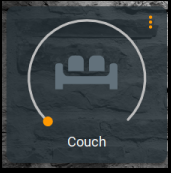
b3
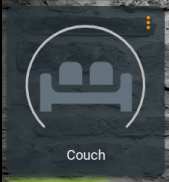
Javascript errors shown in the web inspector (if applicable):
Additional information:
 VDRainer
All 15 comments
cc @thomasloven
 iantrich
on 20 Nov 2019
iantrich
on 20 Nov 2019
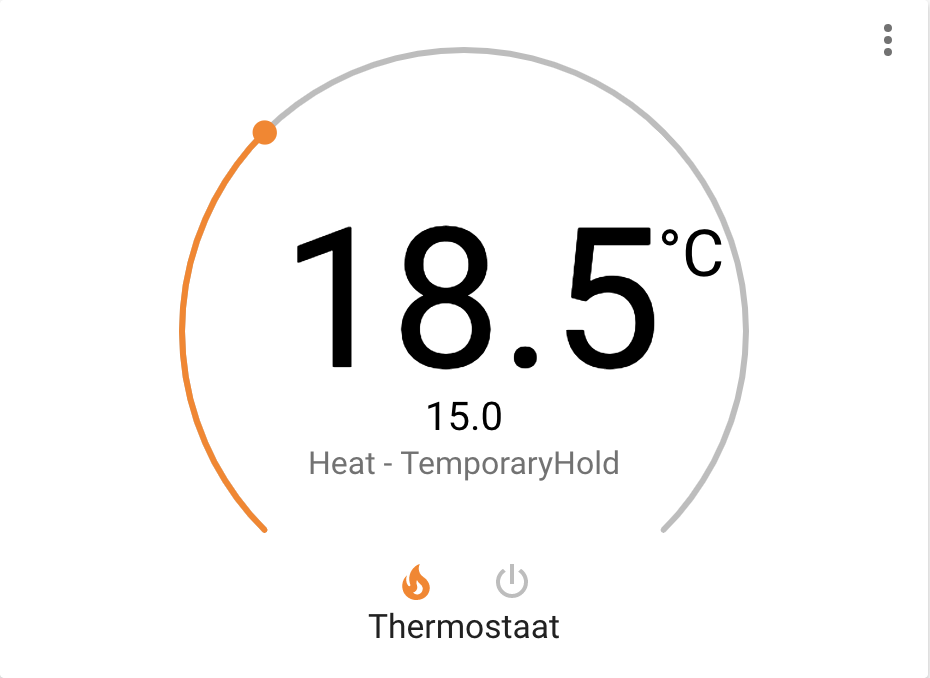
I think we should give the thermostat a max width too like the light and the text should be a little smaller as it nearly touches the slider:
 bramkragten
on 20 Nov 2019
bramkragten
on 20 Nov 2019
@VDRainer The knob is only missing when the light is off right? It still functions by clicking the icon to turn the light on and then sliding?
bramkragten
on 20 Nov 2019
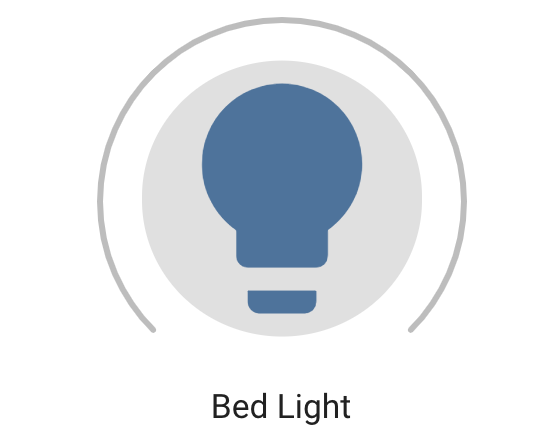
And while we are at it, it also bothers me that the circle stays after you clicked on the icon, can't we make it an paper-icon-button instead of a ha-icon since it is a button?
bramkragten
on 20 Nov 2019
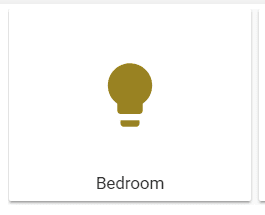
I think the light card without the slider looks a little poor.
VDRainer
on 20 Nov 2019
I think the light card without the slider looks a little poor.
Was just checking if it was still functional, was not even aware it was changed before you mentioned it :-)
bramkragten
on 20 Nov 2019
@VDRainer If the light doesn't support brightness, there is no slider rendered, but there would still be a more-info button...which makes me think this is not the light-card that you are showing?
iantrich
on 20 Nov 2019
:smile: It's a screenshot from the docs where i painted the slider away.
BTW, if i have a light without brightness, i'd rather use an entity-button.
VDRainer
on 20 Nov 2019
I'm so lost...? @bramkragten what issue? @VDRainer what was the point of editing a screenshot from the docs?
iantrich
on 20 Nov 2019
Well, i had the fear that Bram wanted to remove the slider when the light is off.
And while we are at it, it also bothers me that the circle stays after you clicked on the icon.
and i wanted to show him that the card looks poor without a slider.
He edited his comment after that.
VDRainer
on 20 Nov 2019
I'm so lost...? @bramkragten what issue? @VDRainer what was the point of editing a screenshot from the docs?
Ok we are all lost, with the circle I didn't mean the slider, but the focus circle behind the icon.
And I misread things with the issue @iantrich...
bramkragten
on 20 Nov 2019
(╯°□°)╯︵ ┻━┻
iantrich
on 20 Nov 2019
@bramkragten why do you think paper-icon-button will fix it? It appears to be an issue with not releasing focus
iantrich
on 20 Nov 2019
It will not fix it, was just a side note...
bramkragten
on 20 Nov 2019
I think we should give the thermostat a max width too like the light and the text should be a little smaller as it nearly touches the slider:
🤦♂ I never tested it with non-integer temperatures...
About the nomenclature, the Slider consists of a Bar and a Handle. The Handle is hidden when the light is off.
The ripple (shadow circle) is still visible because the button is still focused after clicking, indicating that you can activate it with Enter. I just noticed that problem after commiting the final changes...
 thomasloven
on 21 Nov 2019
thomasloven
on 21 Nov 2019
Related issues
 SeanPM5
·
3Comments
SeanPM5
·
3Comments
SeanPM5
·
3Comments
SeanPM5
·
3Comments
 TheZoker
·
3Comments
SeanPM5
·
4Comments
TheZoker
·
3Comments
SeanPM5
·
4Comments
 Depechie
·
3Comments
Depechie
·
3Comments