Frontend: Add UI to upload snapshots before onboarding
The request
Before the onboarding starts (where you create your first user), there should be a link/button that will allow you to use a snapshot to set up Home Assistant.
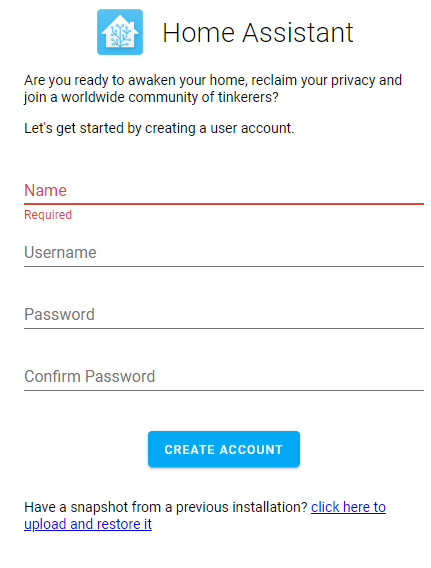
The alternatives
There are several alternatives to this route:
- Add upload to the snapshots tab inside the supervisor.
- Continue as now (finish onboarding, install an add-on, use the add-on to move the snapshot, restore)
- Have the supervisor pick up and apply the snapshot the same way as network config (form USB)
Additional information
This feature request has been raised on several occasions, in various forms:
- https://github.com/home-assistant/home-assistant-polymer/issues/1356
- https://github.com/home-assistant/home-assistant-polymer/issues/1441
- https://github.com/home-assistant/home-assistant-polymer/issues/1710
This is not a simple task to "just implement", this will require work in both the supervisor and the frontend and potentially also the core
 move[bot]
All 14 comments
This feature will be much appreciated. Currently if you want to restore Home Assistant from a dead SD card, you need to flash HA (OK) then go on boarding (OK but why?), then install samba add-on (an official add-on) or install ssh add-on (hidden by default and non trivial)
 mbo18
on 11 May 2020
mbo18
on 11 May 2020
Agreed. There is no official way to restore a backup.
There is an option to download a snapshot, and currently only community ways to restore.
 Kanga-Who
on 11 May 2020
Kanga-Who
on 11 May 2020
I can't understand how with all the moves to 'make things easy' this doesn't already exist except in a feature request that dates back nearly 18 months. I hope this is on the list of things needed before version 1.
 kloggy
on 11 May 2020
kloggy
on 11 May 2020
@Kanga-Who Click on a snapshot, it has a download option:

Uploading is currently not possible from a frontend perspective, as the backend does not support it (on many different levels).
 frenck
on 11 May 2020
frenck
on 11 May 2020
I am aware how to download a snapshot, my comment states that.
Kanga-Who
on 11 May 2020
well, of course that's cool.
But... if the SD card died on you, this is hardly a solution. the thread that originated this is talking about restoring snapshots from another physical device.
Using a browser interface could probably solve that isn't that possible either?
 Mariusthvdb
on 11 May 2020
Mariusthvdb
on 11 May 2020
I believe that is the point of this request - allow a quick/easy way to upload a previous backup and restore therefrom.
If users need to restore a back-up, there's currently not an 'out-of-the-box' method for this - they all require alternate solutions (Google Drive Backup/Restore, Samba, SSH, etc.).
Seems it would be useful if there was a Restore Via Upload button on this same page that would allow a fresh install to be quickly/easily restored using a previous backup with_out_ the need for alternate solutions to do so - as this would make life easier for NOOBs (esp. w/ the SD Card issues that are [sadly] prevalent).
 markus99
on 11 May 2020
markus99
on 11 May 2020
@Kanga-Who I was visually clarifying.
@Mariusthvdb As said, the backend does not support it, hence the frontend cannot be implemented right now.
@markus99, please remove the caps from your message. It is considered shouting, which is not needed. Thanks. (edit: Thanks for adjusting, appreciated).
Nobody is disagreeing on this request. However, it is a frontend request, which cannot be fulfilled right now. The backend feature is discussed, but not implemented yet.
frenck
on 11 May 2020
@mbo18 this changes nothing, but just noting that the samba addon is an official core addon.
 cogneato
on 11 May 2020
cogneato
on 11 May 2020
@mbo18 this changes nothing, but just noting that the samba addon is an official core addon.
Updated my comment, thanks.
mbo18
on 11 May 2020
The "issue" description has been updated to follow the template for feature requests.
If you want to show your support for this feature request add a 👍 to the description 🎉
If you would help to implement this feature, the links to the repositories are in the description ☝️
We also have specific channels for development on discord 👋
As stated before me no one is disagreeing that this should be added, last week I even started (far far far from finished) with a suggestion for the UI of it.
 ludeeus
on 11 May 2020
ludeeus
on 11 May 2020
Link to https://community.home-assistant.io/t/upload-snapshot-for-restoring-or-migrating/172801 Feature request.
 borpin
on 26 Jul 2020
borpin
on 26 Jul 2020
WTH topic: https://community.home-assistant.io/t/upload-a-snapshot-as-a-step-in-the-onboarding/219579
 Misiu
on 18 Sep 2020
Misiu
on 18 Sep 2020
 bramkragten
on 23 Sep 2020
bramkragten
on 23 Sep 2020
Related issues
 SeanPM5
·
4Comments
SeanPM5
·
4Comments
 Depechie
·
3Comments
Depechie
·
3Comments
 KennethLavrsen
·
3Comments
KennethLavrsen
·
3Comments
 Lopton
·
4Comments
Misiu
·
3Comments
Lopton
·
4Comments
Misiu
·
3Comments
Most helpful comment
The "issue" description has been updated to follow the template for feature requests.
If you want to show your support for this feature request add a 👍 to the description 🎉
If you would help to implement this feature, the links to the repositories are in the description ☝️
We also have specific channels for development on discord 👋
As stated before me no one is disagreeing that this should be added, last week I even started (far far far from finished) with a suggestion for the UI of it.