Freshrss: After setting up FreshRSS via Docker cannot get any feeds
I installed everything following the default installation steps for Docker. I then went to the homepage and went through the installer. Once the installer was complete I saw the FreshRSS releases default feed with the 10 latest posts. These are the only posts that show currently. I manually added a feed that I know works, and is valid according to the validator. I get the error on the feed that This feed is empty. Please verify that it is still maintained. If I try to actualize it, it just says that it Updated the Feed and notes no errors in the log but also does not grab anything. Going back into the settings of the feed still shows that same error about the feed being empty.
I then added about 50 feeds via an OPML file. All these feeds have the same results. I have not adjusted any of the default FreshRSS settings, I only added some extensions. I am unsure what is going on.
FreshRSS: 1.16.3-dev
Ubuntu20.04 - Fresh VM, only Docker installed.
SQLite
There is nothing going on in the FreshRSS logs that is recent or related. I do not know how to check PHP logs in Docker (new to docker).
Using the default docker cron settings as in the installation guide. The installation checker shows all green, no issues.
Edit: I believe there are no PHP errors assuming it's in the default location:
$ sudo docker exec -it freshrss cat /var/log/apache2/error.log
Outputs no results and they are 0 in size:
$ sudo docker exec -it freshrss ls -alh /var/log/apache2/                                                                                                       !121
total 8.0K
drwxr-x--- 2 root adm  4.0K Jul  6 17:36 .
drwxr-xr-x 1 root root 4.0K Jul  6 17:35 ..
-rw-r----- 1 root adm     0 Jul  6 17:36 access.log
-rw-r----- 1 root adm     0 Jul  6 17:36 error.log
-rw-r----- 1 root adm     0 Jul  6 17:36 other_vhosts_access.log
 Fogest
All 19 comments
Hello,
Please try first without FreshRSS extensions. Please share your Docker run command, or docker-compose, or similar.
Please check docker logs -f freshrss.
Feed being empty can also be that the given feed had no article recently (some of that can be tuned in the FreshRSS configuration page about archiving).
 Alkarex
on 7 Jul 2020
Alkarex
on 7 Jul 2020
My old non-self hosted feed reader has no problems with these feeds and some of them are from active reddit communities so there definitely should be articles it is picking up. I did not change the settings for archiving or any of the settings for that matter so it is on the default 3 month and max 200 articles.
I will use the TEEM feed as an example as I assume it should be supported in FreshRSS without problems since there are 3rd party extensions based around it. I am using the feed https://jointheteem.com/feed/. I go into the "manage" on it and it says This feed is empty. Please verify that it is still maintained.. If I check the validity the validator says it is valid. I see a feed on the link and my other reader doesn't have issues. The logs show this when I open the manage tab and then click "Actualize":
172.18.0.2 - - [07/Jul/2020:17:34:46 -0400] "GET /i/?c=subscription&a=feed&id=2&ajax=1 HTTP/1.1" 200 3146 "-" "Mozilla/5.0 (Windows NT 10.0; Win64; x64) AppleWebKit/537.36 (KHTML, like Gecko) Chrome/84.0.4147.68 Safari/537.36"
FreshRSS[17382]: SimplePie GET https://jointheteem.com/feed/
172.18.0.2 - - [07/Jul/2020:17:34:52 -0400] "GET /i/?c=feed&a=actualize&id=2 HTTP/1.1" 302 312 "-" "Mozilla/5.0 (Windows NT 10.0; Win64; x64) AppleWebKit/537.36 (KHTML, like Gecko) Chrome/84.0.4147.68 Safari/537.36"
172.18.0.2 - - [07/Jul/2020:17:34:52 -0400] "GET /i/?get=f_2 HTTP/1.1" 200 7472 "-" "Mozilla/5.0 (Windows NT 10.0; Win64; x64) AppleWebKit/537.36 (KHTML, like Gecko) Chrome/84.0.4147.68 Safari/537.36"
The manage page goes away and it brings me to the TEEM feed which just has a page that says There is no article to show.. At the top it also indicates it updated it. If I open up the manage page it still indicates the feed is empty which is not true.
If I disable ALL extensions the logs look similar. I see the SimplePie GET missing but I don't know if that means anything:
172.18.0.2 - - [07/Jul/2020:17:37:02 -0400] "GET /i/?c=subscription&a=feed&id=2&ajax=1 HTTP/1.1" 200 3146 "-" "Mozilla/5.0 (Windows NT 10.0; Win64; x64) AppleWebKit/537.36 (KHTML, like Gecko) Chrome/84.0.4147.68 Safari/537.36"
172.18.0.2 - - [07/Jul/2020:17:37:06 -0400] "GET /i/?c=feed&a=actualize&id=2 HTTP/1.1" 302 312 "-" "Mozilla/5.0 (Windows NT 10.0; Win64; x64) AppleWebKit/537.36 (KHTML, like Gecko) Chrome/84.0.4147.68 Safari/537.36"
172.18.0.2 - - [07/Jul/2020:17:37:06 -0400] "GET /i/?get=f_2 HTTP/1.1" 200 7382 "-" "Mozilla/5.0 (Windows NT 10.0; Win64; x64) AppleWebKit/537.36 (KHTML, like Gecko) Chrome/84.0.4147.68 Safari/537.36"
Still no change.
My docker run commands are pretty much straight from the documentation apart from switching host, timezones and cron.
# Network
docker network create freshrss-network

# Reverse Proxy
docker volume create traefik-letsencrypt
docker volume create traefik-tmp
sudo docker run -d --restart unless-stopped --log-opt max-size=10m \
  -v traefik-letsencrypt:/etc/traefik/acme \
  -v traefik-tmp:/tmp \
  -v /var/run/docker.sock:/var/run/docker.sock:ro \
  --net freshrss-network \
  -p 80:80 \
  -p 443:443 \
  --name traefik traefik:1.7 --docker \
  --loglevel=info \
  --entryPoints='Name:http Address::80 Compress:true Redirect.EntryPoint:https' \
  --entryPoints='Name:https Address::443 Compress:true TLS TLS.MinVersion:VersionTLS12 TLS.SniStrict:true TLS.CipherSuites:TLS_ECDHE_RSA_WITH_AES_128_GCM_SHA256,TLS_ECDHE_RSA_WITH_AES_256_GCM_SHA384,TLS_ECDHE_RSA_WITH_AES_128_CBC_SHA' \
  --defaultentrypoints=http,https --keeptrailingslash=true \
  --acme=true --acme.entrypoint=https --acme.onhostrule=true --acme.tlsChallenge \
  --acme.storage=/etc/traefik/acme/acme.json [email protected]


# FreshRSS
docker volume create freshrss-data
docker volume create freshrss-extensions

sudo docker run -d --restart unless-stopped --log-opt max-size=10m \
  -v freshrss-data:/var/www/FreshRSS/data \
  -v freshrss-extensions:/var/www/FreshRSS/extensions \
  -e 'CRON_MIN=*/20' \
  -e TZ=America/Toronto \
  --net freshrss-network \
  --label traefik.port=80 \
  --label traefik.frontend.rule='Host:rss.example.com' \
  --label traefik.frontend.headers.forceSTSHeader=true \
  --label traefik.frontend.headers.STSSeconds=31536000 \
  --name freshrss freshrss/freshrss
_I only censored my domain name to example everything else is exactly what I used_
Fogest
on 7 Jul 2020
PS You should use docker-compose or you hunt down this exact command in a month or two.
 SuperSandro2000
on 8 Jul 2020
SuperSandro2000
on 8 Jul 2020
Sorry for the delay. Hum, I do not know what is happening, but maybe a network problem. Please try:
docker exec freshrss php -r "readfile('https://jointheteem.com/feed/');"
It seems to have started working now however the data displayed on the page seems to be about 1-2 hours old consistently. Based on the cron I have set it should be updating every 20 minutes from my understanding.
Running the command it outputs the XML based RSS feed. Not sure if you want the output from it but it is quite a large amount of output that is displayed on the regular RSS feed.
<?xml version="1.0" encoding="UTF-8"?><rss version="2.0"
...
</rss>
It starts and ends like this with a lot in between :),
Just for kicks I setup tt-rss via docker as well on a different port and it is updating every 15 minutes (per my settings) without issue so I do not believe it is a network issue.
To note, I do want to use FreshRSS though not tt-rss so I would love to get this RSS delay fixed.
Fogest
on 11 Jul 2020
What happens when you manually refresh?
It can also be a simple display matter, for instance due to a time-zone error.
Have you spotted any example of article in a feed that is more than one hour old, and which was not received?
In any case, the hour displayed on the right-hand side of an article is the publication date advertised by the feed, and is not always reliable.
Alkarex
on 12 Jul 2020
If you like, you are welcome to send me a test account on your instance, so I can have a look.
Alkarex
on 12 Jul 2020
I think it may be working and part of the problem may have been that I was comparing to another client that is going by "import time" rather than the actual article time so that was causing it to look like certain imports were more delayed. I believe it is working correctly now and I will mark the issue as closed.
The manual refresh seems to work correctly and not generate errors anymore. I will continue to monitor and see if the feed importing is on-time. If it ends up that there is a problem I will shoot you a test account :)
On a secondary note is there a way to switch how the time shows up? Such as being in a relative format (ex: "38 min") rather than exact time?
Fogest
on 12 Jul 2020
On a secondary note is there a way to switch how the time shows up? Such as being in a relative format (ex: "38 min") rather than exact time?
At the moment, there is no such thing. Feel free to open a new issue!
 aledeg
on 12 Jul 2020
aledeg
on 12 Jul 2020
It looks we have a problem or two with the current development branch.
Could you please try with our latest release? freshrss/freshrss:1.16.2
Alkarex
on 13 Jul 2020
I switched and am now on 1.16.2 via the following commands:
docker pull freshrss/freshrss:1.16.2

docker stop freshrss
docker rename freshrss freshrss_old

docker run ...... (same command as used originally except with freshrss/freshrss:1.16.2 instead.
After it loaded in I did a manually refresh via the webpage. It went through all 60 feeds and "updated" on them however they did not update. My latest feed entry is from July 11th. There should be content from the 12th and 13th from many different feeds I have.
Also @Alkarex I sent you a test account a day or two ago which I assume you received via email fine :)
Fogest
on 14 Jul 2020
@Fogest Please make sure you first test without any extension. In the test account you sent me, I could see many extensions, and in particular Teem Video Feed was enabled. After disabling it (but it would be better to just remove them all for testing), the test account seems to work fine
Alkarex
on 14 Jul 2020
P.S. Make sure also to check which parameters you have in your maximum refresh parameter
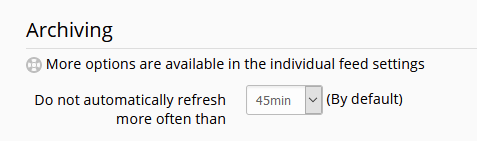 (global settings, and per-feed settings).
Please avoid refreshing faster than needed, to preserve a healthy RSS ecosystem.
If you need fast refresh, favour WebSub-enabled feeds (built-in FreshRSS, allowing instant reception of new articles with compatible Web sites) - can be tested with https://push-pub.appspot.com , and a few examples are listed in https://github.com/FreshRSS/FreshRSS/issues/2595#issuecomment-552348137
Alkarex
on 14 Jul 2020
I do see that extension is off however I am still noticing many feeds quite a bit behind in what is there. Even after performing a manual refresh I still have some feeds multiple hours behind and manually checking the RSS URL I see the data is there so I am confused why it would not be grabbing the new articles.
Oddly enough, some feeds are more up to date then others. What is even more odd is that some feeds are from the same site such as Reddit feeds and some of them are up to date, whereas some are 4-5 hours out of date.
Fogest
on 14 Jul 2020
It looks like some feeds (maybe those added before disabling / removing some problematic extensions) have had a problem, which can probably first be automatically fixed when there is some fresh new content upstream. Meanwhile, under the settings of a specific problematic feed, try to Delete all articles and then Actualize:
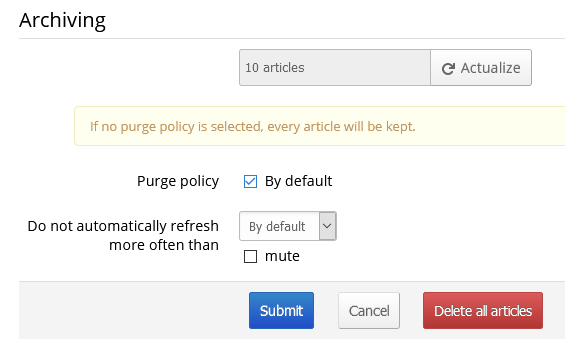
Looking at the RSS URL is a good test. When you see a new entry in the original RSS URL, it is supposed to arrive with a delay defined by your global and/or feed-specific setting Do not automatically refresh more than..., followed by the next time your cron runs after that.
Except for WebSub-compatible feeds, which are arriving instantly :-)
Alkarex
on 14 Jul 2020
Thanks, it looks like deleting all articles and hitting "actualize" fixed it and got those missing articles.
Is there a way to do this across all the feeds at once to make sure they are all fixed? Does doing a "Purge now" in the "Maintenance" section with a press of the manual refresh button accomplish this the same as the method you described?
Fogest
on 14 Jul 2020
No, the purge now will not be powerful enough.
However (please do a back-up before), a couple of SQL requests could do the job:
-- This will delete all your articles!
DELETE FROM entry;
UPDATE feed SET lastUpdate=0;
together with deleting the disk cache:
rm ./freshrss/data/cache/*.spc
before refreshing again.
Alkarex
on 14 Jul 2020
Thanks! While I was waiting for a reply I just manually went through and
deleted all the articles and ran the actualize again. I wonder if part of
my problem was there being broken things in the cache from that Teem
extension. With all the other extensions running it seems to be working
just not with the Teem one.
I will monitor for the next day or so and ensure the feeds are staying up
to date properly :)
On Tue., Jul. 14, 2020, 4:45 p.m. Alexandre Alapetite, <
[email protected]> wrote:
No, the purge now will not be powerful enough.
However (please do a back-up before), a couple of SQL requests could do
the job:-- This will delete all your articles!DELETE FROM entry;UPDATE feed SET lastUpdate=0;
together with deleting the disk cache:
rm ./freshrss/data/cache/*.spc
before refreshing again.
—
You are receiving this because you were mentioned.
Reply to this email directly, view it on GitHub
https://github.com/FreshRSS/FreshRSS/issues/3100#issuecomment-658404035,
or unsubscribe
https://github.com/notifications/unsubscribe-auth/AAI4C3F55M52UE5ZIPGTZPLR3S7WZANCNFSM4OSLL6GQ
.
Fogest
on 14 Jul 2020
Everything seems to still be working, will mark this as closed now.
Thank you everyone for the help, I appreciate it!
Fogest
on 17 Jul 2020
Related issues
 eminphi
·
5Comments
eminphi
·
5Comments
 Glaived
·
5Comments
Glaived
·
5Comments
 mbnoimi
·
4Comments
Alkarex
·
5Comments
mbnoimi
·
4Comments
Alkarex
·
5Comments
 Tealk
·
5Comments
Tealk
·
5Comments