Freshrss: why does freshrss change my feed urls?
I have some feeds that are from https://feeds.feedburner.com
like https://feeds.feedburner.com/TheArtOfManliness
but it seems that freshrss changes the url from https to http.
when I fix it again it gets changed again later.
maybe related to websub?
 rezad1393
All 34 comments
Hello,
Looking at the source https://feeds.feedburner.com/TheArtOfManliness?format=xml , there is a "self" attribute, which is referring to the HTTP version, and this "self" attribute is used by FreshRSS to find the canonical address.
<atom10:link xmlns:atom10="http://www.w3.org/2005/Atom" rel="self" type="application/rss+xml" href="http://feeds.feedburner.com/TheArtOfManliness" />
Feedburner is already in our list of forced HTTPS domains https://github.com/FreshRSS/FreshRSS/blob/dev/force-https.default.txt but we should double-check that the queries are actually done over HTTPS.
 Alkarex
on 11 Nov 2019
Alkarex
on 11 Nov 2019
I have checked again and it does change the update feed url to http.
at least that is what I see when I open manage option of the feed.
and also the blogspot feeds get changed to the https://www.blogger.com/feeds/MANYNUMBERS/posts/default format.
how do I stop this.
I dont like that a program changes my feeds automatically.
how do I stop freshrss saving me from myself?
rezad1393
on 12 Nov 2019
The self attribute is a way for the feeds to tell what the correct/best/canonical address is.
Likewise, we are obeying HTTP/1.x 301 Moved Permanently responses.
Both are standard behaviours, expected from compliant clients.
(Forced) HTTPS is another issue, and we need to double-check in the query logs, not in the feed configuration page.
You can chose to disable WebSub in your ./data/config.php on the following model:
Cf. https://github.com/FreshRSS/FreshRSS/blob/09c088c62ece3b17615fb4e2addfa16663bb334f/config.default.php#L72-L74
We could consider disabling the logic around self when WebSub is disabled though.
Alkarex
on 12 Nov 2019
I understand some of what you say.
but I dont understand why the application changes what I configed it to use.
when I use https://somefeed and then it uses the http://sameaddress .
cant I force the freshrss not to touch my feeds addresses?
this is the first time ever (after using good reader and inoreader and a lot of desktop apps) that I encounter this issue.
rezad1393
on 12 Nov 2019
It's not FreshRSS doing it, it's the feed doing it. If those others don't then they've got a bug imho.
 Frenzie
on 12 Nov 2019
Frenzie
on 12 Nov 2019
@rezad1393 After you have disabled WebSub, please try this patch https://github.com/FreshRSS/FreshRSS/pull/2659
Alkarex
on 12 Nov 2019
how do I disble websub?
and https to http is websub bug too?
again if I add a feed and then later change it feed url , shouldnt freshrss resect that and not change it back automatically ?
rezad1393
on 13 Nov 2019
@rezad1393 Please see my response higher up https://github.com/FreshRSS/FreshRSS/issues/2654#issuecomment-552839190 on how to disable WebSub
HTTPS to HTTP: 1) the feed itself asked to change the URL, see the proposed patch; 2) Thanks to the force-HTTPS system we have, some domains are always addressed via HTTPS (should be double-checked, though)
Alkarex
on 13 Nov 2019
so maybe use that force-https system so that when feed wants to change from https to http you automatically convert that to https? or even better use the https as default and just use domain without prefix (http or https) so that when feed says from https to http on the same address then freshrss just ignores that cause the domain and url didn't change at all except protocol.
rezad1393
on 13 Nov 2019
Just to try differently to the initial question: the self URL in a feed tells FreshRSS "the correct URL to find this feed is at this address" and so FRSS understands "the URL that was given to me is wrong, so I update the address". This is a "normal" behavior, based on standards. In fact, we should not let users to change the feed URLs
The real problem here is that FeedBurner is badly configured and set a "http" URL instead of a "https". But we shouldn't have to change the behavior of FRSS for a bad actor. Our stand until now was to add this specific case in the force-https.default.txt
But I understand your point and there is indeed a problem in the interface. I see two options:
- if we choose to let users to change the URL, we shouldn't change it automatically on his back
- if we choose to rely on the "self" URL, we shouldn't let users to change this URL
 marienfressinaud
on 15 Nov 2019
marienfressinaud
on 15 Nov 2019
I see two options:
I don't care for either one of those one bit. Just because someone messed up slightly and forgot to 301 redirect their feed doesn't mean I now want to be responsible for updating the feed URL in the future. This is a very real example.
Not being able to change the URL would be even worse!
Frenzie
on 15 Nov 2019
Disobeying 301 redirects and self attributes should be a conscious choice fully separate from updating the URL.
Frenzie
on 15 Nov 2019
We could also hide the input by default, and hide it behind a checkbox: if checked, the input would appear and the url passed by the user would overidde the "self" one
marienfressinaud
on 15 Nov 2019
But then a regular URL update becomes a complex workaround of:
- Check
Force URL. - Update URL.
- Uncheck
Force URL.
Not as bad, but it's far too easy to accidentally skip step 3. That means you need to slap some big warning label on there, which increases the extra UI effort even more. Because then you also need to fake a disabled input in CSS since you can't select & copy text from <input disabled>, for example. (Or much worse still but also borderline acceptable, implement a "copy" button in JS.)
Imo it'd be a lot of wasted time and effort to implement a vastly inferior, error-prone experience.
I have never in my life thought to update the URL of a feed unless it quit working. Any proposal that couples forcing the URL and updating the URL virtually guarantees that a feed will quit working against my wishes.
Frenzie
on 15 Nov 2019
I'm obviously not arguing for an inferior and error-prone experience ;) I didn't spent too much time on thinking on this alternative option which has its flaws, indeed. The point is: @rezad1393 raised a "problem". Our position is: it's not a bug, it's a feature. So there is no bugs to "fix", but I still want to avoid the problem which result from a bad experience.
My suggestion about this is that we don't need to display the feed URL unless the feed is broken. A user almost never updates the feed URL because he doesn't have to (FRSS takes care of that). If he does, it's probably because the feed changed upstream without a proper 301 redirection: it's a real but very special case. So maybe updating the URL should be done in a special "feed is broken" workflow.
marienfressinaud
on 15 Nov 2019
we don't need to display the feed URL unless the feed is broken.
I copy the feed URL all the time, 99.99 % of the time when it's working. For sticking it in a different feed reader, for sharing with people, etc. :-) Displaying a feed URL is the most basic of features. (I think of OPML as only for backup or for switching feed readers wholesale.)
Hence why if you remove the editability, you need to waste time implementing a poor, inferior facsimile it in CSS and JS instead (because like I said, <input disabled> is unusable).
So basically you invest a lot of effort to make everything more or less the same as it is now, except not using an input to avoid easy editing (which I must emphasize I consider a negative change). Since we do want to be able to edit it somehow, you then need to add a space-wasting Update URL type button above the feed validity button. And you need that Force URL toggle separately regardless, because otherwise it'd be mysteriously hidden.
I think it's easier and more important, flatout better to add a Force URL toggle and be done with it.
So maybe updating the URL should be done in a special "feed is broken" workflow.
I think that's a separate issue. You see errors like these in the logs but otherwise feed problems are somewhat hidden.
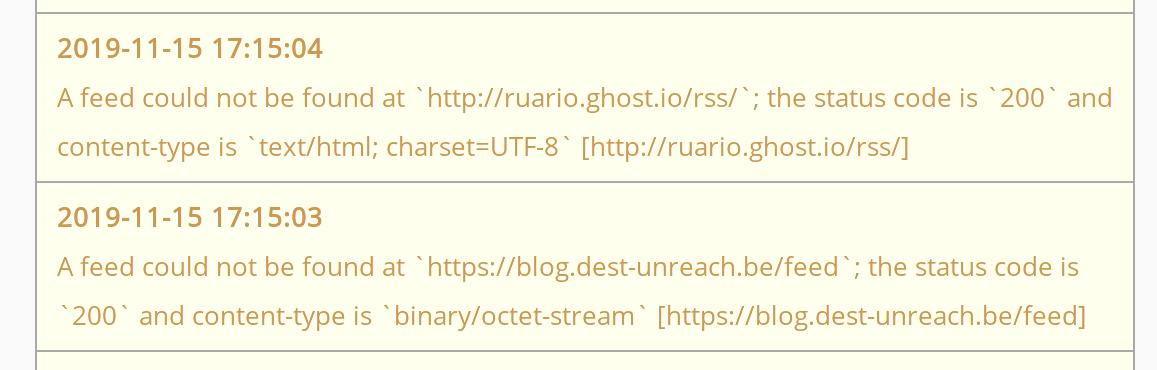
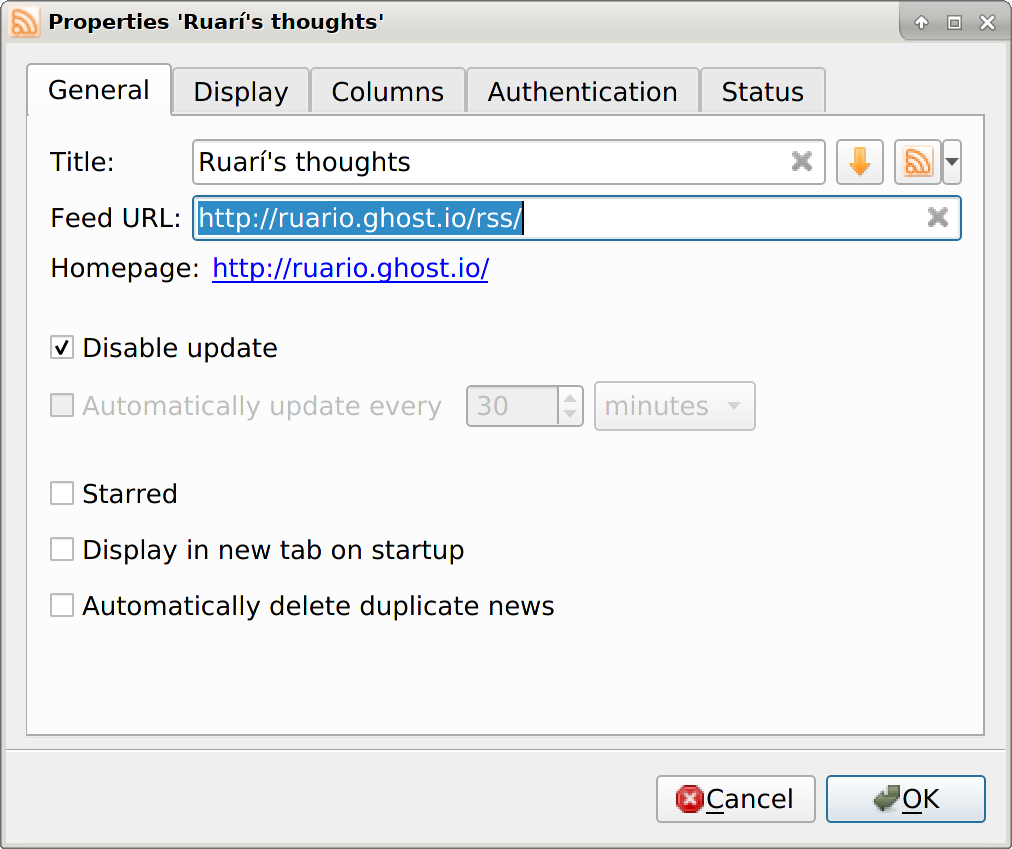
It's currently rather inconvenient to take action on that. Also I don't think it's possible to disable feed updates completely, only to set it to really infrequently (1 month), cf. QuiteRSS:
Frenzie
on 15 Nov 2019
@Frenzie We can disable feed updates fully thanks to the mute checkbox
Alkarex
on 15 Nov 2019
@marienfressinaud Unfortunately, it is quite often that when Web sites are changing version, or CMS, there is no proper HTTP redirection, and the old RSS addresses left with a 404 or - worse - a non-updating feed. Hence the need to be able to manually update the feed address
Alkarex
on 15 Nov 2019
While talking redirections, there is a more technical issue, which we mentionned before, but did not address yet:
- We subscribe to feed A
- We subscribe to feed B
- A is redirected to C
- B is redirected to C <-- Bug, because we cannot have two feeds with the same URL
Alkarex
on 15 Nov 2019
@Alkarex Oh, I thought "mute" meant "update as usual but don't bother me about it."
Edit: basically something like "mark everything as read automatically".
Frenzie
on 15 Nov 2019
Unfortunately, it is quite often that when Web sites are changing version, or CMS, there is no proper HTTP redirection, and the old RSS addresses left with a 404 or - worse - a non-updating feed. Hence the need to be able to manually update the feed address
All of these have happened to me, especially the non-updating feed one. Sometimes the site owner (and hence me because I didn't notice the lack of updates without a 404) finds out a couple of years later and adds a redirect after all. :rofl:
Frenzie
on 15 Nov 2019
@Frenzie Maybe the wording could be improved, of with a description. Maybe @aledeg has some comments on the rationale behind mute (before it was one parameter, with "infinite" being the last possible value)
Alkarex
on 15 Nov 2019
I think something like Disable updating would convey it very well. I "mute" various things regularly, but that doesn't mean my emails stop flowing in, for example.
Edit: or maybe Pause updating.
Frenzie
on 15 Nov 2019
I fully agree to keep the possibility to manually update the feed URL, I don't see where I said the opposite :eyes: The problem is: updating this address can be reverted back by FRSS and I try to find a more intuitive solution to keep the ability to change the URL without being surprised that the change was canceled, that's all. And my suggestion is: based on the fact that we don't need to change the feed URL very often, let's make the input less visible.
@Frenzie your Force URL toggle is indeed simpler, but as a user, I would not understand why I need to check it. So maybe with a bit of text to explain its use?
I'll try to do a small mockup to explain what I have in mind because I'm not sure I'm really clear
marienfressinaud
on 15 Nov 2019
mute refers to the flow of new entries stopped in the process. As @Alkarex said, it stops checking for new messages. Maybe we need to use a better wording.
 aledeg
on 15 Nov 2019
aledeg
on 15 Nov 2019
@marienfressinaud
as a user, I would not understand why I need to check it.
I'd call that an argument against the toggle tout court. ^_^ But sure, you can add some text underneath it or use the title attribute. The former is probably better, because having to hover can be easily missed.
Frenzie
on 15 Nov 2019
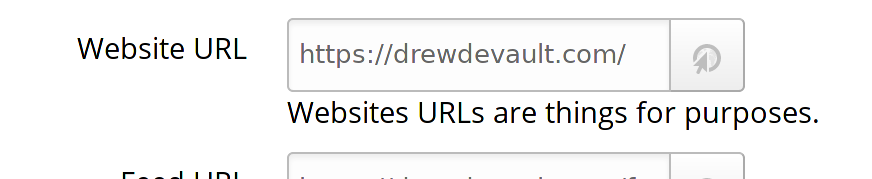
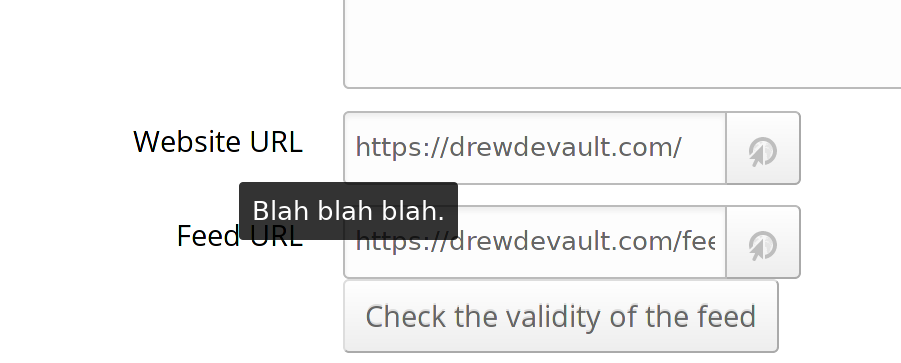
I did something really quick, different from my first suggestion (I have read again my previous messages and I realize I didn't explicitly say that my opinion changed with your feedback, which might lead to some misunderstandings :sweat_smile:). It is not what I think is the perfect solution but it illustrates my mind. The only change I made is to make the input a simple string and I changed the "check validity" button into "Fix broken feed".
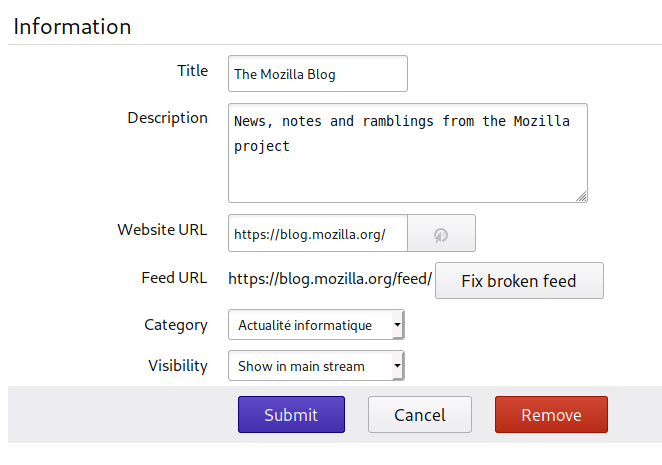
Clicking on the button would just transform the string into this (one line of JavaScript!):
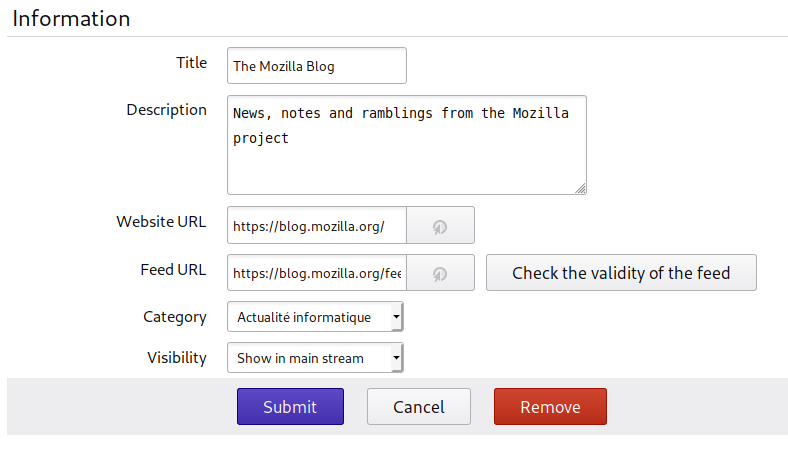
Yes, it is the current view. It might look pretty useless, but the main difference (and it's important from my point of view) is that you're invited to update the address only if it's broken which is the only case I see where you would want to change it. And it would avoid (I think) changing the address just for a "http" in "https" -> that's all I try to explain ^^
It's far from perfect, maybe I need to change the wording, maybe it should not be a button, maybe it should be elsewhere, maybe the "check validity" should stay always visible: that's just details. And yet, maybe it's a bad suggestion, but I wanted to explain it with screenshots because I'm pretty sure I wasn't clear!
Side note: I realize what we really need here is a UX/UI designer who could help us to think and make suggestions (and maybe even take the decisions) :smile:
marienfressinaud
on 15 Nov 2019
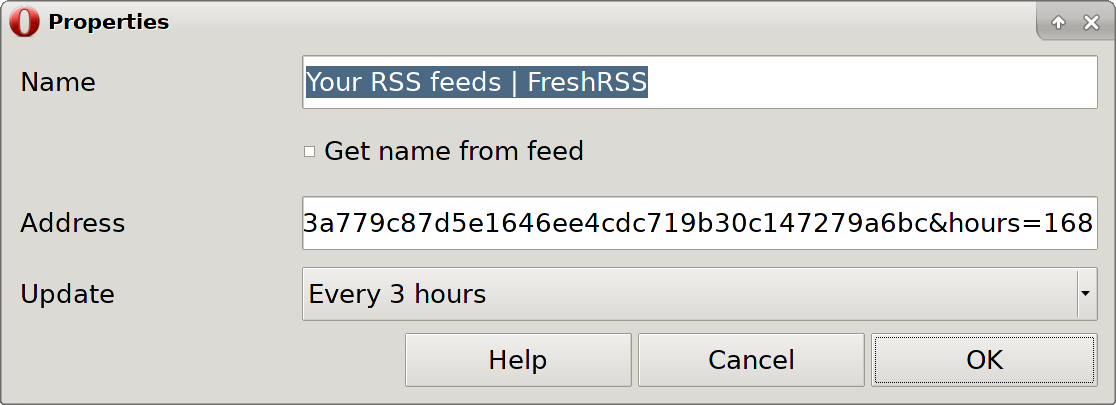
As an aside, old Opera had a feature to automatically update the name from the feed.
And it would avoid (I think) changing the address just for a "http" in "https" -> that's all I try to explain ^^
Hence my suggestion is to add a simple checkmark right underneath that says Automatically update feed address. That way it serves as built-in documentation for the field right above.
I incorrectly swiveled to Force feed address in one or two replies earlier, but that isn't self-documenting. That phrasing only works with prior knowledge that a feed URL will update itself.
Side note
That's kind of my focus. ;-)
Frenzie
on 15 Nov 2019
While we are at it, something I would personally like is to log the last error message per feed, instead (or in addition to) the main logs.
Alkarex
on 15 Nov 2019
wow, what a monster I created.
just kidding.
btw this feed change happens with blogspot too which is almost worst because it changes it from
someblog.blogspot.com to www.blogspot.com/some-encoded-url.
I think as @Frenzie said this is because of websub.
this is worst because it makes the url feed unreadable, as in if I backup my feed I have no idea what that url points to. and with blogs coming and going I need to know what blog just got deleted or moved on.
rezad1393
on 16 Nov 2019
Copied from #3086.
The Chromium blog rss feed link is https://blog.chromium.org/feeds/posts/default but it will rewrite itself to http://www.blogger.com/feeds/2471378914199150966/posts/default which redirects to https.. We should add blogger.com to the http rewrite.
 SuperSandro2000
on 28 Jun 2020
SuperSandro2000
on 28 Jun 2020
can someone tell me what websub (or PubSubHubbub) does?
does it somehow "subscribes" me to a server with my external address and then in real time sends the updates to me(my feed reader).
is that why if my instance of freshrss is not accessible from web (wan side of my network) then I should disable because if I remember correctly otherwise it would spam the log with errors.
but what does websub have to do with the rss feed address change?
cant these be separated?
because now I want to be able to follow the feed to the new address (which is the opposite of my opinion at the start of this issue,i know, I changed my opinion).
so now I cant have selfupdating feed urls without websub and if I enable websub I need to somehow make freshrss instance visible from wan side?
and how would I do that? I need to have a personal website that is www accessible? that would be to hard for me.
rezad1393
on 29 Jun 2020
@rezad1393
can someone tell me what websub (or PubSubHubbub) does?
https://en.wikipedia.org/wiki/WebSub
does it somehow "subscribes" me to a server with my external address and then in real time sends the updates to me(my feed reader).
Yes, that is correct
is that why if my instance of freshrss is not accessible from web (wan side of my network) then I should disable because if I remember correctly otherwise it would spam the log with errors.
Yes, also correct. FreshRSS automatically disables it when it detects a non-public address such as localhost, 127.0.0.1, etc., but it is best to manually disable it when the instance is not accessible from Internet (in which case, other features such as the API for mobile clients might not work either).
but what does websub have to do with the rss feed address change?
In the WebSub protocol, there is the concept of self, which is the canonical address of the feed. Some feeds do not configure that correctly. If you disable WebSub, this type of redirection will also be disabled. FreshRSS will still obey other redirections such as HTTP 301 (and change the address accordingly).
cant these be separated?
The WebSub redirection is only obeyed when WebSub is enabled.
because now I want to be able to follow the feed to the new address (which is the opposite of my opinion at the start of this issue,i know, I changed my opinion).
so now I cant have selfupdating feed urls without websub and if I enable websub I need to somehow make freshrss instance visible from wan side?
I have not understood this part :-)
and how would I do that? I need to have a personal website that is www accessible? that would be to hard for me.
Alkarex
on 4 Jul 2020
In the WebSub protocol, there is the concept of
self, which is the canonical address of the feed. Some feeds do not configure that correctly. If you disable WebSub, this type of redirection will also be disabled. FreshRSS will still obey other redirections such as HTTP 301 (and change the address accordingly).
thanks.
that is enough for me.
rezad1393
on 4 Jul 2020
Related issues
 mbnoimi
·
4Comments
mbnoimi
·
4Comments
 Tealk
·
5Comments
Tealk
·
5Comments
 mdemoss
·
4Comments
mdemoss
·
4Comments
 Stegemueller
·
3Comments
Stegemueller
·
3Comments
 Sp3r4z
·
4Comments
Sp3r4z
·
4Comments
Most helpful comment
@marienfressinaud Unfortunately, it is quite often that when Web sites are changing version, or CMS, there is no proper HTTP redirection, and the old RSS addresses left with a 404 or - worse - a non-updating feed. Hence the need to be able to manually update the feed address