Fresco: Fix Fresco 2.1 Java-only version?
I want to use java-only version in my project.
We can find some instruction on Version 2.1.0 release note.
I hava added Java-Fresco Gradle setup:
implementation('com.facebook.fresco:fresco:2.1.0') {
    exclude group: 'com.facebook.soloader', module: 'soloader'
    exclude group: 'com.facebook.fresco', module: 'soloader'
    exclude group: 'com.facebook.fresco', module: 'nativeimagefilters'
    exclude group: 'com.facebook.fresco', module: 'nativeimagetranscoder'
    exclude group: 'com.facebook.fresco', module: 'memory-type-native'
    exclude group: 'com.facebook.fresco', module: 'imagepipeline-native'
}
And changed freco init code.
        ImagePipelineConfig.Builder builder = createFrescoConfig();
        builder.experiment().setNativeCodeDisabled(true);
        Fresco.initialize(getApplicationContext(), builder.build(),null,false);
But we still got some problem.Fresco still trying load so files.
So which is the right way to use java-only version? Can we get some wiki about this?
Can we exclude so files when use java-only version?
 HenryPirot
All 18 comments
Hey!
This should work:
Fresco.initialize(
            applicationContext,
            ImagePipelineConfig.newBuilder(applicationContext)
                .setMemoryChunkType(MemoryChunkType.BUFFER_MEMORY)
                .setImageTranscoderType(ImageTranscoderType.JAVA_TRANSCODER)
                .experiment().setNativeCodeDisabled(true).build())
We'll update the documentation shortly. Let me know if that fixes your issue.
 oprisnik
on 11 Feb 2020
oprisnik
on 11 Feb 2020
Thanks for your help. It works now.
HenryPirot
on 11 Feb 2020
Hey!
This should work:
Fresco.initialize(
            applicationContext,
            ImagePipelineConfig.newBuilder(applicationContext)
                .setMemoryChunkType(MemoryChunkType.BUFFER_MEMORY)
                .setImageTranscoderType(ImageTranscoderType.JAVA_TRANSCODER)
                .experiment().setNativeCodeDisabled(true).build())
We'll update the documentation shortly. Let me know if that fixes your issue.
The memoryChunkType value not worked when os version before LOLLIPOP.We find code in PlatformBitmapFactoryProvider class.
public static PlatformBitmapFactory buildPlatformBitmapFactory(
      PoolFactory poolFactory,
      PlatformDecoder platformDecoder,
      CloseableReferenceFactory closeableReferenceFactory) {
    if (Build.VERSION.SDK_INT >= Build.VERSION_CODES.LOLLIPOP) {
      return new ArtBitmapFactory(poolFactory.getBitmapPool(), closeableReferenceFactory);
    } else if (Build.VERSION.SDK_INT >= Build.VERSION_CODES.HONEYCOMB) {
      return new HoneycombBitmapFactory(
          new EmptyJpegGenerator(poolFactory.getPooledByteBufferFactory()),
          platformDecoder,
          closeableReferenceFactory);
    } else {
      return new GingerbreadBitmapFactory();
    }
  }
The poolFactory.getPooledByteBufferFactory() method will return a NATIVE_MEMORY PooledByteBufferFactory directly.
It makes mMemoryChunkType that we set before not work.
So we have to override this method to return a BUFFER_MEMORY PooledByteBufferFactory.
Maybe we can change some code for better support of Java-only version.
HenryPirot
on 13 Feb 2020
Thanks, we'll take a look.
oprisnik
on 13 Feb 2020
I also tried to use Fresco 2.1.0 or 2.2.0 Java only version but I am getting crashes for devices using API 19.
The error says
java.lang.RuntimeException: Unable to create application com.example.xyz.MyApplication: java.lang.RuntimeException: Wrong Native code setup, reflection failed.
I am initializing fresco using
Fresco.initialize(
    applicationContext,
    ImagePipelineConfig.newBuilder(applicationContext)
        .setMemoryChunkType(MemoryChunkType.BUFFER_MEMORY)
        .setImageTranscoderType(ImageTranscoderType.JAVA_TRANSCODER)
        .experiment().setNativeCodeDisabled(true)
        .build())
Is there any solution?
 kmrinmoy07
on 26 Apr 2020
kmrinmoy07
on 26 Apr 2020
Hey is there any fixes to my above comment. I tried to find some solution in the web and did not find anything nor any on my tried way is working. Can anyone give some way so that I can use it for API 19 too?
kmrinmoy07
on 27 Apr 2020
What's the rest of the stack trace? It shows you which part is not correctly configured.
oprisnik
on 27 Apr 2020
I had already posted the whole stack trace in this #2049(comment) as my main problem was related to that issue. Please go through it and please let me know how can I solve it as no solution is working till now nor any of my tried ways are working.
kmrinmoy07
on 27 Apr 2020
I also tried to use Fresco 2.1.0 or 2.2.0 Java only version but I am getting crashes for devices using API 19.
The error says
java.lang.RuntimeException: Unable to create application com.example.xyz.MyApplication: java.lang.RuntimeException: Wrong Native code setup, reflection failed.
I am initializing fresco using
Fresco.initialize( applicationContext, ImagePipelineConfig.newBuilder(applicationContext) .setMemoryChunkType(MemoryChunkType.BUFFER_MEMORY) .setImageTranscoderType(ImageTranscoderType.JAVA_TRANSCODER) .experiment().setNativeCodeDisabled(true) .build())Is there any solution?
As we metioned before,fresco will trying to load so file when devices using API 19.
You can use ImagePipelineConfig.setPoolFactory to fix this.
Fresco.initialize(applicationContext, ImagePipelineConfig.newBuilder(applicationContext) .setMemoryChunkType(MemoryChunkType.BUFFER_MEMORY) .setImageTranscoderType(ImageTranscoderType.JAVA_TRANSCODER)
.setPoolFactory(new CustomPoolFactory(PoolConfig.newBuilder().build(), MemoryChunkType.BUFFER_MEMORY));
 .experiment().setNativeCodeDisabled(true) .build())
class CustomPoolFactory(config: PoolConfig, @MemoryChunkType val chunkType: Int) : PoolFactory(config) {
//override this method to get a BUFFER_MEMORY pool.
override fun getPooledByteBufferFactory(): PooledByteBufferFactory {
    return getPooledByteBufferFactory(chunkType)
}
}
I also tried to use Fresco 2.1.0 or 2.2.0 Java only version but I am getting crashes for devices using API 19.
The error saysjava.lang.RuntimeException: Unable to create application com.example.xyz.MyApplication: java.lang.RuntimeException: Wrong Native code setup, reflection failed.
I am initializing fresco using
Fresco.initialize( applicationContext, ImagePipelineConfig.newBuilder(applicationContext) .setMemoryChunkType(MemoryChunkType.BUFFER_MEMORY) .setImageTranscoderType(ImageTranscoderType.JAVA_TRANSCODER) .experiment().setNativeCodeDisabled(true) .build())
Is there any solution?As we metioned before,fresco will trying to load so file when devices using API 19.
You can use ImagePipelineConfig.setPoolFactory to fix this.Fresco.initialize(applicationContext, ImagePipelineConfig.newBuilder(applicationContext) .setMemoryChunkType(MemoryChunkType.BUFFER_MEMORY) .setImageTranscoderType(ImageTranscoderType.JAVA_TRANSCODER) .setPoolFactory(new CustomPoolFactory(PoolConfig.newBuilder().build(), MemoryChunkType.BUFFER_MEMORY)); .experiment().setNativeCodeDisabled(true) .build())class CustomPoolFactory(config: PoolConfig, @MemoryChunkType val chunkType: Int) : PoolFactory(config) { //override this method to get a BUFFER_MEMORY pool. override fun getPooledByteBufferFactory(): PooledByteBufferFactory { return getPooledByteBufferFactory(chunkType) } }
I tried your solution using Java as my entire project is built with Java but as till now I have no experience in Kotlin so may be I am not able to understand it properly. So @HenryPirot could you please help me the class CustomPoolFactory in Java
kmrinmoy07
on 29 May 2020
CustomPoolFactory
import com.facebook.common.memory.PooledByteBufferFactory;
import com.facebook.imagepipeline.core.MemoryChunkType;
import com.facebook.imagepipeline.memory.PoolConfig;
import com.facebook.imagepipeline.memory.PoolFactory;

class CustomPoolFactory extends PoolFactory {

    private int chunkType;

    public CustomPoolFactory(PoolConfig config, @MemoryChunkType int chunkType) {
        super(config);
        this.chunkType = chunkType;
    }

    @Override
    public PooledByteBufferFactory getPooledByteBufferFactory() {
//        return super.getPooledByteBufferFactory(memoryChunkType);
        return getPooledByteBufferFactory(chunkType);
    }
}
Just like this
HenryPirot
on 4 Jun 2020
@HenryPirot I did as you told for API 19. I used the
CustomPoolFactory as you showed aboved and initialised fresco using
Fresco.initialize(getApplicationContext(), ImagePipelineConfig.newBuilder(getApplicationContext())
                .setMemoryChunkType(MemoryChunkType.BUFFER_MEMORY)
                .setImageTranscoderType(ImageTranscoderType.JAVA_TRANSCODER)
                .setPoolFactory(new CustomPoolFactory(PoolConfig.newBuilder().build(), MemoryChunkType.BUFFER_MEMORY))
                .experiment().setNativeCodeDisabled(true).build());
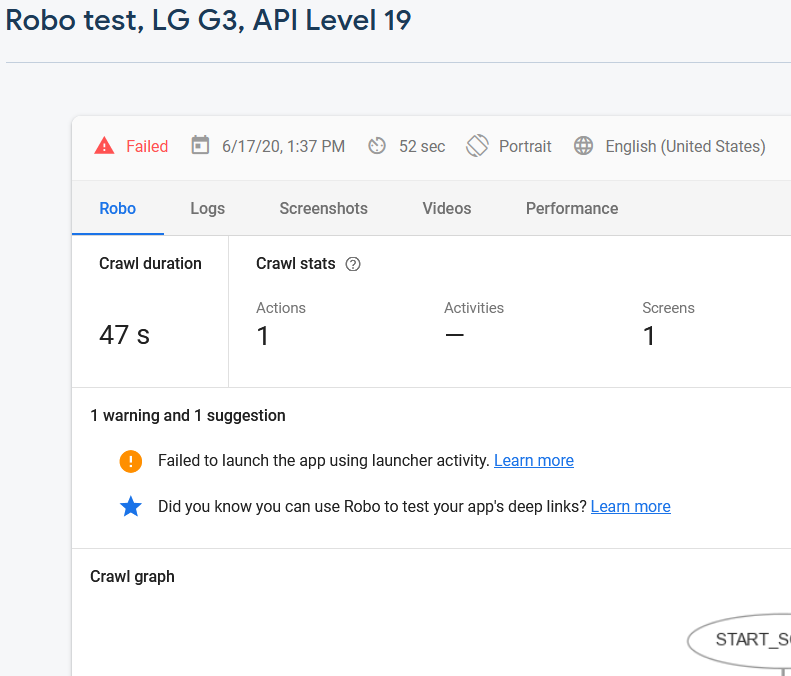
But still I got the same crash on API 19 devices.

kmrinmoy07
on 17 Jun 2020
@HenryPirot I did as you told for API 19. I used the
CustomPoolFactory as you showed aboved and initialised fresco using
Fresco.initialize(getApplicationContext(), ImagePipelineConfig.newBuilder(getApplicationContext()) .setMemoryChunkType(MemoryChunkType.BUFFER_MEMORY) .setImageTranscoderType(ImageTranscoderType.JAVA_TRANSCODER) .setPoolFactory(new CustomPoolFactory(PoolConfig.newBuilder().build(), MemoryChunkType.BUFFER_MEMORY)) .experiment().setNativeCodeDisabled(true).build());But still I got the same crash on API 19 devices.
Could you paste the crash logs here
HenryPirot
on 17 Jun 2020
@HenryPirot These are the crash logs which I think is the same error as before without the CustomPoolFactory
java.lang.RuntimeException: Unable to create application com.example.myapp.MyApplication:java.lang.RuntimeException: Wrong Native code setup, reflection failed.
FATAL EXCEPTION: main Process: com.example.myapp, PID: 14046 java.lang.RuntimeException: Unable to create application com.example.myapp.MyApplication: java.lang.RuntimeException: Wrong Native code setup, reflection failed.
at android.app.ActivityThread.handleBindApplication(ActivityThread.java:4927)
at android.app.ActivityThread.access$1500(ActivityThread.java:153)
at android.app.ActivityThread$H.handleMessage(ActivityThread.java:1412)
at android.os.Handler.dispatchMessage(Handler.java:102)
at android.os.Looper.loop(Looper.java:157)
at android.app.ActivityThread.main(ActivityThread.java:5633)
at java.lang.reflect.Method.invokeNative(Native Method)
at java.lang.reflect.Method.invoke(Method.java:515)
at com.android.internal.os.ZygoteInit$MethodAndArgsCaller.run(ZygoteInit.java:896)
at com.android.internal.os.ZygoteInit.main(ZygoteInit.java:712)
at dalvik.system.NativeStart.main(Native Method)
  Caused by: java.lang.RuntimeException: Wrong Native code setup, reflection failed.
at com.facebook.imagepipeline.platform.PlatformDecoderFactory.buildPlatformDecoder(PlatformDecoderFactory.java:51)
at com.facebook.imagepipeline.core.ImagePipelineFactory.getPlatformDecoder(ImagePipelineFactory.java:312)
at com.facebook.imagepipeline.core.ImagePipelineFactory.getPlatformBitmapFactory(ImagePipelineFactory.java:304)
at com.facebook.imagepipeline.core.ImagePipelineFactory.getAnimatedFactory(ImagePipelineFactory.java:164)
at com.facebook.imagepipeline.core.ImagePipelineFactory.getImageDecoder(ImagePipelineFactory.java:227)
at com.facebook.imagepipeline.core.ImagePipelineFactory.getProducerFactory(ImagePipelineFactory.java:327)
at com.facebook.imagepipeline.core.ImagePipelineFactory.getProducerSequenceFactory(ImagePipelineFactory.java:360)
at com.facebook.imagepipeline.core.ImagePipelineFactory.getImagePipeline(ImagePipelineFactory.java:282)
at com.facebook.drawee.backends.pipeline.PipelineDraweeControllerBuilderSupplier.<init>(PipelineDraweeControllerBuilderSupplier.java:52)
at com.facebook.drawee.backends.pipeline.PipelineDraweeControllerBuilderSupplier.<init>(PipelineDraweeControllerBuilderSupplier.java:43)
at com.facebook.drawee.backends.pipeline.PipelineDraweeControllerBuilderSupplier.<init>(PipelineDraweeControllerBuilderSupplier.java:36)
at com.facebook.drawee.backends.pipeline.Fresco.initializeDrawee(Fresco.java:121)
at com.facebook.drawee.backends.pipeline.Fresco.initialize(Fresco.java:110)
at com.facebook.drawee.backends.pipeline.Fresco.initialize(Fresco.java:54)
at com.facebook.drawee.backends.pipeline.Fresco.initialize(Fresco.java:46)
at com.example.myapp.MyApplication.onCreate(MyApplication.java:35)
at android.app.Instrumentation.callApplicationOnCreate(Instrumentation.java:1020)
at android.app.ActivityThread.handleBindApplication(ActivityThread.java:4924)
... 10 more
   Caused by: java.lang.ClassNotFoundException: com.facebook.imagepipeline.platform.KitKatPurgeableDecoder
at java.lang.Class.classForName(Native Method)
at java.lang.Class.forName(Class.java:251)
at java.lang.Class.forName(Class.java:216)
at com.facebook.imagepipeline.platform.PlatformDecoderFactory.buildPlatformDecoder(PlatformDecoderFactory.java:44)
... 27 more
   Caused by: java.lang.NoClassDefFoundError: com/facebook/imagepipeline/platform/KitKatPurgeableDecoder
... 31 more
   Caused by: java.lang.ClassNotFoundException: Didn't find class "com.facebook.imagepipeline.platform.KitKatPurgeableDecoder" on path: DexPathList[[zip file "/data/app/com.example.myapp-1.apk", zip file "/data/data/com.example.myapp/code_cache/secondary-dexes/com.example.myapp-1.apk.classes2.zip", zip file "/data/data/com.example.myapp/code_cache/secondary-dexes/com.example.myapp-1.apk.classes3.zip"],nativeLibraryDirectories=[/data/app-lib/com.example.myapp-1, /vendor/lib, /system/lib, /vendor/lib]]
at dalvik.system.BaseDexClassLoader.findClass(BaseDexClassLoader.java:56)
at java.lang.ClassLoader.loadClass(ClassLoader.java:497)
at java.lang.ClassLoader.loadClass(ClassLoader.java:457)
... 31 more
`
kmrinmoy07
on 17 Jun 2020
Well,you should use animated-gif-lite to display gif image.
implementation 'com.facebook.fresco:animated-gif-lite:2.1.0'
and invoke ImagePipelineConfig.Builder.setImageDecoderConfig.
builder.setImageDecoderConfig(ImageDecoderConfig.newBuilder().overrideDecoder(DefaultImageFormats.GIF, new GifDecoder()).build());
HenryPirot
on 17 Jun 2020
But I don't have any gif images. I only use png / jpg images and the problem only occurs for API 19 or below when I try to use only Java only version of fresco.
kmrinmoy07
on 17 Jun 2020
But I don't have any gif images. I only use png / jpg images and the problem only occurs for API 19 or below when I try to use only Java only version of fresco.
Yes ,I was wrong here. You need use
Fresco.initialize(
      Context context,
      @Nullable ImagePipelineConfig imagePipelineConfig,
      @Nullable DraweeConfig draweeConfig,
      boolean useNativeCode)
to initialize fresco. Pass draweeConfig with null,and useNativeCode with false.
HenryPirot
on 17 Jun 2020
   Fresco.initialize(getApplicationContext(),
            ImagePipelineConfig.newBuilder(getApplicationContext())
            .setMemoryChunkType(MemoryChunkType.BUFFER_MEMORY)
            .setImageTranscoderType(ImageTranscoderType.JAVA_TRANSCODER)
            .setPoolFactory(new CustomPoolFactory(PoolConfig.newBuilder().build(),MemoryChunkType.BUFFER_MEMORY))
            .experiment().setNativeCodeDisabled(true).build(),
            null,false);
Thanks a lot this works fine
kmrinmoy07
on 17 Jun 2020
Related issues
 eldk
·
3Comments
eldk
·
3Comments
 rafaelekol
·
4Comments
rafaelekol
·
4Comments
 stephen-workpop
·
4Comments
stephen-workpop
·
4Comments
 cococool
·
4Comments
cococool
·
4Comments
 amodkanthe
·
3Comments
amodkanthe
·
3Comments