Description
Graphics memory leak occurred on my device.
Here is my code
<com.facebook.drawee.view.SimpleDraweeView
            android:id="@+id/_image"
            android:layout_width="match_parent"
            android:layout_height="match_parent"
            fresco:placeholderImage="@drawable/default_img"
            fresco:roundBottomEnd="false"
            fresco:roundBottomStart="false"
            fresco:roundedCornerRadius="6dp"
            />
The code above is item view of RecycleView which load data page by page.
When i scroll to end to load next page, then, graphics memory leak occurs.
When not use round corner, leak would not happen.
I can fix it by set Activity _android:hardwareAccelerated="false"_ ,but list scroll less smoothly.

Additional Information
- Fresco version:Any
- Platform version: LeMobile Le X820 Android 6.0.1 API=23
 xuwakao
All 8 comments
Same in my case too but I faced this after updating the lib to 1.9.0
 shashankpsingh
on 26 Apr 2018
shashankpsingh
on 26 Apr 2018
Hi @xuwakao, thanks for filling the issue. 1.4 GiB looks pretty worrying.
I've tried to reproduce the issue using the Showcase, but to no avail. I've used the master branch, added rounding params and an OnePlus w/ API 26.
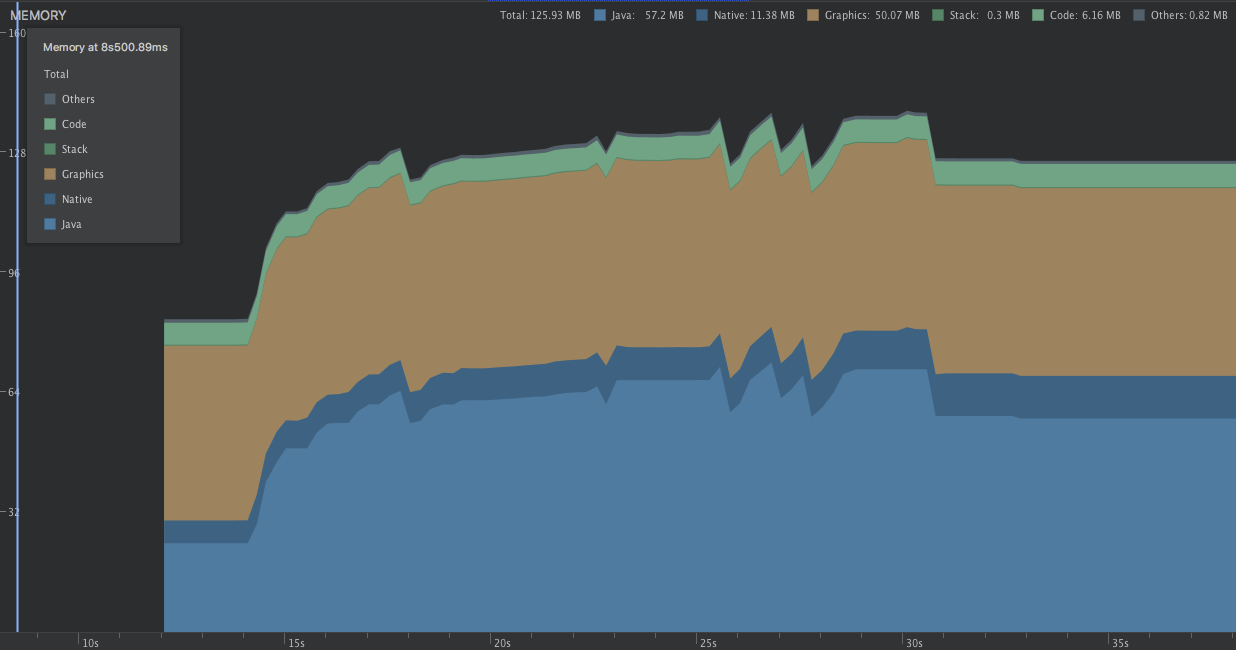
I'd like to debug this issue. It's most effective if I can reproduce it in the showcase app using the recycler view example (adding rounded-corners). The following items would help me a lot here:
- Can you post your initialization code for Fresco (especially if you set any caching limits)
- What kind of images you display? Do you have sample URIs?
- Can you re-create the issue in a fork of the showcase app? That would be the best way for me to help :)
Cheers and thanks again, Daniel
 lambdapioneer
on 26 Apr 2018
lambdapioneer
on 26 Apr 2018
Closing issue since we cannot proceed with the investigation without more details
 erikandre
on 24 May 2018
erikandre
on 24 May 2018
Hey, @lambdapioneer, @shashankpsingh, @xuwakao! I was having precisely the same issue. The memory was increasing linearly, and it had no end - up to 2Gb and so on until an app restarted itself without any exception, though the Logcat constantly showed the string like
I/memtrack_graphic: graphic_memtrack_get_memory match 4:      ion_mm_heap 26606  1417216   1 ffffffc09fe1e880 ffffffc0122b1000.
     : 26606 26606 1417216 1 1417216
In my case, it occurred if I loaded 2 or more pictures (.png, ~ 2Mb each) with rounded corners in a recycler view's item. The memory increased every time I tried to scroll down, even though there were no more elements below those images. With scrolling up everything was OK.
The solution to this is to call the setLayerType(View.LAYER_TYPE_SOFTWARE, null) method on a SimpleDraweeView's parent (not on a SimpleDraweeView itself due to an images' corners will have black areas). The method turns off the hardware acceleration for the view (for more info see https://developer.android.com/guide/topics/graphics/hardware-accel).
My config is
ImagePipelineConfig.newBuilder(this)
                .setProgressiveJpegConfig(SimpleProgressiveJpegConfig())
                .setResizeAndRotateEnabledForNetwork(true)
                .setDownsampleEnabled(true)
                .build()
The way I load pictures is
 val request = ImageRequestBuilder.newBuilderWithSource(Uri.parse(url ?: ""))
            .setProgressiveRenderingEnabled(true)
            .build()

 val newController = Fresco.newDraweeControllerBuilder()
            .setImageRequest(request)
            .setOldController(controller)
            .build()

 controller = newController
Rounded corners are set like this
val roundingParams = RoundingParams.fromCornersRadii(topLeft, topRight, bottomRight, bottomLeft)

hierarchy = GenericDraweeHierarchyBuilder.newInstance(resources)
            .setRoundingParams(roundingParams)
            .build()
Images' links look like this content://com.android.providers.downloads.documents/document/4172
Fresco version: 1.13.0
_Would be glad if someone could explain why the memory thing happens._
 abstractHero
on 21 Mar 2019
abstractHero
on 21 Mar 2019
Thanks for the detailed info. You can consistently repro this issue with your setup? On any Android version or a specific one?
 oprisnik
on 21 Mar 2019
oprisnik
on 21 Mar 2019
I've just tested on an emulator with Android 8.1 - there is no such issue. I can reproduce the issue on a device with Android 6.0 (a real device) every time if the hardware acceleration is on.
abstractHero
on 21 Mar 2019
@abstractHero May I know have you figure out why the graphics memory increased?
 linxs0211
on 10 Jan 2020
linxs0211
on 10 Jan 2020
Hi! Unfortunately, I haven't :(
abstractHero
on 20 Mar 2020
Related issues
 eresid
·
4Comments
eresid
·
4Comments
 eldk
·
3Comments
eldk
·
3Comments
 zewenwang
·
4Comments
zewenwang
·
4Comments
 kingty
·
4Comments
kingty
·
4Comments
 amodkanthe
·
3Comments
amodkanthe
·
3Comments
Most helpful comment
I've just tested on an emulator with Android 8.1 - there is no such issue. I can reproduce the issue on a device with Android 6.0 (a real device) every time if the hardware acceleration is on.