Freetube: Some Search Filter combinations don't behave properly
Is your feature request related to a usage problem (not a bug)? Please describe.
When selecting filters u can make the most weirdest combinations.
When u press on search it will take a bit of time, throw u an error and show u nothing because it is not possible to request what u ask for.
Describe the solution you'd like to see implemented
_For this solution to work the filter should only be visible after u searched something so only on the search page! (more on this later)_
- On the search page apply filters directly when u click on them.
- Next step is to grey out the filters that the current filter cant combine with, so it is not possible to make non existing combinations.
Why it is important to only have the filter after u search?
Lets say u want to search for Linus Tech Tips, but before pressing on search u select some filters.
- Sort by: Rating
- Time: This year
- Type: Channel
- Duration: Long
After this u press on search you'll encounter the same problem, because the application can't guess before pressing on search that some filters should be greyed out, because it doesn't know the query to search for yet!
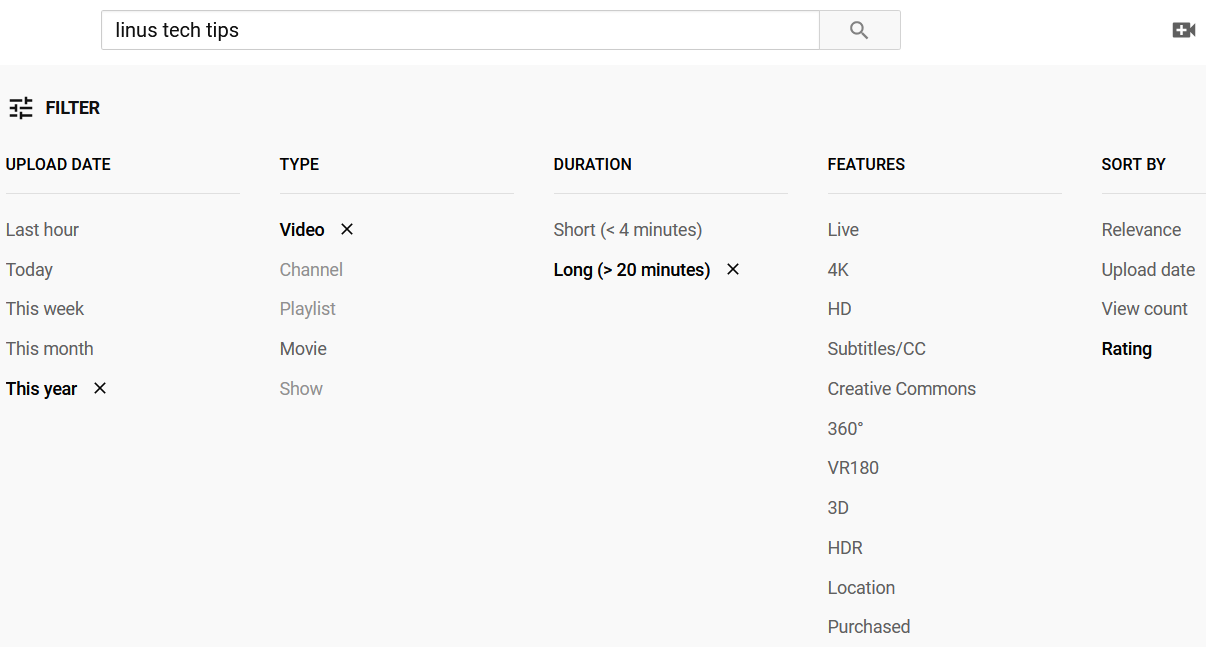
See screenshot for YT's implementation.
Describe alternatives you've considered
None
Screenshots
Additional context
None
 efb4f5ff-1298-471a-8973-3d47447115dc
All 11 comments
Search hasn't been working properly for a while, as such this is a duplicate of #662. This has also already been fixed in the nightly builds.
 PrestonN
on 16 Dec 2020
PrestonN
on 16 Dec 2020
@PrestonN i don't quite get what ur saying.
I already know of the existence of this issue, but i couldnt find the things im suggesting for in that issue.
Thats why i created this enhancement, because i think the things the im suggesting don't occur in #662.
I think the things im suggesting is different from #662
efb4f5ff-1298-471a-8973-3d47447115dc
on 16 Dec 2020
I'm not sure what you're suggesting then, we already support search filters (Which are broken in the current release but fixed in the nightly builds).
PrestonN
on 16 Dec 2020
@PrestonN I have the latest nightly builds. Im not suggesting that the search filters are broken.
If u combine the filters in a certain way it will give u an error and in the issue im suggesting a possible solution for this.
I dont know if i use the right wording in the issue, because there seems to be a bit of confusion between us.
I could give u a call if u want on Element to explain myself better and show u what i mean.
efb4f5ff-1298-471a-8973-3d47447115dc
on 17 Dec 2020
Alright, my mistake. I understand what you're talking about now.
Yes we can disable some combinations from working. Alternatively we can silently ignore these combinations in the background and not account for them when we search. Either way should be fine and I'll experiment with what method works best.
PrestonN
on 17 Dec 2020
I've pushed an update to the nightly builds now. This will automatically force your filter settings to revert to the default if it would create an incompletable search. Let me know if I missed any combinations and I'll make another fix.
PrestonN
on 17 Dec 2020
@PrestonN So i did some more digging on YT to make sure we getting everything. This is everything u need.
Playlist / Channel only works with all the things that fall under Sort By.
If any of the things that fall under Time or Duration is selected (expect Any Time / All Duration) when Channel or Playlist is already selected it should always bounce back to Any Time / All Duration.
Playlist / Channel must not work when selecting any Time / Duration.
If Channel or Playlist is selected when Time or Duration is already selected (expect Any Time / All Duration) it should always bounce back to All Types.
efb4f5ff-1298-471a-8973-3d47447115dc
on 18 Dec 2020
@PrestonN i wanted to reopen this but it seems i dont have the right to do that. Could u reopen this issue?
efb4f5ff-1298-471a-8973-3d47447115dc
on 21 Dec 2020
The filter combinations you mentioned matches the logic I implemented in the latest release. This appears to be fixed and so I do not see a reason to reopen this issue.
PrestonN
on 21 Dec 2020
@PrestonN There seems to be a few bugs in the implementation.
Sort By: Most relevant / Rating / Upload date / View count (Choose one)
Press on the filter in this sequence: Videos > Channels > Playlist (Notice that playlist bounces back to All types).
Time or Duration doesn't bounce back when:
I select Channel or Playlist as a filter and after that i try to select a Time or Duration.
Type doesn't bounce back when:
I select Time or Duration as a filter and after that i try to select Channel/Playlist
efb4f5ff-1298-471a-8973-3d47447115dc
on 22 Dec 2020
I took another look into this. I had the right logic but it wasn't updating the filters properly. I've definitely fixed this time and the fix should be in the next update. It'll also be available in the nightly builds. Thanks for the help in finding everything.
PrestonN
on 22 Dec 2020
Related issues
 vuurvogelblog
·
5Comments
vuurvogelblog
·
5Comments
 baraa272
·
4Comments
baraa272
·
4Comments
 Albirew
·
4Comments
Albirew
·
4Comments
 linuxgirl22
·
5Comments
linuxgirl22
·
5Comments
 stemy2
·
5Comments
stemy2
·
5Comments