Freetube: Display a persistent notification that allows users to interact with media via built-in media keys.
Description of issue
I've seen some closed issues relating to keyboard shortcuts which can be used while the app is in foreground to play/pause and do all sorts of actions. But I would like to see a way of playing or pausing, skipping to next video, going back to previous video via media keys which are built into most laptops/PC keyboards nowadays while the app is in the background. Seems like currently you have to switch to the app which can be buried beneath other apps to able to perform such actions, and this can be slower than simply hitting the media hotkeys already build into the keyboard for the same purpose.
Describe the solution you'd like to see implemented
Chrome, Spotify and numerous other applications generally display a persistent notification in the notification drop-down menu regarding the current video/song that is being played and the user is able to play/pause, skip next or previous, via the media keys. From what I see when a YouTube video is playing in Chrome, you can only play/pause, but this application can make it to where you can switch to the next or previous video when autoplay is turned on, or when the user has a queue enabled.
Describe alternatives you've considered
I don't believe there is one at the moment, user has to switch to the app and perform actions there.
Screenshots
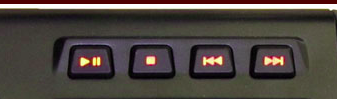
Example media keys (can be built into F keys above the keyboard also):
Persistent notification in Pop!_OS (fork of Ubuntu) from Chrome:

Miscellaneous Comments
Absolutely amazing app so far, thanks for contributing to the already thriving open-source community!
 ACodingGenie
All 7 comments
I'm not sure what OS you use, though FreeTube already does this on my machines, which run GNOME. It's been a while since I've tried on Windows though I'm fairly certain it's the same over there.
If there is nothing that needs to be done, then this issue can be closed.
 PrestonN
on 9 Dec 2020
PrestonN
on 9 Dec 2020
The media keys just won't do anything on Pop!_OS (fork of Ubuntu) with FreeTube which was installed as a flatpak from Flathub. Doesn't matter if the app is in foreground or background. Nothing and I have no idea why :(
Pop!_OS runs GNOME too. My version is 20.10
ACodingGenie
on 9 Dec 2020
I have the same issue with flatpak. I'm not using media keys, but a shortcut key that I configured myself. Before when I installed using AUR, it worked fine. But because it has problems with the inability to open externally using Privacy Redirect, so I installed the flatpak. I'm in Manjaro KDE.
 tanandry
on 9 Dec 2020
tanandry
on 9 Dec 2020
The media keys just won't do anything on Pop!_OS
Same here with Pop!_OS 20.04. It would be an important feature.
 rafael-ferro
on 12 Dec 2020
rafael-ferro
on 12 Dec 2020
Play/Pause works fine on Windows when FreeTube is in the background.
Sadly though, Next/Back doesn't do anything in a playlist.
 Etrit1
on 28 Dec 2020
Etrit1
on 28 Dec 2020
So I think I've figured out the problem with this. The Flatpak version of FreeTube has MPRIS blocked because of Flatpak's sandboxing feature. I can however allow this so that the notification shows up for this build. If you install FreeTube using another method, you likely won't have noticed this problem.
I'll get this resolved here shortly.
PrestonN
on 1 Jan 2021
For Pop!_OS users (temporary workaround allowing playing/pausing with Preston's idea, haven't figured out next/previous yet or may not be possible yet):
- Download "Flatseal" from Pop!_Shop.
- Go to Freetube inside of Flatseal
- Allow the following permission:

- Add
org.mpris.MediaPlayer2.freetubeunder "Session Bus" like so:
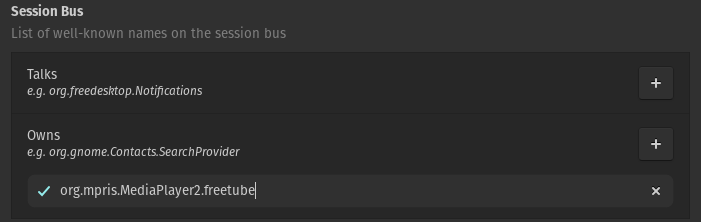
- Relaunch Freetube is you have it opened or open it otherwise.
- You should be able to play/pause now and see a notification like so:

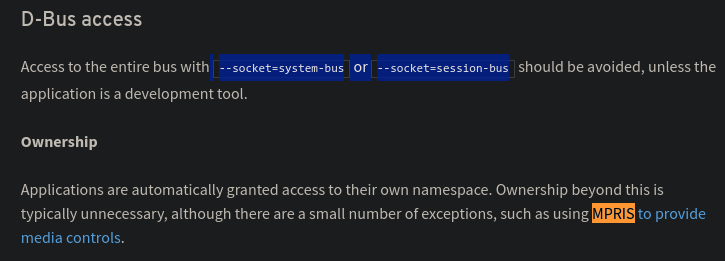
Note: Flatpak docs do discourage from allowing access to --socket=system-bus or --socket=session-bus but they also say it may be necessary for media controls to work properly. See here: https://docs.flatpak.org/en/latest/sandbox-permissions.html
PS: If you use other Flatpak's also like I do and sometimes you'll run into ones where they don't have permission to user's files or whatever it can be fixed via Flatseal.
ACodingGenie
on 13 Jan 2021
Related issues
 Zypherspace
·
3Comments
Zypherspace
·
3Comments
 aproposnix
·
3Comments
aproposnix
·
3Comments
 Albirew
·
4Comments
Albirew
·
4Comments
 shivasagarrao
·
4Comments
shivasagarrao
·
4Comments
 jibe-b
·
3Comments
jibe-b
·
3Comments