Freerdp: ERRINFO_GRAPHICS_SUBSYSTEM_FAILED (0x0000112F): The server-side graphics subsystem is in an error state and unable to continue graphics encoding
Describe the bug
Connection to Hyper-V 2016 (with latest updates) guest is sometimes dropped like this:
[DEBUG][com.freerdp.channels.cliprdr.client] - VirtualChannelEntryEx
[INFO][com.freerdp.client.common.cmdline] - loading channelEx cliprdr
[INFO][com.freerdp.client.x11] - Property 240 does not exist
[DEBUG][com.freerdp.client.x11] - Searching for XInput pointer device
[DEBUG][com.freerdp.client.x11] - Pointer device: 6
[DEBUG][com.freerdp.core.nego] - Enabling security layer negotiation: FALSE
[DEBUG][com.freerdp.core.nego] - Enabling restricted admin mode: FALSE
[DEBUG][com.freerdp.core.nego] - Enabling RDP security: TRUE
[DEBUG][com.freerdp.core.nego] - Enabling TLS security: TRUE
[DEBUG][com.freerdp.core.nego] - Enabling NLA security: TRUE
[DEBUG][com.freerdp.core.nego] - Enabling NLA extended security: FALSE
[DEBUG][com.freerdp.core.nego] - Security Layer Negotiation is disabled
[DEBUG][com.freerdp.core.nego] - Sending preconnection PDU
[DEBUG][com.freerdp.core.nego] - Negotiated NLA security
[DEBUG][com.freerdp.core.nego] - nego_security_connect with PROTOCOL_NLA
[DEBUG][com.winpr.sspi] - InitSecurityInterfaceExA
[DEBUG][com.freerdp.core.nla] - nla_client_init 349 : packageName=Negotiate ; cbMaxToken=12256

...
[DEBUG][com.freerdp.core.update] - MemBlt Primary Drawing Order (0x0000000D) rop=S [0x00cc0020]
[DEBUG][com.freerdp.core.update] - Frame Marker Alternate Secondary Drawing Order (0x0D)
[DEBUG][com.freerdp.core.update] - Frame Marker Alternate Secondary Drawing Order (0x0D)
[DEBUG][com.freerdp.core.update] - MemBlt Primary Drawing Order (0x0000000D) rop=S [0x00cc0020]
[DEBUG][com.freerdp.core.update] - Frame Marker Alternate Secondary Drawing Order (0x0D)
[DEBUG][com.freerdp.core.update] - Frame Marker Alternate Secondary Drawing Order (0x0D)
[DEBUG][com.freerdp.core.update] - MemBlt Primary Drawing Order (0x0000000D) rop=S [0x00cc0020]
[DEBUG][com.freerdp.core.update] - Frame Marker Alternate Secondary Drawing Order (0x0D)
[DEBUG][com.freerdp.core.rdp] - recv Set Error Info Data PDU (0x2F), length: 22
[INFO][com.freerdp.core] - ERRINFO_GRAPHICS_SUBSYSTEM_FAILED (0x0000112F):The server-side graphics subsystem is in an error state and unable to continue graphics encoding.
[DEBUG][com.freerdp.core.transport] - transport_check_fds: transport_read_pdu() - -1
[DEBUG][com.freerdp.core.rdp] - transport_check_fds() - -1
[DEBUG][com.freerdp.core] - rdp_check_fds() - -1
To Reproduce
Connect to Hyper-V 2016 guest:
xfreerdp /u:Administrator /p:XXX /v:openqaw7-hyperv.qa.suse.de /cert-ignore /vmconnect:c10c0db0-e444-41e2-bbaa-4239b55261b1 /f /log-level:DEBUG
Expected behavior
Connection is not dropped after a while.
Screenshots
N/A
Application details
- Version of FreeRDP: 2.0.0-rc2 (n/a) / freerdp-2.0.0~rc2-95.1.x86_64 / https://build.opensuse.org/package/show/X11:RemoteDesktop/freerdp
- OS version connecting to: Windows Server 2016
Desktop (please complete the following information):
- OS: openSUSE Leap 42.3
 mnowaksuse
All 43 comments
This seems like a server configuration issue. Not much we can do about that.
You might want to add /rfx, /gfx or /gfx:avc444 to get the new RDP graphics pipe (depends on remote os and if you build with h264 support)
 akallabeth
on 28 Jun 2018
akallabeth
on 28 Jun 2018
What might be the misconfiguration? It's a default WS 2016 installation with all updates. I turned 'NLA' not to be required.
Tried with /gfx, but soon it failed again.
[13:56:36:127] [32472:32482] [DEBUG][com.freerdp.channels.rdpgfx.client] - RecvEndFramePdu: frameId: 3495
[13:56:36:127] [32472:32482] [DEBUG][com.freerdp.channels.rdpgfx.client] - SendFrameAcknowledgePdu: 3495
[13:56:36:127] [32472:32482] [DEBUG][com.freerdp.channels.drdynvc.client] - write_data: ChannelId=3 size=20
[13:56:36:333] [32472:32482] [DEBUG][com.freerdp.channels.drdynvc.client] - order_recv: Cmd=0x3, Sp=1 cbChId=0
[13:56:36:333] [32472:32482] [DEBUG][com.freerdp.channels.rdpgfx.client] - cmdId: RDPGFX_CMDID_STARTFRAME (0x000B) flags: 0x0000 pduLength: 16
[13:56:36:333] [32472:32482] [DEBUG][com.freerdp.channels.rdpgfx.client] - RecvStartFramePdu: frameId: 3499 timestamp: 0x00000000
[13:56:36:333] [32472:32482] [DEBUG][com.freerdp.channels.rdpgfx.client] - cmdId: RDPGFX_CMDID_WIRETOSURFACE_1 (0x0001) flags: 0x0000 pduLength: 29
[13:56:36:333] [32472:32482] [DEBUG][com.freerdp.channels.rdpgfx.client] - RecvWireToSurface1Pdu: surfaceId: 0 codecId: RDPGFX_CODECID_CLEARCODEC (0x0008) pixelFormat: 0x20 destRect: left: 0 top: 766 right: 8 bottom: 768 bitmapDataLength: 4
[13:56:36:333] [32472:32482] [DEBUG][com.freerdp.channels.rdpgfx.client] - cmdId: RDPGFX_CMDID_ENDFRAME (0x000C) flags: 0x0000 pduLength: 12
[13:56:36:333] [32472:32482] [DEBUG][com.freerdp.channels.rdpgfx.client] - RecvEndFramePdu: frameId: 3499
[13:56:36:333] [32472:32482] [DEBUG][com.freerdp.channels.rdpgfx.client] - SendFrameAcknowledgePdu: 3499
[13:56:36:333] [32472:32482] [DEBUG][com.freerdp.channels.drdynvc.client] - write_data: ChannelId=3 size=20
[13:56:36:541] [32472:32482] [DEBUG][com.freerdp.channels.drdynvc.client] - order_recv: Cmd=0x3, Sp=1 cbChId=0
[13:56:36:541] [32472:32482] [DEBUG][com.freerdp.channels.rdpgfx.client] - cmdId: RDPGFX_CMDID_STARTFRAME (0x000B) flags: 0x0000 pduLength: 16
[13:56:36:541] [32472:32482] [DEBUG][com.freerdp.channels.rdpgfx.client] - RecvStartFramePdu: frameId: 3503 timestamp: 0x00000000
[13:56:36:541] [32472:32482] [DEBUG][com.freerdp.channels.rdpgfx.client] - cmdId: RDPGFX_CMDID_WIRETOSURFACE_1 (0x0001) flags: 0x0000 pduLength: 29
[13:56:36:541] [32472:32482] [DEBUG][com.freerdp.channels.rdpgfx.client] - RecvWireToSurface1Pdu: surfaceId: 0 codecId: RDPGFX_CODECID_CLEARCODEC (0x0008) pixelFormat: 0x20 destRect: left: 0 top: 766 right: 8 bottom: 768 bitmapDataLength: 4
[13:56:36:541] [32472:32482] [DEBUG][com.freerdp.channels.rdpgfx.client] - cmdId: RDPGFX_CMDID_ENDFRAME (0x000C) flags: 0x0000 pduLength: 12
[13:56:36:541] [32472:32482] [DEBUG][com.freerdp.channels.rdpgfx.client] - RecvEndFramePdu: frameId: 3503
[13:56:36:541] [32472:32482] [DEBUG][com.freerdp.channels.rdpgfx.client] - SendFrameAcknowledgePdu: 3503
[13:56:36:542] [32472:32482] [DEBUG][com.freerdp.channels.drdynvc.client] - write_data: ChannelId=3 size=20
[13:56:36:749] [32472:32482] [DEBUG][com.freerdp.channels.drdynvc.client] - order_recv: Cmd=0x3, Sp=1 cbChId=0
[13:56:36:749] [32472:32482] [DEBUG][com.freerdp.channels.rdpgfx.client] - cmdId: RDPGFX_CMDID_STARTFRAME (0x000B) flags: 0x0000 pduLength: 16
[13:56:36:749] [32472:32482] [DEBUG][com.freerdp.channels.rdpgfx.client] - RecvStartFramePdu: frameId: 3507 timestamp: 0x00000000
[13:56:36:749] [32472:32482] [DEBUG][com.freerdp.channels.rdpgfx.client] - cmdId: RDPGFX_CMDID_WIRETOSURFACE_1 (0x0001) flags: 0x0000 pduLength: 29
[13:56:36:749] [32472:32482] [DEBUG][com.freerdp.channels.rdpgfx.client] - RecvWireToSurface1Pdu: surfaceId: 0 codecId: RDPGFX_CODECID_CLEARCODEC (0x0008) pixelFormat: 0x20 destRect: left: 0 top: 766 right: 8 bottom: 768 bitmapDataLength: 4
[13:56:36:749] [32472:32482] [DEBUG][com.freerdp.channels.rdpgfx.client] - cmdId: RDPGFX_CMDID_ENDFRAME (0x000C) flags: 0x0000 pduLength: 12
[13:56:36:749] [32472:32482] [DEBUG][com.freerdp.channels.rdpgfx.client] - RecvEndFramePdu: frameId: 3507
[13:56:36:749] [32472:32482] [DEBUG][com.freerdp.channels.rdpgfx.client] - SendFrameAcknowledgePdu: 3507
[13:56:36:749] [32472:32482] [DEBUG][com.freerdp.channels.drdynvc.client] - write_data: ChannelId=3 size=20
[13:56:45:811] [32472:32474] [DEBUG][com.freerdp.core.transport] - transport_check_fds: transport_read_pdu() - -1
[13:56:45:812] [32472:32474] [DEBUG][com.freerdp.core.rdp] - transport_check_fds() - -1
[13:56:45:812] [32472:32474] [DEBUG][com.freerdp.core] - rdp_check_fds() - -1
[13:56:45:812] [32472:32474] [INFO][com.freerdp.client.x11] - Network disconnect!
[13:56:45:813] [32472:32482] [DEBUG][com.freerdp.channels.rdpgfx.client] - OnClose
[13:56:45:814] [32472:32482] [DEBUG][com.freerdp.channels.drdynvc.client] - close_channel_iface: id=3
[13:56:45:814] [32472:32474] [DEBUG][com.freerdp.channels.rdpgfx.client] - Terminated
you don't, by chance, have activated the option to drop idle connections?
akallabeth
on 29 Jun 2018
@mnowaksuse Did you have time to check your server settings?
I do remember a similar issue where there was a server side option active that was dropping idle connections.
akallabeth
on 3 Jul 2018
Closing as configuration issue.
akallabeth
on 9 Jul 2018
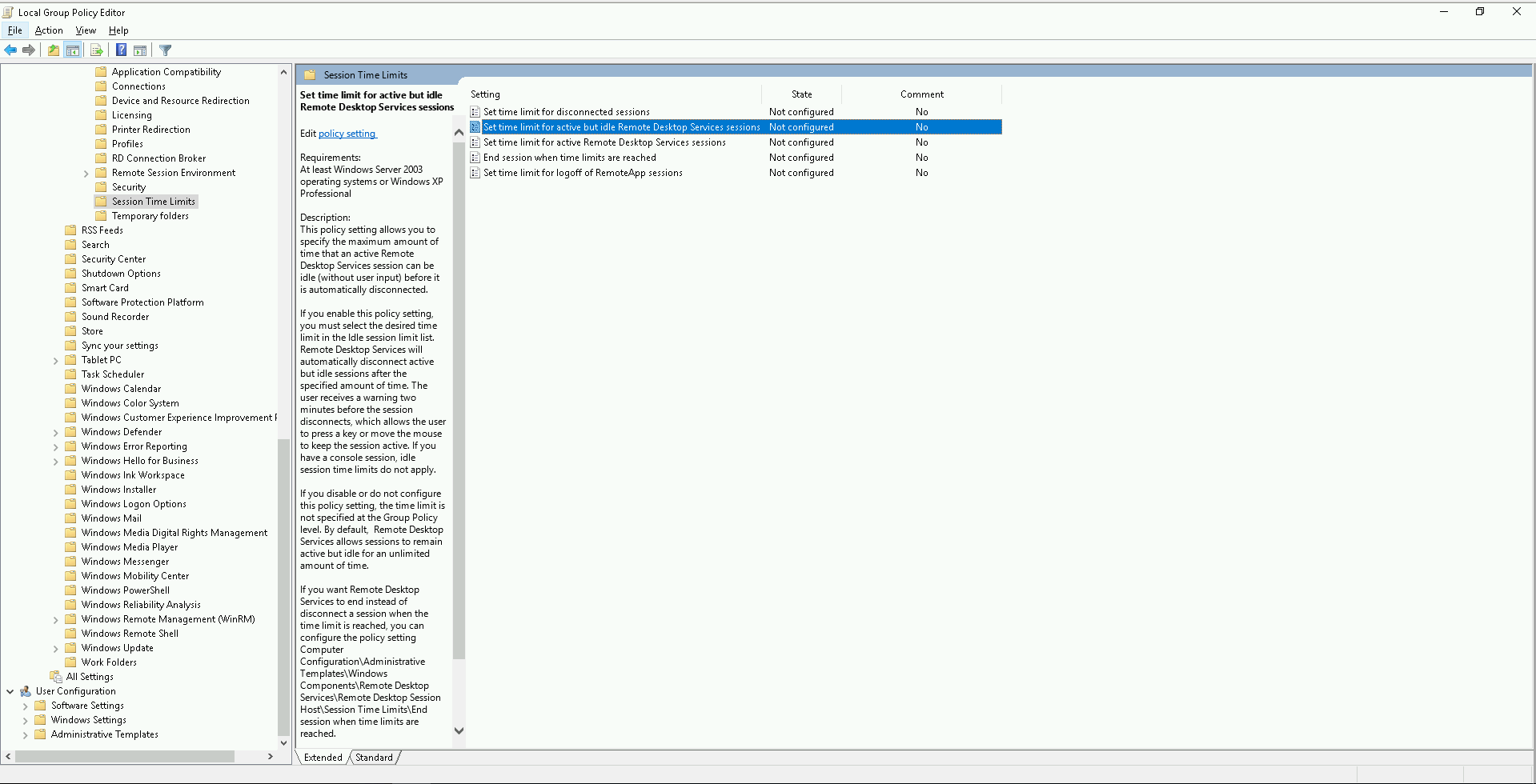
@akallabeth Do you have some particular configuration option in mind? This seems to me configured correctly:
mnowaksuse
on 9 Jul 2018
@mnowaksuse The second trace you posted suggests the server just discards the running session. (don't know the defaults, but I assume you sometimes see reconnecting 1/xx with mstsc too)
Adding /auto-reconnect with a very recent version of freerdp will fix that. (2.0.0-rc2 had a bug with that option)
The first trace you posted is typical for a session trying to run legacy RDP on a very recent server.
akallabeth
on 9 Jul 2018
Im seeing this on Windows 2012R2 too. I'm using remmina 1.3.4 on ubuntu 18.04
 dennisTGC
on 12 Apr 2019
dennisTGC
on 12 Apr 2019
@mnowaksuse did you ever find a solution to this issue? I recently updated my in-production freerdp build to a git pull from last week and am now experiencing this issue as well. ( No server config changes, no client switch changes )
 beimhoff
on 22 Apr 2019
beimhoff
on 22 Apr 2019
@akallabeth I (and my users) are also still running into this issue. Auto reconnect is of no help as it's not triggered by this particular error. Any ideas?
 lemonmojo
on 25 Apr 2019
lemonmojo
on 25 Apr 2019
Some of my findings:
- It does happen with and without RemoteFX enabled.
- I can reliably reproduce it by connecting to a Server 2016 machine and leaving it idle while playing a YouTube video.
- Eventually the connection drops with the
ERRINFO_GRAPHICS_SUBSYSTEM_FAILEDerror code. - Sometimes it takes just a few seconds for this to occur, at other times it takes 10 minutes or even longer.
- In my own FreeRDP client I tried to check for the specific error code in the handler for
PubSub_SubscribeErrorInfoand callfreerdp_reconnectfrom there. While the reconnect seems to work initially, the client crashes later on in callbacks when accessing thefreerdpinstance.
lemonmojo
on 25 Apr 2019
I've dig a similar issue with a client, and it looks like it's something server-side (as stated in the error). The guys at ms confirmed that there were something fishy on their side. I'm suspecting that tests at microsoft are done using mstsc that always announces nscodec or remoteFx, so the code path without these codecs is undertested. We did a workaround that consist in enabling auto-reconnection, and when we hit this particular error reported by the server, we automatically reconnect.
 hardening
on 25 Apr 2019
hardening
on 25 Apr 2019
IIRC the error was occurring a lot faster when the bitmap cache was disabled.
hardening
on 25 Apr 2019
@hardening I can reproduce it with and without RemoteFX. But I agree that the MS RDP clients seem to handle this by automatically reconnecting.
Is the workaround you mentioned in the main FreeRDP code base?
lemonmojo
on 25 Apr 2019
@lemonmojo nope, the workaround is here => https://github.com/RangeeGmbH/FreeRDP/commit/bf9e5ceb4ac0afc97d2d44671ff08d460947b7d9
I've not seen the disconnection with remoteFx enabled.
hardening
on 25 Apr 2019
@hardening Thx for sharing this! Just implemented the workaround in my client and managed to successfully auto reconnect after the error occurred. This should definitely be in the main repo.
lemonmojo
on 25 Apr 2019
What boggles my mind, is the fact that this wasn't happening on a build I made form a git pull early-mid October (post rc3, pre rc4 era) which I have had in production to roughly 150 computers since that time period. On April 11th, I built fresh from master in the hope of fixing a different bug we were encountering (it did), but as I was slowly rolling it out, users on this new build started complaining about this issue.
I immediately halted rollout, and verified that only users on the new build were crashing with this error. I've rolled most of them back to the October build, but kept a few on the new to try and work out a solution.
Nothing has worked so far. I've whittled down to a pretty basic cmd line:
xfreerdp /f /network:auto +auto-reconnect /auto-reconnect-max-retries:20 -sec-nla /smart-sizing /multimon /monitors:0,1 /bpp:32 /cert-ignore /sound /drive:USB,/mnt/usbdevice /v:
Ive tried /rfx, /gfx:rfx, /gdi:hw, and /gdi:sw - nothing has stopped this error from happening
Running Server 2012R2 RDS servers on VMWare 6.5 hosts - didn't do any special configuration. From a RDS standpoint, its all vanilla and left pretty much at default settings.
April 11th 2019 freerdp git pull build - several random ERRINFO_GRAPHICS_SUBSYSTEM_FAILED per day
October 2018 freerdp RC3-ish git pull build - rock solid
I just don't get how this is a config issue.
beimhoff
on 25 Apr 2019
@hardening thanks for that info....ill have to give that patch a try.
beimhoff
on 25 Apr 2019
@beimhoff I also only recently updated to a more up to date FreeRDP version. While some of my users always had this issue, it was much less common and also occurred much less frequently. In the past I also thought it only affected older Windows versions (2003/XP) but now I can reproduce it on 2016 and 10 hosts. So it appears that either something changed in Microsoft's RDP server or in FreeRDP just recently.
lemonmojo
on 25 Apr 2019
Also: while the patch from @hardening works around the problem it's not really a fix as the connection is at least very shortly dropped and re-established which interrupts whatever the user is doing at the moment. Even if it's just a split second...
lemonmojo
on 25 Apr 2019
I will try to email the contact I had at Microsoft that told me there were something server-side.
hardening
on 25 Apr 2019
@mnowaksuse did you ever find a solution to this issue? I recently updated my in-production freerdp build to a git pull from last week and am now experiencing this issue as well. ( No server config changes, no client switch changes )
Nope. I still have sporadic disconnects with 2.0.0 RC4 on Hyper-V 2016.
Should this issue be reopened and the label "waiting-feedback" removed?
mnowaksuse
on 29 Apr 2019
Should this issue be reopened and the label "waiting-feedback" removed?
I sure as heck think so.
beimhoff
on 30 Apr 2019
My contact at Microsoft told me that a bug has been fixed in 2016 Server build 1803, guys could you check the versions of your servers ?
hardening
on 30 Apr 2019
I am on Windows Server 2016 (Long-Term Servicing Channel), version=1607, build=14393.
mnowaksuse
on 30 Apr 2019
Same build as @mnowaksuse here.
lemonmojo
on 30 Apr 2019
I'm running RDS on 2012R2 (fully patched) - A business critical application (healthcare) requires 2012R2 if you are running their software in a terminal server environment - so updating to 2016+ is not possible at this time.
There is no such thing as "2016 Server build 1803".
https://docs.microsoft.com/en-us/windows-server/get-started/windows-server-release-info
Windows Server 2016 is Version 1607, and its a LTS version - There is a Windows Server, version 1803, but it is not Windows Server 2016.
Semantics (and Microsoft's own understanding of their broken versioning and naming aside)...
Assuming this bug was fixed in Windows Server version 1803, since this isn't a new "feature", it is a bug fix, shouldn't this be back ported to the still-supported server versions, 2016 and 2012R2? Or are these versions now being abandoned as part of some Semi-Annual, Windows Server as a Service initiative (which would be horrible).
If this is actually the same bug we are talking about, I don't understand why I only see this error on clients still running a build from the RC3-era; only machines on the RC5-era are getting this error, and both sets are connecting to the same RDP farm. Perhaps we are talking about two different bugs that end up terminating a session with this same error?
EDIT:
https://docs.microsoft.com/en-us/windows-server/get-started/semi-annual-channel-overview
After doing some more research, the Semi-Annual Windows Server releases (like 1803) can only be installed as Server Core for container host and image and Nano Server container image - Desktop Experience isn't even available - you can't even run user based RDS / RemoteApp sessions.
beimhoff
on 30 Apr 2019
Started seeing this after upgrading our remote desktop servers to 2012R2. FreeRDP in the 1.2/2.0-dev era (mid-2017) and running on old Stratodesk NoTouch OS builds so no auto-reconnect option for me. :) If I find any way of fixing I'll report back.
BTW - if the bug really was fixed in the March 2018 time frame, it should be included in the latest full release which is Windows Server 2019 which does allow desktop experience. I sure would hope they'd back port it but you never know...
 greatquux
on 3 Jul 2019
greatquux
on 3 Jul 2019
I have the same issue, so strange because with the same freerdp version (freerdp-nightly_2.0.0+0~20190907014825) one client connects correctly from a Virtualbox VM, but everybody from bare metal installations cannot. All clients are Linux Mint LMDE3.
The machine I am connecting to is a Windows Server 2012.
I am thinking about client graphics setup, something that in Virtualbox is working but in a real installation is not. What can I try to do? Thank you in advance
 udanieli
on 11 Sep 2019
udanieli
on 11 Sep 2019
The issue is only on multi-monitor workstations. If I choose /monitors:0 the error disappears, but then the remote app is unusable because the window shows between the two monitors: half in one and half in another. I don't know if there is already a bug for this,
udanieli
on 12 Sep 2019
same issue against 2k16. is everyone misconfigured or is this actually a bug that should have stayed open?
i can confirm workaround is effective https://github.com/RangeeGmbH/FreeRDP/commit/bf9e5ceb4ac0afc97d2d44671ff08d460947b7d9
 erpadmin
on 4 Oct 2019
erpadmin
on 4 Oct 2019
another confirmation that workaround is effective, but also a reminder you must add +auto-reconnect to the flags for it to work!
greatquux
on 28 Feb 2020
I just stumbled over this issue because I can also see the same ERRINFO_GRAPHICS_SUBSYSTEM_FAILED messages here for user sessions using the official freerdp 2.2.0 version connecting to a 2012R2 terminal server farm.
So I wonder. What is the current state of affair regarding this issue? Is this issue officially solved or does it still exists? Are they know known to be issues in Windows Server 2012R2 itself? What about the workaround? Who is using it permanently? Why is this issue still closed if there are still cases like mine and the others reported here?
Here are some other third-party reports on the same issue, suggesting that the issue is still not solved:
https://bugs.freebsd.org/bugzilla/show_bug.cgi?id=247168
https://gitlab.com/Remmina/Remmina/-/issues/2241
 jens-maus
on 25 Nov 2020
jens-maus
on 25 Nov 2020
@jens-maus please check the comments in this issue.
This is a SERVER side configuration issue, not much the CLIENT can do here.
Suggested workaround:
Always add /rfx /gfx:avc444 /network:auto and don´t play too much with graphics options (some combinations are simply not supported by the RDP server and are answered like this)
akallabeth
on 26 Nov 2020
@akallabeth thanks for the comment. I did indeed check the previous comments. However, it seems to be still unclear if this is a server configuration issue or an actual bug in the Windows 2012R2/2016 operating system, right?
Because if it is a configuration issue then it is still unclear which config option in the RDP service might trigger this problem?!? And there seem to be reports that previous versions of FreeRDP are not affected (2.0rc3?) and that this issue only appears with recent FreeRDP versions/releases?
jens-maus
on 26 Nov 2020
well, from our point of view both, configuration issue and bug on a windows server side are equal (= it just does not work) and we can not do anything about that.
as for the reports, they just confirm that SOME graphics path combinations are just not supported by windows servers (we added a lot since 2.0rc3)
Seen the issue myself and most of the time it has to do with the Use hardware graphics adapters for all Remote Desktop Services sessions and NSCodec but not exclusive.
Since you can imagine how many server side combinations are possible (software settings, hardware, ...) and not all constraints are really well documented in one place...
So, if you have a setup that exposes that behaviour, just try to figure out:
- What is your command line for connection?
- How many users did connect (this might be triggered due to resource exhaustion too)
- What are your server settings (group policies, os, version and patchlevel), ...
from that you can create a matrix with what works and what does not.
akallabeth
on 26 Nov 2020
Given that the workaround patch in https://github.com/RangeeGmbH/FreeRDP/commit/bf9e5ceb4ac0afc97d2d44671ff08d460947b7d9 is really simple, it would be very helpful if it was in the main repo. Do they need to create a PR for it? I can confirm my users have not had the trouble since it was implemented.
greatquux
on 26 Nov 2020
@greatquux I also just implemented that workaround patch and the results seem fine so far. What about your users? do they still see regular reconnects because the patch really doesn't seem to solve the issue but perform an almost invisible reconnection? Is this sudden reconnect visible or noticeable at all?
jens-maus
on 26 Nov 2020
I actually have no idea, I implemented it remotely and all I know is users stopped complaining. I am sure it's doing that quick reconnect, but because they don't have to click OK on an error box (which is what the thin client brought up from FreeRDP exit), click on the icon again, and re-enter their password, I don't think they care. Given that and it is such a simple patch even if it's not perfect I think it should be in the main repo.
greatquux
on 26 Nov 2020
@greatquux because you can simply add /auto-reconnect and have the same behaviour? so the patch is a really ugly hack that is better up to the user
akallabeth
on 26 Nov 2020
I thought you still needed the patch _and_ +auto-reconnect (or /auto-reconnect) - I think without the patch it doesn't work? Or am I completely wrong here?
greatquux
on 26 Nov 2020
@akallabeth Nope, I had +auto-reconnect previously and it wasn't automatically reconnecting without that patch. So I second the opinion by @greatquux. This workaround should be merged into master branch because it actually solves a lot of headaches, even thought it is working around a potential windows bug itself. But AFAICS, the current FreeRDP 2.2.0 release doesn't work that nicely without that patch and people are compaining about connection drops even thought I had +auto-reconnect) added even without that patch.
jens-maus
on 26 Nov 2020
@jens-maus @greatquux ok, you convinced me, autoreconnect should succeed in that case, true.
akallabeth
on 26 Nov 2020
Related issues
 kekekeks
·
8Comments
kekekeks
·
8Comments
 JonnyTech
·
4Comments
JonnyTech
·
4Comments
 kartun83
·
17Comments
kartun83
·
17Comments
 yoklmn
·
11Comments
yoklmn
·
11Comments
 baracoder
·
5Comments
baracoder
·
5Comments
Most helpful comment
The issue is only on multi-monitor workstations. If I choose
/monitors:0the error disappears, but then the remote app is unusable because the window shows between the two monitors: half in one and half in another. I don't know if there is already a bug for this,