Freerdp: Can't open wfreerdp.exe on windows 7 x64 and windows 10 x64
Hello,
It seems that i can't open the x64 windows binary of FreeRDP called wfreerdp.exe.
I have tested it on windows 7 x64 and i have nothing showing up :

I had downloaded both x86 and x64 binaries on https://ci.freerdp.com/job/freerdp-nightly-windows/ and test it on a x64 computer.
It doesn't work on windows 10 as well.
Any help ?
 nerdd97
All 31 comments
wfreerdp.exe /v:[IP address]
The help switch does not write output to console I will fix this.
 DevGoslinga
on 12 Jul 2017
DevGoslinga
on 12 Jul 2017
The problem doesn't seem to be the help switch. Even with /v the program doesn't start for me (Win7 x64).
 msdeibel
on 13 Jul 2017
msdeibel
on 13 Jul 2017
Yes it's not only the help section ! It simply doesn't start. I'm so confuse ! Please help.
nerdd97
on 13 Jul 2017
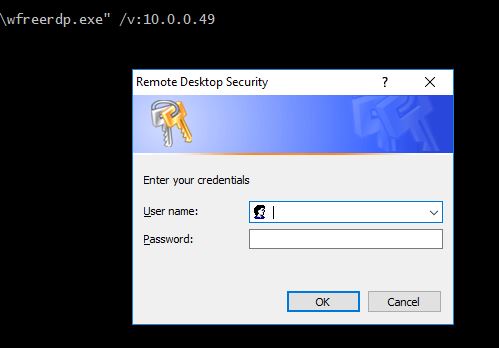
Are you willing to test this version for me? Link below:
https://ci.freerdp.com/job/freerdp-nightly-windows/arch=win64,label=vs2013/lastSuccessfulBuild/artifact/build/Release/wfreerdp.exe
Do check if the credential prompt window is put on the foreground if not do so.
DevGoslinga
on 15 Jul 2017
This version works for me.
msdeibel
on 17 Jul 2017
Unfortunately it still doesnt work ! I'm using Microsoft Windows [version 10.0.15063] ...
nerdd97
on 17 Jul 2017
Can reproduce this with the latest build on windows 10.
@msdeibel what windows version did you test with?
 bmiklautz
on 18 Jul 2017
bmiklautz
on 18 Jul 2017
@nerdd97 my bad works also on windows 10 for me. To test just run
wfreerdp.exe /help > a
type a
You should see the help.
Best is to just run your command you want and redirect the output to a file (like above) to see what goes wrong.
bmiklautz
on 18 Jul 2017
I tested on Win 7 64bit
msdeibel
on 18 Jul 2017
@msdeibel thanks.
bmiklautz
on 19 Jul 2017
thanks bmiklautz I can confirm it works on win 10 and 7 ! One more last thing : is it normal that the +auth-only command does not return any informations even with the " > logsfile" command ?
wfreerdp /u:user /p:pass /v:1.1.1.2:3390 /cert-ignore +auth-only > logsfile
type logsfile
does not return any informations for working and non-working credentials
nerdd97
on 21 Jul 2017
@nerdd97 not sure if auth-only is implemented on windows.
bmiklautz
on 24 Jul 2017
Hello. Same error with both 32/64 latest windows builds.
Params:
wfreerdp /v:cloud.softrum.ru /cert-ignore /log-level:trace > log.log
Log:
[22:33:12:214] [1048:000004f8] [DEBUG][com.freerdp.channels.cliprdr.client] - VirtualChannelEntryEx
[22:33:12:214] [1048:000004f8] [INFO][com.freerdp.client.common.cmdline] - loading channelEx cliprdr
[22:33:12:215] [1048:000004f8] [DEBUG][com.freerdp.core.nego] - Enabling security layer negotiation: TRUE
[22:33:12:215] [1048:000004f8] [DEBUG][com.freerdp.core.nego] - Enabling restricted admin mode: FALSE
[22:33:12:215] [1048:000004f8] [DEBUG][com.freerdp.core.nego] - Enabling RDP security: TRUE
[22:33:12:215] [1048:000004f8] [DEBUG][com.freerdp.core.nego] - Enabling TLS security: TRUE
[22:33:12:215] [1048:000004f8] [DEBUG][com.freerdp.core.nego] - Enabling NLA security: TRUE
[22:33:12:215] [1048:000004f8] [DEBUG][com.freerdp.core.nego] - Enabling NLA extended security: FALSE
[22:33:12:215] [1048:000004f8] [DEBUG][com.freerdp.core.nego] - state: NEGO_STATE_NLA
[22:33:12:215] [1048:000004f8] [DEBUG][com.freerdp.core.nego] - Attempting NLA security
[22:33:12:222] [1048:000004f8] [DEBUG][com.freerdp.core.nego] - RequestedProtocols: 3
[22:33:12:230] [1048:000004f8] [DEBUG][com.freerdp.core.nego] - RDP_NEG_RSP
[22:33:12:230] [1048:000004f8] [DEBUG][com.freerdp.core.nego] - selected_protocol: 2
[22:33:12:230] [1048:000004f8] [DEBUG][com.freerdp.core.nego] - state: NEGO_STATE_FINAL
[22:33:12:230] [1048:000004f8] [DEBUG][com.freerdp.core.nego] - Negotiated NLA security
[22:33:12:230] [1048:000004f8] [DEBUG][com.freerdp.core.nego] - nego_security_connect with PROTOCOL_NLA
[22:33:12:247] [1048:000004f8] [DEBUG][com.winpr.sspi] - InitSecurityInterfaceExW
[22:33:12:249] [1048:000004f8] [DEBUG][com.freerdp.core.nla] - nla_client_init 314 : packageName=N ; cbMaxToken=12256
[22:33:12:249] [1048:000004f8] [TRACE][com.freerdp.core.nla] - InitializeSecurityContext status SEC_I_CONTINUE_NEEDED [0x00090312]
[22:33:12:249] [1048:000004f8] [DEBUG][com.freerdp.core.nla] - Sending Authentication Token
[22:33:12:249] [1048:000004f8] [DEBUG][com.freerdp.core.nla] - 0000 4e 54 4c 4d 53 53 50 00 01 00 00 00 b7 82 08 e2 NTLMSSP.........
[22:33:12:249] [1048:000004f8] [DEBUG][com.freerdp.core.nla] - 0010 00 00 00 00 00 00 00 00 00 00 00 00 00 00 00 00 ................
[22:33:12:249] [1048:000004f8] [DEBUG][com.freerdp.core.nla] - 0020 06 01 b1 1d 00 00 00 0f ........
[22:33:12:254] [1048:000004f8] [TRACE][com.freerdp.core.nla] - InitializeSecurityContext SEC_E_OK [0x00000000]
[22:33:12:254] [1048:000004f8] [DEBUG][com.freerdp.core.rdp] - transport_check_fds() - -1
[22:33:12:254] [1048:00000a7c] [DEBUG][com.freerdp.client.windows] - Keyboard thread exited.
 puserp
on 18 Nov 2017
puserp
on 18 Nov 2017
the same happens to me, I can't get any windows at all. I try on windows 10 windows 7 all x64 :-(
 ediazrod
on 6 Dec 2017
ediazrod
on 6 Dec 2017
Same here multiple Windows 7 x64 latest updated boxes - this app simply will not run and does not even appear in taskmgr no window nor console output.
 CollinChaffin
on 23 Feb 2018
CollinChaffin
on 23 Feb 2018
Everything is created. The dll's , the executables. The app simply does not run.
Just to ensure , i have created the application by building the solution file FreeRDP.sln with msbuild command in Release mode.
Actually i executed both debug and release mode.
 adityasood11
on 12 May 2018
adityasood11
on 12 May 2018
@adityasood11 for the command line options you used that is the final output. Read and use what you require (/v:host /cert-ignore /u:user /p:password most likely).
As for getting the output to console, that is a windows limitation, no chance except recompile (with some modifications) as a command line application (which always spawns a cmd window)
 akallabeth
on 14 May 2018
akallabeth
on 14 May 2018
Closing as this is more support than issue.
akallabeth
on 14 May 2018
@akallabeth I dont think it is just support , many of them have been facing this problem.
Getting output to Console being a windows limitation is an issue.
adityasood11
on 14 May 2018
@adityasood11 an issue yes, a microsoft issue. There is no way to get console output for a non console application and no way to not spawn a console for a console application :/
The rest is just support for how to use command line options.
Other than that, maybe https://stackoverflow.com/questions/796476/displaying-windows-command-prompt-output-and-redirecting-it-to-a-file might help you.
akallabeth
on 14 May 2018
@akallabeth Is this a non console application for windows? The output which i posted earlier, is that the final output for windows freerdp
And how is @DevGoslinga getting console output on Windows?
adityasood11
on 14 May 2018
@adityasood11 Everybody uses file redirection. The output you posted is the help screen as you did invoke with missing/invalid command line arguments.
akallabeth
on 14 May 2018
@akallabeth how to create a server for wfreerdp on a port (other than 3389) for a remote desktop connection so that client can connect using mstsc(terminal services client) on that specific port number.
Now this is support for me. Please help. :)
adityasood11
on 15 May 2018
@adityasood11 please use the malining list or IRC for support, this is for issues only.
akallabeth
on 15 May 2018
@akallabeth Yes i have done that.
adityasood11
on 15 May 2018
@adityasood11 did not get any mail neither any IRC messages in the log, so no...
akallabeth
on 15 May 2018
@akallabeth I subscribed to this mailing list
Mailing list: https://lists.sourceforge.net/lists/listinfo/freerdp-devel
And i sent a mail to
and sorry , i dont have any idea about IRC.
adityasood11
on 15 May 2018
@akallabeth While building the solution file , i added DWITH_SERVER=ON so as to create server libs. Now one more exe file is created that is freerdp_shadow_cli.exe which is working on console and the client is able to connect to my system ( VNC ) . I am still not able to create wfreerdp-server.exe.
adityasood11
on 16 May 2018
More support than issue?! This is a compiled build that simply does not properly send it's output to stdout to be displayed. This is why running the .exe with no args appears to everyone to be broken and do nothing, yet give it a server name as arg and bang the creds box appears. Heck, when running wfreerdp.exe /help appears to return NOTHING, no help to the end-user, how on earth is that user to know that this is the ONLY windows executable in history that for some reason you need to do this:
C:\> wfreerdp.exe
C:\> wfreerdp.exe /help
C:\> wfreerdp.exe /help >> wfreerdp.txt
C:\> type wfreerdp.txt
FreeRDP - A Free Remote Desktop Protocol Implementation
See www.freerdp.com for more information
Usage: i:\Data\Downloads\wfreerdp.exe [file] [options] [/v:<server>[:port]]
Syntax:
/flag (enables flag)
/option:<value> (specifies option with value)
+toggle -toggle (enables or disables toggle, where '/' is a synonym of '+')
/a:<addin>[,<options>] Addin
/action-script:<file-name> Action script
/admin Admin (or console) session
+aero Enable desktop composition
/app:<path> or ||<alias> Remote application program
/app-cmd:<parameters> Remote application command-line parameters
/app-file:<file-name> File to open with remote application
/app-guid:<app-guid> Remote application GUID
/app-icon:<icon-path> Remote application icon for user interface
/app-name:<app-name> Remote application name for user interface
/assistance:<password> Remote assistance password
+async-channels Enable Asynchronous channels
(experimental)
+async-input Enable Asynchronous input
+async-update Enable Asynchronous update
/audio-mode:<mode> Audio output mode
+auth-only Enable Authenticate only
-authentication Disable Authentication (expermiental)
+auto-reconnect Enable Automatic reconnection
/auto-reconnect-max-retries:<retries>
Automatic reconnection maximum retries, 0
for unlimited [0,1000]
+bitmap-cache Enable bitmap cache
/bpp:<depth> Session bpp (color depth)
/buildconfig Print the build configuration
/cert-deny Automatically abort connection for any
certificate that can not be validated.
/cert-ignore Ignore certificate
/cert-name:<name> Certificate name
/cert-tofu Automatically accept certificate on first
connect
/client-hostname:<name> Client Hostname to send to server
-clipboard Disable Redirect clipboard
/codec-cache:[rfx|nsc|jpeg] Bitmap codec cache
-compression Disable compression
/compression-level:<level> Compression level (0,1,2)
+credentials-delegation Enable credentials delegation
/d:<domain> Domain
-decorations Disable Window decorations
/disp Display control
/drive:<name>,<path> Redirect directory <path> as named share
<name>. Hotplug support is enabled with
/drive:hotplug,*. This argument provides
the same function as "Drives that I plug
in later" option in MSTSC.
+drives Enable Redirect all mount points as shares
/dvc:<channel>[,<options>] Dynamic virtual channel
/dynamic-resolution Send resolution updates when the window is
resized
/echo Echo channel
-encryption Disable Encryption (experimental)
/encryption-methods:[40,][56,][128,][FIPS]
RDP standard security encryption methods
/f Fullscreen mode (<Ctrl>+<Alt>+<Enter>
toggles fullscreen)
-fast-path Disable fast-path input/output
+fipsmode Enable FIPS mode
/floatbar[:sticky:[on|off],default:[visible|hidden],show:
[always|fullscreen||window]]
floatbar is disabled by default (when
enabled defaults to sticky in fullscreen
mode)
-fonts Disable smooth fonts (ClearType)
/frame-ack:<number> Number of frame acknowledgement
/from-stdin[:force] Read credentials from stdin. With <force>
the prompt is done before connection,
otherwise on server request.
/g:<gateway>[:<port>] Gateway Hostname
/gateway-usage-method:[direct|detect]
Gateway usage method
/gd:<domain> Gateway domain
/gdi:sw|hw GDI rendering
/geometry Geometry tracking channel
+gestures Enable Consume multitouch input locally
/gfx[:[RFX|AVC420|AVC444]] RDP8 graphics pipeline (experimental)
/gfx-h264[:[AVC420|AVC444]] RDP8.1 graphics pipeline using H264 codec
+gfx-progressive Enable RDP8 graphics pipeline using progressive
codec
+gfx-small-cache Enable RDP8 graphics pipeline using small cache
mode
+gfx-thin-client Enable RDP8 graphics pipeline using thin client
mode
+glyph-cache Enable Glyph cache (experimental)
/gp:<password> Gateway password
-grab-keyboard Disable Grab keyboard
/gt:[rpc|http|auto] Gateway transport type
/gu:[[<domain>\]<user>|<user>[@<domain>]]
Gateway username
/gat:<access token> Gateway Access Token
/h:<height> Height
-heartbeat Disable Support heartbeat PDUs
/help Print help
+home-drive Enable Redirect user home as share
/ipv6 Prefer IPv6 AAA record over IPv4 A record
/kbd:0x<id> or <name> Keyboard layout
/kbd-fn-key:<value> Function key value
/kbd-list List keyboard layouts
/kbd-subtype:<id> Keyboard subtype
/kbd-type:<id> Keyboard type
/load-balance-info:<info-string> Load balance info
/log-filters:<tag>:<level>[,<tag>:<level>[,...]]
Set logger filters, see wLog(7) for
details
/log-level:[OFF|FATAL|ERROR|WARN|INFO|DEBUG|TRACE]
Set the default log level, see wLog(7) for
details
/max-fast-path-size:<size> Specify maximum fast-path update size
/max-loop-time:<time> Specify maximum time in milliseconds spend
treating packets
+menu-anims Enable menu animations
/microphone[:[sys:<sys>,][dev:<dev>,][format:<format>,][rate:<rate>,]
[channel:<channel>]] Audio input (microphone)
/monitor-list List detected monitors
/monitors:<id>[,<id>[,...]] Select monitors to use
-mouse-motion Disable Send mouse motion
/multimedia[:[sys:<sys>,][dev:<dev>,][decoder:<decoder>]]
Redirect multimedia (video)
/multimon[:force] Use multiple monitors
+multitouch Enable Redirect multitouch input
+multitransport Enable Support multitransport protocol
-nego Disable protocol security negotiation
/network:[modem|broadband|broadband-low|broadband-high|wan|lan|auto]
Network connection type
/nsc NSCodec support
+offscreen-cache Enable offscreen bitmap cache
/orientation:[0|90|180|270] Orientation of display in degrees
+old-license Enable Use the old license workflow (no CAL and
hwId set to 0)
/p:<password> Password
/parallel[:<name>[,<path>]] Redirect parallel device
/parent-window:<window-id> Parent window id
+password-is-pin Enable Use smart card authentication with
password as smart card PIN
/pcb:<blob> Preconnection Blob
/pcid:<id> Preconnection Id
/pheight:<height> Physical height of display (in
millimeters)
/play-rfx:<pcap-file> Replay rfx pcap file
/port:<number> Server port
-suppress-output Disable suppress output when minimized
+print-reconnect-cookie Enable Print base64 reconnect cookie after
connecting
/printer[:<name>[,<driver>]] Redirect printer device
/proxy:[<proto>://][<user>:<password>@]<host>:<port>
Proxy settings: override env.var (see also
environment variable below). Protocol
"socks5" should be given explicitly where
"http" is default. Note: socks proxy is
not supported by env. variable
/pth:<password-hash> Pass the hash (restricted admin mode)
/pwidth:<width> Physical width of display (in millimeters)
/reconnect-cookie:<base64-cookie> Pass base64 reconnect cookie to the
connection
/redirect-prefer:<FQDN|IP|NETBIOS>,[...]
Override the preferred redirection order
/relax-order-checks Do not check if a RDP order was announced
during capability exchange, only use when
connecting to a buggy server
/restricted-admin Restricted admin mode
/rfx RemoteFX
/rfx-mode:[image|video] RemoteFX mode
/scale:[100|140|180] Scaling factor of the display
/scale-desktop:<percentage> Scaling factor for desktop applications
(value between 100 and 500)
/scale-device:100|140|180 Scaling factor for app store applications
/sec:[rdp|tls|nla|ext] Force specific protocol security
+sec-ext Enable NLA extended protocol security
-sec-nla Disable NLA protocol security
-sec-rdp Disable RDP protocol security
-sec-tls Disable TLS protocol security
/serial[:<name>[,<path>[,<driver>[,permissive]]]]
Redirect serial device
/shell:<shell> Alternate shell
/shell-dir:<dir> Shell working directory
/size:<width>x<height> or <percent>%[wh]
Screen size
/smart-sizing[:<width>x<height>] Scale remote desktop to window size
/smartcard[:<str>[,<str>...]] Redirect the smartcard devices containing
any of the <str> in their names.
/smartcard-logon Activates Smartcard Logon authentication.
(EXPERIMENTAL: NLA not supported)
/sound[:[sys:<sys>,][dev:<dev>,][format:<format>,][rate:<rate>,]
[channel:<channel>,][latency:<latency>,][quality:<quality>]]
Audio output (sound)
/span Span screen over multiple monitors
/spn-class:<service-class> SPN authentication service class
/ssh-agent SSH Agent forwarding channel
/t:<title> Window title
-themes Disable themes
/tls-ciphers:[netmon|ma|ciphers] Allowed TLS ciphers
/tls-seclevel:<level> TLS security level - defaults to 1
-toggle-fullscreen Disable Alt+Ctrl+Enter to toggle
fullscreen
/u:[[<domain>\]<user>|<user>[@<domain>]]
Username
+unmap-buttons Enable Let server see real physical pointer
button
/usb:[dbg,][dev:<dev>,][id|addr,][auto]
Redirect USB device
/v:<server>[:port] Server hostname
/vc:<channel>[,<options>] Static virtual channel
/version Print version
/video Video optimized remoting channel
/vmconnect[:<vmid>] Hyper-V console (use port 2179, disable
negotiation)
/w:<width> Width
-wallpaper Disable wallpaper
+window-drag Enable full window drag
/window-position:<xpos>x<ypos> window position
/wm-class:<class-name> Set the WM_CLASS hint for the window
instance
/workarea Use available work area
Examples:
i:\Data\Downloads\wfreerdp.exe connection.rdp /p:Pwd123! /f
i:\Data\Downloads\wfreerdp.exe /u:CONTOSO\JohnDoe /p:Pwd123! /v:rdp.contoso.com
i:\Data\Downloads\wfreerdp.exe /u:JohnDoe /p:Pwd123! /w:1366 /h:768 /v:192.168.1.100:4489
i:\Data\Downloads\wfreerdp.exe /u:JohnDoe /p:Pwd123! /vmconnect:C824F53E-95D2-46C6-9A18-23A5BB403532 /v:192.168.1.100
Clipboard Redirection: +clipboard
Drive Redirection: /drive:home,/home/user
Smartcard Redirection: /smartcard:<device>
Serial Port Redirection: /serial:<name>,<device>,[SerCx2|SerCx|Serial],[permissive]
Serial Port Redirection: /serial:COM1,/dev/ttyS0
Parallel Port Redirection: /parallel:<name>,<device>
Printer Redirection: /printer:<device>,<driver>
Audio Output Redirection: /sound:sys:oss,dev:1,format:1
Audio Output Redirection: /sound:sys:alsa
Audio Input Redirection: /microphone:sys:oss,dev:1,format:1
Audio Input Redirection: /microphone:sys:alsa
Multimedia Redirection: /multimedia:sys:oss,dev:/dev/dsp1,decoder:ffmpeg
Multimedia Redirection: /multimedia:sys:alsa
USB Device Redirection: /usb:id,dev:054c:0268
For Gateways, the https_proxy environment variable is respected:
set HTTPS_PROXY=http://proxy.contoso.com:3128/
i:\Data\Downloads\wfreerdp.exe /g:rdp.contoso.com ...
More documentation is coming, in the meantime consult source files
I guess if that's not an issue it must be a feature that you'd better have a working text editor handy if you want to view the output of this binary executable. :-1:
CollinChaffin
on 21 Feb 2019
@CollinChaffin This is a system limitation, feel free to create a workaround for that.
akallabeth
on 22 Feb 2019
You can pipe output instead of redirection to file.
Try this workaround:
wfreerdp | findstr "^"
or
wfreerdp | more
Insert FreeRDP arguments before |, for example:
wfreerdp /v:my-rdp-server | findstr "^"
Thanks to this post
You also can create batch file, for example freerdp.cmd, containing following line:
@wfreerdp %* |findstr "^"
and call freerdp /v:my-rdp-server instead of wfreerdp /v:my-rdp-server | findstr "^" just as usual.
 qbsa
on 22 Jun 2019
qbsa
on 22 Jun 2019
Related issues
 markd89
·
5Comments
markd89
·
5Comments
 FutureKidBuu
·
12Comments
FutureKidBuu
·
12Comments
 victorhooi
·
5Comments
victorhooi
·
5Comments
 andreesteve
·
16Comments
andreesteve
·
16Comments
 macredash
·
9Comments
macredash
·
9Comments
Most helpful comment
The problem doesn't seem to be the help switch. Even with /v the program doesn't start for me (Win7 x64).