Freecodecamp: Disable Monaco code actions highlighting
Describe the bug
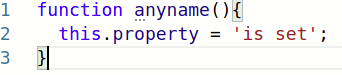
The highlighting for code actions appears in the editor, but the user cannot interact with them.
To Reproduce
Steps to reproduce the behavior:
function anyname(){
  this.property = 'is set';
}
- see the three dots below the 'a' in 'anyname'
Expected behavior
Since the user cannot act on this information these dots should not appear.
StackOverflow suggests they can be disabled in vscode, and hopefully the same is true of Monaco.
Screenshots
Thanks to @lasjorg for investigating this and olgamlop (who I'm not sure has a GitHub account, so I didn't want to ping the wrong person) for reporting it.
Originally discussed on the forum, here
 ojeytonwilliams
All 2 comments
@ojeytonwilliams Not sure if there is an editor option for it, but here is the CSS for removing the three dots.
client\src\templates\Challenges\classic\classic.css
.monaco-editor .squiggly-hint {
  background: none !important;
}
I did look a bit for an option but the API docs for Monaco are pretty dense and hard to comb through.
Just let me know if I should make a PR with the CSS change.
 lasjorg
on 16 Sep 2020
lasjorg
on 16 Sep 2020
I made a PR just in case. If we want to use it its there.
lasjorg
on 16 Sep 2020
Related issues
 vaibsharma
·
3Comments
vaibsharma
·
3Comments
 kokushozero
·
3Comments
kokushozero
·
3Comments
 MichaelLeeHobbs
·
3Comments
MichaelLeeHobbs
·
3Comments
 imhuyqn
·
3Comments
imhuyqn
·
3Comments
 Tzahile
·
3Comments
Tzahile
·
3Comments
Most helpful comment
I made a PR just in case. If we want to use it its there.