Freecodecamp: Unclear instructions with the use of Glitch to submit challenges.
I was recently attempting to submit my code changes of the APIs and Mcroservices certification through the URL of glitch as instructed in the introduction but I was finding trouble with passing the tests because I was submitting a wrong URL. Instead of something like https://blush-tundra-dodo.glitch.me/ I was submitting https://glitch.com/edit/#!/blush-tundra-dodo?path=package.json:7:21 until I was guided on the help forum before I got demotivated.
Don't you think we should revise the introduction and include steps on how to submit in the URLs from glitch to save future cases like mine? How do you see?
 e-Kaxada
All 10 comments
I have seen this come up a number of times. Should we put a note in each challenge or just one in the introduction or maybe just one in the first challenge? I would word it something like...
Be sure to submit a URL to a live demo of your project
 moT01
on 17 Mar 2020
moT01
on 17 Mar 2020
I was thinking of including instructions on which URL to copy and paste and where to find it once one is in glitch. A mere link to glitch is not enough for someone to submit in a challenge for a without inquiring.
I was also thinking of adding a link to someone's glitch account on every challenge that requires the use of glitch so that when someone leaves a challenge session and they come back at any time they can find the link to glitch at any challenge without going to the introduction part.
Does that help?
e-Kaxada
on 17 Mar 2020
@moT01 I think the introduction would be the better place for the instruction. Also, it might be worth creating a newx article on https://freecodecamp.org/news that shows a basic tutorial on how to use Glitch for the FCC backend challenges. The tutorial would be short and should include a section that specifically deals with how to identify the "live" url for a project. We would link to that section of the article from the introduction page.
We really do not want to make each challenge longer if at all possible.
See this reply in a separate issue of how we would like to get rid of the introduction sections all together in favor of adding a challenge at the beginning of each existing section that would cover any information needed for other challenges in the section. If we go this route, then we could add the necessary details about Glitch in the first challenge.
 RandellDawson
on 17 Mar 2020
RandellDawson
on 17 Mar 2020
I might be making this up, but when I did those challenges, there was a placeholder text in the submission input that gave a _Glitch_ specific example link. Could this not be reintroduced? Having the _CodePen_ example in that side of the curriculum makes no sense.
 Sky020
on 17 Mar 2020
Sky020
on 17 Mar 2020
@Sky020 I don't see why not. There's a placeholder prop being introduced for the Python projects:
https://github.com/freeCodeCamp/freeCodeCamp/blob/87b2d37dd6f69c65519e193c1a6d0dd971cc628b/client/src/templates/Challenges/projects/ProjectForm.js#L50-L53
it shouldn't be hard to adapt that.
 ojeytonwilliams
on 17 Mar 2020
ojeytonwilliams
on 17 Mar 2020
Some people also try to submit files from their GitHub repo (e.g. the package.json) because of the "clone this repository on GitHub" line. I do like that we have a link to the starter code on GitHub but it's a bit unclear from the challenge text how it should be used.
It doesn't happen as often as submitting the incorrect Glitch link does, but it does happen every now and then.
 lasjorg
on 18 Mar 2020
lasjorg
on 18 Mar 2020
It seems that all of the challenges in the APIs and Microservices Certification are considered _Front-End_.
https://github.com/freeCodeCamp/freeCodeCamp/blob/802f9f68ba01ad929c97b64fe6a011edcae3943d/client/src/templates/Challenges/projects/ProjectForm.js#L48-L56
I suppose this is a feature that was not correctly implimented.
Sky020
on 18 Mar 2020
I found the culprit:
https://github.com/freeCodeCamp/freeCodeCamp/blob/802f9f68ba01ad929c97b64fe6a011edcae3943d/client/src/templates/Challenges/projects/backend/Show.js#L92-L94
I believe this can be changed to the Glitch link, as none of the back-end curriculum uses CodePen:
placeholders: {
    solution: 'Link to solution, ex: https://camperbot.glitch.me'
  }
The main issue is the logic implemented in this section:
https://github.com/freeCodeCamp/freeCodeCamp/blob/802f9f68ba01ad929c97b64fe6a011edcae3943d/client/src/templates/Challenges/projects/backend/Show.js#L206-L219
The ternary operator negates the need for the isFrontEnd prop, and overrides the placeholders with the options prop.
Sky020
on 18 Mar 2020
After commenting out the aforementioned logic, this is the output:
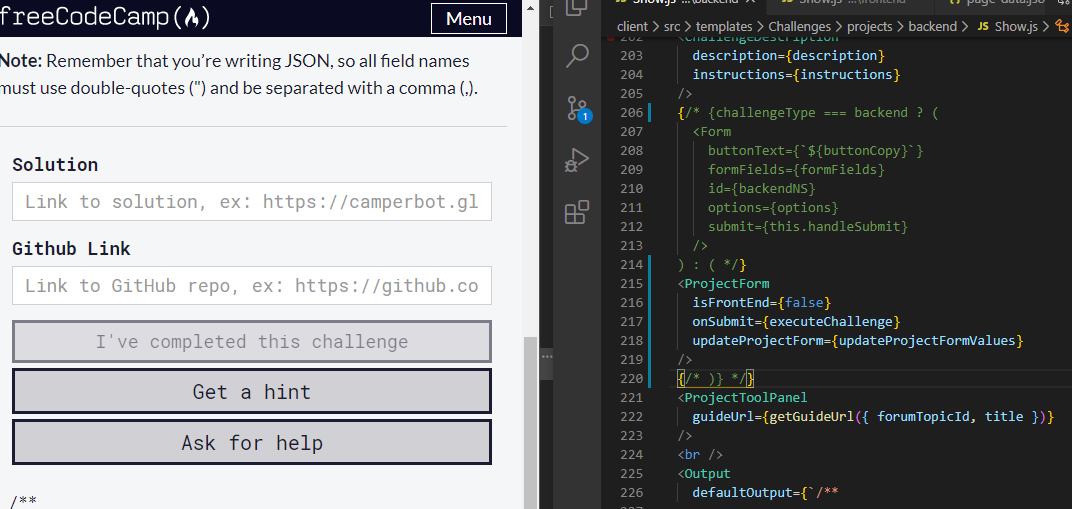
Is this not what the page is supposed to look like? It provides the correct placeholders for both the Glitch and the GitHub.
Sky020
on 18 Mar 2020
@Sky020 That is what it should look like. I would make it even clearer by shortening the Solution link placeholder to be able to see more of the glitch link. Something like:
Solution link: ex: https://camperbot.glitch.met
And since Github Link is already a label above the 2nd input box, I would say we could shorten the other placeholder to:
ex: https:/github.com/camperbot/repo-name
RandellDawson
on 18 Mar 2020
Related issues
 QuincyLarson
·
3Comments
QuincyLarson
·
3Comments
 danielonodje
·
3Comments
danielonodje
·
3Comments
 kokushozero
·
3Comments
kokushozero
·
3Comments
 itsmikewest
·
3Comments
itsmikewest
·
3Comments
 robwelan
·
3Comments
robwelan
·
3Comments