Freecodecamp: I can't sign in to freeCodeCamp through GitHub or Twitter account, Please help
I used my GitHub account to sign in to freeCodeCamp but now I can't sign in. I also connected my twitter account with freeCodeCamp but it is not working as well.
I feeling very confused and stressed since I have completed a lot of challenge.
Please help me get my account back.
User Information:
Full Name: Shuvongkor Barman
User Name: shuvongkor-barman
GitHub User Name: shuvongkor-barman
Twitter User Name: shuvongkor1
Issue Description
Browser Information
- Browser Name = Opera
- Version: 52.0
- Operating System: Windows 10
- Desktop
Your Code
Screenshot


 shuvongkor-barman
All 10 comments
@shuvongkor-barman (note the msg from freecodecamp) https://github.com/freeCodeCamp/freeCodeCamp/issues/14669#issuecomment-341918303 :
@raisedadead commented on Nov 4, 2017
Yes, we have disabled new signups via GitHub, you can expect to see this button gone soon too(when we release next version).
If you are signing up for the first time, please do so via the email, and then link up GitHub through the settings on your profile.
Simply create a freecodecamp account using the same email you used to create your github account.
After that, log into freecodecamp using that email, then go to https://www.freecodecamp.org/settings and you can link your github account, and your progress should still be there.
Good luck
 Sy-CoDe
on 19 May 2018
Sy-CoDe
on 19 May 2018
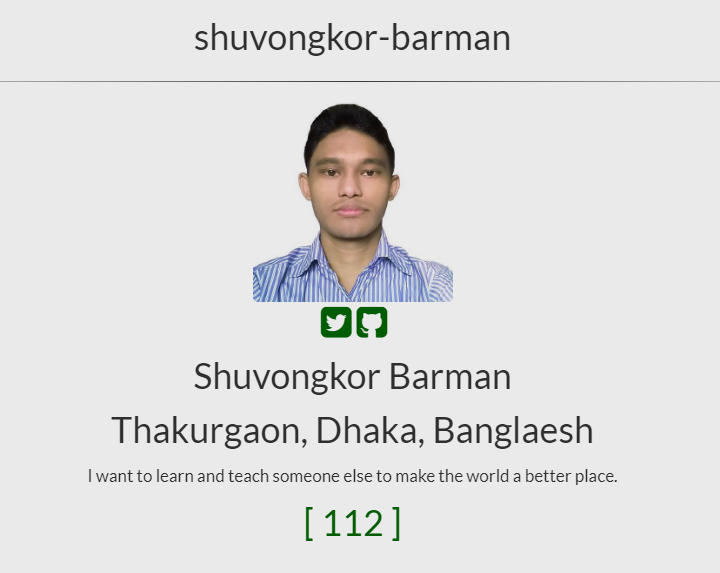
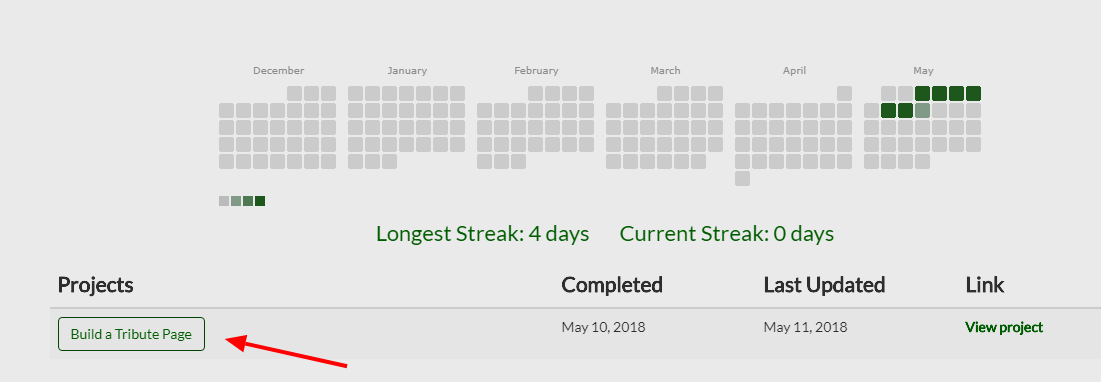
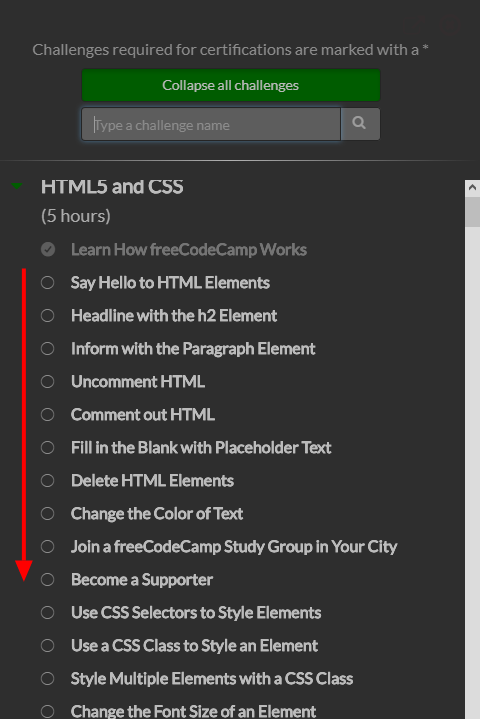
I did exactly what you said but although it is showing that I have completed 112 challenges, on the top it was showing only 1 and when I completed some now it is showing 4. And in the Map it is showing that I did not complete the first 112 challenges.
Why is that?
And please help me solve this problem.

shuvongkor-barman
on 19 May 2018
-try https://forum.freecodecamp.org/c/support bc it seems this is a known issue
-Also try reaching someone at freecodecamp https://github.com/orgs/freeCodeCamp/people like @raisedadead @QuincyLarson
Sy-CoDe
on 20 May 2018
@shuvongkor-barman apologies for the delay in getting back to you. please send an email to [email protected] from your email that you have with us.
We will try and get this fixed.
/cc @QuincyLarson
 raisedadead
on 21 May 2018
raisedadead
on 21 May 2018
@raisedaddead I can't sign in either. I have already sent you at [email protected] without any response.
Thanks
cc @QuincyLarson
 mabras
on 25 May 2018
mabras
on 25 May 2018
Hi @shuvongkor-barman @mabras Quincy is currently away until Monday for a work trip. He may not have had access to emails.
He is the sole person at the moment, who can access the DB.
raisedadead
on 25 May 2018
@raisedadead So how long do we have to wait? Should we worry then?
shuvongkor-barman
on 27 May 2018
Hi @shuvongkor-barman I understand the frustration and apologise for the delay. Unfortunately, as I said, we will have to wait for Quincy to be back. The write access to DB is limited for obvious security reasons.
We know the issue that you have duplicate accounts which need to be merged. Rest assured, your progress is saved. Merging them to your email account with us will get this working again.
May I suggest that you do not wait, and keep working through the next challenges, and save the solutions offline somewhere? This way when we have merge your old account with your email, all you would have to do is just re-submit them?
Quincy, reaches US on Monday just so that you know.
Thanks and sorry about the inconvenience.
raisedadead
on 27 May 2018
Okay Then. I will wait for the fixing. But I will continue my practice and save my project somewhere online or offline.
Thanks.
shuvongkor-barman
on 29 May 2018
@shuvongkor-barman This should now be working on learn.freecodecamp.org
 QuincyLarson
on 4 Jun 2018
QuincyLarson
on 4 Jun 2018
Related issues
 cmal
·
3Comments
cmal
·
3Comments
 vaibsharma
·
3Comments
vaibsharma
·
3Comments
 imhuyqn
·
3Comments
imhuyqn
·
3Comments
 jurijuri
·
3Comments
jurijuri
·
3Comments
 Tzahile
·
3Comments
Tzahile
·
3Comments
Most helpful comment
Hi @shuvongkor-barman I understand the frustration and apologise for the delay. Unfortunately, as I said, we will have to wait for Quincy to be back. The write access to DB is limited for obvious security reasons.
We know the issue that you have duplicate accounts which need to be merged. Rest assured, your progress is saved. Merging them to your email account with us will get this working again.
May I suggest that you do not wait, and keep working through the next challenges, and save the solutions offline somewhere? This way when we have merge your old account with your email, all you would have to do is just re-submit them?
Quincy, reaches US on Monday just so that you know.
Thanks and sorry about the inconvenience.