Freecodecamp: Improve instructions: Link to External Pages with Anchor Elements
Challenge Name
Basic HTML and HTML5: Link to External Pages with Anchor Elements
https://beta.freecodecamp.org/en/challenges/basic-html-and-html5/link-to-external-pages-with-anchor-elements
Issue Description
The image displaying the anchor elements is smashed together. I think it should be broken into smaller parts and displayed with regular text like below:
Let's break down the example:
<p>Here's` a <a href="http://freecodecamp.org"> link to freecodecamp.org</a> for you to follow.</p>
- Normal text in the p element
<p>Here's a ... for you to follow.</p>
- Anchor tag (requires a closing tag)
<a></a>
- href is an anchor tag attribute
<a href="http://freecodecamp.org"></a>
- The text within the anchor tags,
link to freecodecamp.org, will display a link to click
<p>Here's` a <a href="http://freecodecamp.org"> link to freecodecamp.org</a></p>
- Final Render
Here's a link to freecodecamp.org for you to follow.
 mtrivera
All 14 comments
I think there's no problem with the image displayed on the challenge. The only change which should be done to the image is that there must be double quotes instead of single quotes on the href attribute. Though, single quotes work but using double quotes is a good practice.
@Bouncey I would like to implement this change if required :)
 vkWeb
on 23 Dec 2017
vkWeb
on 23 Dec 2017
when I tried to run "npm start" I got "Error: Connection strategy not found"
 ghost
on 24 Dec 2017
ghost
on 24 Dec 2017
npm run develop is your friend
On Sun, 24 Dec 2017 at 09:14, harsha notifications@github.com wrote:
when I tried to run npm start I got Error: Connection strategy not found
—
You are receiving this because you were mentioned.
Reply to this email directly, view it on GitHub
https://github.com/freeCodeCamp/freeCodeCamp/issues/16289#issuecomment-353774026,
or mute the thread
https://github.com/notifications/unsubscribe-auth/ARtk5jci0NlDsuObccNsA9HBs3Ojv1vgks5tDhXdgaJpZM4RLm-g
.
 Bouncey
on 24 Dec 2017
Bouncey
on 24 Dec 2017
i am newbie here please help me what to do....please mentor me..
 prinzpiuz
on 26 Dec 2017
prinzpiuz
on 26 Dec 2017
@prinzpiuz You should go through the freeCodeCamp curriculum. Good luck.
vkWeb
on 26 Dec 2017
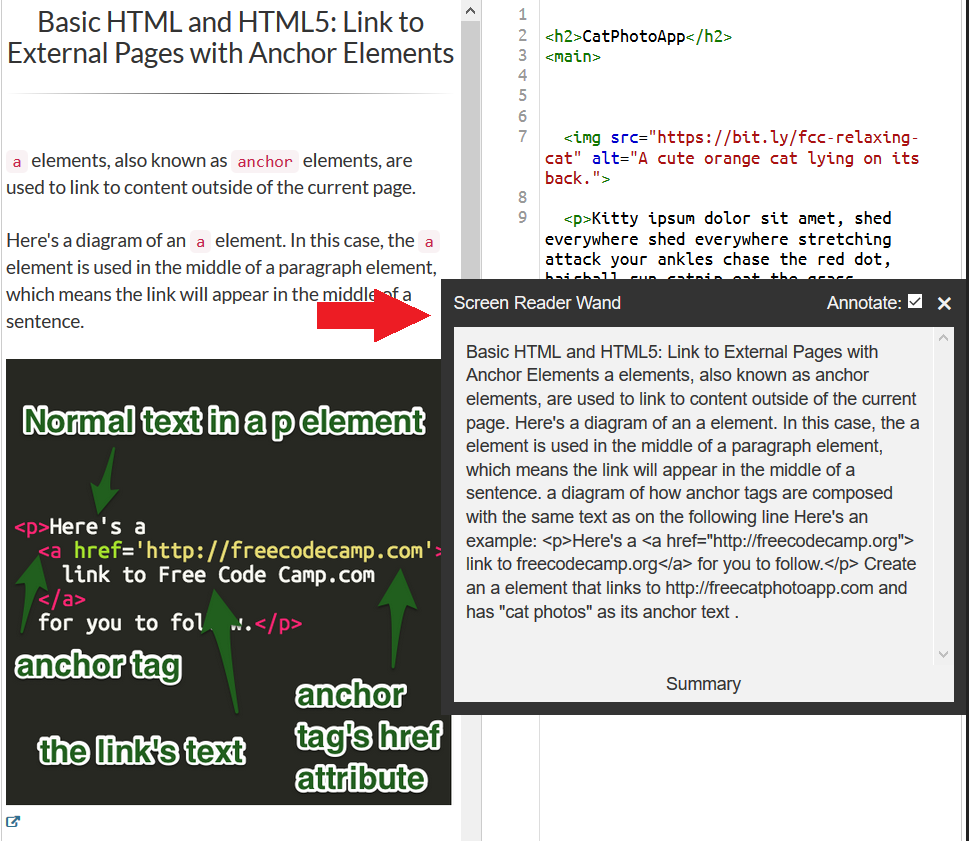
This is an accessibility issue as well. I'm using tota11y for accessibility visualization and this is how screen readers would see.
 huyenltnguyen
on 27 Dec 2017
huyenltnguyen
on 27 Dec 2017
Is anybody working on this? I would love to give it a shot. I've never contributed to open source before
 Ryan-ED
on 3 Jan 2018
Ryan-ED
on 3 Jan 2018
@Ryan-ED Great - Please go through our contributing guidelines. Good luck. 😃
vkWeb
on 3 Jan 2018
Just to be clear @mtrivera , are you saying you want the image removed and replaced with text instead?
Ryan-ED
on 4 Jan 2018
Yes, but it can be a reference for writing the text. Also, as @huyenltnguyen mentioned its an accessibility issue (see his post in this thread).
mtrivera
on 4 Jan 2018
I am still slightly unclear on what exactly needs to be changed. Could you please clarify this for me, @Bouncey
As far as I know, @mtrivera wants me to remove the image and replace it with the text that he mentions in the description.
Ryan-ED
on 8 Jan 2018
Hey there, @Ryan-ED !
Apologies, we should have been very clear on what is the need here. Thanks for taking the time to contribute.
Here is general direction of what's needed:
Let's not remove the image, it is sometimes useful to see an example annotated as in the image.
Let's update this line to have an additional text "Click to enlarge" like so, for clarity to open it.
https://github.com/freeCodeCamp/freeCodeCamp/blob/575ea380dc95f06d2a684fe65814cd1ee03f5e3e/seed/challenges/01-responsive-web-design/basic-html-and-html5.json#L711Should be changed to
"<a href=\"//i.imgur.com/hviuZwe.png\" target=\"_blank\" data-lightbox=\"img-enlarge\"><img class=\"img-responsive\" title=\"Click to enlarge\" alt=\"a diagram of how anchor tags are composed with the same text as on the following line\" src=\"//i.imgur.com/hviuZwe.png\">Click to enlarge </a>",Next the example snippet needs to be wrapped in a
blockquotecurrently its wrapped in acodetag, and somebrtags need to be added to separate the lines.
https://github.com/freeCodeCamp/freeCodeCamp/blob/575ea380dc95f06d2a684fe65814cd1ee03f5e3e/seed/challenges/01-responsive-web-design/basic-html-and-html5.json#L713Should be changed to:
"<blockquote><p><br> Here's a <a href=\"http://freecodecamp.org\"> link to freecodecamp.org</a> for you to follow.<br></p></blockquote>",Finally proceed with adding the additional description like
Let's break down the example:
<p>Here's` a <a href="http://freecodecamp.org"> link to freecodecamp.org</a> for you to follow.</p>
1. Normal text in the p element
<p>Here's a ... for you to follow.</p>
2. Anchor tag (requires a closing tag)
<a></a>
3. href is an anchor tag attribute
<a href="http://freecodecamp.org"></a>
4. The text within the anchor tags, `link to freecodecamp.org`, will display a link to click
<p>Here's` a <a href="http://freecodecamp.org"> link to freecodecamp.org</a></p>
You can do so, by following the style guide here and reference the pre-exsting code for details.
Of course feel free to hit us in Contributors Chat room if you are stuck. And the local development setup is outlined here in our Guidelines for Contributing
 raisedadead
on 8 Jan 2018
raisedadead
on 8 Jan 2018
Bonus, if you or anyone else is looking for a contribution do the similar changes for another challenge reported in #16335
raisedadead
on 8 Jan 2018
Thanks @raisedadead !
Ryan-ED
on 8 Jan 2018
Related issues
 bagrounds
·
3Comments
bagrounds
·
3Comments
 EthanDavis
·
3Comments
EthanDavis
·
3Comments
 QuincyLarson
·
3Comments
QuincyLarson
·
3Comments
 robwelan
·
3Comments
robwelan
·
3Comments
 MichaelLeeHobbs
·
3Comments
MichaelLeeHobbs
·
3Comments
Most helpful comment
Bonus, if you or anyone else is looking for a contribution do the similar changes for another challenge reported in #16335