Freecodecamp: Map should be expand in right places to show current challenge
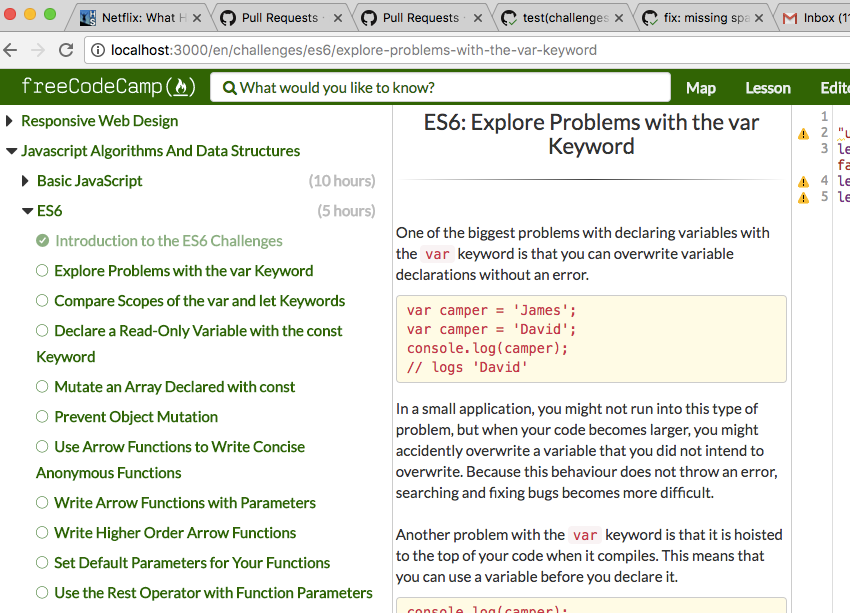
Currently this is how the map looks when I navigate to a specific challenge:

Instead, when a challenge loads, the map should automatically expand the necessary challenge super-block and sub-block to show the current challenge, like this:
 QuincyLarson
All 23 comments
I had opened a similar one earlier. https://github.com/freeCodeCamp/freeCodeCamp/issues/16192 😕
 raisedadead
on 21 Dec 2017
raisedadead
on 21 Dec 2017
@raisedadead Ah, that issue as I understood it was about having a collapse button like we have in production. I'm not saying we should have a button or a separate search box or anything - just that when you arrive at a challenge, that challenge is already visible in the map.
QuincyLarson
on 22 Dec 2017
Hey @raisedadead and @QuincyLarson, I'm new to the project but I'd like to contribute.
Can I help with this issue?
 vbelolapotkov
on 2 Jan 2018
vbelolapotkov
on 2 Jan 2018
@vbelolapotkov it appears that nobody has claimed this issue yet, so please go ahead and put a note here if you're planning on fixing this issue.
 theoutlander
on 3 Jan 2018
theoutlander
on 3 Jan 2018
@theoutlander great, will work on it
vbelolapotkov
on 3 Jan 2018
@vbelolapotkov Awesome! Thanks for jumping on this. Please keep us posted on your progress, and let us know if we can do anything to help :)
QuincyLarson
on 4 Jan 2018
@QuincyLarson I guess I need an advice from someone who is familiar with a project.
Here is what I have at the current moment.
The problem is in Map state after app.fetchChallenges.complete. Map is filled in with default list of blocks/projects, but their state is not applied based on url params.
I see two options here:
1) Add extra parameter to fetcheChallenges.complete action, to create map with proper initial state in current reducer.
Pros: easy to implement, no need to create new actions/epics/reducers
Cons: need to read superblock name from fetched results (not from current state) as super block name is not a url param. IMO it looks like a hack so don't like it very much.
2) Trigger additional Map action to update state
Pros: Can read superblock name from state with selectors.
Cons: harder to implement, need to create extra actions/epics/reducers.
I've tried tried to experiment with both solutions, but 2 leads to an error due to circular dependency between Map reducers and App reducers.
First approach did the trick, but I've noticed a reasonable delay between page loaded and fetchChallenges.complete. So it looks like there is a SSR part somewhere in between which need to be fixed.
Anyway I'd appreciate to get some feedback on following:
1) Which implementation option is better in terms of patterns used in the project.
2) Is SSR used? If yes where is a best place to start playing with ssr part?
3) There will be one more problem with scrolling to the selected challenge in the case of current challenge located at the bottom of the list. I haven't seen/noticed yet any code which would update scroll position of a Map component. Any thoughts on this?
vbelolapotkov
on 4 Jan 2018
@vbelolapotkov thanks for your analysis, looping in @BerkeleyTrue for the clarifications.
raisedadead
on 4 Jan 2018
I'd suggest using the challengeUpdated action to trigger state changes in the map. This will contain the information necessary to drill down the map.
My strategy would be to add some meta data to the action and use this meta data to filter for that action in a reducer. This will keep the two areas decoupled.
 BerkeleyTrue
on 4 Jan 2018
BerkeleyTrue
on 4 Jan 2018
@BerkeleyTrue challenge is passed as a payload to challengeUpdated and it contains all required info to updated map (superBlock, block, dashedName). Why would you pass the same info as additional meta?
vbelolapotkov
on 5 Jan 2018
The meta data strategy is to keep the Map feature decoupled from the rest of the app. This is in opposition to directly triggering a state change in Map with a type imported from another place in the app or by creating an additional action in Map and then dispatching it in addition to the challengeUpdated action. The meta data does not need to be a duplicate of the date in the payload but should be something that is unique to Map. You can see this strategy in the Panes feature.
BerkeleyTrue
on 5 Jan 2018
@BerkeleyTrue I've made some changes here but I'm not very happy with them so not creating a PR.
Here is a list of concerns:
- Only order numbers from challenge (superOrder, order) can be used for expanding map, as challenge keeps superBlock title and not a dashed name. Possible fix here is to add superBlock dashed name to challenge object.
- Map is expanded only after full map is fetched. As this is done in a background there is a significant delay between map rendered and expanded. Solution here is to update server/ssr part to render map properly.
- Scroll isn't updated to display current challenge if it's at the bottom of the map. Solution here is to update UI to update scroll on component mount/update.
Please, let me know what do you think.
vbelolapotkov
on 9 Jan 2018
Thanks for the attempt.
- You could instead use the challenge name itself to find the panel to open and then recur open. This is how the map was designed. No need for additional information.
- Solution here is to expand when the map is fetched. No need to change how SSR works. That's the beauty of redux, timing is everything and nothing.
- That should be handled using name/id/hash browser scroll.
I see you also did not use metadata to drive the expansion of the map and instead tied it directly to the challangeUpdated type. This tightly couples the map to the challenges. As a result, you've had to add a couple of extra and unnecessary actions in places they weren't needed. This could result in unwanted state changes. The meta pattern would let you avoid this issue.
BerkeleyTrue
on 9 Jan 2018
@BerkeleyTrue thanks for the feedback.
- Great idea, thanks. Will try it.
- Ok.
- Ok.
I see you also did not use metadata to drive the expansion of the map...
Sorry, but I pretty sure I don't completely understand the concept of meta and how to use it properly. Is there any article/doc about it or could you get some directions (FYI, I've already tried to check berkeley-redux-utils docs on that topic)?
vbelolapotkov
on 10 Jan 2018
Hey @BerkeleyTrue, I've updated the src code to solve map expand (no scroll yet) and used meta reducer as in Panes feature. Could you please have a look here
vbelolapotkov
on 15 Jan 2018
@vbelolapotkov Looks good so far. Can you open up a PR? This makes it easier to get a dialogue going around the code.
BerkeleyTrue
on 17 Jan 2018
@BerkeleyTrue I've created a PR but scrolling part is not solved yet.
I've tried to solve it with hash scroll as you suggested by updating location.hash in Challenge didMount for current challenge, but it doesn't work and I don't like the idea of manipulating location in a component.
So the other option is to handle pane scroll in Pane component itself as it holds the dom element which have to be scrolled. My idea is following:
1) Add some attribute to current challenge, e.g. data-scroll-pane='true'
2) On pane component update, find dom node by attribute above and if it exists update scroll to ensure element is visible.
What do you think on that approach? Maybe you have other ideas?
vbelolapotkov
on 19 Jan 2018
So the other option is to handle pane scroll in Pane component itself
There is no reason to couple panes to their content. This should be done in the Map feature since this is a Map specific feature.
Yes, some combination of scrollTop/findDOMNode will be required.
BerkeleyTrue
on 19 Jan 2018
This should be done in the Map feature since this is a Map specific feature.
It makes sense, but at now scrollable div is rendered in Pane component.
So Map should find it's parent Pane node, current challenge node, and update pane's div scroll.
In this scenario I don't like the side effect: Map component updates Pane component dom.
May there is a way to render special pane for map, or update styling to make Map component scrollable. What do you think.
vbelolapotkov
on 21 Jan 2018
@vbelolapotkov I'll defer to @BerkeleyTrue on this since he knows more about how this was implemented.
QuincyLarson
on 22 Jan 2018
update styling to make Map component scrollable. What do you think.
This is probably the easiest approach. Adding a container div for the map, setting it to 100% hight width, then controlling the element scroll there.
BerkeleyTrue
on 24 Jan 2018
That's the way I'm trying to solve it now, will add this part to PR as well once implemented.
vbelolapotkov
on 24 Jan 2018
@BerkeleyTrue I've added a solution for setting map scroll to PR as well.
vbelolapotkov
on 29 Jan 2018
Related issues
 trashtalka3000
·
3Comments
trashtalka3000
·
3Comments
 danielonodje
·
3Comments
raisedadead
·
3Comments
QuincyLarson
·
3Comments
danielonodje
·
3Comments
raisedadead
·
3Comments
QuincyLarson
·
3Comments
 bagrounds
·
3Comments
bagrounds
·
3Comments
Most helpful comment
@vbelolapotkov it appears that nobody has claimed this issue yet, so please go ahead and put a note here if you're planning on fixing this issue.