Describe the bug
When I try to play a video in WhatsApp, there's no sound
To Reproduce
Steps to reproduce the behavior:
- Go to WhatsApp
- Click on a video in a message
- There's no sound from video
Expected behavior
Sound should play from a video
Desktop:
View my system information here: whatsmybrowser.org/b/8CPKKZL
 megaroeny
All 14 comments
I'm having the same problem with whatsapp audio too.
Franz 5.0.0-beta.24
 thalesog
on 11 Feb 2019
thalesog
on 11 Feb 2019
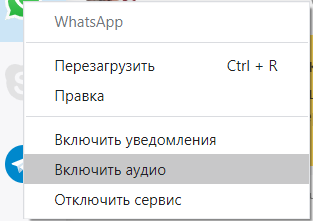
you need to enable the sound for the Whatsapp service by right-clicking the Whatsapp icon on the left bar of the Franz window and clicking "Enable Audio".
you can still manually disable the notification sound in the Whatsapp settings if you don't want it.
 thompson004
on 14 Feb 2019
thompson004
on 14 Feb 2019
I have the same problem, and I can't hear when people send audio message aswell, and no, the sound is not disabled when I right click on the WhatsApp service on the left..
 romskidd
on 10 Apr 2019
romskidd
on 10 Apr 2019
Same problem. Any solution?
_Version 5.0.1 / Release 4.0.8_
 jeanduarte
on 11 Apr 2019
jeanduarte
on 11 Apr 2019

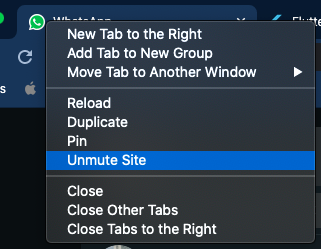
I try to unmute here and it works! _(Ctrl+Shift+M)_
jeanduarte
on 11 Apr 2019
I try to unmute here and it works! _(Ctrl+Shift+M)_
That worked for me! Didn't saw that bell before, thanks!
romskidd
on 13 Apr 2019
Worked for me too. It would be great if we could divide the volume of notifications and videos in different menus.
 wmsenna
on 24 Apr 2019
wmsenna
on 24 Apr 2019
@thompson004 solution should be in the FAQ. Just saying.
 naquiroz
on 20 Jul 2019
naquiroz
on 20 Jul 2019
solution is :
- right click whatsapp icon, ensure sound is on
- ensure sound isnt mute as @romskidd said
 jeffangama
on 13 May 2020
jeffangama
on 13 May 2020
Guys, hello!
Issue still exists(
Click on WhatsApp video and there is no any sound.
Tried to enable audio, but this menu item seems continue to stand in off mode (don't change the caption after click on it)
https://www.whatsmybrowser.org/b/CUBL6
Help!
 samowarpro
on 9 Jul 2020
samowarpro
on 9 Jul 2020
hmm..it was fixed somehow, now is working properly
samowarpro
on 12 Jul 2020
you need to enable the sound for the Whatsapp service by right-clicking the Whatsapp icon on the left bar of the Franz window and clicking "Enable Audio".
you can still manually disable the notification sound in the Whatsapp settings if you don't want it.
I had the same problem. Shouldn't audio be enabled by default? This default is literally the opposite of any other app or user expectation. Without mentioning, there is no "mute icon" that shows that. The only way to figure this out as a user is to google the issue or find it on github. This is why the reply quoted above has 31 "likes".
 aleksfadini
on 22 Oct 2020
aleksfadini
on 22 Oct 2020
This did not work for me.
Version 5.3.3
 B1ackDrag0n
on 26 Oct 2020
B1ackDrag0n
on 26 Oct 2020
 MadPanta
on 7 Nov 2020
MadPanta
on 7 Nov 2020
Related issues
 m2kk
·
4Comments
m2kk
·
4Comments
 gcarrion-gfrmedia
·
3Comments
gcarrion-gfrmedia
·
3Comments
 dbfin
·
4Comments
dbfin
·
4Comments
 gregoralbrecht
·
3Comments
gregoralbrecht
·
3Comments
 wibimaster
·
3Comments
wibimaster
·
3Comments
Most helpful comment
you need to enable the sound for the Whatsapp service by right-clicking the Whatsapp icon on the left bar of the Franz window and clicking "Enable Audio".
you can still manually disable the notification sound in the Whatsapp settings if you don't want it.