Franz: Franz version 5.0.0-beta.19 fails to start with "uscript_getScript_58" error
A 🐛 report.
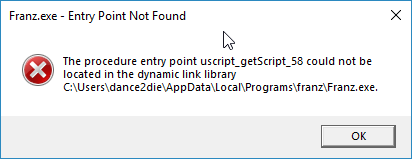
After updating from beta.18 to beta.19, Franz fails to start with following error message on Windows 10.
Expected Behavior
After upgrading from beta.18, Franz should start.
Current Behavior
Fails to start after an upgrade & an reinstall with following error message.
Steps to Reproduce (for bugs)
- Upgrade or Install
franz-setup-5.0.0-beta.19.exe. - Start the application
Your Environment
- Franz Version used:
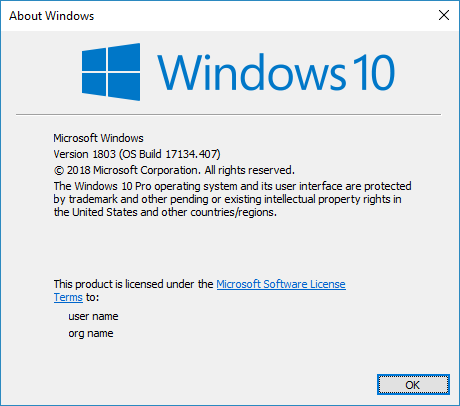
franz-setup-5.0.0-beta.19 - Operating System and version:
 dance2die
All 15 comments
in my case too.
 BeefoIO
on 3 Dec 2018
BeefoIO
on 3 Dec 2018
I'm also getting this. Some googling turned up this, but I'm not sure if they have the same cause. I believe Franz uses electron though, so it could be relevant.
 mopquill
on 3 Dec 2018
mopquill
on 3 Dec 2018
Got the same error after the update too with the same setup.
The fix @mopquill mentions could work but the issue was also a problem on the users setup.
 jonhil
on 3 Dec 2018
jonhil
on 3 Dec 2018
@adlk rereleased beta v19 a couple of hours ago and after reinstalling the new released version everything worked as expected for me.
Hope this workes for you guys aswell!?
jonhil
on 3 Dec 2018
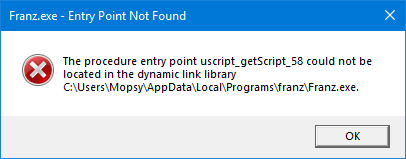
I'm still getting the same error, unfortunately.
mopquill
on 3 Dec 2018
This is an unfortunate issue 😕
If this has happened to you, please re-download the latest version here:
https://github.com/meetfranz/franz/releases
 adlk
on 3 Dec 2018
adlk
on 3 Dec 2018
This is an unfortunate issue 😕
If this has happened to you, please re-download the latest version here:
https://github.com/meetfranz/franz/releases
I already did before I got the error I just posted above. The issue persists. :-/
mopquill
on 3 Dec 2018
Had the same issue. An uninstall and a new install afterwards fixed it for me... Also on Windows v1803, if it helps.
 EinPinsel
on 4 Dec 2018
EinPinsel
on 4 Dec 2018
This is an unfortunate issue 😕
If this has happened to you, please re-download the latest version here:
https://github.com/meetfranz/franz/releases
Thank you @adlk.
The new release worked for me.
dance2die
on 4 Dec 2018
What worked for me, besides downloading the new version, is uninstalling, rebooting Windows, then reinstalling. Without rebooting I still got the same error message.
 appel
on 4 Dec 2018
appel
on 4 Dec 2018
What worked for me, besides downloading the new version, is uninstalling, rebooting Windows, then reinstalling. Without rebooting I still got the same error message.
@mopquill does that work for you as well?
adlk
on 5 Dec 2018
Updating to 5.0.0-beta.20 cleared up the issue on my end.
 naviabbot
on 6 Dec 2018
naviabbot
on 6 Dec 2018
I had the same issue with version 5.0.0-beta.20 - was able to install without errors only after rebooting my PC
 olehmelnyk
on 10 Dec 2018
olehmelnyk
on 10 Dec 2018
@adlk Sorry for the late update, I've been super busy with work. But yes, that is what worked for me as well. I've had this same issue repeat on a few version updates after this, too, but I believe not the most recent two updates -- if memory serves.
mopquill
on 1 May 2019
I will close the issue as the reported issue is resolved.
dance2die
on 1 May 2019
Related issues
 seanford
·
4Comments
seanford
·
4Comments
 BinaryBen
·
4Comments
BinaryBen
·
4Comments
 Guredaniel
·
3Comments
Guredaniel
·
3Comments
 tayfuuun
·
4Comments
tayfuuun
·
4Comments
 sach160
·
4Comments
sach160
·
4Comments
Most helpful comment
What worked for me, besides downloading the new version, is uninstalling, rebooting Windows, then reinstalling. Without rebooting I still got the same error message.