Expected Behavior
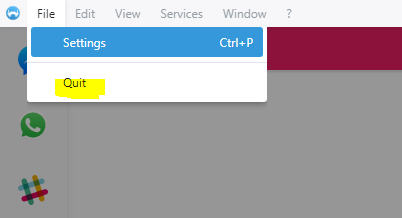
From menu bar, when going to File --> Quit, I expect the Franz program to quit entirely.
Current Behavior
When I go to File --> Quit, nothing happens. Doesn't quit Franz, doesn't minimize, nothing.
Screenshots (if appropriate):
Steps to Reproduce (for bugs)
- Go to Menu, click File
- Click Quit
Context
I've noticed this in the past week, but maybe it's been happening for longer
Your Environment
Franz version 5.0.0-beta.18
Windows 10 Enterprise, 64 Bit
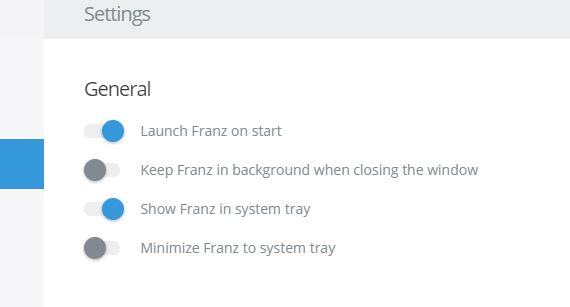
Franz Settings below. But bug occurs regardless of settings.
 anthonyg2003
All 5 comments
I can confirm this bug. Here's my report, which I was writing up until I found that there was a pre-existing issue.
Quite simply, the File / Quit menu selection in the Windows 10 Franz client (v5.0.0-beta.18) doesn't do anything. Doesn't minimize the window, and certainly does not exit the Franz client, which is what I would expect. More detail below.
"I wish I could quit you..."
Expected Behavior
After clicking File, then Quit, the Franz client should terminate, its window should disappear, and it should no longer be running in Task Manager. The behavior should be identical to when the main window control "X" is clicked when the "Keep Franz in background" option is de-selected.
Current Behavior
Selecting File, then Quit, has no effect on the client. Mouse-clicking on the menu is the only option, as there is no Alt-F shortcut for File, and no action shortcut for File / Quit. Clicking window control "X" closes/minimizes the window, but Franz continues to run (blue bar under taskbar icon) if "Keep Franz in background" option is enabled (by default). If the background option is de-selected, closing the window with "X" does quit Franz, and clicking the pinned taskbar icon re-starts the client (blue fill, Franz title, busy spinner, then services are restored).
Additionally, if I use Task Manager to kill Franz, it dies, but I get a pop-up Windows dialog box "Unable to terminate process (icon: red circle X) The operation could not be completed. The operation is not valid for this process. [OK]" If I have more than one service configured, I get multiple of these dialog boxes, one for each service configured.
Screenshots (if appropriate):
See above. Windows client runs, click File in menu bar, then click Quit, and observe that nothing happens.
Possible Solution
A mild workaround is to de-select the "Keep Franz in background" option, and then click "X" only if I want to quit Franz, as opposed to minimize it. But my habit is to click "X" assuming that it will continue to run.
Steps to Reproduce (for bugs)
- Install franz-setup-5.0.0-beta.18.exe.
- Start Franz client.
- Set up at least one service. (I did not test behavior with zero services, but I wouldn't expect it to be different. Issue exists with one or several services configured.)
- Click File, then click Quit. Observe that Franz client continues to run.
Context
Simply need a way to quit Franz without de-selecting background option.
Your Environment
- Franz Version used: 5.0.0-beta.18 (Windows x64)
- Operating System and version: Windows 10 Pro version 1709, fully patched.
 drodgers-ls
on 3 May 2018
drodgers-ls
on 3 May 2018
Having the same issue - File > Quit has no effect, doesn't quit Franz, doesn't even quit the window.
As far as I can tell, the only way to exit Franz on Windows is to End task in Task Manager.
 DigitalKeri
on 23 Nov 2018
DigitalKeri
on 23 Nov 2018
Another way you can quit Franz is if you show Franz in the system tray (through settings), you can right click on the system tray icon, then Quit Franz there.
anthonyg2003
on 24 Nov 2018
Same here, it's quite annoying, the only way to quit Franz is from the system tray; also could be great (as a MacOS user too) add a shortcut to quit on windows.
EDIT: just updated to the latest beta and works. 5.0.0-beta.24
 requenaxii
on 11 Feb 2019
requenaxii
on 11 Feb 2019
This issue has been automatically marked as stale because it has not had recent activity. It will be closed if no further activity occurs. Thank you for your contributions.
![stale[bot] picture](https://avatars3.githubusercontent.com/in/1724?v=4&s=40) stale[bot]
on 11 Feb 2020
stale[bot]
on 11 Feb 2020
Related issues
 sach160
·
4Comments
sach160
·
4Comments
 ArmeF97
·
4Comments
ArmeF97
·
4Comments
 wibimaster
·
3Comments
wibimaster
·
3Comments
 m2kk
·
4Comments
m2kk
·
4Comments
 dbfin
·
4Comments
dbfin
·
4Comments
Most helpful comment
I can confirm this bug. Here's my report, which I was writing up until I found that there was a pre-existing issue.
Quite simply, the File / Quit menu selection in the Windows 10 Franz client (v5.0.0-beta.18) doesn't do anything. Doesn't minimize the window, and certainly does not exit the Franz client, which is what I would expect. More detail below.
"I wish I could quit you..."
Expected Behavior
After clicking File, then Quit, the Franz client should terminate, its window should disappear, and it should no longer be running in Task Manager. The behavior should be identical to when the main window control "X" is clicked when the "Keep Franz in background" option is de-selected.
Current Behavior
Selecting File, then Quit, has no effect on the client. Mouse-clicking on the menu is the only option, as there is no Alt-F shortcut for File, and no action shortcut for File / Quit. Clicking window control "X" closes/minimizes the window, but Franz continues to run (blue bar under taskbar icon) if "Keep Franz in background" option is enabled (by default). If the background option is de-selected, closing the window with "X" does quit Franz, and clicking the pinned taskbar icon re-starts the client (blue fill, Franz title, busy spinner, then services are restored).
Additionally, if I use Task Manager to kill Franz, it dies, but I get a pop-up Windows dialog box "Unable to terminate process (icon: red circle X) The operation could not be completed. The operation is not valid for this process. [OK]" If I have more than one service configured, I get multiple of these dialog boxes, one for each service configured.
Screenshots (if appropriate):
See above. Windows client runs, click File in menu bar, then click Quit, and observe that nothing happens.
Possible Solution
A mild workaround is to de-select the "Keep Franz in background" option, and then click "X" only if I want to quit Franz, as opposed to minimize it. But my habit is to click "X" assuming that it will continue to run.
Steps to Reproduce (for bugs)
Context
Simply need a way to quit Franz without de-selecting background option.
Your Environment