Franz: Why does Franz have so many background processes?
Hey guys,
Is there any word on a 64bit installer?
Lastly is there a reason why Franz has so many background processes?
Running 5 services but have between 7 to 12 services running in the background.
Expected Behavior
5x Background apps, 1 for each service.
Current Behavior
Currently I have 12 background processes for my 5 services.
Screenshots (if appropriate):
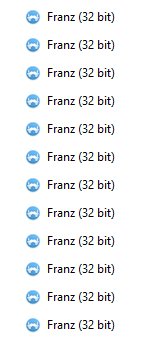

Steps to Reproduce (for bugs)
Configured 2x Slack, 1x WhatsApp, 1x Skype, 1x Discord.
Watch background processes
Context
Not a big effect, just extra resources taken.
Your Environment
- Franz Version used: 5.0.0-beta.13
- Operating System and version: Windows 10 - 1607
 SavellM
All 29 comments
Every service runs in a separate process. Based on your screenshot, I'd guess that you have added 9 services.
If one service for examples crashes, just the service goes down and not the complete app.
64bit installer is on my radar but I'm not quite ready yet.
 adlk
on 13 Nov 2017
adlk
on 13 Nov 2017
I only have 5 services added...
That's why I was wondering why there were so many running...

SavellM
on 13 Nov 2017
When you restart the app and give it some time to initialize everthing, do you already have 12 processes in task manager?
adlk
on 13 Nov 2017
Yup... Its been running now for must be 5+ hours.
Still have 12 instances in background processes.
SavellM
on 13 Nov 2017
Ok, thanks!
Can you please update your initial post with the missing information from the issue template? Otherwise it's impossible for me to keep track of it.
https://raw.githubusercontent.com/meetfranz/franz/master/.github/ISSUE_TEMPLATE.md
adlk
on 13 Nov 2017
Updated. Let me know if I'm missing anything helpful for you
SavellM
on 13 Nov 2017
It's kinda the same for me, i have 3 services and 5 (or 6 if you count the main one) processes:

 deseven
on 14 Nov 2017
deseven
on 14 Nov 2017
@SavellM thanks. I will update this issue once I've ben able to test it.
@deseven in your case, everything seems fine to me :)
Usually those processes will be shown:
- One main process (handles most of the background stuff, managing the windows, tray icons, ...)
- One render process (everything inside of Franz e.g. UI)
- Every WebView runs in a separate process, even every instance of the dev tools.
- Some background tasks that will be spawned from time to time..
So even with just one service, the minimum of processes is 3.
adlk
on 14 Nov 2017
Worth pointing out as well that disabled services still consume memory.
 henrebotha
on 14 Nov 2017
henrebotha
on 14 Nov 2017
@henrebotha this issue was resolved in #294
adlk
on 19 Nov 2017
This is normal behavior for Electron apps, but we will of course try to reduce memory usage in the future... stay tuned!
 haraldox
on 13 Jan 2018
haraldox
on 13 Jan 2018
Any updates on this? Experiencing similar issue. 4 Services 8 instances of Franz helper eating up 2 gigs of ram :/
 IljaDaderko
on 3 Mar 2018
IljaDaderko
on 3 Mar 2018
same on MacBook Pro (Retina, 13-inch, Late 2013) 10.13.2 Beta (17C79a) when i start the Franz, my mac goes crazy.
 keremcankabadayi
on 14 Mar 2018
keremcankabadayi
on 14 Mar 2018
Same issue on ubuntu 16.04.
Moreover it uses a lot of memory. :cry:
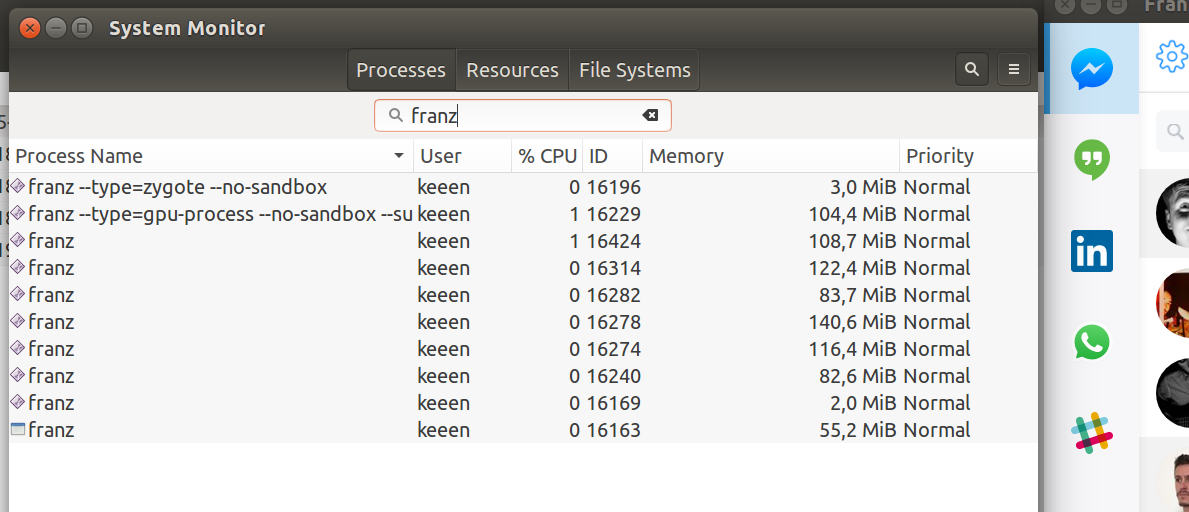
Version: 5.0.0-beta.17
Release: 1.8.4 / linux / x64
 KeeeN
on 9 Apr 2018
KeeeN
on 9 Apr 2018
Same on Ubuntu 18.04
Version: 5.0.0-beta.18
Release: 1.8.4 / linux / x64
 solalatus
on 26 May 2018
solalatus
on 26 May 2018
I have the same issue. My ubuntu 18.04 was only running franz with 8 services and it was eating up 6.7 GB of ram. This is crazy since i have to spin up my local develpment servers and my editors and they all need memory. with franz taking up more than half of it, it's impossible to for me to keep up with my work. I have 12GB of ram. Any update on this issue????
 abhanshgiri21
on 31 May 2018
abhanshgiri21
on 31 May 2018
Just deleted a couple of services that were disabled and the memory went down about 500MB to 2.33Gb.
Disabled services shouldn't use that much memory.
 samura
on 9 Jun 2018
samura
on 9 Jun 2018
@abhanshgiri21, @samura
It may be useful to report the exact services that you're using. Also you could try disabling all services and adding them again one by one to pinpoint the culprits. Only then can your issues be resolved.
By doing this I was able to determine the new gmail interface was hogging huge amounts of memory and constantly churning CPU. Having two gmail services for work and personal email enabled made Franz unusable for me. Switching them to Inbox by gmail helped a lot. I now ended up switching back to the old Gmail UI, and now my resource usage is back to normal.
 menzow
on 17 Jun 2018
menzow
on 17 Jun 2018
Same issue here.
Windows 7 x64
Version: 5.0.0-beta.17
Release: 1.8.4 / win32/ x64
10 services enabled, 2gb+ RAM in use.
 TerrorSource
on 16 Jul 2018
TerrorSource
on 16 Jul 2018
Similar issue.
For me it's with Windows 10 x64
Version: 5.0.0-beta.18
Release: 1.8.4 / win32/ x64
8 Services -> 20 open Tasks with minimum 1GB RAM
 MarleneMayr
on 3 Sep 2018
MarleneMayr
on 3 Sep 2018
me too, it's almost 2GB!
screen
 MaciejWWojcik
on 4 Sep 2018
MaciejWWojcik
on 4 Sep 2018
@MaciejWWojcik, @MarleneMayr, @TerrorSource
Please refer to and provide the information requested in my earlier comment ( https://github.com/meetfranz/franz/issues/265#issuecomment-397901300 )
menzow
on 4 Sep 2018
@menzow Even better. i made an excel list.
Started with all services enabled. Listed the process RAM usage. Deleted 1, list RAM usage etc etc. until no service were left.
Franz was running for almost 7hours straight after starting up the laptop.
TerrorSource
on 13 Sep 2018
This issue has been automatically marked as stale because it has not had recent activity. It will be closed if no further activity occurs. Thank you for your contributions.
![stale[bot] picture](https://avatars3.githubusercontent.com/in/1724?v=4&s=40) stale[bot]
on 16 Nov 2018
stale[bot]
on 16 Nov 2018
Same issue over here. I have three active services (WhatsApp, Hangouts and Telegram) and one disabled (Slack). Franz is running 7 processes and uses almost 2 GB of memory in total.
Franz version: 5.0.0-beta.19 release 2.0.13 / darwin / x64
MacOs: 10.14.1
UPDATE: restarting the app (which was running for 2 days) reduces the number of processes and memory consumption significantly. I waited some time (few minutes) for everything to boot and switched to every service a few times. It is now using 1.2 GB (600 MB less) divided over 6 processes (1 less), which is much more acceptable, but I don't think it should be necessary to restart Franz every day, right?
UPDATE 2: completely removing the already disabled Slack service, didn't seem to change anything. Still 1.2 GB and 6 processes. So the problem that disabled service take up resources is indeed fixed. However, the overall memory consumption is a bit high in my opinion and gets higher the longer the app runs.
 kreintjes
on 8 Dec 2018
kreintjes
on 8 Dec 2018
I'm not impressed by the RAM hungriness of the Franz, I think was not that bad before but when Main app takes usually more than 1.5GB sometimes over 2GB of memory - it's really pretty bad. I love Franz but if this issue will not be addressed, there's really no reason not to use browser that is now way more RAM effective :(. I've also read about slack and other electron apps optimising this problem as well, but I also understand that this is basically a one-man project so no hard feelings, just RAM is the most important bottleneck for me.
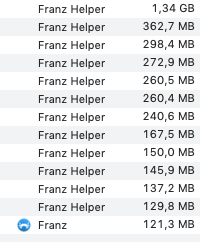
I'm on newest version: 5.0.0-beta.22 (5.0.0-beta.22.1059)
 janjurek
on 15 Dec 2018
janjurek
on 15 Dec 2018
I'm in the same boat, love the app, using it for 8 services, but RAM consumption is a bit high. Complete agreement with janjurek. If it can be improved, that would rock.
 Alsoknownasjazz
on 15 Feb 2019
Alsoknownasjazz
on 15 Feb 2019
Not quite as bad here, but still pretty poor.
5 services, 11 processes running, 900MB total. I did have 8 services but didn't use 3 much so figured I recover some ram.
Kind of defeats the purpose of this program if I have to slim down how many services I use because it eats all my available ram.
5.2.1-beta.1
 felixpenrose
on 15 Aug 2019
felixpenrose
on 15 Aug 2019
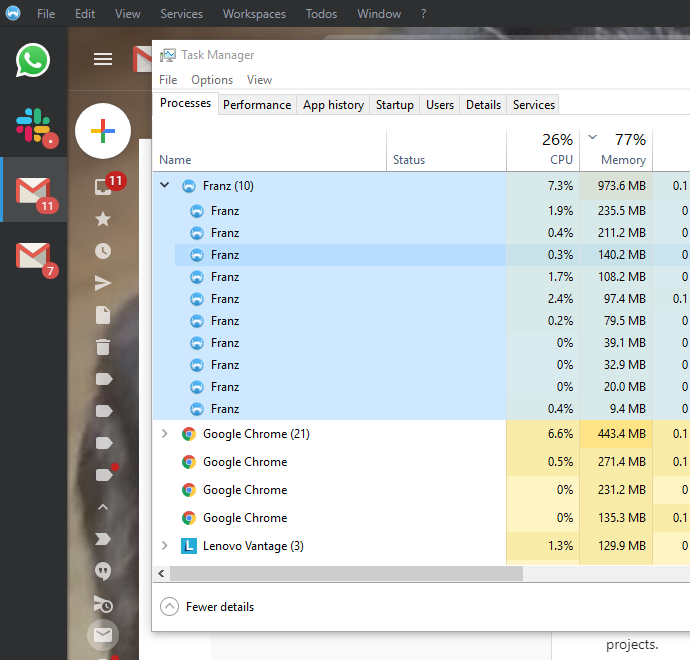
This is the same issue for me 4 services and 11 processes with 1gb of memory use,
 sjtw119
on 16 Oct 2019
sjtw119
on 16 Oct 2019
Related issues
 wibimaster
·
3Comments
wibimaster
·
3Comments
 dbfin
·
4Comments
dbfin
·
4Comments
 larissaales
·
3Comments
larissaales
·
3Comments
 Guredaniel
·
3Comments
Guredaniel
·
3Comments
 Sigri44
·
4Comments
Sigri44
·
4Comments
Most helpful comment
Not quite as bad here, but still pretty poor.
5 services, 11 processes running, 900MB total. I did have 8 services but didn't use 3 much so figured I recover some ram.
Kind of defeats the purpose of this program if I have to slim down how many services I use because it eats all my available ram.
5.2.1-beta.1