Franz 5.0.0-beta.11: When adding any service I get a red error message "Could not load service recipe."
I am behind a proxy which might be causing the issue. Franz 4.0.4 works fine.
Screenshots (if appropriate):
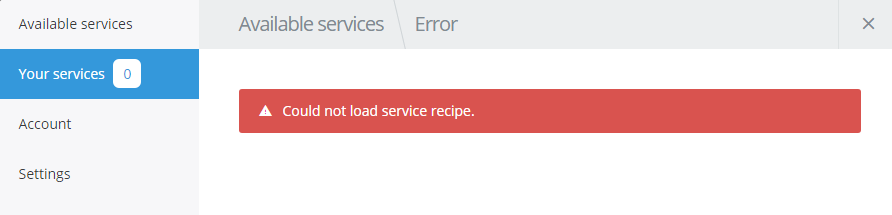
Possible Solution
Allow user to edit proxy settings.
Your Environment
- Franz Version used: 5.0.0-beta.11
- Operating System and version: Win 10
 An3skmbi
All 40 comments
Thanks for reporting this. While Franz should be working with most of the proxy servers, we have seen some windows/proxy setups where this wasn't the case.
I need to do more research and hope that I will be able to fix this issue soon.
 adlk
on 30 Oct 2017
adlk
on 30 Oct 2017
Cool. Here is some more detail if it helps:
Proxy settings are applied via AD group policy, here is the settings in IE:
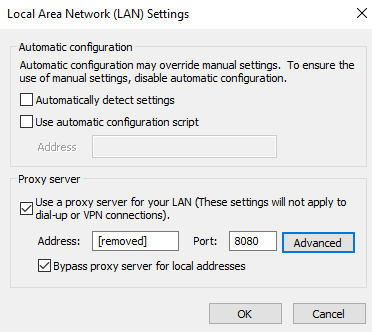
As mentioned, Franz 4 worked without issue and I never did any manual proxy config.
An3skmbi
on 30 Oct 2017
Thanks for the additional info.
We have decoupled services in Franz 5 from the app itself to avoid a lot of issues with outdated configs. Franz 5 doesn't have built in services any longer. They are now downloaded on demand.
This makes us much more flexible but brings new issues as well – but nothing we can't fix :)
adlk
on 30 Oct 2017
I'can report the same error. My laptop is also behind a proxy or VPN. If I can supply any info to help please let me know!
 kloknibor
on 17 Nov 2017
kloknibor
on 17 Nov 2017
same problem on xubuntu 16.04
 cicciofuser
on 28 Nov 2017
cicciofuser
on 28 Nov 2017
same problem on mac os sierra 10.12.6
 erolando
on 28 Nov 2017
erolando
on 28 Nov 2017
Same problem on Manjaro 17.1-pre3
 maxnth
on 29 Nov 2017
maxnth
on 29 Nov 2017
Same problem on Arch KDE. Only Github service is loading
 pat-s
on 30 Nov 2017
pat-s
on 30 Nov 2017
Same problem with Arch, no proxy nor VPN. Some services like Github or Trello load, but most do not.
5.0.0-beta.14
 GuillaumeLagrange
on 30 Nov 2017
GuillaumeLagrange
on 30 Nov 2017
Same problem with Manjaro Linux 17.1-pre3, no proxy nor VPN using version 5.0.0-beta.14
 ludcl
on 1 Dec 2017
ludcl
on 1 Dec 2017
Ditto here.. Arch, no proxy/vpn, compiled 5.0.0-beta.14
version 4.x however does work
 falsified
on 1 Dec 2017
falsified
on 1 Dec 2017
Same here. Arch, no proxy/vpn, compiled 5.0.0-beta.14
 linusheinz
on 3 Dec 2017
linusheinz
on 3 Dec 2017
Same here. Manjaro Linux 17.0.6. No vpn, no proxy.
Can I help to debug this anyhow?
 tsusanka
on 3 Dec 2017
tsusanka
on 3 Dec 2017
Confirming the bug
- version
5.0.0-beta.14 - no proxy
- no VPN
- Arch linux
 blufor
on 3 Dec 2017
blufor
on 3 Dec 2017
@linusheinz, @tsusanka, @blufor, @ludcl, @GuillaumeLagrange can you please try the AppImage https://github.com/meetfranz/franz/releases/download/v5.0.0-beta.14/franz-5.0.0-beta.14-x86_64.AppImage
I got a report in the community Slack that it is working with the AppImage but not with a custom Arch build. If this is the issue for several users, it would be great to find out what is happening exactly.
adlk
on 4 Dec 2017
Very odd.. after running app image, the beta works fine now (unless you've made any changes since).
falsified
on 4 Dec 2017
@adlk the AppImage works for me as well! :+1:
pat-s
on 4 Dec 2017
@falsified the AppImage was created from the beta 14 tag. So it is exactly the same source as it should be in the Arch repo.
@ all when you run into this issue, please open the dev tools and take a look in the console and network tab, maybe there is something useful in there.
adlk
on 4 Dec 2017
@adlk actually I downloaded again the deb package, installed again with gdebi and the app is working now. Quite weird
cicciofuser
on 4 Dec 2017
@adlk I'm getting this error in the console:
Error: /home/tomas/.config/Franz/recipes/temp/whatsapp/package.json: ENOENT: no such file or directory, open '/home/tomas/.config/Franz/recipes/temp/whatsapp/package.json'
    at Object.fs.openSync (fs.js:584:18)
    at Object.module.(anonymous function) [as openSync] (ELECTRON_ASAR.js:173:20)
    at Object.fs.readFileSync (fs.js:491:33)
    at Object.fs.readFileSync (ELECTRON_ASAR.js:505:29)
    at Object.readFileSync (/usr/share/franz/resources/app.asar/node_modules/fs-extra/node_modules/jsonfile/index.js:67:22)
    at ServerApi.getRecipePackage (/usr/share/franz/resources/app.asar/api/server/ServerApi.js:326:40)
    at <anonymous>
The folder is present, but the package.json file is missing. If I delete the folder and start over, the folder gets created, so does recipe.tar.gz, but no package.json.
EDIT: Aha! The recipe.tar.gz doesn't get extracted. If I extract manually, it works!
tsusanka
on 4 Dec 2017
@adlk I can confirm what @tsusanka is reporting.
I can reproduce the behavior on my Arch/Manjaro Deepin (17.0.6) System. The package is downloaded into /home/peter/.config/Franz/recipes/temp/[recipe_name]/recipe.tar.gz after beeing selected, but for some reason the automatic extraction of the package fails.
When I extract/unpack that package manually in the /home/peter/.config/Franz/recipes/[recipe_name]/ folder everything works just fine.
 ghost
on 4 Dec 2017
ghost
on 4 Dec 2017
I just ran into issues with this myself. I have created a local build and I wasn't able to install recipes (tar.gz extraction). When I use the provided built from travis, everything is working again
My first thought was that the package is not downloaded completely but the checksum checks out.
So atm, I have absolutely no clue what's happening but I'll keep investigating this issue.
adlk
on 5 Dec 2017
We did quite some debugging and testing and I believe we have found a solution.
If you are using custom builds, please try building from here: https://github.com/meetfranz/franz/tree/feature/harden-recipe-extraction
you can test the official travis build here: http://franz-travis.s3-website.eu-central-1.amazonaws.com/?prefix=484/
adlk
on 6 Dec 2017
After testing with @adlk it seems the error has to do with synchronizing the recipe to the file system.
Recipes are downloaded to the ~/.config/Franz/recipes/temp/ on Linux in .tar.gz format
Those recipes are then extracted and after that moved to the ~/.config/Franz/recipes/ folder.
The extract command (https://github.com/meetfranz/franz/blob/v5.0.0-beta.14/src/api/server/ServerApi.js line 296) does not seem to sync to the file system.
A work around would be to extract the files by hand (cd to the folder and tar -xf recipe.tar.gz) and then try to add the service again. Same goes if after a login not all your services get loaded.
We might have a solution and it should be fixed in beta 15.
 hmhofman
on 6 Dec 2017
hmhofman
on 6 Dec 2017
you can test the official travis build here: http://franz-travis.s3-website.eu-central-1.amazonaws.com/?prefix=484/
I can confirm that this works. I've used the tar.gz archive and tried to add a service which I haven't used -> no error.
tsusanka
on 6 Dec 2017
@adlk it's not exactly the same as in Arch, at least installation wise. Arch's package pulls the latest "tar" package; v4.1.1, while the one in the AppImage is 4.0.2. I found that the 4.1.1 version fails to extract the tar.gz file, and just swapping the tar package with the older one fixes it.
 tgalal
on 6 Dec 2017
tgalal
on 6 Dec 2017
@adlk @tgalal I can confirm the package bump.
When I cloned the repository this morning, it was version 4.0.2.
Updated a lot of dependencies in just a few hours.
Still, the feature branch feature/harden-recipe-extraction works for me.
hmhofman
on 6 Dec 2017
@tgalal thanks for the info. It's difficult to say where the actual issue happens but as long as there is the yarn.lock present, yarn should install 4.0.2. But as you've commented on the Arch AUR repo, pinning the version is definitely a good idea until we know the source of the issue.
adlk
on 6 Dec 2017
Hi, OP here, running 5.0.0-beta.14 on Windows
I looked in dev tools console, I'm seeing the following error:
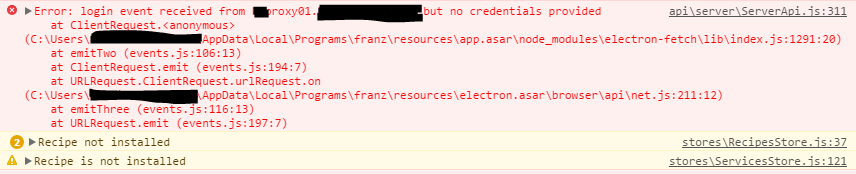
Looks to be related to downloading of the recipes. There are folders in C:\Users\xxx\AppData\Roaming\Franz\recipes\temp like slack and gmail but they're empty.
Edit: I now disabled the proxy via IE settings and success! Can add recipes. And they continue working after proxy is turned back on.
An3skmbi
on 7 Dec 2017
+1 Manjaro with no proxy or vpn. Installed from AUR.
 rvega
on 7 Dec 2017
rvega
on 7 Dec 2017
@An3skmbi you ran into the actual proxy issue. I'm going to test a small API change that there isn't a recipe package redirect but direct fetch. I'll let you know as soon as the test build is ready.
adlk
on 8 Dec 2017
After arch's latest update, Franz V4.0.4 works. no more error message "Could not load service recipe"
 gaoqi7
on 8 Dec 2017
gaoqi7
on 8 Dec 2017
@gaoqi7 That's the franz-bin AUR... which maintains the legacy version only. This is about the franz AUR which pulls the latest versions including beta.
 itsagoodbrain
on 8 Dec 2017
itsagoodbrain
on 8 Dec 2017
+1 AntergOS with no proxy.
Only Trello recipe works
 rafaellehmkuhl
on 17 Dec 2017
rafaellehmkuhl
on 17 Dec 2017
+1 on Arch via AUR, 5.0.0-beta.14. No proxy, no VPN. Only Trello works.
 simonszu
on 19 Jan 2018
simonszu
on 19 Jan 2018
+1 Arch via AUR, franz 5.0.0_beta.18-1. No proxy, no VPN. Can't find a single service that works, including Trello.
 gavsiu
on 21 Aug 2018
gavsiu
on 21 Aug 2018
+1
Manjaro 17.1 via AUR
Version: 5.0.0-beta.18
Release: 1.8.4 / linux / x64
GNOME 4.0.4
No proxy or VPN. I tried all of the services and none of them worked.
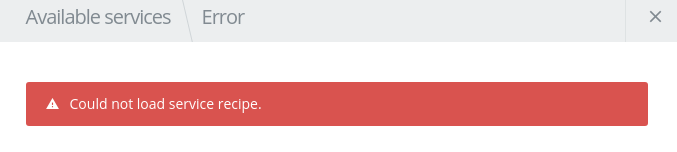
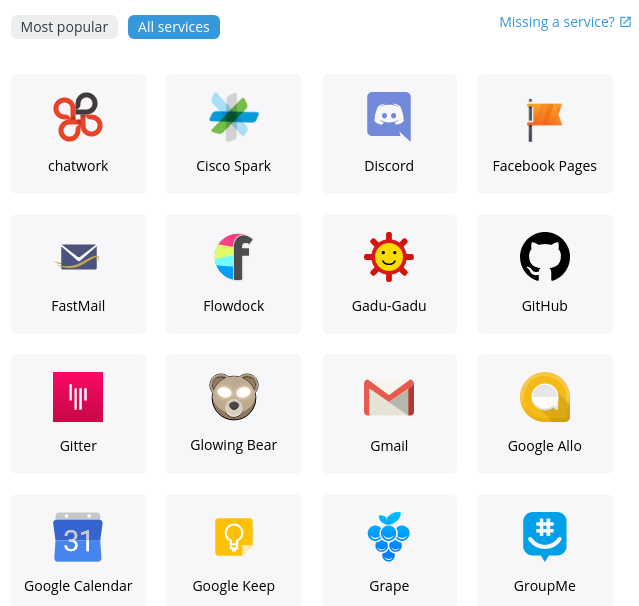


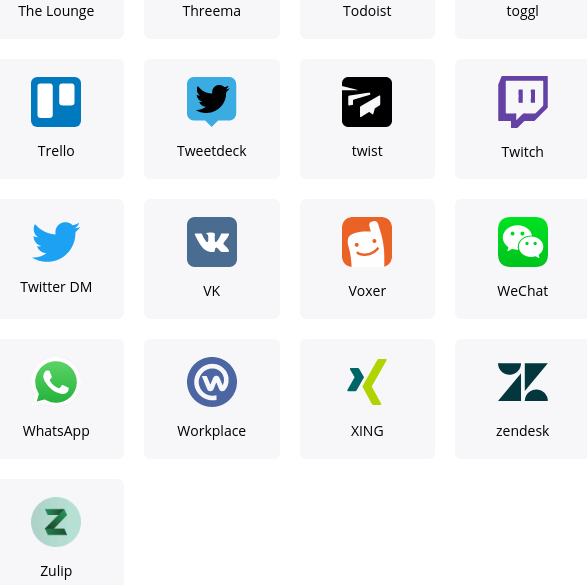
The app also froze while I had the settings window open. After closing and trying to open again, it didn't load. After restarting I got 3 "watchdog did not stop!" errors (presumably from trying to open the app 3 times).
I will try an earlier version e.g. 4.0.4 as mentioned above. After looking into how to do that, it seems like it is not a good idea. (Source)
I will try the app image.
@ all when you run into this issue, please open the dev tools and take a look in the console and network tab, maybe there is something useful in there.
This is what is in the console.
Warnings: Proptypes and createClass are deprecated, need to use the v15.* prop-types package from npm instead and use a plain JavaScript class instead.
/usr/share/franz/resources/app.asar/node_modules/react/lib/lowPriorityWarning.js:38 Warning: Accessing createClass via the main React package is deprecated, and will be removed in React v16.0. Use a plain JavaScript class instead. If you're not yet ready to migrate, create-react-class v15.* is available on npm as a temporary, drop-in replacement. For more info see https://fb.me/react-create-class
Next error:
Uncaught (in promise) TypeError: Cannot read property 'autoLaunchInBackground' of undefined
    at SettingsStore._migrate (SettingsStore.js:77)
    at SettingsStore.setup (SettingsStore.js:26)
    at <anonymous>
Next error. I have 82 of these, presumably the error occurs for each service request.
ServerApi.js:380 TypeError: fetch is not a function
    at ServerApi.getRecipePackage (ServerApi.js:354)
    at ServicesApi.install (RecipesApi.js:11)
    at _promise.Promise (Request.js:44)
    at Promise (<anonymous>)
    at Request.execute (Request.js:43)
    at RecipesStore._install (RecipesStore.js:59)
    at executeAction (/usr/share/franz/resources/app.asar/node_modules/mobx/lib/mobx.js:915)
    at RecipesStore.res (/usr/share/franz/resources/app.asar/node_modules/mobx/lib/mobx.js:906)
    at ServicesStore._showAddServiceInterface (ServicesStore.js:138)
    at action.listeners.forEach.listener (actions.js:14)
I also have this error, which is similar to @tsusanka's error with the ENOENT:
Request.js:66 Uncaught (in promise) Error: ENOENT: no such file or directory, lstat '/home/james/.config/Franz/Partitions'
In the network tab, I have 34/36 42 requests after trying services a few more times. 16 are the icons of the popular services. There is one sad.png emoji. The rest are google analytics collect queries. Here is one of them:
Request URL:https://www.google-analytics.com/collect?v=1&_v=j68&a=1515368284&t=pageview&_s=241&dl=file%3A%2F%2F%2Fusr%2Fshare%2Ffranz%2Fresources%2Fapp.asar%2Findex.html&dp=Settings%2FService%2FEdit&ul=en-gb&de=windows-1252&dt=Franz&sd=24-bit&sr=1440x900&vp=800x600&je=0&_u=aKAAAAAB~&cid=977220979.1535088701&tid=UA-74126766-6&_gid=1548368371.1535091083&z=259729249
Request Method:GET
Status Code:200
Remote Address:172.217.25.174:443
Referrer Policy:no-referrer-when-downgrade
Response Headers
access-control-allow-origin:*
age:269503
alt-svc:quic=":443"; ma=2592000; v="44,43,39,35"
cache-control:no-cache, no-store, must-revalidate
content-length:35
content-type:image/gif
date:Tue, 21 Aug 2018 04:00:14 GMT
expires:Mon, 01 Jan 1990 00:00:00 GMT
last-modified:Sun, 17 May 1998 03:00:00 GMT
pragma:no-cache
server:Golfe2
status:200
x-content-type-options:nosniff
Request Headers
:authority:www.google-analytics.com
:method:GET
:path:/collect?v=1&_v=j68&a=1515368284&t=pageview&_s=241&dl=file%3A%2F%2F%2Fusr%2Fshare%2Ffranz%2Fresources%2Fapp.asar%2Findex.html&dp=Settings%2FService%2FEdit&ul=en-gb&de=windows-1252&dt=Franz&sd=24-bit&sr=1440x900&vp=800x600&je=0&_u=aKAAAAAB~&cid=977220979.1535088701&tid=UA-74126766-6&_gid=1548368371.1535091083&z=259729249
:scheme:https
accept:image/webp,image/apng,image/*,*/*;q=0.8
accept-encoding:gzip, deflate
accept-language:en-GB
user-agent:Mozilla/5.0 (X11; Linux x86_64) AppleWebKit/537.36 (KHTML, like Gecko) Franz/5.0.0-beta.18 Chrome/59.0.3071.115 Electron/1.8.4 Safari/537.36
x-devtools-request-id:1451.10481
Query String Parameters
view source
view URL encoded
v:1
_v:j68
a:1515368284
t:pageview
_s:241
dl:file:///usr/share/franz/resources/app.asar/index.html
dp:Settings/Service/Edit
ul:en-gb
de:windows-1252
dt:Franz
sd:24-bit
sr:1440x900
vp:800x600
je:0
_u:aKAAAAAB~
cid:977220979.1535088701
tid:UA-74126766-6
_gid:1548368371.1535091083
z:259729249
Requests go up to 500000 ms (500 s).
Service folders exist but are empty in /home/james/.config/Franz/recipes/temp.
@hmhofman @adlk
We might have a solution and it should be fixed in beta 15.
Was this done? I'm using beta 18.
Recipes are downloaded to the ~/.config/Franz/recipes/temp/ on Linux in .tar.gz format. Those recipes are then extracted and after that moved to the ~/.config/Franz/recipes/ folder.
No recipes are in ~/.config/Franz/recipes/, just the temp folder which has empty folders for each service.
The extract command (https://github.com/meetfranz/franz/blob/v5.0.0-beta.14/src/api/server/ServerApi.js line 296) does not seem to sync to the file system.
Right, seems like my error has a different cause:ServerApi.js:380 TypeError: fetch is not a function.
A work around would be to extract the files by hand (cd to the folder and tar -xf recipe.tar.gz) and then try to add the service again. Same goes if after a login not all your services get loaded.
Tried franz4-bin via AUR—v 4.0.4-2, however the new app doesn't open. I tried restarting, trying to open again, but franz5 opened and nothing happened with franz4. So I then tried removing franz, but the remaining installed franz4-bin still didn't open, so I removed that as well and reinstalled (via yay). Still didn't work.
 jamesray1
on 24 Aug 2018
jamesray1
on 24 Aug 2018
Next error. I have 82 of these, presumably the error occurs for each service request.
ServerApi.js:380 TypeError: fetch is not a function
at ServerApi.getRecipePackage (ServerApi.js:354)
at ServicesApi.install (RecipesApi.js:11)
at _promise.Promise (Request.js:44)
at Promise ()
at Request.execute (Request.js:43)
at RecipesStore._install (RecipesStore.js:59)
at executeAction (/usr/share/franz/resources/app.asar/node_modules/mobx/lib/mobx.js:915)
at RecipesStore.res (/usr/share/franz/resources/app.asar/node_modules/mobx/lib/mobx.js:906)
at ServicesStore._showAddServiceInterface (ServicesStore.js:138)
at action.listeners.forEach.listener (actions.js:14)
Same for me. Installed from .rpm on Fedora 28. rpm built in a fedora 28 docker container from source cloned from github according to instructions from README.md.
 skidnik
on 27 Sep 2018
skidnik
on 27 Sep 2018
Happens on windows10 as well. Interesting that published version seems to work just fine. Where was that 5.0.0 beta.18 build ?
EDIT:
I verified that I have electron-fetch 1.1.0, then did yarn install and yarn build (my previous, faulty build was initiated with just "node_modules/.bin/electron-builder). While it was building regular chrome crashed. After build, I removed Franz directory from %appdata% and installed. Now it works normally.
 MikeDabrowski
on 30 Sep 2018
MikeDabrowski
on 30 Sep 2018
A pretty basic trouble shooting, but you might want to check if you are running an anti virus program on your Mac such as Kaspersky...
 3337777fw
on 21 Nov 2018
3337777fw
on 21 Nov 2018
Related issues
 wibimaster
·
3Comments
wibimaster
·
3Comments
 ArmeF97
·
4Comments
ArmeF97
·
4Comments
 gcarrion-gfrmedia
·
3Comments
gcarrion-gfrmedia
·
3Comments
 tayfuuun
·
4Comments
tayfuuun
·
4Comments
 m2kk
·
4Comments
m2kk
·
4Comments
Most helpful comment
Ditto here.. Arch, no proxy/vpn, compiled 5.0.0-beta.14
version 4.x however does work