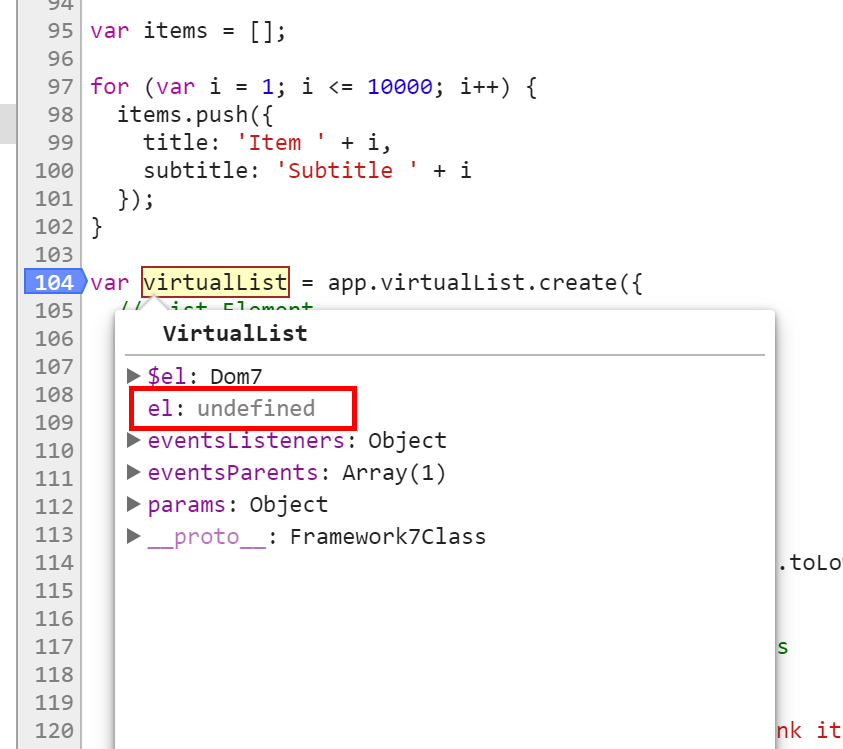
Framework7: Cannot create Virtual List, in cordova. virtualList's "el" is undefined.
The same code. It works fine under the Web, but the virtualList under Cordova is not created correctly.
I used framework7-cli to generate the default project. Insert the official Virtual List sample code.
If you copy the "build-dev" code "www" to the "cordova/www" directory, then cordova can display the virtualList.
step 1
`$ framework7 create
√ All good, you have latest framework7-cli version.
? What type of the app are you targeting? Cordova + Simple web app
? App (project) name: My App
? App package (Bundle ID): io.framework7.myapp
? Target Cordova platform: Android
? What type of framework do you prefer? Framework7 Core
? Choose starter template: Tabbed Views (Tabs)
? Should we setup project with bundler? Webpack (recommended)
? Do you want to setup CSS Pre-Processor No, i am good with CSS
? Do you want to specify custom theme color? No, use default color theme
? Do you want to include Framework7 Icons and Material Icons icon fonts? Yes, include icon fonts
√ Generating package.json
√ Creating required folders structure
√ Installing NPM Dependencies
√ Installing NPM Dev Dependencies
√ Creating Cordova project
√ Creating project files
√ Done! 💪`
step 2
Copy the code from http://v2.framework7.io/docs/virtual-list.html#examples
Replace form.f7.html with the following code.
<template>
  <div class="page">
    <div class="navbar">
      <div class="navbar-inner sliding">
        <div class="title">Virtual List</div>
        <div class="subnavbar">
          <form data-search-container=".virtual-list" data-search-item="li" data-search-in=".item-title" class="searchbar searchbar-init">
            <div class="searchbar-inner">
              <div class="searchbar-input-wrap">
                <input type="search" placeholder="Search"/>
                <i class="searchbar-icon"></i>
                <span class="input-clear-button"></span>
              </div>
              <span class="searchbar-disable-button">Cancel</span>
            </div>
          </form>
        </div>
      </div>
    </div>
    <div class="searchbar-backdrop"></div>
    <div class="page-content">
      <div class="list simple-list searchbar-not-found">
        <ul>
          <li>Nothing found</li>
        </ul>
      </div>
      <div class="list virtual-list media-list searchbar-found"></div>
    </div>
  </div>
</template>
<script>
export default {}
</script>
step 3
Add the following code to the end of app.js.
// Dummy items array
var items = [];
for (var i = 1; i <= 10000; i++) {
  items.push({
    title: 'Item ' + i,
    subtitle: 'Subtitle ' + i
  });
}

var virtualList = app.virtualList.create({
  // List Element
  el: '.virtual-list',
  // Pass array with items
  items: items,
  // Custom search function for searchbar
  searchAll: function (query, items) {
    var found = [];
    for (var i = 0; i < items.length; i++) {
      if (items[i].title.toLowerCase().indexOf(query.toLowerCase()) >= 0 || query.trim() === '') found.push(i);
    }
    return found; //return array with mathced indexes
  },
  // List item Template7 template
  itemTemplate:
    '<li>' +
    '<a href="#" class="item-link item-content">' +
    '<div class="item-inner">' +
    '<div class="item-title-row">' +
    '<div class="item-title">{{title}}</div>' +
    '</div>' +
    '<div class="item-subtitle">{{subtitle}}</div>' +
    '</div>' +
    '</a>' +
    '</li>',
  // Item height
  height: app.theme === 'ios' ? 63 : 73,
});
Debugger
Web:
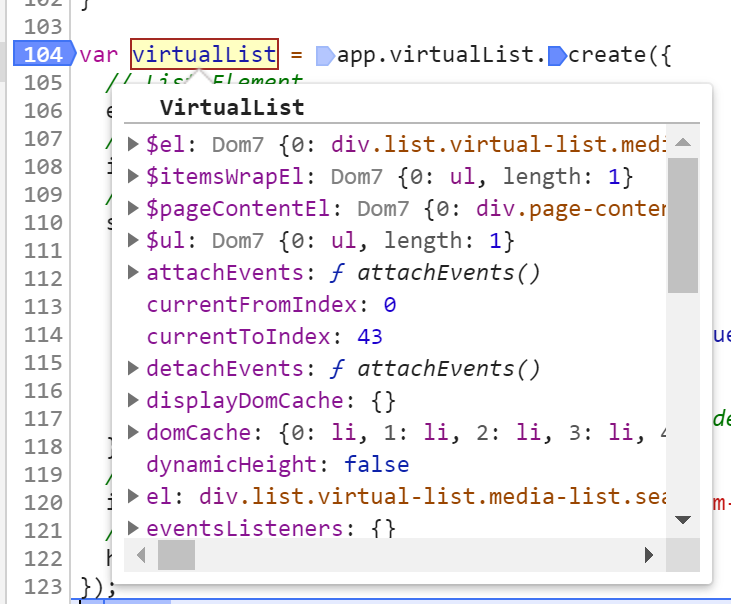
Cordova:
 ichingsoft
All 4 comments
В Кордове нужно по умолчанию работать в событии init(), а не просто в app.js, т.к. создание инстанса F7 откладывается до deviceready.
 shastox
on 9 Apr 2019
shastox
on 9 Apr 2019
This code is wrong:
- Why do you take example from v2 and adding it to v4?
- Adding this code to
app.jsis also wrong, it must be added to related page component file http://framework7.io/docs/router-component.html
 nolimits4web
on 11 Apr 2019
nolimits4web
on 11 Apr 2019
This code is wrong:
- Why do you take example from v2 and adding it to v4?
- Adding this code to
app.jsis also wrong, it must be added to related page component file http://framework7.io/docs/router-component.html
Thanks, I have moved the code to the following location. The problem is solved.
home.f7.html
  export default {
    on: {
      pageInit: function() {
        var self = this;
        var app = self.$app;

        // create virtualList
        const virtualList = app.virtualList.create({
        ...
В Кордове нужно по умолчанию работать в событии init(), а не просто в app.js, т.к. создание инстанса F7 откладывается до deviceready.
You gave me inspiration. After I set "initOnDeviceReady: false", the cordova can display normally, but my method seems to be wrong.
ichingsoft
on 11 Apr 2019
Related issues
 wakiem
·
4Comments
wakiem
·
4Comments
 nimo23
·
4Comments
nimo23
·
4Comments
 yeli19950109
·
3Comments
yeli19950109
·
3Comments
 J05HI
·
3Comments
J05HI
·
3Comments
 l2aelba
·
4Comments
l2aelba
·
4Comments
Most helpful comment
This code is wrong:
app.jsis also wrong, it must be added to related page component file http://framework7.io/docs/router-component.html