Framework7: Page gone white overlay after back from third page
Hi @nolimits4web
This is a (multiple allowed):
- [x] bug
- [ ] enhancement
- [ ] feature-discussion (RFC)
- Framework7 Version: 2.2.5
- Platform and Target: Android
- Live Link or JSFiddle: I'm afraid it would visible here,
What you did
In Page 2 (routes.js) :
{
    path: '/product/',
    url: './pages/produk.html',
    on: {
        pageInit: function () {
         app.preloader.show("blue");
         //var app = this.$app;
          var kos;
          //app.dialog.alert('Hello World!');
          console.log(id_hewan)
          app.request({
              url: 'some url',
              method: 'GET',
              dataType: 'json',
              cache:true,
              //send "query" to server. Useful in case you generate response dynamically
              success: function (data) {
                app.preloader.hide();
                for(var i=0;i < data.payload.length;i++){
                    $$(".product_list ul").append('<li data-bahasa="'+ data.payload[i].product_name +'" data-id="'+ data.payload[i].product_id +'" class="com_language"><a class="item-link item-content">'+ data.payload[i].product_id +' - '+ data.payload[i].product_name +'</a></li>');
                    /*$$(".product_list ul").append('<li class="item-content">'+
                         '<div class="item-inner">'+
                            '<div class="item-title com_language" data-id="'+ data.payload[i].product_id +'">'+ data.payload[i].product_name +'</div>'+
                          '</div>'+
                    '</li>');*/
                }

                $$(".com_language").on("click",function(){
                    id_hewan = $$(this).data("id");
                    app.router.navigate("/hewan/"+id_hewan+"/")
                });


              }
            })
        }
    }
  }
In page 3 (routes.js) - get detailed of item :
{
    path: '/hewan/:id/',
    content:
    '<div class="page">'+
        '<div class="navbar">'+
            '<div class="navbar-inner sliding">'+
              '<div class="left">'+
                '<a href="#" class="link back">'+
                  '<i class="icon icon-back"></i>'+
                  '<span class="ios-only">Kembali</span>'+
                '</a>'+
              '</div>'+
              '<div class="title title_page">...</div>'+
            '</div>'+
          '</div>'+
        '<div class="page-content">'+
          '<div class="block">'+
            '<img class="img_page" src="" />'+
            '<p class="desc_page">Menunggu teks...</p>'+
          '</div>'+
        '</div>'+
      '</div>',
    on: {
        pageInit: function () {
            //app.dialog.alert(localStorage.akadbaiq.hewan);
            app.preloader.show("blue");
            app.request({
                url: 'some url',
                method: 'GET',
                dataType: 'json',
                success: function (data) {
                    app.preloader.hide();
                    $$(".title_page").html(data.payload[0].product_id+" - "+data.payload[0].product_name);
                    $$(".desc_page").html(data.payload[0].product_description);
                    $$(".img_page").attr("src",data.payload[0].main_image).css("width","100%");
                    //app.dialog.alert(data.nama);
                    //app.dialog.alert(data.payload[0].product_name);
                },
                error: function (er){
                    if(is_error){
                        app.dialog.alert(data.status_msg);
                    }
                }
            });
        },
        pageAfterOut:function(){
            $$(document).trigger("click");
        }
    }
  }
Expected Behavior
Get white page on my item list removed after back from detail page (page 3).
Actual Behavior
There is white screen overlay on my list, so my list were gone or invisible after back from detail page (page 3).
P.S. I searched & tried with add stackPages:true & animateWithJS:true on the app.js but it did nothing and also put cacheIgnore.
Please give me a detail help so I can work on it.
Thank you & appreciate
 daksamedia
All 15 comments
Can't say much, can't see some issues in your code, do you have live example?
 nolimits4web
on 29 May 2018
nolimits4web
on 29 May 2018
@nolimits4web I emailed you few days ago. Please checked it out.
daksamedia
on 30 May 2018
@daksamedia didn't get any emails, if you need to send me a private message, better place for this is through PM messages on forum at http://forum.framework7.io
nolimits4web
on 31 May 2018
@nolimits4web I emailed you to [email protected] by subject
Screen white on Cordova Android
from [email protected]
I gave you my apk & video teaser.
daksamedia
on 1 Jun 2018
yep i have the same problem!
 ijry
on 2 Jun 2018
ijry
on 2 Jun 2018
@daksamedia still, didn't receive anything from you
nolimits4web
on 14 Jun 2018
i have the same problem.
 YaoaY
on 27 Aug 2018
YaoaY
on 27 Aug 2018
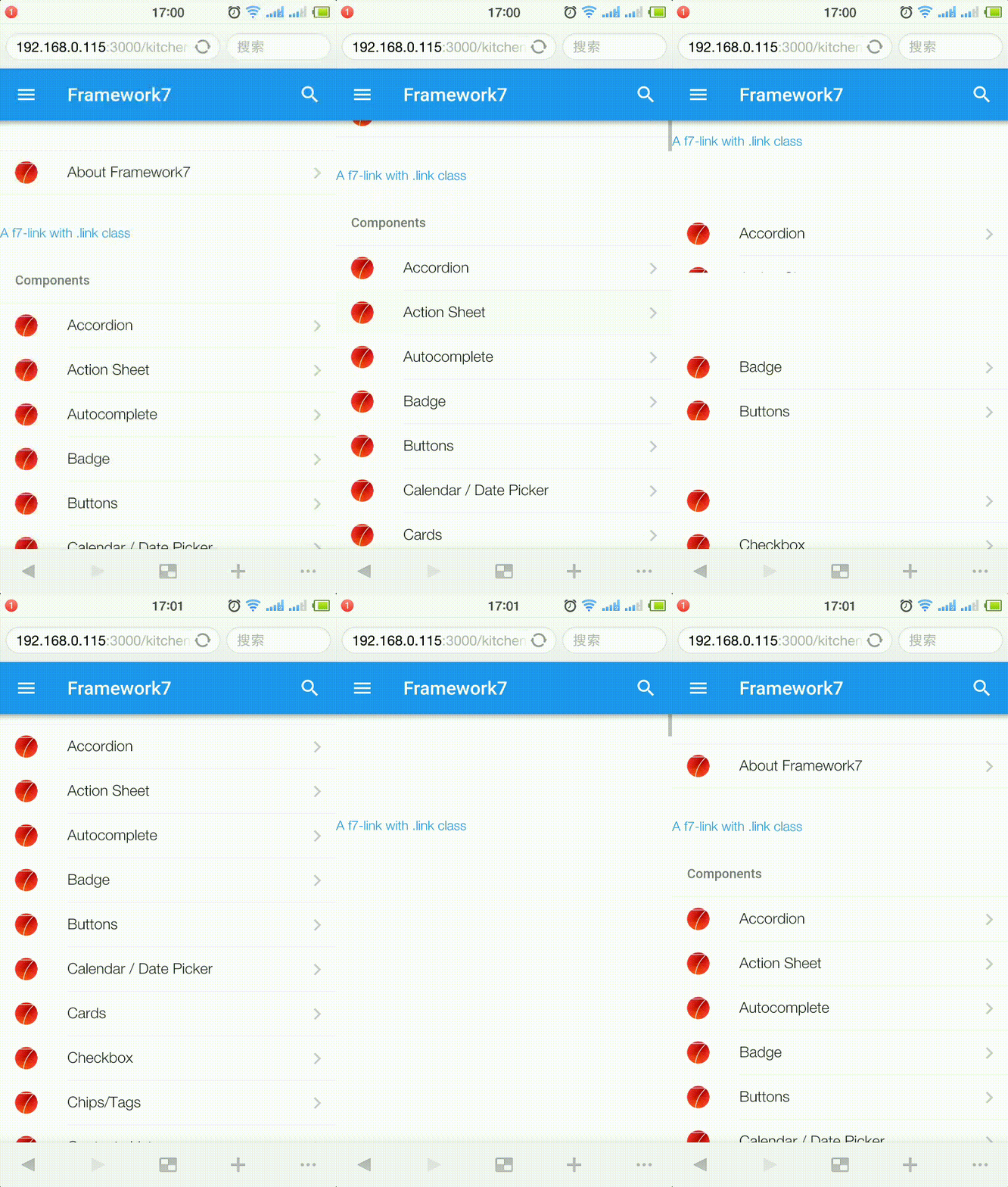
YaoaY
on 27 Aug 2018
Steps to reproduce the behavior:
- just modify Kithchen-sink (vue or core,doesn't matter) , add a '.link' class to any html tag in home.html.
<a class="link item-content item-link" href="/about/">
open home.html on an Android Browser.
Scroll home page down a little , and click any link to other page.
Swipe back or just click back link of navbar to back home page.
ps: this issue only occurs on Android device. PC Chrome or IOS act normally.
not only '.link' class cause this problem:
.swipe-wrapper,.button,.progressbar and more (i didn't tested all component)
@nolimits4web
YaoaY
on 27 Aug 2018
The more the first page scrolls down, the larger the area disappears 😭
YaoaY
on 27 Aug 2018
Temporay workaround:
 this.$f7.on('routeChanged', () => {
        this.$f7.dialog.preloader();
        setTimeout(() => {
          this.$f7.dialog.close();
        }, 1);
      });
The same problem occurred to me. Follow the steps below
1.Using iOS theme and running on Android device.
2.Open a page (page A, page-content enable ptr and infinite scroll) with lis. Scroll down a little
3.Click a item of this list and navigate to page B
4.Swipe back from page B to page A
5.List items on page A will disappear, but if you click at the list position, the 'onclick' event will be fired
 axis0093
on 14 Sep 2018
axis0093
on 14 Sep 2018
Another workaround:
.page-content {
    z-index:auto;
}
😢
YaoaY
on 8 Oct 2018
This issue has been automatically marked as stale because it has not had recent activity. It will be closed if no further activity occurs. Thank you for your contributions.
![stale[bot] picture](https://avatars3.githubusercontent.com/in/1724?v=4&s=40) stale[bot]
on 6 Jan 2019
stale[bot]
on 6 Jan 2019
This issue has been automatically closed due to inactivity. If this issue is still actual, please, create the new one.
stale[bot]
on 20 Jan 2019
Related issues
 vousys
·
5Comments
vousys
·
5Comments
 oVerde
·
3Comments
oVerde
·
3Comments
 J05HI
·
3Comments
J05HI
·
3Comments
 mesutgok
·
4Comments
vousys
·
4Comments
mesutgok
·
4Comments
vousys
·
4Comments