Framework: [8.x] Dynamic component HTML encodes props even when it shouldn't
- Laravel Version: 8.2.0
- PHP Version: 7.4.0
- Database Driver & Version: irrelevant
Description:
The difference between :foo="$bar" and foo="{{ $bar }}" is that :foo doesn't HTML-encode values. This is useful for passing raw strings to components such as the Trix editor.
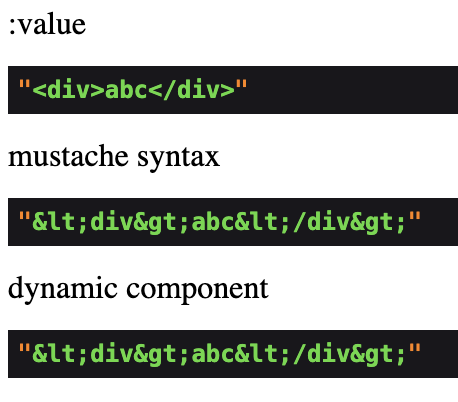
However, when you use :foo="$bar" on a dynamic component, the value is encoded before being passed to the target component.
Steps To Reproduce:
Action:
Route::get('/', function () {
    return view('welcome', [
        'html' => '<div>abc</div>',
    ]);
});
View:
<html>
<head>
<body>
    :value <x-foo :value="$html" />
    mustache syntax <x-foo value="{{ $html }}" />
    dynamic component <x-dynamic-component component="foo" :value="$html" />
</body>
</head>
Component:
@props([
    'value',
])

<div>
    @dump($value)
</div>
Result:
 stancl
All 29 comments
Indeed looks like a bug to me.
 driesvints
on 15 Sep 2020
driesvints
on 15 Sep 2020
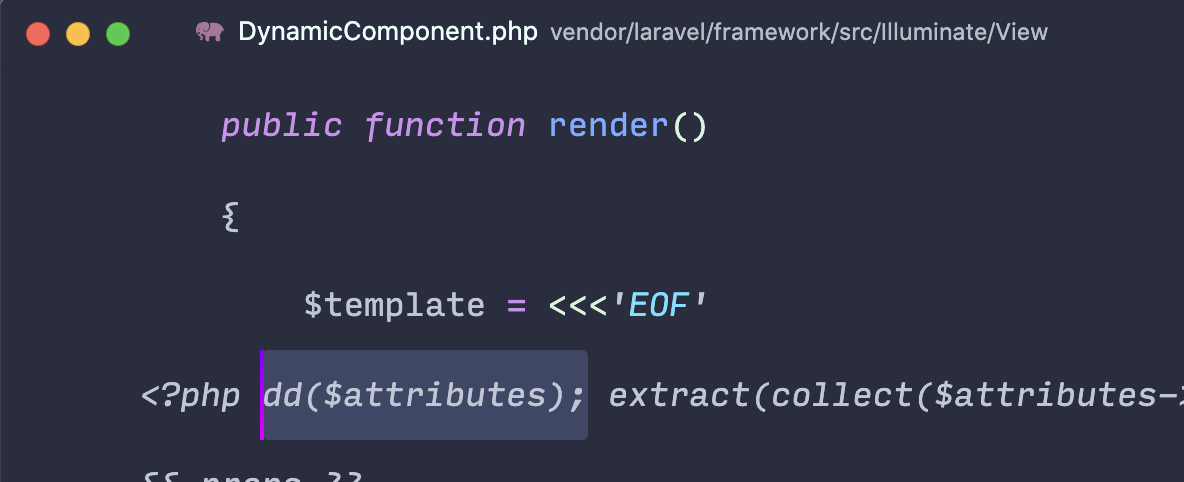
I found that the issue is not the generated template from DynamicComponent:

It uses :value correctly.
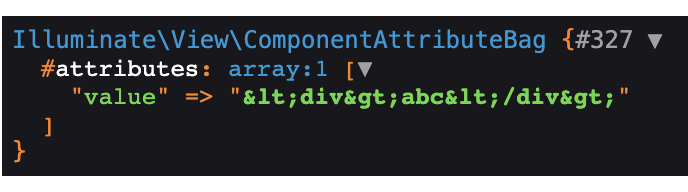
The issue is the attributes that are passed to the dynamic component:
stancl
on 15 Sep 2020
I think the issue is ComponentTagCompiler::attributesToString() calling Illuminate\View\Compilers\BladeCompiler::sanitizeComponentAttribute in the output code.

In the following call in ComponentTagCompiler::componentString()

stancl
on 15 Sep 2020
Adding false as the second argument ($escapeBound) to the above highlighted attributesToString() call fixes this.
Therefore, we could do something like this:
if ($class === DynamicComponent::class) {
    $escapeAttributes = false;
} else {
    $escapeAttributes = true;
}

return " @component('{$class}', '{$component}', [".$this->attributesToString($parameters, $escapeBound = false).'])"
<?php $component->withAttributes(['.$this->attributesToString($attributes->all(), $escapeAttributes).']); ?>';
But I'm not sure if we always want to disable escaping attributes for dynamic components?
stancl
on 15 Sep 2020
Does the component your dynamic component is rendering have a class or is it anonymous?
 taylorotwell
on 15 Sep 2020
taylorotwell
on 15 Sep 2020
It's anonymous
stancl
on 15 Sep 2020
Out of curiosity is the behavior any different when it has a class and body is a property of the class injected through its constructor?
taylorotwell
on 15 Sep 2020
Using a class-based component seems to work.
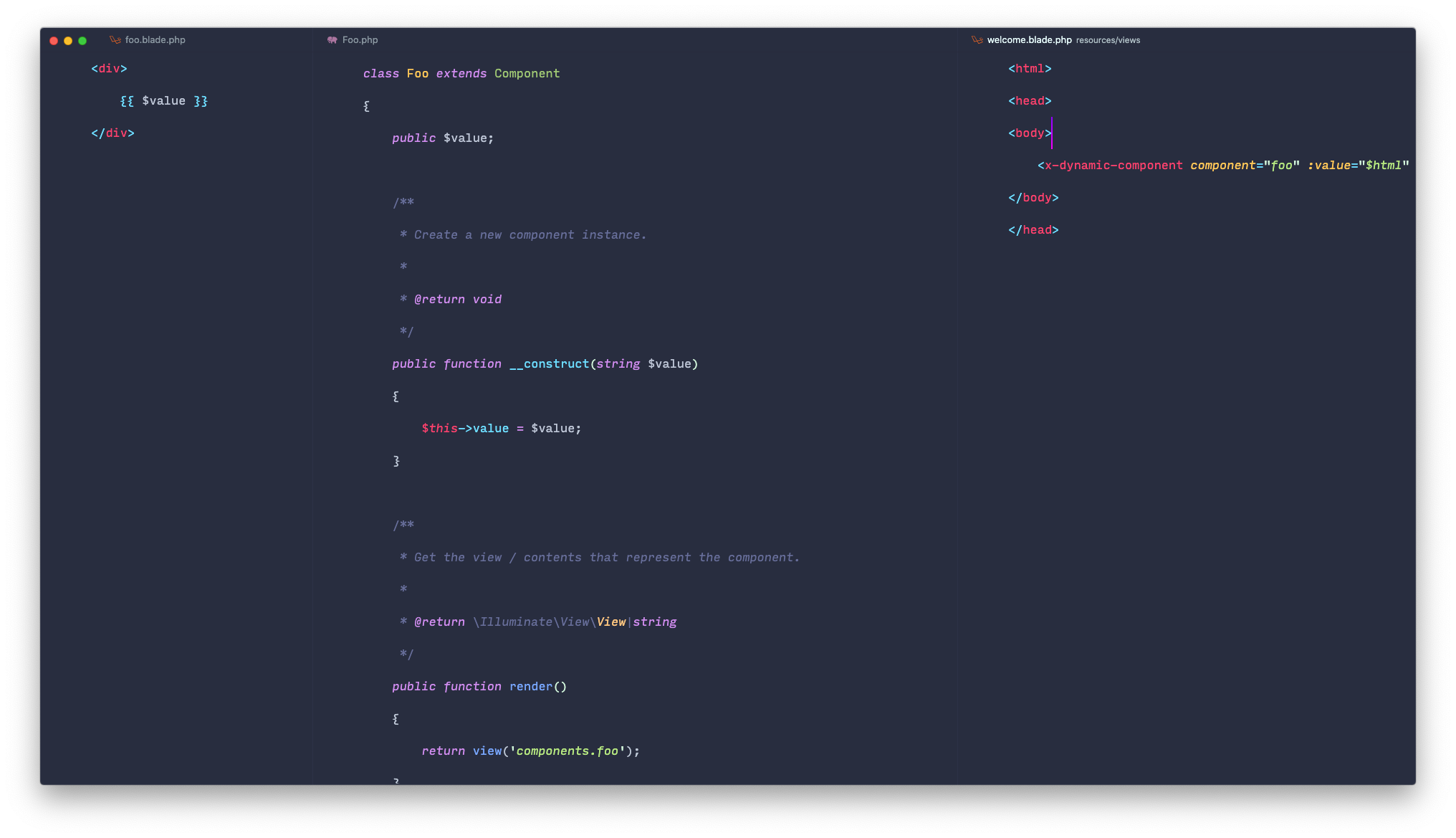
And the moment I revert to an anonymous component, it stops working again.

stancl
on 15 Sep 2020
Yeah, it probably has something to do with... when we do an anonymous component we do not know ahead of time what is data and what is attributes... so we have to treat everything as attributes and let people use @props... so, like attributes, they are escaped to protect against XSS.
Your best bet may be just to use a class for this component.
taylorotwell
on 15 Sep 2020
@taylorotwell What do you think about my code suggestion above? To better visualize it, I'll make a diff:
+if ($class === DynamicComponent::class) {
+    $escapeAttributes = false;
+} else {
+    $escapeAttributes = true;
+}

return " @component('{$class}', '{$component}', [".$this->attributesToString($parameters, $escapeBound = false).'])
-<?php $component->withAttributes(['.$this->attributesToString($attributes->all()).']); ?>';
+<?php $component->withAttributes(['.$this->attributesToString($attributes->all(), $escapeAttributes).']); ?>';
This basically disables the attribute sanitization if the currently compiled component is dynamic component.
I think this should be OK because it will not do any sanitization on the first run (when compiling DynamicComponent), but when this runs again for the target component, it will sanitize what should be sanitized.
So this will literally just let the dynamic component pass data through to the target component and let it deal with it how it should. At least from my understanding of the compiler code.
stancl
on 15 Sep 2020
Hit the same issue yesterday when passing an object into a dynamic anonymous component.
I added a class so that it worked but would be pretty sweet to get it working without needing the class.
 colinhall17
on 16 Sep 2020
colinhall17
on 16 Sep 2020
@taylorotwell , @driesvints
I'm finding its not working even with a class based component file with objects. Have tried with both registering the component and leaving it in the default namespace
Laravel v8.3
PHP v7.3
AppProviders\AppServiceProvider
public function boot()
{
        Blade::component('test-component', TestComponent::class);
}
App\View\Components\TestComponent
public $user;

    public function __construct($user)
    {
        $this->user = $user;
    }

    public function render()
    {
        return view('layout.component');
    }
in blade file
@php($partial = 'test-component')
@php($user = \App\Models\User::first())

<x-dynamic-component :component="$partial" :user="$user"/>
also tried
@php($user = \App\Models\User::first())

<x-dynamic-component component="test-component" :user="$user"/>
in layout.component.blade.php
{{ dd($user) }}
The output is the encoded string:-
"{"id":1,"name":"Gregory Langworth MD","email":"[email protected]","email_verified_at" ....
Also dd'ing the user in the Component Class file is the same.
colinhall17
on 16 Sep 2020
@stancl I think your change seems correct. I have pushed a patch.
taylorotwell
on 16 Sep 2020
Thanks Taylor
stancl
on 16 Sep 2020
For anyone encountering this in the future: When you're accessing the value from the attribute bag, it will be encoded. Make sure you use @props().
stancl
on 16 Sep 2020
Works perfectly,
Thanks @stancl and @taylorotwell
colinhall17
on 16 Sep 2020
@taylorotwell I don't want to open another issue so I'll ask you here as it's related.
So, a few days ago I opened that issue about passing dynamic attributes. To remind you, I have:
- dynamic blade component
- dynamic attributes
I need to be able to pass attributes from a variable to the component.
So, the two solutions I found:
<x-dynamic-component :component="$foo->component" some-attr="foo" :attributes="$foo->attributes">
and
@php($attributes = $foo->attributes)
<x-dynamic-component :component="$foo->component" some-attr="foo" {{ $attributes }}>
The second solution works because of the regex that looks directly for {{ $attributes }}, and the $foo->attributes variable is an instance of ComponentAttributeBag.
However, passing attributes like this breaks the encoding.
For example:
<x-dynamic-component :component="$foo->component()" :attributes="$foo->attributes()" :value="$bar" />
Inside the target component, $value will be HTML encoded.
If I remove attributes, it starts working correctly again — no encoding.
However, I need to be able to pass attributes from an array.
How would this be possible?
I'm discovering so many strange Blade-x bugs just because of this use case :/ Passing dynamic attributes to a dynamic component. Basically the equivalent of @component($component, $data).
stancl
on 16 Sep 2020
Gonna re-open so @taylorotwell can check in on that.
driesvints
on 17 Sep 2020
Why don't you just call it something else besides "attributes"? Overriding the attributes property is just going to cause problems IMO. It would help to know what your actual end goal is. What are you trying to accomplish?
taylorotwell
on 18 Sep 2020
@taylorotwell In PHP, I do some logic to find the components (based on the route and other things), and I have some some data that I want to pass to the component.
I need to be able to put things into the attribute bag, because inside that component, I use attribute forwarding.
So to show some code, let's say I have:
$component = 'my-trix-component';
$data = ['foo' => 'bar', 'class' => 'form-input'];
I use:
<x-dynamic-component :component="$component" :attributes="$data">
Inside my-trix-component, I do:
@props([
    'foo',
])

... some logic with $foo

<input type="text" {{ $attributes }}>
So I need to be able to put stuff into $attributes, because inside the target component, I use attribute forwarding.
stancl
on 18 Sep 2020
Hmm, we may just not have considered this use case so I'm not really sure. You can't just do <x-dynamic-component component="foo" {{ $attributes }} /> I'm assuming?
taylorotwell
on 18 Sep 2020
@taylorotwell Yeah, as I said here: https://github.com/laravel/framework/issues/34346#issuecomment-693648580 it gets encoded when passed like that.
stancl
on 18 Sep 2020
If you'd be interested in the specifics: When you do
<x-dynamic-component :component="$foo" foo="bar" {{ $attributes }} />
where $attributes has ['class' => 'form-input'], the dynamic component would have:
- props of
['component' => $foo](because it's a thing dynamic component explicitly accepts) - attributes of
['foo' => 'bar', 'attributes' => ['class' => 'form-input']]- as you can see, stuff passed using{{ $attributes }}ends up in a nested'attributes'key inside the actual attribute bag.
At least I believe it's this way - I was debugging this the other day.
stancl
on 18 Sep 2020
I'm not sure what your question is.
taylorotwell
on 18 Sep 2020
The second comment was just a pointer for debugging this.
The thing you asked:
Hmm, we may just not have considered this use case so I'm not really sure. You can't just do
<x-dynamic-component component="foo" {{ $attributes }} />I'm assuming?
doesn't work. When I pass attributes like that, they get encoded.
There should be a way to pass dynamic attributes to dynamic components without having them broken by encoding.
stancl
on 18 Sep 2020
Can you post some full code examples of something that is broken. Not just small example snippets but actual code I can copy and paste and that I can use to diagnose and view the problem? In your previous example where you have :attributes="$data" is $data literally a plain array? I need a fuller example that I can copy and paste into a project.
taylorotwell
on 18 Sep 2020
Sure.
Route:
Route::get('/', function () {
    return view('welcome', [
        'component' => 'foo',
        'value' => '<div>abc</div>',
        'myAttributes' => new ComponentAttributeBag([
            'foo' => 'bar',
        ]),
    ]);
});
welcome.blade.php
<html>
<head>
<body>
    <x-dynamic-component :component="$component" :attributes="$myAttributes" :value="$value" />
</body>
</head>
foo.blade.php
@props([
    'value',
])

<div>
    @dump($value)
</div>
Result:

- When you remove the
:attributes="$myAttributes"call it works OK. - When you use
{{ $attributes }}it's as broken as:attributes="$myAttributes". - Attributes need to be passed as a
ComponentAttributeBag, otherwise you can't use them well inside the component. Therefore, array$attributesdoesn't work.
stancl
on 19 Sep 2020
@stancl can you try my latest commit to 8.x? I haven't tagged it yet... make sure to clear your view cache.
I'm using it like this:

taylorotwell
on 21 Sep 2020
@taylorotwell Awesome! Both {{ $attributes }} and :attributes="$myAttributes" work perfectly now.
Thanks a lot!
stancl
on 21 Sep 2020
Related issues
 jackmu95
·
3Comments
jackmu95
·
3Comments
 gabriellimo
·
3Comments
gabriellimo
·
3Comments
 klimentLambevski
·
3Comments
klimentLambevski
·
3Comments
 progmars
·
3Comments
progmars
·
3Comments
 YannPl
·
3Comments
YannPl
·
3Comments
Most helpful comment
For anyone encountering this in the future: When you're accessing the value from the attribute bag, it will be encoded. Make sure you use
@props().