Framework: TreeGrid expansion not working correctly
I found out that since Vaadin 8.9 the expansion of 3rd level child entries in a TreeGrid is not working properly if the (2nd level) parent entry is surrounded by entries which don't have child entries. To understand me better please have a look at my screenshot:
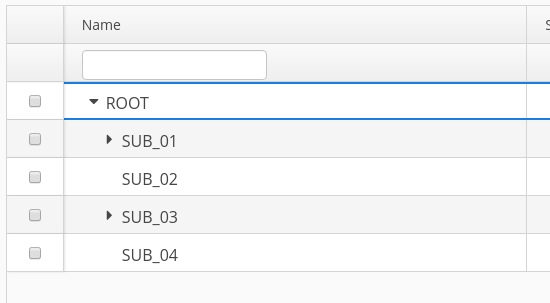
You can see that we have the 2nd level entries "SUB_01" and "SUB_03" which have child entries and another entry "SUB_02" which has no child entries. When I now click on "SUB_01" to expand its children, the TreeGrid will look a little bit strange and the last row disappears. The same thing happens if I expand "SUB_03". When you then try to collapse your expanded entry, the complete TreeGrid will collapse.

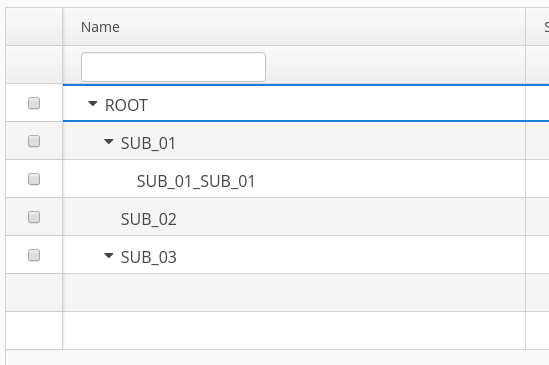
You can reproduce this issue when building a TreeGrid with the same data structure as I have. I used Vaadin 8.9.1 but the issue is also present in Vaadin 8.9.0. I was not able to reproduce this issue with a Vaadin 8.8.x version.
The expected behavior as it also was in Vaadin < 8.9 is visible in the following screenshot:

For my TreeGrid I am getting my data out of an AbstractBackEndDataProvider implementation in combination with the HierarchicalDataProvider interface.
 jbreitung
All 6 comments
I've been contacted about similar kind of problem, so it seems that there is something wrong.
Would it be possible for you to check with "?debug" url parameter and to see if there is client side exception?
Can you share your test application?
 TatuLund
on 16 Oct 2019
TatuLund
on 16 Oct 2019
Hi, I've tried to get some logs in my browser but it seems that there are no client side exceptions.
Unfortunately it is not possible to share my application because it's a real project and I dont have a test application for this specific issue.
jbreitung
on 16 Oct 2019
Attached is a test case to reproduce this issue.
Expand node "1key0" and then try to click "2key9"... every item after "2key8" is not clickable and this exception is thrown:
com.google.gwt.core.client.JavaScriptException: (TypeError) : right-hand side of 'in' should be an object, got null
`public class MyUI extends UI {
public class B {
    private Object key;
    private String value;

    public B(Object inKey, String inValue) {
        key = inKey;
        value = inValue;
    }

    public Object getKey() {
        return key;
    }

    public void setKey(Object inKey) {
        key = inKey;
    }

    public String getValue() {
        return value;
    }

    public void setValue(String inValue) {
        value = inValue;
    }
}

@Override
protected void init(VaadinRequest vaadinRequest) {
    final VerticalLayout layout = new VerticalLayout();

    B parent = null;
    TreeGrid<B> tree = new TreeGrid<>(B.class);
    tree.setColumns("key", "value");
    tree.setHierarchyColumn("key");
    TreeData<B> treeData = new TreeData<>();

    for (int i = 0; i < 2; i++) {
        B val = new B("1key" + i, "1value" + i);
        treeData.addItem(parent, val);
        for (int j = 0; j < 10; j++) {
            B v = new B("2key" + j, "2value" + j);
            treeData.addItem(val, v);
        }
    }
    TreeDataProvider<B> dataProvider = new TreeDataProvider<>(treeData);
    tree.setDataProvider(dataProvider);
    tree.setHeight("500px");

    layout.addComponent(tree);

    setContent(layout);
}

@WebServlet(urlPatterns = "/*", name = "MyUIServlet", asyncSupported = true)
@VaadinServletConfiguration(ui = MyUI.class, productionMode = false)
public static class MyUIServlet extends VaadinServlet {
}
}`
 sirbris
on 16 Oct 2019
sirbris
on 16 Oct 2019
This is probably regression due this patch https://github.com/vaadin/framework/pull/11438
We did major fix in Escalator, since there were severe problems. Now it seems that there some corner case issue, that in some occasions when expanding the TreeGrid, there is row data missing in client side or something like that, which triggers exception when TreeGrid hierarchy renderers ClickHandler is executed.
I have observed that order sequence of expanding the nodes matter. I.e. with certain order the exception is not triggered while with different order it can be triggered on the same node.
TatuLund
on 19 Oct 2019
And another example to reproduce the problem:
 private TreeGrid addTreeGrid(){
        TreeData<Integer> treeData = new TreeData<>();
        treeData.addItems(null, 10, 5);
        treeData.addItems(10, 9, 8, 7, 6);
        treeData.addItems(5, 4, 3, 2, 1);
        treeData.addItems(1, 0, -1, -2, -3, -4);

        TreeDataProvider<Integer> treeDataProvider = new TreeDataProvider<>(treeData);

        TreeGrid<Integer> tree = new TreeGrid<>();
        tree.setCaption("Tree");
        tree.setSizeFull();
        tree.setDataProvider(treeDataProvider);
       tree.addComponentColumn(integer -> {
            VerticalLayout verticalLayout = new VerticalLayout();
            verticalLayout.addComponent(new Label(integer.toString()));
            return verticalLayout;
        });
        tree.addColumn(i->String.valueOf(i));
        treeDataProvider.refreshAll();
        return tree;
    }
In this case content inside VerticalLayout is not rendered at all inside the cell and in the second column value -4 is missing (expand 5,expand 1 and -4 is missing)
 anasmi
on 21 Oct 2019
anasmi
on 21 Oct 2019
Hi,
We have the same issue
 pinonpierre
on 21 Oct 2019
pinonpierre
on 21 Oct 2019
Related issues
 tomislavi
·
6Comments
anasmi
·
5Comments
tomislavi
·
6Comments
anasmi
·
5Comments
 vaadin-bot
·
7Comments
vaadin-bot
·
7Comments
 knoell-it-service
·
4Comments
knoell-it-service
·
4Comments
 Wnt
·
7Comments
Wnt
·
7Comments
Most helpful comment
Attached is a test case to reproduce this issue.
Expand node "1key0" and then try to click "2key9"... every item after "2key8" is not clickable and this exception is thrown:
`public class MyUI extends UI {
}`