Framework: Request allFiles() Method Returns Wrong Data After Modification
- Laravel Version: 5.7.19
- PHP Version: 7.2
- Database Driver & Version: MySql 5.7
Description:
The InteractsWithInput.php Concern will return the wrong files array if a user has at any point modified the files of the request.
I'm fine submitting a PR for this, I wanted to check first if this is considered a bug.
Steps To Reproduce:
- Access a controller's filled Request param that has one or more files:
public function saveModel(Request $request)
- Modify the FileBag by calling the
replacemethod
// Modify files in whichever way you wish; remove, add, or edit
$newFiles = $request->allFiles();
$newFiles = $files->forget('some-key')

// Now call the replace method
$problemRequest = (clone $request)->files->replace($newFiles);
- Observe that the files array is wrong when calling allFiles()
dd($problemRequest->allFiles());
Steps To Reproduce: Why It Happens
Here's the method code:
https://github.com/illuminate/http/blob/master/Concerns/InteractsWithInput.php#L308
 public function allFiles()
    {
        $files = $this->files->all();
        return $this->convertedFiles
                    ? $this->convertedFiles
                    : $this->convertedFiles = $this->convertUploadedFiles($files);
    }
This method will return the cached convertedFiles property instead of the actual updated files (as would be correct with the $files variable there).
Happy to submit a PR on a preferred solution. Cheers.
 zschuessler
All 14 comments
Your example doesn't seems to be valid. Where does $files come from?
 driesvints
on 4 Feb 2019
driesvints
on 4 Feb 2019
It's probably best to just copy/paste the entire controller method.
driesvints
on 4 Feb 2019
Sorry about that, here's a working example I just tested:
    // Original request has a single file by key `image`
    $requestFile = $request->files->get('image');

    // Let's clone the request and copy the file, but change its key
    $modifiedRequest = clone $request;
    $modifiedRequest->files->replace([
        'modifiedKey' => $requestFile
    ]);

    // Here, $modifiedRequest correctly shows the changed key
    var_dump($modifiedRequest->files);

    // Here, the `allFiles` method shows the original cached array, with key `image`
    dd($modifiedRequest->allFiles());
You're 100% sure that this is all the code that's involved? Because from looking at the code I believe it should indeed return the modified key. The only exception being if an internal or external call was made to the allFiles method.
driesvints
on 5 Feb 2019
Were you not able to duplicate with the updated code? It is correct for me.
In the allFiles method, if files were at any point converted, it will return the cached converted files. This happens when the file upload type is a Symfony UploadedFile, which then gets converted in the request (and thus, setting the convertedFiles property).
I suspect if you aren't able to duplicate, for whatever reason your UploadedFile was never a Symfony type, so no conversion took place.
zschuessler
on 5 Feb 2019
@zschuessler I haven't tried it out yet manually because I need to focus on other things atm. I'll try to look into this at a later time.
Any help with this is much appreciated.
driesvints
on 7 Feb 2019
@driesvints
Just tested with laravel 5.7.19, used code from snippet above
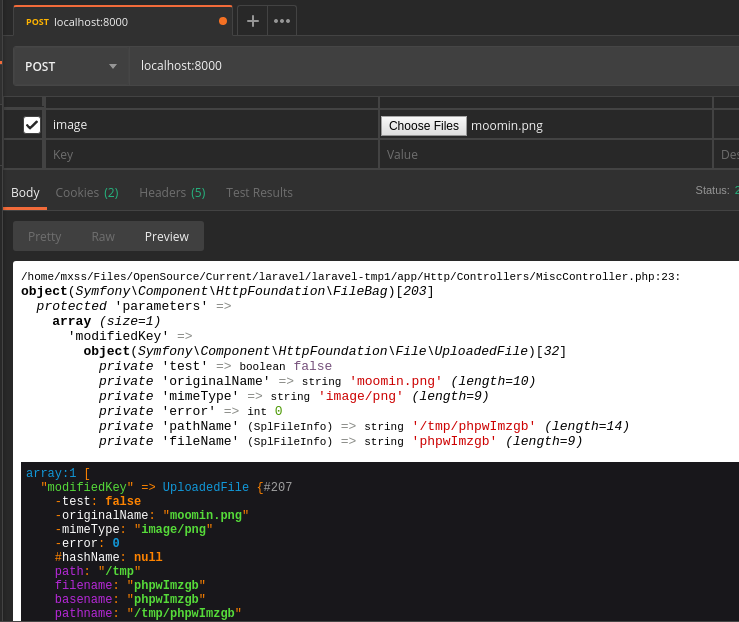
Here's full controller code:
<?php


namespace App\Http\Controllers;


use Illuminate\Http\Request;

class MiscController extends Controller
{
    public function post(Request $request)
    {
        // Original request has a single file by key `image`
        $requestFile = $request->files->get('image');

        // Let's clone the request and copy the file, but change its key
        $modifiedRequest = clone $request;
        $modifiedRequest->files->replace([
            'modifiedKey' => $requestFile
        ]);

        // Here, $modifiedRequest correctly shows the changed key
        var_dump($modifiedRequest->files);

        // Here, the `allFiles` method shows the original cached array, with key `image`
        dd($modifiedRequest->allFiles());
    }
}
 mx2s
on 9 Jun 2019
mx2s
on 9 Jun 2019
I get the correct modified key in the latest Laravel 5.8 release with the snippet above:
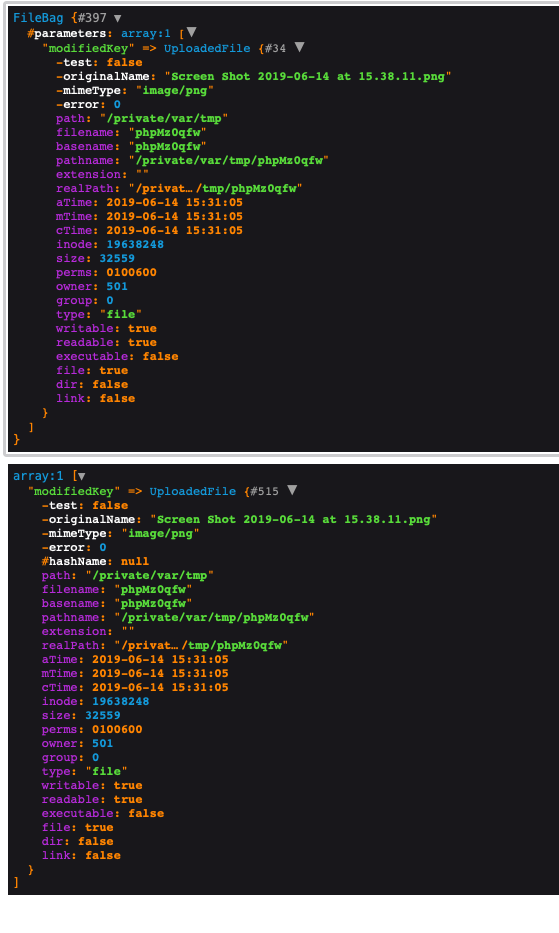
Can you try to upgrade to 5.8 and see if the problem persists?
driesvints
on 14 Jun 2019
Duplicated this, so glad after googling someone else had ran into this. In our instance, we developed a trait to convert base64 image strings into an actual image. Was a hacky fix to prevent breaking validation for old/new clients.
So after we did the conversion, we would shove that new image into the files array using.
        $this->files->add($fileArray);
        $this->merge($fileArray);
Not helpful without full context, but $fileArray is just a bunch of UploadedFiles, indexed by the same key that the posted base64 image string was.
Why this became an issue is beyond me. The only change to the area was refactoring to a null-coalescing operator - https://github.com/laravel/framework/commit/7a7cacc3fd02d7d4c596c1a0f8af3c5b7a2990b4
After more digging though - I think we need to revert it. It is not the same check. The first one is a "truthy" check and 2nd is a "emptyness" check.
 iBotPeaches
on 25 Jul 2019
iBotPeaches
on 25 Jul 2019
Going to close this as I can't reproduce this.
driesvints
on 30 Sep 2019
@driesvints I can still reproduce by calling the allFiles() method before modifying the request. This method caches files into an internal class property, which is then used regardless of any modified contents thereafter.
@iBotPeaches is correct in that the null coalescing operator does not fix the problem, only changes the nature in which the problem presents itself with the truthy vs emptiness check.
Add a simple html form with an input named "original_uploaded_file", here's the route to duplicate:
Route::post('test', function(\Illuminate\Http\Request $request) {
    // If we call this here, files get cached and causes problems
    $request->allFiles();

    // Original request has a single file by key `original_uploaded_file`
    $requestFile = $request->files->get('original_uploaded_file');

    // Let's clone the request and add another file to the array
    $modifiedRequest = clone $request;
    $modifiedRequest->files->add([
        'modified_request_file' => $requestFile
    ]);

    // Here, $modifiedRequest correctly shows two keys: the original, and the one we just added
    var_dump($modifiedRequest->files->all());

    // Here, the `allFiles` method shows the original cached array only, with key `original_uploaded_file`
    dd($modifiedRequest->allFiles());
});
So either we don't cache the files internally, or we make it evident that allFiles really means get a copy of the cached files.
zschuessler
on 30 Sep 2019
@driesvints this should be reopened. Let me know if you need anything, I confirmed in latest major version of Laravel.
zschuessler
on 7 Oct 2019
@zschuessler I finally managed to reproduce this with you code snippet and I think I know what's going wrong. I'll send in a PR.
driesvints
on 11 Oct 2019
Actually, the actual problem is something different. You don't even need to clone the object to reproduce this:
    // If we call this here, files get cached and causes problems
    $request->allFiles();

    // Original request has a single file by key `original_uploaded_file`
    $requestFile = $request->files->get('original_uploaded_file');

    $request->files->add([
        'modified_request_file' => $requestFile
    ]);

    // Here, $modifiedRequest correctly shows two keys: the original, and the one we just added
    dump($request->files->all());

    // Here, the `allFiles` method shows the original cached array only, with key `original_uploaded_file`
    dd($request->allFiles());
The thing is that the caching happens and then the underlying $files property is modified but because of the caching it can't be changed anymore. The caching is needed because converting the files property to UploadedFile instances can be quite intensive if that's done several times during a request.
I've also just realized that you're not meant to manipulate the request in this way as the files property is more like a read-only property. What I suggest you do is that you pull the files from it in a separate self-owned variable or object and then add any files you want there.
So I'm sorry to say but this will be a no-fix.
driesvints
on 11 Oct 2019
Related issues
 lzp819739483
·
3Comments
lzp819739483
·
3Comments
 kerbylav
·
3Comments
kerbylav
·
3Comments
 progmars
·
3Comments
progmars
·
3Comments
 Anahkiasen
·
3Comments
Anahkiasen
·
3Comments
 CupOfTea696
·
3Comments
CupOfTea696
·
3Comments
Most helpful comment
@zschuessler I finally managed to reproduce this with you code snippet and I think I know what's going wrong. I'll send in a PR.