Framework: The Tooltip of a MenuItem inside a Window is not displayed
Expected:
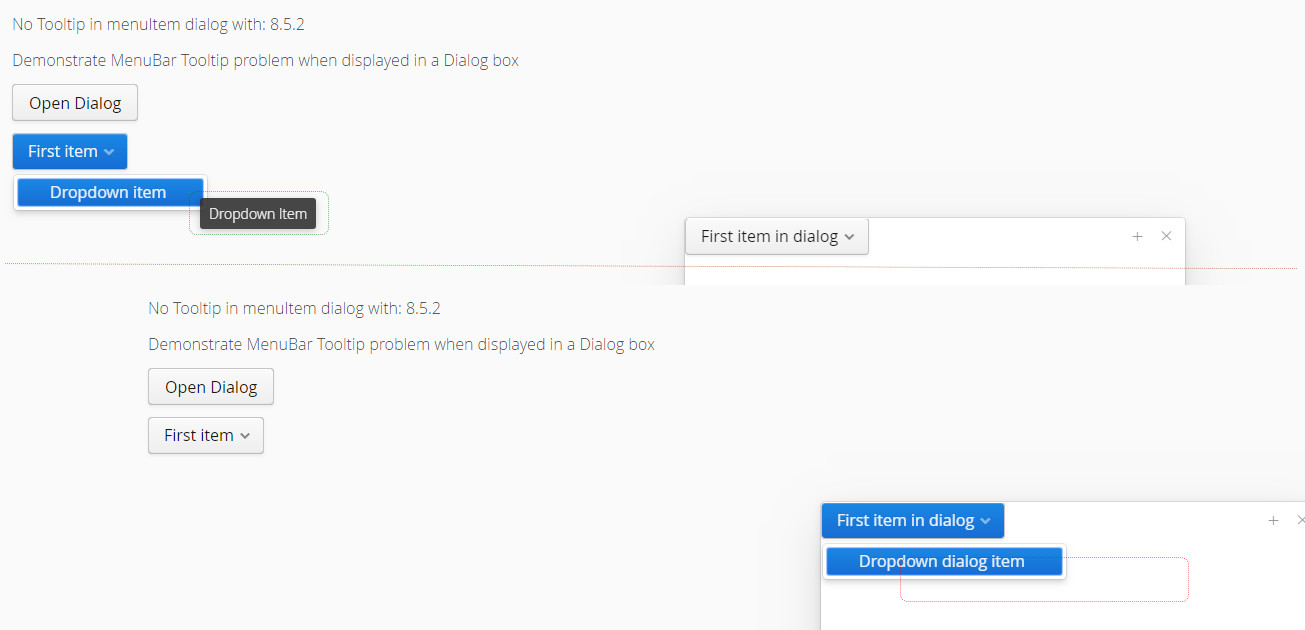
The Tooltip of a MenuItem should also be displayed when the MenuBar is displayed in a Window.
Actual:
No Tooltip is displayed for MenuItems inside a Window
Steps to reproduce:
- Show MenuItem Tooltip outside Window -> :heavy_check_mark:
- Show MenuItem Tooltip inside Window -> :x:
Affected versions:
Issue can be observed with latest Vaadin 8.5.2 release
[UPDATE 2019-07-25]
Issue can still be observed with the latest Vaadin 8.8.5 release
Sample project with failing Testbench test case:
https://github.com/FOCONIS/vaadintooltipinmenuitem
Sample code:
        final VerticalLayout layout = new VerticalLayout();
        layout.addComponent(new Label("No Tooltip in menuItem dialog with: " +
                com.vaadin.shared.Version.getFullVersion()));
        Label issueLabel = new Label("Demonstrate MenuBar Tooltip problem when displayed in a Dialog box");
        issueLabel.setContentMode(ContentMode.HTML);
        layout.addComponent(issueLabel);

        Button openDialogButton = new Button("Open Dialog");
        openDialogButton.addClickListener(event -> {
            Window dialog = new Window();
            dialog.center();
            dialog.setWidth("500px");
            dialog.setHeight("500px");

            MenuBar dialogmenuBar = new MenuBar();
            MenuItem menuItem = dialogmenuBar.addItem("First item in dialog");
            MenuItem firstDropdownItem = menuItem.addItem("Dropdown dialog item");
            firstDropdownItem.setDescription("Dropdown dialog Item Tooltip");

            dialog.setContent(dialogmenuBar);
            addWindow(dialog);
        });

        MenuBar menuBar = new MenuBar();
        MenuItem menuItem = menuBar.addItem("First item");
        MenuItem firstDropdownItem = menuItem.addItem("Dropdown item");
        firstDropdownItem.setDescription("Dropdown Item");

        layout.addComponent(openDialogButton);

        layout.addComponent(menuBar);
        layout.setMargin(true);
        layout.setSpacing(true);

        setContent(layout);
 focbenz
All 8 comments
Hello there!
We are sorry that this issue hasn't progressed lately. We are prioritizing issues by severity and the number of customers we expect are experiencing this and haven't gotten around to fix this issue yet.
There are a couple of things you could help to get things rolling on this issue (this is an automated message, so expect that some of these are already in use):
- Check if the issue is still valid for the latest version. There are dozens of duplicates in our issue tracker, so it is possible that the issue is already tackled. If it appears to be fixed, close the issue, otherwise report to the issue that it is still valid.
- Provide more details how to reproduce the issue.
- Explain why it is important to get this issue fixed and politely draw others attention to it e.g. via the forum or social media.
- Add a reduced test case about the issue, so it is easier for somebody to start working on a solution.
- Try fixing the issue yourself and create a pull request that contains the test case and/or a fix for it. Handling the pull requests is the top priority for the core team.
- If the issue is clearly a bug, use the Warranty in your Vaadin subscription to raise its priority.
Thanks again for your contributions! Even though we haven't been able to get this issue fixed, we hope you to report your findings and enhancement ideas in the future too!
![stale[bot] picture](https://avatars.githubusercontent.com/in/1724?v=4&s=40) stale[bot]
on 25 Feb 2019
stale[bot]
on 25 Feb 2019
Oh noes ... such a nice bug description. Please try and fix this annoyance.
focbenz
on 25 Feb 2019
Hello there!
We are sorry that this issue hasn't progressed lately. We are prioritizing issues by severity and the number of customers we expect are experiencing this and haven't gotten around to fix this issue yet.
There are a couple of things you could help to get things rolling on this issue (this is an automated message, so expect that some of these are already in use):
- Check if the issue is still valid for the latest version. There are dozens of duplicates in our issue tracker, so it is possible that the issue is already tackled. If it appears to be fixed, close the issue, otherwise report to the issue that it is still valid.
- Provide more details how to reproduce the issue.
- Explain why it is important to get this issue fixed and politely draw others attention to it e.g. via the forum or social media.
- Add a reduced test case about the issue, so it is easier for somebody to start working on a solution.
- Try fixing the issue yourself and create a pull request that contains the test case and/or a fix for it. Handling the pull requests is the top priority for the core team.
- If the issue is clearly a bug, use the Warranty in your Vaadin subscription to raise its priority.
Thanks again for your contributions! Even though we haven't been able to get this issue fixed, we hope you to report your findings and enhancement ideas in the future too!
stale[bot]
on 25 Jul 2019
The issue can still be verified in Vaadin 8.8.5 - and I have created a sample project with failing Testbench test case to illustrate the problem:
https://github.com/FOCONIS/vaadintooltipinmenuitem
[UPDATE] 2020-01-04 The issue can still be observed with latest Vaadin 8.9.4
focbenz
on 25 Jul 2019
Hello there!
We are sorry that this issue hasn't progressed lately. We are prioritizing issues by severity and the number of customers we expect are experiencing this and haven't gotten around to fix this issue yet.
There are a couple of things you could help to get things rolling on this issue (this is an automated message, so expect that some of these are already in use):
- Check if the issue is still valid for the latest version. There are dozens of duplicates in our issue tracker, so it is possible that the issue is already tackled. If it appears to be fixed, close the issue, otherwise report to the issue that it is still valid.
- Provide more details how to reproduce the issue.
- Explain why it is important to get this issue fixed and politely draw others attention to it e.g. via the forum or social media.
- Add a reduced test case about the issue, so it is easier for somebody to start working on a solution.
- Try fixing the issue yourself and create a pull request that contains the test case and/or a fix for it. Handling the pull requests is the top priority for the core team.
- If the issue is clearly a bug, use the Warranty in your Vaadin subscription to raise its priority.
Thanks again for your contributions! Even though we haven't been able to get this issue fixed, we hope you to report your findings and enhancement ideas in the future too!
stale[bot]
on 23 Dec 2019
This sounds quite strange. I did brief checking of the code. The default z-index of a overlay is 20000 and Tooltip uses it +1. Window is an overlay, but it overrides the default base value with 10000 (subsequent windows will be adding some offset on top of this base). Which means that Window should not appear on top of Tooltip. But apparently there must be something somewhere that messes the logic.
 TatuLund
on 28 Dec 2019
TatuLund
on 28 Dec 2019
Reproduced in Vaadin 8.10.3.
When opening the MenuBar inside of Window, the v-tooltip text isn't updated, and its position remains at left: -5000px; top: -5000px.
 javier-godoy
on 27 Apr 2020
javier-godoy
on 27 Apr 2020
The problem is within connector identifying logic when an element within an overlay is owned by another element within another overlay. Got it working within nested Windows already, nested PopupViews need to wait until next week.
 Ansku
on 30 Apr 2020
Ansku
on 30 Apr 2020
Related issues
 lanmaster
·
3Comments
lanmaster
·
3Comments
 knoell-it-service
·
4Comments
knoell-it-service
·
4Comments
 vaadin-bot
·
6Comments
vaadin-bot
·
6Comments
 hannuvaadin
·
6Comments
TatuLund
·
3Comments
hannuvaadin
·
6Comments
TatuLund
·
3Comments