Framework: Refreshing doesn't fix `The page has expired due to inactivity. Please refresh and try again.`
- Laravel Version: 5.6.23
- PHP Version: 7.2.4
- Database Driver & Version: mysql / MariaDB 10.1.33
- Windows 7 64-bit / XAMPP v3.2.2
- Firefox 60.0.2
Description & Steps To Reproduce::
Refreshing doesn't fix The page has expired due to inactivity. Please refresh and try again.
The page with the form:
    <form method="POST" action="{{ route('admin.users.update', $user) }}">
         @method('PUT')
         @csrf
         . . .
... was opened in Firefox for some time and there was no activity (I was AFK :game_die:).
When I came back and tried to submit it - I got the following message:
The page has expired due to inactivity. Please refresh and try again.
... which was expected. But the problem was that I could not get rid of this message. I would go back one page, press "_Ctrl + Shift + R_" - and I would get this message again after submitting the form.
So refreshing didn't fix it.
I also tried to clean browser's cache, Laravel cache (php artisan cache:clear, php artisan config:clear, php artisan clear-compiled, php artisan route:clear, php artisan view:clear) - and it didn't work.
But when I closed and opened the browser - there was no more of that message, everything worked as it should.
Is this a bug? I'm worried about the end users of the website, if that happens to them ... they will be lost :thinking:
config/session.php was not changed after installing Laravel.
'driver' => env('SESSION_DRIVER', 'file'),
'lifetime' => env('SESSION_LIFETIME', 120),
'expire_on_close' => false,
'encrypt' => false,
'files' => storage_path('framework/sessions'),
'connection' => null,
'table' => 'sessions',
'store' => null,
'lottery' => [2, 100],
'cookie' => env(
    'SESSION_COOKIE',
    str_slug(env('APP_NAME', 'laravel'), '_').'_session'
),
'path' => '/',
'domain' => env('SESSION_DOMAIN', null),
'secure' => env('SESSION_SECURE_COOKIE', false),
'http_only' => true,
'same_site' => null,
... and there's nothing in .env that is used in config/session.php except:
SESSION_DRIVER=file
SESSION_LIFETIME=120
 FilipQL
All 19 comments
Welcome to Laravel! We are glad to have you as part of the community.
Unfortunately GitHub is not an appropriate platform for general application issues. This is only for issues/bugs with the framework code itself.
Please close your issue, and instead try asking your question on one of the many great community support areas that will likely give you a better answer more quickly:
Laravel Slack (https://larachat.co/)
Laravel.io Forum (https://laravel.io/forum)
Laracasts Forum (https://laracasts.com/discuss)
StackOverflow (http://stackoverflow.com/questions/tagged/laravel)
Thanks!
 browner12
on 13 Jun 2018
browner12
on 13 Jun 2018
@browner12 Hi, thanks. Is it possible that the described issue is exactly related to the framework code itself? There is similar issue reported here, but just for v5.5: https://github.com/laravel/framework/issues/23212
Also, on Laracasts some users were having the similar issue and speculated whether it was a bug or not.
FilipQL
on 13 Jun 2018
it's possible, but more often than not when we see these issues come in, it is some kind of misconfiguration on the programmer's end. I would spend some time on the forums first and see if you can resolve it there. if after a week or 2 you can't get it solved there, come back here, but probably just add your name to the existing open issue. this way we can help keep the number of issues down.
browner12
on 13 Jun 2018
[...] was opened in Firefox for some time and there was no activity [...]
This is the CSRF middleware blocking the post because it does not contain the correct token. The one the server knows about, in the session, has been regenerated. A refresh will never work. You have to go back, refresh the form to get the new token (a hidden input), and post the form again.
 sisve
on 13 Jun 2018
sisve
on 13 Jun 2018
That message definitely doesn't fit the context and has been questioned a few times here, but left unchanged. Personally, I override it with my own solution in every project.
 devcircus
on 13 Jun 2018
devcircus
on 13 Jun 2018
But if you refresh the form page - you should end up with the "new" CSRF token - and thus it should work? What else could the message possibly be otherwise?
 laurencei
on 13 Jun 2018
laurencei
on 13 Jun 2018
Refreshing the form page should work, yes, but it's the error page that indicates that it should be refreshed. And the browser will show a dialog stating something "are you sure you want to submit this form again yada yada", so it's reasonable to expect confusion when the refresh doesn't actually solve the problem.
sisve
on 13 Jun 2018
@sisve
You have to go back, refresh the form to get the new token (a hidden input), and post the form again.
You didn't read what I wrote, or my English is bad. I wrote:
I would go back one page, press "Ctrl + Shift + R" - and I would get this message again after submitting the form.
FilipQL
on 13 Jun 2018
@laurencei That's why I opened this issue - Refreshing the form page (as I have already described) didn't work, and I'm just wondering why...
FilipQL
on 13 Jun 2018
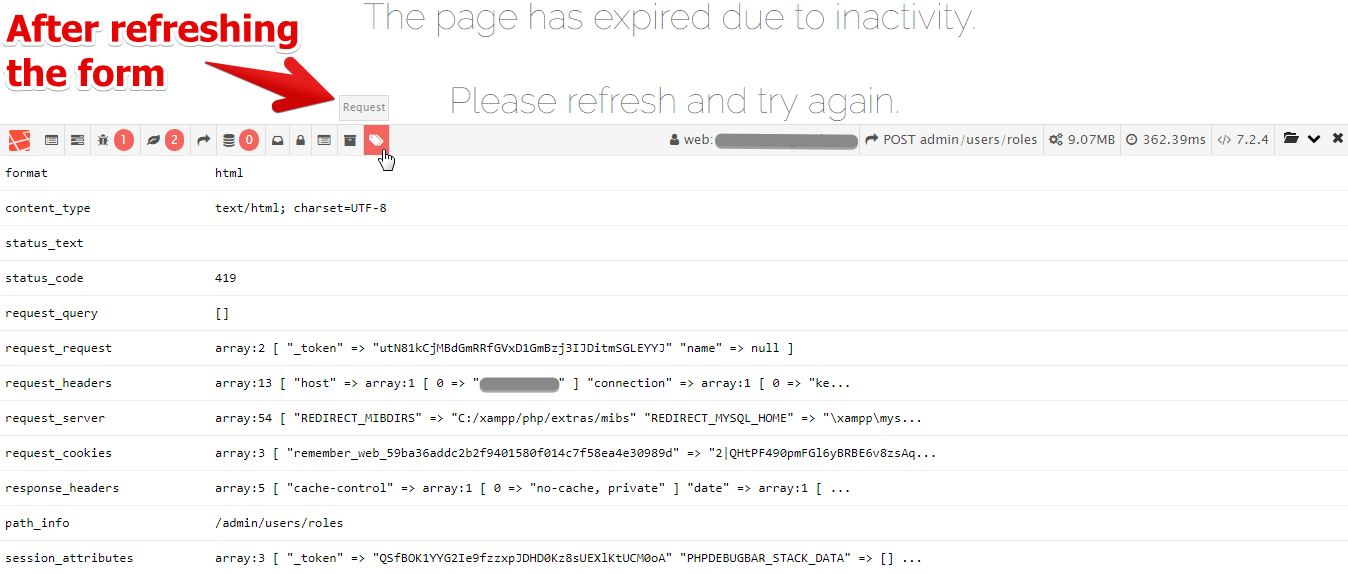
OK, now I'm getting it again (The page has expired due to inactivity. Please refresh and try again.) and I can not get rid of it even when I close/re-open the browser.
As for the possible misconfiguration - if there is any, then it's from Laravel's default config because session.php was not changed after installation, and in .env there is only SESSION_DRIVER=file SESSION_LIFETIME=120 (which was already there after installing Laravel).
I'm not sure if this is issue with the framework code itself, but @tillkruss closed it and there is no point to write about it here.
FilipQL
on 13 Jun 2018
I closed this, because it's not a framework issue.
@devcircus: Do you have a suggestion for a better message? I find it confusing as well.
 tillkruss
on 13 Jun 2018
tillkruss
on 13 Jun 2018
The same problem exists when using Google Chrome (67.0.3396.87).



FilipQL
on 16 Jun 2018
I have a laravel application with many many users logging in all day long and I have had some users report that they are unable to login because of this exact issue. I don't know what's going on but this is without a doubt a framework bug fix it.
 GlitterCakes
on 20 Nov 2018
GlitterCakes
on 20 Nov 2018
@GlitterCakes - its a problem with your sessions, which then causes a CSRF token mismatch.
laurencei
on 20 Nov 2018
Try Like this
Insert the @csrf to the every form on the page.
 ChaoWang318915
on 23 Nov 2018
ChaoWang318915
on 23 Nov 2018
You must insert {{csrf_field()}} into your forms.
 edrisranjbar
on 30 Nov 2018
edrisranjbar
on 30 Nov 2018
I HAVE done that I am using the default laravel auth scaffolding it's a problem with Laravel out of the box for some people why should I have to fix it?
GlitterCakes
on 2 Dec 2018
As far as I understand the problem stems from CSRF token invalidation due to session expiry.
I found a simple solution for handling this error more or less gracefully.
Use the VerifyCsrfToken::handle() in your application to wrap the parent call to handle in a try-catch block which catches the TokenMismatchException and redirects back with an error message.
You can see a simple example here: VerifyCsrfToken
 mchekin
on 22 Dec 2018
mchekin
on 22 Dec 2018
Thanks @mchekin for your advice. I had the same problem as @FilipQL and I have solved it by customizing the VerifyCsrfToken :: handle () treatment as your example VerifyCsrfToken indicates.
 byedusoft
on 30 Dec 2018
byedusoft
on 30 Dec 2018
Related issues
 jackmu95
·
3Comments
jackmu95
·
3Comments
 fideloper
·
3Comments
fideloper
·
3Comments
 ghost
·
3Comments
ghost
·
3Comments
 RomainSauvaire
·
3Comments
RomainSauvaire
·
3Comments
 Anahkiasen
·
3Comments
Anahkiasen
·
3Comments
Most helpful comment
As far as I understand the problem stems from CSRF token invalidation due to session expiry.
I found a simple solution for handling this error more or less gracefully.
Use the
VerifyCsrfToken::handle()in your application to wrap the parent call to handle in a try-catch block which catches theTokenMismatchExceptionand redirects back with an error message.You can see a simple example here: VerifyCsrfToken