fractal start --sync does not load local server
On windows environment - when you set up fractal using the guide provided on the site. Running fractal start --sync only try to open fractal.js but fails to launch the web server UI.
 DadaConsultant
All 20 comments
nevermind, resolved the issue. I wasn't running the command from the 'public/' folder created in my root dir
DadaConsultant
on 6 Oct 2016
@DadaConsultant Glad you got it working - however it shouldn't actually need to be run from the public directory, it should work from the project root directory, so that may be a bug - I'll look into it.
 allmarkedup
on 18 Oct 2016
allmarkedup
on 18 Oct 2016
It mustn't be the public directory, but on cmd you have to start fractal from a subdirectory.
Anything new on this bug?
 schnubb
on 20 Jan 2017
schnubb
on 20 Jan 2017
Having the same issue on Windows 10 running node v6.9.5 and fractal v1.1.3. Any progress investigating fixing this?
 siiron
on 15 Feb 2017
siiron
on 15 Feb 2017
Having the same problem on Mac. Work around for me is to start the Fractal CLI and then start the server from there.
Using yarn:
yarn run fractal
Within fractal:
start --sync
 mja202
on 10 Apr 2017
mja202
on 10 Apr 2017
I fixed this problem after run command
npm install [email protected]
But I have fractal version 1.0.8
 serslon
on 11 Apr 2017
serslon
on 11 Apr 2017
@mja202 @serslon There was an issue with an updated version of vorpal, see this thread for more details: #232
 dkhuntrods
on 11 Apr 2017
dkhuntrods
on 11 Apr 2017
I#'m having the same issue on windows.
Jsut tried the same as mj202 recommended and it worked!
 trickydisco78
on 25 May 2017
trickydisco78
on 25 May 2017
Just went into this issue too. Fractal seems to be a great idea, but it needs more love. The approach of @mja202 isn't a solution, just a workaround.
 julmot
on 15 Jun 2017
julmot
on 15 Jun 2017
Btw: What you can do to speed it up in one command is: yarn run fractal -- start --sync
julmot
on 15 Jun 2017
Yes, it was a workaround. However, the current fractal (@1.1.4) works as it should (at least for me).
When fractal is installed globally (yarn global add @frctl/fractal) then fractal start sync within a project should just work.
mja202
on 15 Jun 2017
@julmot @trickydisco78 can you confirm that you are using the latest release (1.1.4)? This was caused by a breaking change in the version of Vorpal that was used but it was bumped in the latest release and should work now.
allmarkedup
on 16 Jun 2017
@allmarkedup I was using 1.1.4, yes.
julmot
on 16 Jun 2017
I was able to get it to work with this workaround.
julmot
on 19 Jun 2017
After using Fractal on a project for about 9 months, I'm suddenly experiencing this, using version 1.1.5.
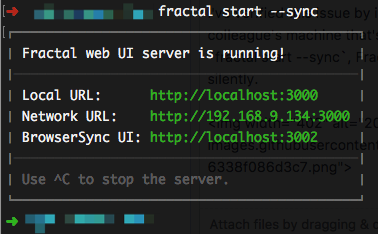
I've verified this issue by installing a brand new blank Fractal site on my machine and on a colleague's machine that's never run Fractal before. As the below screenshot shows, after running fractal start --sync, Fractal starts, shows a localhost address, then the process seems to quit silently.
 ten1seven
on 18 Sep 2017
ten1seven
on 18 Sep 2017
I'm experiencing the same. Here's something strange going on, probably due to #346.
julmot
on 18 Sep 2017
Same here
 meerestier
on 19 Sep 2017
meerestier
on 19 Sep 2017
@ten1seven @meerestier
An unsupervised Greenkeeper update broke 1.1.6 - I've just pushed v1.1.7 that rolls back that update, so if it was due to that, this version should fix it.
dkhuntrods
on 19 Sep 2017
The update fixes the problem for me on macos
 davidDuymelinck
on 23 Sep 2017
davidDuymelinck
on 23 Sep 2017
This issue has been automatically marked as stale because it has not had recent activity. It will be closed if no further activity occurs. Thank you for your contributions.
![stale[bot] picture](https://avatars.githubusercontent.com/in/1724?v=4&s=40) stale[bot]
on 13 Jul 2018
stale[bot]
on 13 Jul 2018
Related issues
allmarkedup
·
7Comments
 sturobson
·
6Comments
allmarkedup
·
6Comments
sturobson
·
6Comments
allmarkedup
·
6Comments
 dzwarg
·
5Comments
dzwarg
·
5Comments
 alexrussell
·
7Comments
alexrussell
·
7Comments