Foundation-sites: Trying to add lottie.js, but it won't work
What should happen?
I added lottie.js (latest build) to src/…/js, necessary code to src/…/app.js and json files to same folder as index.html.
What happens instead?
I open localhost:8000 - everything shows up as expected, except for the svg's which are missing.
inspect/console says:
app.js:23 Uncaught ReferenceError: lottie is not defined
at Module../src/assets/js/app.js (app.js:23)
at __webpack_require__ (bootstrap:19)
at Object.0 (app.js:21822)
at __webpack_require__ (bootstrap:19)
at bootstrap:83
at bootstrap:83
 alexf77
All 6 comments
Hi @alexf77
please provide some more code or a codepen
how are you importing lottie?
according to your error message the module cannot be found
 SassNinja
on 14 Aug 2019
SassNinja
on 14 Aug 2019
@SassNinja
this is where i put lottie.js
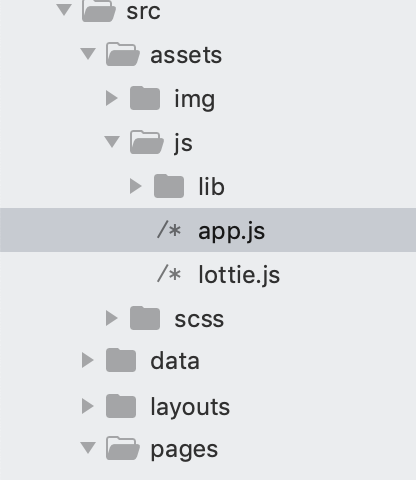
this is app.js:
`import $ from 'jquery';
import 'what-input';

// Foundation JS relies on a global varaible. In ES6, all imports are hoisted
// to the top of the file so if we used`import` to import Foundation,
// it would execute earlier than we have assigned the global variable.
// This is why we have to use CommonJS require() here since it doesn't
// have the hoisting behavior.
window.jQuery = $;
require('foundation-sites');

// If you want to pick and choose which modules to include, comment out the above and uncomment
// the line below
//import './lib/foundation-explicit-pieces';


$(document).foundation();

lottie.loadAnimation({
  container: document.getElementById('lottie1'), // the dom element that will contain the animation
  renderer: 'svg',
  loop: true,
  autoplay: true,
  path: 'data2.json' // the path to the animation json
});

lottie.loadAnimation({
  container: document.getElementById('lottie2'), // the dom element that will contain the animation
  renderer: 'svg',
  loop: true,
  autoplay: true,
  path: 'data1.json' // the path to the animation json
});`
I appended my code after "$(document).foundation();"
alexf77
on 14 Aug 2019
Hi @alexf77,
you have to import or reference it as <script> tag.
 DanielRuf
on 14 Aug 2019
DanielRuf
on 14 Aug 2019
Hi @DanielRuf,
I should have a seprate js file for the code I added to app.js, and then import it or reference it?
alexf77
on 14 Aug 2019
In your case you should be able to import it but I do not know lottiejs and if it is CommonJS or a ES Module.
In some cases you also have to set window.lottie = lottie too to export it to the browser globals.
DanielRuf
on 14 Aug 2019
Closing as we did not receive further feedback. I think the issue should be solved now.
DanielRuf
on 26 Aug 2019
Related issues
 g12n
·
4Comments
g12n
·
4Comments
 KharamanV
·
3Comments
KharamanV
·
3Comments
 udf2457
·
3Comments
udf2457
·
3Comments
 johnbacon
·
3Comments
johnbacon
·
3Comments
 foodgy
·
3Comments
foodgy
·
3Comments