Foundation-sites: Menu icon: changing direction of submenu icons is not working
<ul class="menu icons icon-top">
  <li>
    <a href="#"><i class="fi-list"></i> <span>One</span></a>
    <ul class="menu icons icon-left">
      <li><a href="#"><i class="fi-list"></i> <span>Two</span></a></li>
    </ul>
  </li>
</ul>
In the above snippet, the nested list picks up the icon orientation of the the outer one. This is because the CSS for the icons is written like:
.menu.icon-top li a {
    -webkit-box-orient: vertical;
    -webkit-box-direction: normal;
        -ms-flex-flow: column nowrap;
            flex-flow: column nowrap;}
If we change it to this, it will fix it:
.menu.icon-top li a,
.menu.icon-top>li>a {
    -webkit-box-orient: vertical;
    -webkit-box-direction: normal;
        -ms-flex-flow: column nowrap;
            flex-flow: column nowrap;}
 onecreative
All 14 comments
cc @IamManchanda
 kball
on 12 Sep 2017
kball
on 12 Sep 2017
We'll accept a Pull Request for this @onecreative . Do you think you can add that?
 rafibomb
on 1 Feb 2018
rafibomb
on 1 Feb 2018
@rafibomb Kind of embarrassing, but I haven't submitted a pull request before. I'd love to contribute, but I'll need guidance the first time.
onecreative
on 5 Feb 2018
 colin-marshall
on 6 Mar 2018
colin-marshall
on 6 Mar 2018
Hi, is there any update for us regarding this?
 DanielRuf
on 19 Oct 2019
DanielRuf
on 19 Oct 2019
Hi @DanielRuf, can I take a look at this issue if it's available?
 evagm
on 20 Oct 2019
evagm
on 20 Oct 2019
Hi @DanielRuf, can I take a look at this issue if it's available?
Hi @evagm,
sure, feel free to pick any issues and work on them if you want.
DanielRuf
on 20 Oct 2019
Perfect! Thank you!
evagm
on 20 Oct 2019
@DanielRuf - The "nested" class is not included in the example above but is part of the documentation for nested lists. Can I make the assumption that the class would always be required when nesting menu lists?
The styles above don't work as a solution but if we utilize the "nested" class we could create specificity for nested icons.
.menu {
  &,
  &.nested {
    // Icon Left
    &.icon-left {
      @include menu-icon-position(left);
    }

    ...
  }
}
The output would be:
.menu.icon-left li a,
.menu.nested.icon-left li a {}
I guess so. At least it is recommended to use .nested for such use cases.
DanielRuf
on 20 Oct 2019
@DanielRuf Got one more question for you. I found a potential issue with the icons. When you have a vertical menu with icon-top, they don't align as you would expect. Would this be considered an issue and if so should I create a new issue for this or work on fixing it inside the same branch as this current issue?
<ul class="vertical menu icons icon-top">
  <li>
    <a href="#"><i class="fi-list"></i> <span>One</span></a>
  </li>
  <li><a href="#"><i class="fi-list"></i> <span>Two</span></a></li>
  <li><a href="#"><i class="fi-list"></i> <span>Three</span></a></li>
  <li><a href="#"><i class="fi-list"></i> <span>Four</span></a></li>
</ul>

evagm
on 20 Oct 2019
Hi @evagm,
You can create a new issue and a new branch for this but feel free to solve both in one and mention both bugs, for example by creating two commits.
DanielRuf
on 20 Oct 2019
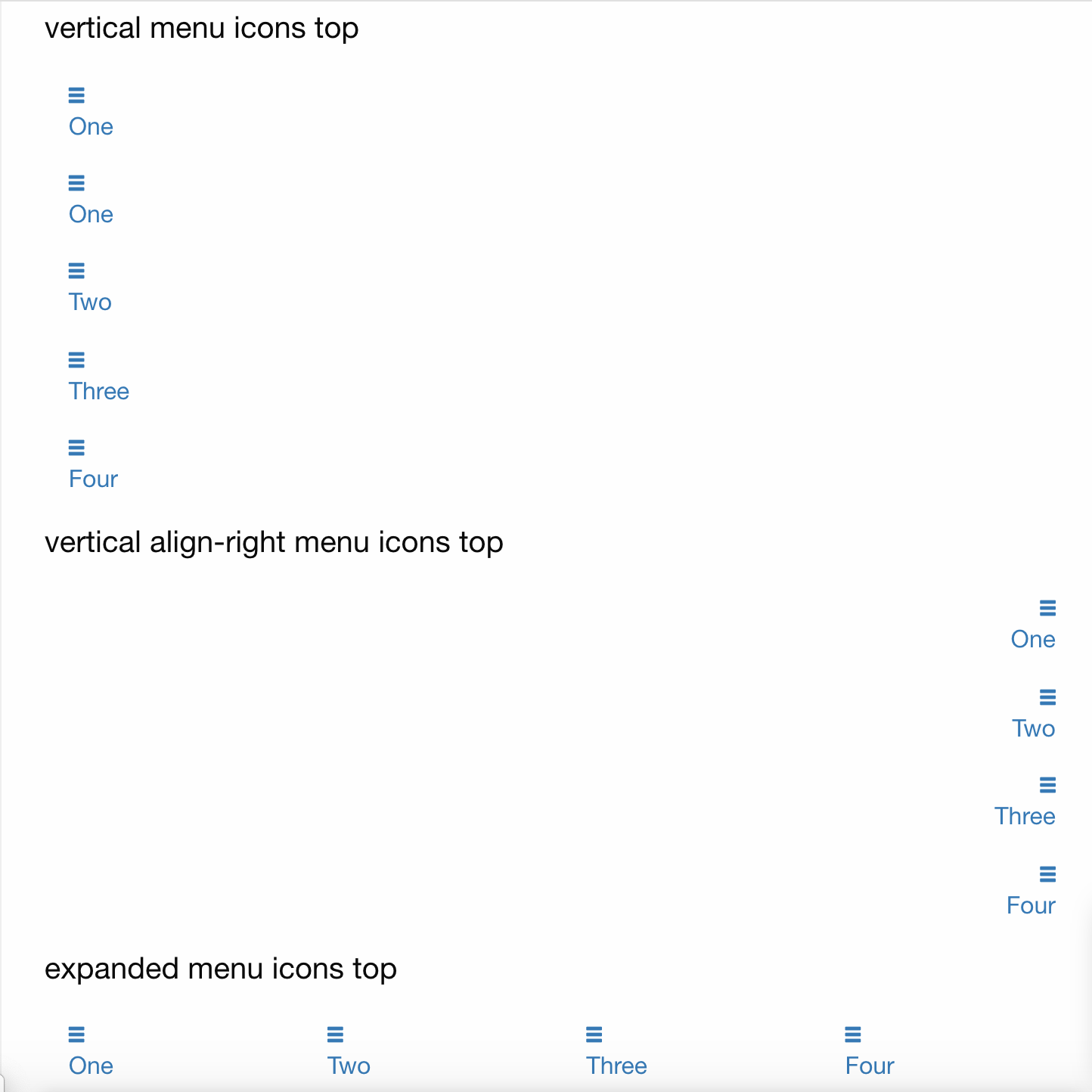
Full bug findings
The icon inside the menu list does not align correctly when the icon is position top/bottom for menus with the classes:
- vertical
- vertical align-right
- expanded
Solution
The solution requiring the least amount of changes to the code would be to remove the text-align: center from the icon in those instances. @DanielRuf Thoughts?
evagm
on 20 Oct 2019
This looks good and the described solution sounds also good but I am not 100% sure. We will see then in the PR and when we do some tests with it. It's a bit late here (11pm) so I am not that good at thinking now.
I'm happy to review and test the PR then and provide feedback then =)
DanielRuf
on 20 Oct 2019
Related issues
 anware
·
3Comments
anware
·
3Comments
 ncoden
·
3Comments
ncoden
·
3Comments
 CGTS
·
3Comments
CGTS
·
3Comments
 Jared-Dev
·
3Comments
Jared-Dev
·
3Comments
 lspoor
·
3Comments
lspoor
·
3Comments