Foundation-sites: Sticky plugin- possible to stick and stack multiple elements [FEATURE REQUEST]
Have asked this on the forum with no replies.
Trying to use the Sticky plugin to stick and stack 2 elements on top of each other with the first having variable height. Is this possible with the current state of Foundation?
Looking for a solution similar to this plugin but would be ideal if it's already available in Foundation:
http://alextaujenis.github.io/jquery-stuck/
http://leafo.net/sticky-kit/
And here is a rough comp of what I'm trying to accomplish:
https://codepen.io/danlewski/pen/QMZYaq
The expected result is for the smaller blue bar to stick to the bottom of the larger gray bar, regardless of the text length.
Thank you!
 dlewand691
All 4 comments
@dlewand691 You just need to apply another class like in this demo, or give one of the bar a margin top correct
 mattbag
on 30 Aug 2017
mattbag
on 30 Aug 2017
https://codepen.io/mattbag/pen/GvwxjW
something like this?
mattbag
on 30 Aug 2017
Brilliant! Thank you! This is exactly what I was looking for and makes total sense. Sometimes the most obvious solutions are right in front of your face.
Even more simplified, can remove the .sticky1 and .sticky2 classes and use something like:
$(document).foundation();
$('#sticky-trigger2 .sticky').on('sticky.zf.stuckto:top',function(){
  console.log($(this));
  $(this).css({
    marginTop: $('.sticky').height()
  })
});
However, I wonder if this might still be something worth integrating into the Sticky plugin? The ability to stick to its "parent" instead of the body?
dlewand691
on 30 Aug 2017
I ran into a similar problem when trying to use the sticky element when I have a manually placed sticky header in place (header = position:fixed / page-content = padding-top:90px). The sticky element wasn't kicking in until it reached the top of the body and when it did the first 90px was hiding behind the sticky header. To fix this I applied the data-top-anchor to an element (#sticky-fix) that was absolute positioned -90px (actually -75px because there was a 15px discrepency for some reason) and applied a margin top of 90px when the element was sticky.
Tried to wrap my head around why it was -90px (-75px) instead of +90px, but gave up because it worked.
Note that this solution positions the sticky element in the correct place AND it kicks in at the right time (as opposed to the example above where it kicks in quite late)

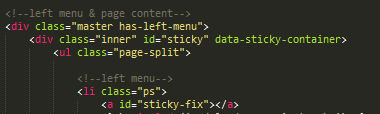

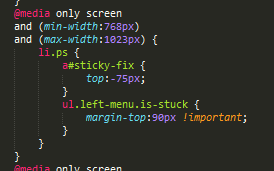
Anyhow, thought I would post this as I ran into this thread when trying to solve my problem.
 ultra86
on 4 Apr 2019
ultra86
on 4 Apr 2019
Related issues
 BicanMarianValeriu
·
3Comments
BicanMarianValeriu
·
3Comments
 Yanchek99
·
4Comments
Yanchek99
·
4Comments
 coachie
·
4Comments
coachie
·
4Comments
 ncoden
·
3Comments
ncoden
·
3Comments
 CGTS
·
3Comments
CGTS
·
3Comments
Most helpful comment
https://codepen.io/mattbag/pen/GvwxjW
something like this?