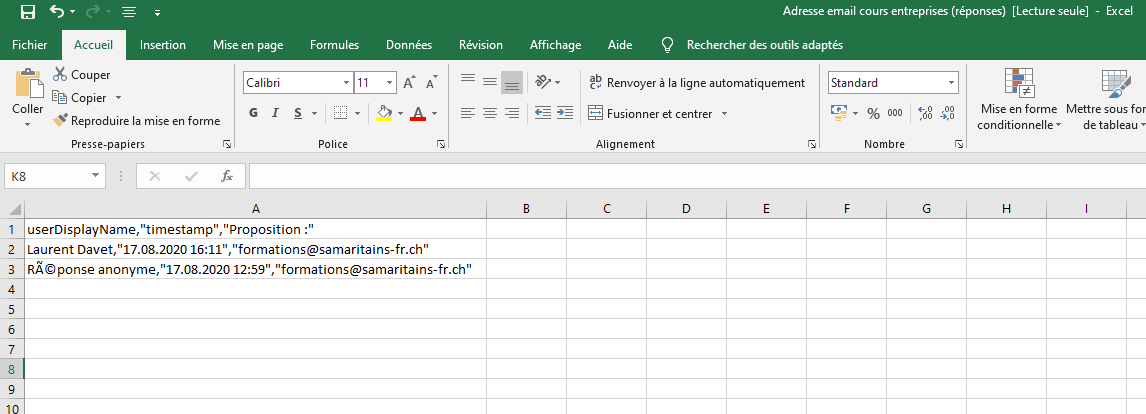
CSV export does not work very well. Everything in one column.
 ldavet
All 3 comments
cc @jotoeri :thinking:
 skjnldsv
on 19 Aug 2020
skjnldsv
on 19 Aug 2020
Hey @ldavet,
the thing about this is that csv is not really a fixed standard. So excel interprets your file here just with a different standard, than our csv is exported. However, our csv-format is not just randomly, but specifically chosen to match e.g. the one used by google-forms, to allow for easy switching to nextcloud-forms. So we won't change that.
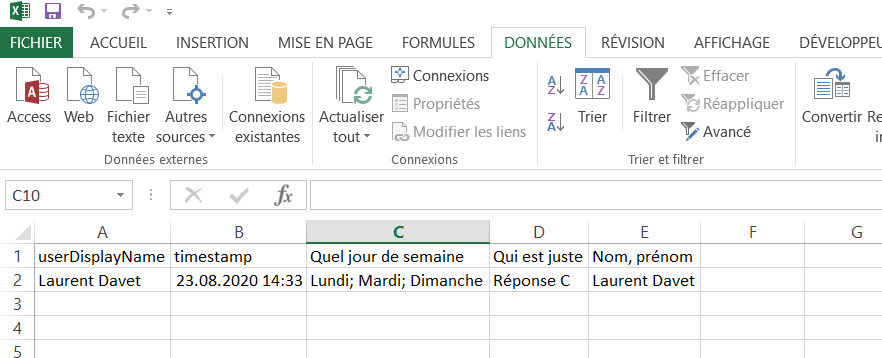
Still - if you just use excels import-functionality (within the Data-section), you can easily import the data as expected in separated columns. Hope that helps? :blush:
Greets,
Jonas
 jotoeri
on 22 Aug 2020
jotoeri
on 22 Aug 2020
❤1
Hello.
I tested according to your answer on Excel. It works very well. See the image below.
Thank you for your help.
ldavet
on 23 Aug 2020
🚀2
Was this page helpful?
0 / 5 - 0 ratings
Related issues
 mfb
·
5Comments
jotoeri
·
5Comments
mfb
·
5Comments
jotoeri
·
5Comments
 Sohalt
·
6Comments
jotoeri
·
7Comments
Sohalt
·
6Comments
jotoeri
·
7Comments
 ei8fdb
·
3Comments
ei8fdb
·
3Comments
Most helpful comment
Hello.
I tested according to your answer on Excel. It works very well. See the image below.
Thank you for your help.