Formik: Using Yup on React Native throws unhandled promise rejection warning when validation fails
🐛 Bug report
Current behavior
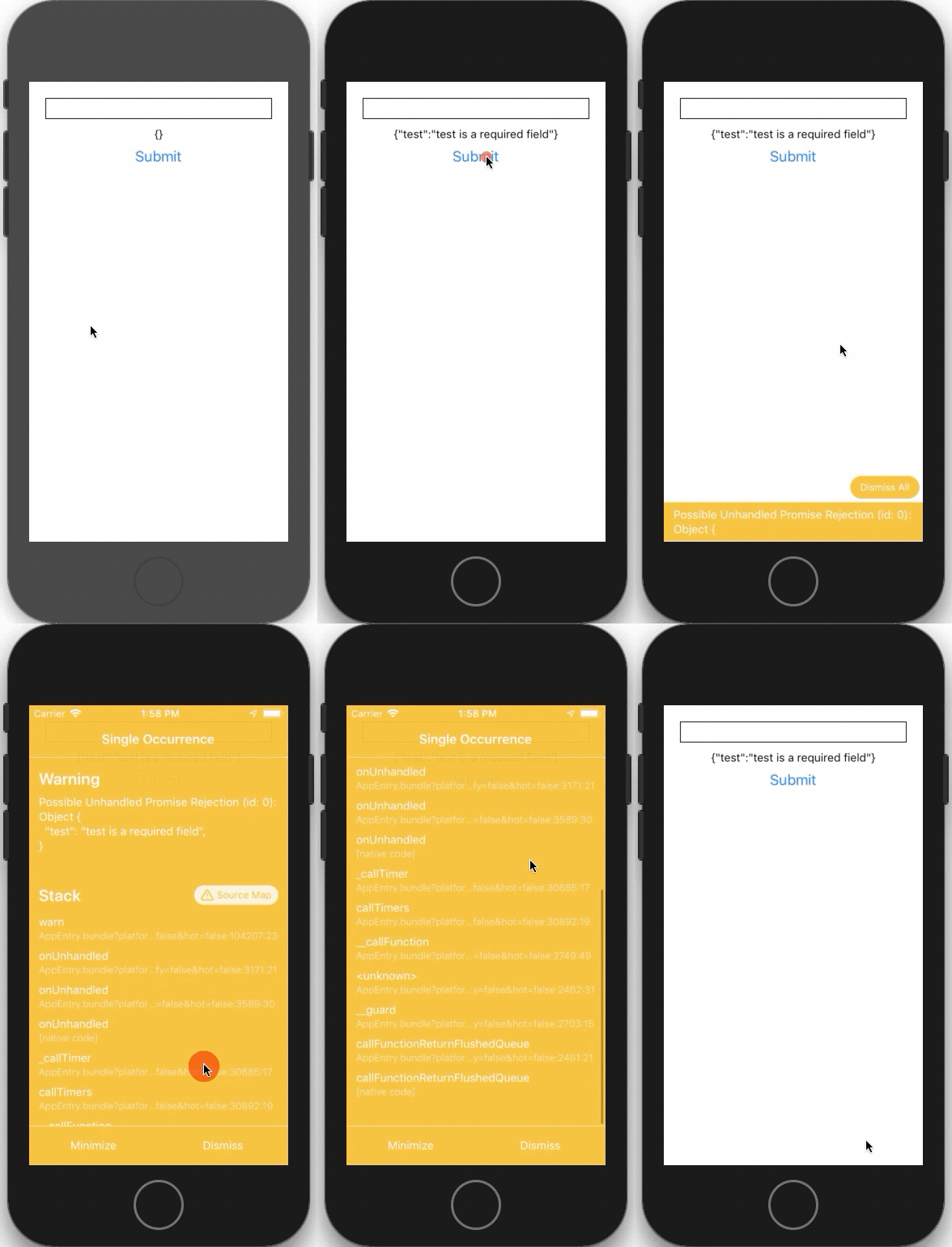
About 1 or 2 seconds after validation fails a promise is rejected with the errors object.
Possible Unhandled Promise Rejection (id: 0):
Object {
  "test": "test is a required field",
}
Expected behavior
I'd expect no unhandled promise rejections.
Reproducible example
Steps to reproduce:
npm install -g expo-cli
expo init formik-yup-test
cd formik-yup-test
yarn add formik yup
Copy this code into App.js
import { Button, StyleSheet, Text, TextInput, View } from 'react-native';
import { Formik } from 'formik';
import * as Yup from 'yup';
import React from 'react';

const schema = Yup.object().shape({
  test: Yup.string().required(),
});

export default function App() {
  return (
    <View style={styles.container}>
      <Formik initialValues={{ test: '' }} onSubmit={values => console.log(values)} validationSchema={schema}>
        {({ errors, handleChange, handleBlur, handleSubmit, values }) => (
          <>
            <TextInput
              onBlur={handleBlur('test')}
              onChangeText={handleChange('test')}
              style={styles.textInput}
              value={values.test}
            />
            <Text style={styles.errors}>{JSON.stringify(errors)}</Text>
            <Button onPress={handleSubmit} title="Submit" />
          </>
        )}
      </Formik>
    </View>
  );
}

const styles = StyleSheet.create({
  errors: {
    textAlign: 'center',
  },
  textInput: {
    alignSelf: 'stretch',
    borderColor: 'black',
    borderWidth: 1,
    fontSize: 20,
    marginBottom: 10,
  },
  container: {
    flex: 1,
    backgroundColor: '#fff',
    padding: 20,
  },
});
Run yarn start and open in the iOS Simulator.
Suggested solution(s)
Avoid rejecting promises or document how the user can avoid this warning. The example form was based on the documentation here https://jaredpalmer.com/formik/docs/guides/react-native
Your environment
| Software | Version(s) |
| ---------------- | ---------- |
| Formik | 2.0.7 |
| Yup | 0.27.0 |
| React | 16.9 |
| npm/Yarn | Yarn 1.19.2 |
| Operating System | macOS 10.15.1 |
 cameronmurphy
👍2
All 2 comments
this is caused by combineErrors and has been rolled back in 2.0.8 hotfix
 dennis-tagomi
on 13 Dec 2019
dennis-tagomi
on 13 Dec 2019
Fixed in 2.1
 jaredpalmer
on 7 Jan 2020
jaredpalmer
on 7 Jan 2020
👍2
Was this page helpful?
0 / 5 - 0 ratings
Related issues
 PeerHartmann
·
3Comments
PeerHartmann
·
3Comments
 najisawas
·
3Comments
jaredpalmer
·
3Comments
najisawas
·
3Comments
jaredpalmer
·
3Comments
 dfee
·
3Comments
dfee
·
3Comments
 Jucesr
·
3Comments
Jucesr
·
3Comments
Most helpful comment
Fixed in 2.1