Formik: Inconsistent error handling with nested data
🐛 Bug report
Current Behavior
Nested properties are showing up in the errors object for non-required fields after being touched, which is incorrect behavior in my opinion and inconsistent with how top level properties are handled. Let me explain with a screenshot and some code.
In the following screenshot, every field has been touched exactly once. The top two inputs correspond to top level object properties, while the last input corresponds to a property that is nested inside of an object.
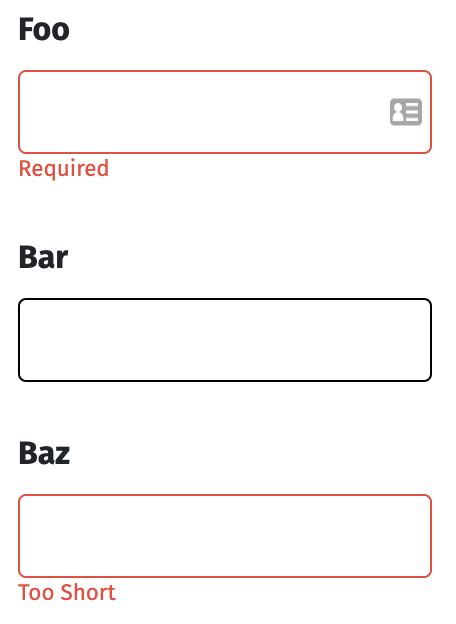
Here is the code that goes along with the screenshot.
const SampleSchema = object().shape({
  foo: string()
    .min(5, 'Too Short')
    .max(20, 'Too Long')
    .required('Required'),
  bar: string()
    .min(5, 'Too Short')
    .max(20, 'Too Long'),
  bif: object().shape({
    baz: string()
      .min(5, 'Too Short')
      .max(20, 'Too Long')
  })
})
<Formik
  initialValues={{
    foo: '',
    bar: '',
    bif: {
      baz: ''
    }
  }}
  validationSchema={SampleSchema}
>
As you can see, neither bar nor baz are required fields. However, after each field has been touched the top level property correctly skips running validations because the field is still empty, while the nested property incorrectly runs validations even though the field is empty and not required.
Expected behavior
Validations should be skipped on a non-required nested property that has been touched but is still empty.
Top level properties are already handled correctly.
Reproducible example
https://codesandbox.io/s/formik-codesandbox-template-ctu7h?fontsize=14
Suggested solution(s)
I'm not entirely certain whether this is a bug with Formik, or if this is a bug with yup...
Your environment
| Software | Version(s) |
| ---------------- | ---------- |
| Formik | ^1.5.4
| Yup | ^0.27.0
| React | ^16.8.6
| Browser | Chrome 74.0
| Yarn | 1.15.2
| Operating System | macOS 10.14.4
 johncmunson
All 7 comments
Confirmed. FWIW i think that this is indeed a Yup issue. It seems to treat "required" / "notRequired" differently within a nested object. cc @jquense
Formik's errormessage component is doing its job. It is rendering when something is touched and has an error. The question is why is Yup considering the empty nested string an error when it is not required.
 jaredpalmer
on 17 May 2019
jaredpalmer
on 17 May 2019
@jaredpalmer thanks for the feedback
If @jquense could confirm that this is indeed a bug and not operator error, I'd be happy to close this issue and open up a similar issue over at yup if that's better for tracking purposes
johncmunson
on 18 May 2019
@johncmunson what is the status here? TY
 Andreyco
on 26 May 2019
Andreyco
on 26 May 2019
Took a quick look, the inconsistency is from Formik. when validating schema, formik sets empty strings to undefined for the top level of the form values, but doesn't do it for nested objects. yup considers empty strings too when validating min and max which is why the nested bif is considered invalid b/c it's an empty string, but the top level fields have been turned into undefined
 jquense
on 28 May 2019
jquense
on 28 May 2019
@jquense superb, thank you for status update
Andreyco
on 28 May 2019
@jquense Thanks! I'm surprised no one noticed this sooner.
@Andreyco We need to make validateYupSchema recursive.
jaredpalmer
on 28 May 2019
I've raised a PR fixing the same - https://github.com/formium/formik/pull/2902
 maddhruv
on 13 Nov 2020
maddhruv
on 13 Nov 2020
Related issues
 emartini
·
3Comments
emartini
·
3Comments
 giulioambrogi
·
3Comments
giulioambrogi
·
3Comments
 Jucesr
·
3Comments
jaredpalmer
·
3Comments
Jucesr
·
3Comments
jaredpalmer
·
3Comments
 pmonty
·
3Comments
pmonty
·
3Comments
Most helpful comment
Took a quick look, the inconsistency is from Formik. when validating schema, formik sets empty strings to
undefinedfor the top level of the form values, but doesn't do it for nested objects. yup considers empty strings too when validatingminandmaxwhich is why the nestedbifis considered invalid b/c it's an empty string, but the top level fields have been turned intoundefined