After submitting my form, I useKeyboard.dismiss() and then reset the form. Something like this:
    Keyboard.dismiss();
    resetForm({ title: '', artist: '', album: '', genre: '' }); // it works, the fields are cleaned
    setFieldTouched('genre', false, false);
You can see that I'm resetting the form and the "touched" property of my last field, but after the keyboard is dismissed, it blurs the field and then shows its validation error, as if I'm not using setFieldTouched. I tried using setFieldError but with no succes. This situation also happens when using onSubmitEditing on my TextInput
When I dismiss the keyboard, and then press the submit button to submit the form, everything works well.
Any suggestions, please?
I can share more code if needed.
 mdelclaro
All 7 comments
resetForm already sets all fields as not touched. Can you provide a reproduction and your Formik version.
 Saifadin
on 8 Oct 2018
Saifadin
on 8 Oct 2018
@Saifadin the submit handler is located at Home.js. The form is in here.
Here's a few screenshots of when I press submit with the keyboard shown or in the keyboard itself (with onSubmitEditing), and after the keyboard is hidden the error on the last modified field is there.
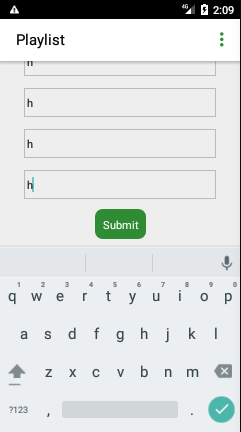
If I click on Submit or on the 'V' on the keyboard, I get this:
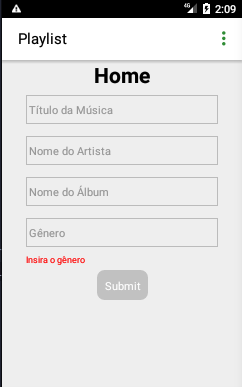
Although, if I close the keyboard and then press submit, it works fine.
mdelclaro
on 8 Oct 2018
You forgot setSubmitting(false);
submitHandler = (values, { resetForm, setFieldTouched, setSubmitting }) => {
const id = uuidV1();
this.props.onTrackAdd(
id,
values.title,
values.artist,
values.album,
values.genre
);
Keyboard.dismiss();
setSubmitting(false);
resetForm({ title: '', artist: '', album: '', genre: '' });
setFieldTouched('genre', false, false);
// Navigation.mergeOptions('bottomTabs', {
// bottomTabs: {
// currentTabIndex: 1
// }
// });
}
It seems that it didn't make any difference :/
mdelclaro
on 8 Oct 2018
I think I know why. It has less to do with Formik but more with how the fields are touched with the keyboard open. Because you are still focussing that field, it is being seen as touched even if you reset the form.
It's a bit hacky but doing this might help:
Keyboard.dismiss();
setTimeout(() => {
  setSubmitting(false);
  resetForm();
}, 0);
This will the code to wait after the Keyboard is dismissed.
Hope it works, because I can't test it over here.
Saifadin
on 8 Oct 2018
It worked, dude! :-)
mdelclaro
on 8 Oct 2018
Good to hear :)
Saifadin
on 8 Oct 2018
Related issues
 jeffbski
·
3Comments
jeffbski
·
3Comments
 jaredpalmer
·
3Comments
jaredpalmer
·
3Comments
 najisawas
·
3Comments
najisawas
·
3Comments
 jordantrainor
·
3Comments
jordantrainor
·
3Comments
 outaTiME
·
3Comments
outaTiME
·
3Comments
Most helpful comment
I think I know why. It has less to do with Formik but more with how the fields are touched with the keyboard open. Because you are still focussing that field, it is being seen as touched even if you reset the form.
It's a bit hacky but doing this might help:
This will the code to wait after the Keyboard is dismissed.
Hope it works, because I can't test it over here.