Formik: Formik with @material-ui/core Select is warning?
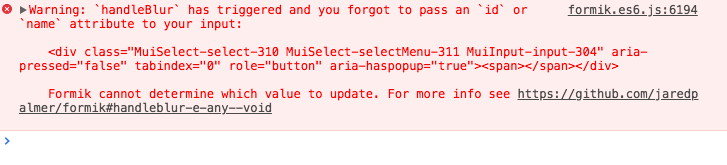
got this warning when i use @material-ui select component.
This is my code
function CustomSelect ({...props}: any) {
  // tslint:disable-next-line:max-line-length
  const { classes, formControlProps, LabelProps, labelText, id, selectProps, handleChange, handleBlur, values, children } = props;
  return (
    <FormControl
      {...formControlProps}
    >
    {labelText !== undefined ? (
      <InputLabel
        htmlFor={id}
        {...LabelProps}
      >
        {labelText}
      </InputLabel>
    ) : null }
      <Select
        // onBlur={handleBlur(id)}
        // onChange={handleChange(id)}
        {...selectProps}
      >
        {children}
      </Select>
    </FormControl>
  );
}
<Field
   name="category"
   render={({ field }: FieldProps<FormValues>) => (
   <CustomSelect
       labelText="Select"
       htmlFor="test"
       formControlProps={{
       fullWidth: true
     }}
       selectProps={{
       autoWidth: true,
       ...field,
       input: <Input id="test" name="category"/>
       // inputProps: {
       //   id: 'test',
       //   name: 'category'
       // }
   }}
   >
      <MenuItem value=""><em>None</em></MenuItem>
      <MenuItem value={10}>Ten</MenuItem>
      <MenuItem value={20}>Twenty</MenuItem>
      <MenuItem value={30}>Thirty</MenuItem>
     </CustomSelect>
   )}
/>
 Adherentman
All 12 comments
Yeah - also problems with
https://github.com/JedWatson/react-select
 IgorJoergensen
on 23 Jun 2018
IgorJoergensen
on 23 Jun 2018
Is this still a problem that doesn't have workaround yet?
 ArvinH
on 24 Jul 2018
ArvinH
on 24 Jul 2018
@ArvinH
<Select
value={roleId}
onBlur={event => {
event.target.name = 'roleId';
handleBlur(event);
}}
/>
But for me it's a little bit sloppy. Formik returns error with a significant delay, don't know it's my code or some internal issue with Select itself.
Update:
Apparently when you blur from open select at first Select closes list, on second blur it blurs out from input itself triggering formik's handleBlur
 metr1ckzu
on 24 Jul 2018
metr1ckzu
on 24 Jul 2018
@metr1ckzu - I tried Your workaround and it doesn't seem to make a difference.
And You're right. First occurs list blur (what brings focus to select itself) and the the input "is blured".
Update: Usage of Select's 'native' prop makes it work quite ok (I've got some layout issues but it's probably about some adjustments/configuration).
 Filson14
on 7 Aug 2018
Filson14
on 7 Aug 2018
Hola! So here's the deal, between open source and my day job and life and what not, I have a lot to manage, so I use a GitHub bot to automate a few things here and there. This particular GitHub bot is going to mark this as stale because it has not had recent activity for a while. It will be closed if no further activity occurs in a few days. Do not take this personally--seriously--this is a completely automated action. If this is a mistake, just make a comment, DM me, send a carrier pidgeon, or a smoke signal.
![stale[bot] picture](https://avatars3.githubusercontent.com/in/1724?v=4&s=40) stale[bot]
on 6 Oct 2018
stale[bot]
on 6 Oct 2018
Seems like this issue still persists. We are using a slightly more generic version of @metr1ckzu 's workaround:
const handleBlurWorkaround = value => event => {
event.target.name = value;
return event;
};
The onBlur prop of the Select component is then passed this little gem here:
onBlur={R.compose(
handleBlur,
handleBlurWorkaround(field.name),
)}
 tonnenpinguin
on 8 Oct 2018
tonnenpinguin
on 8 Oct 2018
Whenever library doesn't call handlers with native events, you should use setField*** to achieve the same functionality, e.g.:
onChange={value => setFieldValue(field.name, value)}
onBlur={() => setFieldTouched(field.name)
 prichodko
on 9 Oct 2018
prichodko
on 9 Oct 2018
Thanks @prichodko! This actually fixed the issue for me.
tonnenpinguin
on 9 Nov 2018
Whenever library doesn't call handlers with native events, you should use
setField***to achieve the same functionality, e.g.:onChange={value => setFieldValue(field.name, value)} onBlur={() => setFieldTouched(field.name)
Thanks for the advice, for anyone who is still struggling, it will most probably work using:
onChange={(e, { value }) => setFieldValue(field.name, value)}
 Natansab
on 3 Jan 2019
Natansab
on 3 Jan 2019
@Natansab Where/how did you define setFieldValue and setFieldTouched?
 amandakoster
on 20 Apr 2020
amandakoster
on 20 Apr 2020
@amandakoster setFieldValue and setFieldTouched come from useFormikContext or the props passed to Formik's child component, but you don't need to use them during normal handleChange / handleBlur usage.
Normal handleChange / handleBlur usage is:
<YourCustomField
  // if your custom field passes an `Event` to callback:
  onChange={formik.handleChange}
  onBlur={formik.handleBlur}
  // if your custom field only passes a value to onChange, and doesn't pass an event to handleBlur:
  onChange={formik.handleChange("fieldName")}
  onBlur={formik.handleBlur("fieldName")}
/>
 johnrom
on 21 Apr 2020
johnrom
on 21 Apr 2020
Here was our final fix for this issue in IE:
     onBlur={e => {
            e.target.name = name;
            field.onBlur(e);
          }}
Related issues
 dearcodes
·
3Comments
dearcodes
·
3Comments
 sibelius
·
3Comments
sibelius
·
3Comments
 jaredpalmer
·
3Comments
jaredpalmer
·
3Comments
 emartini
·
3Comments
jaredpalmer
·
3Comments
emartini
·
3Comments
jaredpalmer
·
3Comments
Most helpful comment
Thanks for the advice, for anyone who is still struggling, it will most probably work using:
onChange={(e, { value }) => setFieldValue(field.name, value)}