I tried adding trim() to my formik validation schema:
Yup.object().shape({
    label: Yup.string().trim().required('some error msg'),
});
But the field value is not being trimmed.
 sketchbuch
All 36 comments
Should work like this - https://github.com/jquense/yup#stringtrimmessage-string-schema, do you get different result? If so, create a reproducible example on https://codesandbox.io/.
 prichodko
on 2 Mar 2018
prichodko
on 2 Mar 2018
trim is also a transfrom so if you are validating in 'strict' mode it won't run as with any other transform
 jquense
on 2 Mar 2018
jquense
on 2 Mar 2018
Well here is an example:
https://codesandbox.io/s/2jo7vox1n0
I have strict set to false. The validation for firstname detects whitespace and show a message but I don't want that, I want it to just trim the string and not show any message.
sketchbuch
on 17 Apr 2018
Same problem here, trim doesn't seem to be working
 rinoma
on 4 May 2018
rinoma
on 4 May 2018
strict() doesn't take an argument (maybe it should) strict(false) doesn't turn off strict mode it enables it.
if I remove strict() it works fine: https://codesandbox.io/s/j35mz5xmz3
jquense
on 4 May 2018
@jquense In your example trim isn't working... at least not for me. There is always a space at the end of my firstname and also the space is visible in the alerts
sketchbuch
on 4 May 2018
It _is_ working in terms of what yup is doing, which is trimming and validating, the problem is Formik is not using the transformed value. it's ignoring it and passing the pre-transformed value to onSubmit. It should probably do something with the return value of schema.validate() https://github.com/jaredpalmer/formik/blob/master/src/Formik.tsx#L391
jquense
on 4 May 2018
Does this mean none of the transformations work with formik? I only tried using trim
sketchbuch
on 4 May 2018
it seems like it...you'd have to ask @jaredpalmer tho, i'm just the yup guy :P
jquense
on 4 May 2018
I've just stumbled upon the very same problem while attempting to TitleCase a Yup.string() inside the validationSchema. The handleSubmit function doesn't return the results from transform. For the time being I'll have to solve this by creating a new object inside the handleSubmit code block which will hold the curated values that come from the values argument. It would be nice to update Formik to provide for this.
 ArnieGA
on 5 Jul 2018
ArnieGA
on 5 Jul 2018
Hey guys, any update on this? After digging deep into @jquense 's yup, apparently I was looking at the wrong place :P
It would be really useful if Formik could submit the transformed values.
For now, I have to externally/manually transform values into their correct api format, which is kind of prone to errors.
 rpedroni
on 11 Nov 2018
rpedroni
on 11 Nov 2018
Giving this a quick glance, something I was doing wrong was using validationSchema: () => createAccountSchema, so what happend:
validationSchema = () => {
return isFunction(config.validationSchema)
? config.validationSchema!(this.props)
: config.validationSchema;
};
it get's called with the props but by remove the lambda it will using the schema correctly and trim/lowercase worked.
I haven't had the time to go more in-dept right now but will update the response if I find more 👍
 klaaz0r
on 21 Jan 2019
klaaz0r
on 21 Jan 2019
@jaredpalmer Looks like Formik isn't passing transformed values (from Yup) to submit handler. This feels like an important functionality - any thoughts on it? Looking at the PR addressing this there's no activity since mid 2018.
 miphe
on 27 May 2019
miphe
on 27 May 2019
@jaredpalmer How do you recommend to remove starting and trailing whitespaces from the formik state before submit?
 mahatosourav91
on 6 Jun 2019
mahatosourav91
on 6 Jun 2019
@mahatosourav91 I'm looking forward to hear Jared's recommendation. Here's how I've solved this for the time being, perhaps it's of help.
<Field
name="name"
render={({ field, form: { isSubmitting, handleBlur } }) => (
<div className="field-section">
<Label htmlFor="name">Name</Label>
<input
{...field}
onBlur={(e) => {
const val = (e.target.value || '').replace(/\s+/gi, ' ');
setFieldValue(field.name, val.trim());
handleBlur(e);
}}
id="name"
disabled={isSubmitting}
type="text"
placeholder="Your name"
/>
<ErrorMessage name="name" component={ValidationError} />
</div>
)}
/>
I would just do the cast manually if you want that behavior in onSubmit
`js
onSubmit={(values) => {
const castValues = mySchema.cast(values)
...
})
jquense
on 6 Jun 2019
@miphe Thanks for approach, but I am was trying to implement the way shown by @jquense , but I am facing an obstacle with the .cast method.
Let's say I have the following schema
const schema = Yup.object().shape<Fields>(
{
firstName: Yup.string().trim().label("First Name").required(),
signature: Yup.object().label("Signature").shape<Media>({ id: Yup.string() }).nullable()
});
When the I apply schema.cast({ firstName: "Hello World"}), I am getting following output
{ firstName: "Hello World", signature: { id: undefined}}
I am not sure how will I remove signature if the signature is not provided in the input. I really want to avoid comparing the input object and the output.
mahatosourav91
on 6 Jun 2019
Yup.object().label("Signature")
.shape<Media>({ id: Yup.string() })
.nullable()
.default(null)
@jaredpalmer any plans to update values after yup transform?
 iamchathu
on 10 Jun 2019
iamchathu
on 10 Jun 2019
I am thinking this through. There are very very weird second-order and likely detrimental effects of this change. Namely, since Yup is async in Formik, you would need to wait to update values until validation has resolved. This could have a negative impact on ux because validation is low-priority while changes to values are high priority.
 jaredpalmer
on 10 Jun 2019
jaredpalmer
on 10 Jun 2019
@jquense it would be super slick if we could have some kind of "mode" or builder method or schema flag that errored when folks used any of the mutations/casting methods like (e.g. cast, trim, default etc.)
jaredpalmer
on 10 Jun 2019
@iamchathu this is one of the things that would be fine if we got rid of async validatino as described in this RFC #1524
jaredpalmer
on 10 Jun 2019
A PR to solve and simplify this is on its way in https://github.com/jaredpalmer/formik/pull/2255
Until that is in, I've created a small set of helpers to help out with this issue. https://www.npmjs.com/package/formik-yup
 vleandersson
on 21 Feb 2020
vleandersson
on 21 Feb 2020
Here:
<Formik>
{formikBag => (
<Form>
<Field
onChange={(event) => {
formikBag.setFieldValue(event.target.name, event.target.value.trim());
}}
/>
</Form>
)}
</Formik>
 aj07mm
on 2 Mar 2020
aj07mm
on 2 Mar 2020
@aj07mm
If you want to have spaces in a string then this wont work.
"This is the string I want" => "ThisisthestringIwant"
 omonk
on 27 Mar 2020
omonk
on 27 Mar 2020
@omonk trim() only removes spaces from both ends of a string, not the middle, no?
 zwbetz-gh
on 8 Apr 2020
zwbetz-gh
on 8 Apr 2020
You're correct, I guess this is a bit off topic as Formik doesn't ever receive the output from yup transformation.
Either way what I mean is if you type: word (note the space)
Then the onChange event fires then sets the value in the formik state as:
"word ".trim() which returns "word".
So if you wanted to enter a sentence like string, each time you type a character, if that character is a space it will trim it off the end.
In the past I've opted to using trim() on the value in the onSubmit handler
omonk
on 8 Apr 2020
I see what you mean. Another way to handle that is doing the trim in onBlur
zwbetz-gh
on 8 Apr 2020
Was able to use yup's transformed values in formik's on blur by doing the below. Thanks for the above sample, @jquense
// define it
const transformBlur = e => {
const fieldName = e.target.name;
const castedValues = mySchema.cast(values);
const fieldValue = _.get(castedValues, fieldName);
setFieldValue(fieldName, fieldValue);
handleBlur(e);
};
// use it
<TextInput
onBlur={transformBlur}
// ...
/>
Keep in mind, the schema cast is for all form fields, so forms with many many fields may not be as performant (also depends on how heavy of transformations that yup is doing).
zwbetz-gh
on 16 Apr 2020
I was able to get it to work for myself combining @omonk 's and @zwbetz-gh 's suggestions/solutions.
What worked for me:
Note: The S. prefix for the control is from styled-components. It is a styled version of the Formik
<Field> component.
<S.Input
name="firstName"
type="text"
onBlur={(event) =>
formik.setFieldValue(event.target.name, event.target.value.trim())
}
/>
Steps for arriving to the above and why:
I'm using the <Formik> component which is the 'Leveraging React Context' step in the Formik tutorial here: https://jaredpalmer.com/formik/docs/tutorial#leveraging-react-context
I couldn't get trim() to work in the schema as mentioned in this and other issues where others couldn't get trim() to work. This is what my schema looked like:
validationSchema={Yup.object({
firstName: Yup.string()
.trim()
.max(15, 'Must be 15 characters or less')
.required('Required'),
...
I've since removed trim() and tried the solutions here.
I couldn't get @zwbetz-gh 's solution to work as I was unable to call transformBlur from the schema if I added transformBlur as a method to the schema. I most likely erred in thinking that I could add a method like this, but I didn't want a function I needed to import into each of my children components. My attempt at @zwbetz-gh 's solution looked as follows:
return (
<Formik
initialValues={{
firstName,
}}
validationSchema={Yup.object({
firstName: Yup.string()
.max(15, 'Must be 15 characters or less')
.required('Required'),
})}
transformBlur ={() => console.log('Blur in schema triggered')}
onSubmit={(values, { setSubmitting }) => {
setTimeout(() => {
console.log(values);
setSubmitting(false);
}, 400);
}}
>
{(formik) => (
<S.Form onSubmit={formik.handleSubmit}>
// Children components where I would pass in the 'formik'
// variable and use it within the children. I've taken one of the
// inputs out of the children components and added it below.
<S.Input
name="firstName"
type="text"
onBlur={() => formik.transformBlur()}
/>
</S.Form>
)}
</Formik>
);
This wouldn't work since formik is not passing through the custom method (transformBlur) added to it. As you would expect, this results in TypeError: formik.transformBlur is not a function.
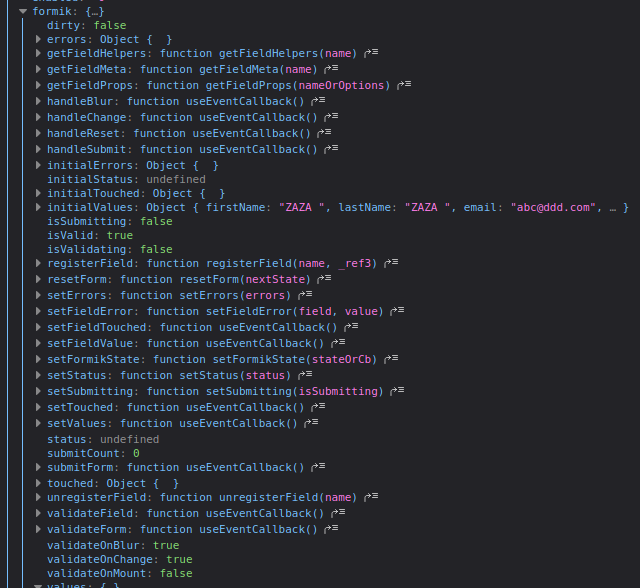
I then changed @omonk 's suggestion onBlur as onChange would prevent a user from adding any spaces at all. This led to the solution that is at the top of this post:
<S.Input
name="firstName"
type="text"
onBlur={(event) =>
formik.setFieldValue(event.target.name, event.target.value.trim())
}
/>
This is not ideal as I need to add it for each control that I want to trim(), but it appears to work without any problems at this point and has allowed me to move forward. I feel that Formik should be applying trim() by default when a text/email control is blurring and contains text, and allowing a config flag to disable it in the <Formik> props.
 martink-rsa
on 19 May 2020
martink-rsa
on 19 May 2020
@martink-rsa it didn't work for you because transformBlur needs to be removed from the return. It should be defined higher up in your component. Then later called in the onBlur.
zwbetz-gh
on 19 May 2020
@martink-rsa it didn't work for you because
transformBlurneeds to be removed from thereturn. It should be defined higher up in your component. Then later called in theonBlur.
Thank you for the response. I've been trying to avoid having a method within the component as I would then need to pass it to all of my children (and children of children) components as my controls are not within this parent component.
I mentioned that in my post above:
I most likely erred in thinking that I could add a method like this, but I didn't want a function I needed to import into each of my children components.
I will most likely add it as a global function though that can be imported, then make sure others in the team know that it's available. I'd rather do this (imported function) at this point than pass the function as a prop to each of my children. This will also hopefully future-proof it for when trim() in the Yup schema eventually works which I'm under the belief will happen at some point judging by the number of issues on this topic.
martink-rsa
on 19 May 2020
Because trim is just one transform, yup has many. Or should we do all of them manually and define everything in several places instead of just once in yup? In which case why use formik? I could then just use yup. Any way I have moved on from formik but still use yup, we just also introduced it at my current employer - formik was also considered but we decided not to as we need transforms working
sketchbuch
on 27 Jul 2020
Yup is not working. I was wrong
 Ruslan-I7
on 27 Jul 2020
Ruslan-I7
on 27 Jul 2020
Now it's working
To not write this function every time
onBlur={(event) =>
formik.setFieldValue(event.target.name, event.target.value.trim())
}
U can make custom input by formik once
const MyInput = ({ label, ...props }) => {
const updProps = omit(props, 'setVal') // lodash
const [field, meta] = useField(props);
const trim = (evt) => props.setVal(evt.target.name, evt.target.value.trim())
return (
<Fragment>
<label htmlFor={props.name} className="LabelForm">
{label}
<Input
{...field} {...updProps}
className="FormInput"
onChange={trim}
/>
{meta.touched && meta.error && <div className="ErrorInput">{meta.error}</div>}
</label>
</Fragment>
);
};
And then it needs to give in props this function _setVal={formikProps.setFieldValue_}
Like this
<Formik
initialValues={SingUpInitialValues}
validationSchema={SignUpValidationSchema}
onSubmit={SignUpOnSubmit}
>
{(formikProps) => {
return (
<Form>
<MyInput
type="text"
label={Username}
name="userName"
placeholder={Username}
setVal={formikProps.setFieldValue}
/>
// use inputs as much as u want ;)
</Form>
)
}}
</Formik>
In our case, we wanted to prevent to fill inputs only with spaces.
After some time searching, the workaround is magical.
In Yup part, add a simple regex:
someField: Yup.string().matches(/^(.*)?\S+(.*)?$/, 'not empty')
 defusioner
on 4 Dec 2020
defusioner
on 4 Dec 2020
Related issues
 giulioambrogi
·
3Comments
giulioambrogi
·
3Comments
 jordantrainor
·
3Comments
jaredpalmer
·
3Comments
jordantrainor
·
3Comments
jaredpalmer
·
3Comments
 najisawas
·
3Comments
najisawas
·
3Comments
 Jungwoo-An
·
3Comments
Jungwoo-An
·
3Comments
Most helpful comment
I would just do the cast manually if you want that behavior in
onSubmit`
js
onSubmit={(values) => {
  const castValues = mySchema.cast(values)
  ...
})