Formik: Supply touched object to validation method
Feature
Current Behavior
Currently the validation method takes in as parameters the values from the form and props. In my current situation, I have to show an error on input A when input B has been interacted with but only if input A has been touched. Inside the validation method, there is no way to grab the information of the touched values and so it makes this type of validation really difficult.
Desired Behavior
Have access to the touched object in the validation method.
Suggested Solutions
Pass the touched object to the validation method.
- Formik Version: 0.11.11
- OS: Windows 10
- Node Version: 8.9.4
- Package Manager and version: npm 5.6.0
Opinions?
 strange-developer
All 11 comments
Why can’t you do this in render?
 jaredpalmer
on 22 Feb 2018
jaredpalmer
on 22 Feb 2018
I've attempted doing this in render but the input A vs B validation errors are not taken into consideration at the handleSubmit stage.
The workaround that I've used:
I moved all the validations into the render method. The errors object does not come from Formik but is mimicked in the render method. Because the validations are mimicked, I need to set all fields as touched at the submit stage (errors are shown on touched and when an error is present), re run all the validations and make sure there are none before continuing to process the rest of the form submit. Formik usually takes care of the intricacies in the handleSubmit by default.
I can't manually call setErrors to benefit from the handleSubmit functionality after running validations in the render method because setErrors triggers a re render of the form and the browser becomes unresponsive because of the circular loop.
So basically I need to manually validate without using any of Formik's validation helpers and manually stop the form from submitting if there are validation errors. This work needs to be done because the validation method needs knowledge of the touched state of input A and input B.
strange-developer
on 22 Feb 2018
Can you you explain the UX of the form in your app? Sorry for the questions, I just need to understand the underlying use case before I can give a suggestion
jaredpalmer
on 22 Feb 2018
The form (changed field names) looks like this:
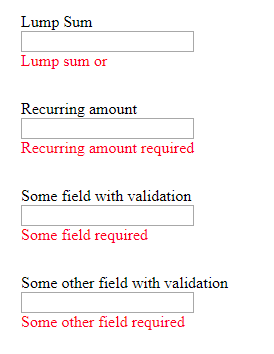
The issue pops up at the validation for lump sum and recurring amount. The error message on both boxes should only pop up once the forms are touched and values are still not entered yet or the values are zero. In addition to this validation, there's also other sanitizing of the input that needs to happen on all input fields.
EDIT:
Thought I'd add that I'm using the withFormik HOC and not the render prop style.
strange-developer
on 22 Feb 2018
Right so why can't you just do something like {touched.fieldA && touched.fieldB && errors.fieldB} ?
jaredpalmer
on 22 Feb 2018
I've explored this option and because fieldA needs to have additional validations (like max and min) which don't depend on fieldB being touched, the non dependent validations will not be shown. It will always require that fieldA and fieldB are touched before any error is shown.
strange-developer
on 22 Feb 2018
Hey, sorry to bother. Is the feature something worth considering? Personally, I don't consider supplying more information to a validation function to be a bad thing. In this case, it seems like it is necessary information which can be ignored if the user does not wish to use it. It shouldn't require any changes from users who have currently implemented Formik and are upgrading if this feature is deemed appropriate to be added.
strange-developer
on 26 Feb 2018
Hiya,
There are definitely situations where this would be useful, for example:
I have a form with two fields, monthlyAmount and yearlyAmount. A user only needs to fill in one of the two.
If the user focuses on monthlyAmount, tabs off, and focuses yearlyAmount, and tabs off (without filling in any value in either) an error needs to be displayed in both. (monthlyAmount - _Monthly, or_, and yearlyAmount - _Yearly amount required_). This means I need to wait until both are _touched_ before validating either.
However, if the user focuses on monthlyAmount, fills in an incorrect value, and tabs off, an error needs to be displayed immediately (monthylAmount - _Enter a monthly value less than 100_).
Here is a sample of the code that will work if I am supplied with touched in my validation method.
_form.js_
import { withFormik } from 'formik'

import Component from './component';

const validate = (values, props, touched) => {
  const errors = {};
  if (!values.monthlyAmount && touched.monthlyAmount && touched.yearlyAmount) {
    errors.monthlyAmount = 'Monthly, or';
  }
  if (!values.yearlyAmount && touched.monthlyAmount && touched.yearlyAmount) {
    errors.yearlyAmount = 'yearly amount is required';
  }
  if (values.monthlyAmount && values.monthlyAmount > 100 && touched.monthlyAmount) {
    errors.monthlyAmount = 'Enter a monthly value less than 100';
  }
  if (values.yearlyAmount && values.yearlyAmount > 100 && touched.yearlyAmount) {
    errors.yearlyAmount = 'Enter a yearly value less than 100';
  }
};

export default withFormik({ validate })(Component);
_component.jsx_
import React from 'react';

const Component = ({ errors, handleBlur, handleChange, handleSubmit, touched, values }) => (
  <form onSubmit={handleSubmit}>
    <input
      name="monthlyAmount"
      onBlur={handleBlur}
      onChange={handleChange}
      type="number"
      value={values.monthlyAmount}
    />
    <p>{touched.monthlyAmount && errors.monthlyAmount}</p>
    <input
      name="yearlyAmount"
      onBlur={handleBlur}
      onChange={handleChange}
      type="number"
      value={values.yearlyAmount}
    />
    <p>{touched.yearlyAmount && errors.yearlyAmount}</p>
  </form>
);

export default Component;
Maybe you can suggest a clean solution without using touched?
 hvolschenk
on 1 Mar 2018
hvolschenk
on 1 Mar 2018
Hola! So here's the deal, between open source and my day job and life and what not, I have a lot to manage, so I use a GitHub bot to automate a few things here and there. This particular GitHub bot is going to mark this as stale because it has not had recent activity for a while. It will be closed if no further activity occurs in a few days. Do not take this personally--seriously--this is a completely automated action. If this is a mistake, just make a comment, DM me, send a carrier pidgeon, or a smoke signal.
![stale[bot] picture](https://avatars3.githubusercontent.com/in/1724?v=4&s=40) stale[bot]
on 15 Aug 2018
stale[bot]
on 15 Aug 2018
ProBot automatically closed this due to inactivity. Holler if this is a mistake, and we'll re-open it.
stale[bot]
on 22 Aug 2018
Just ran into this problem. I'm using the HOC, withFormik, because I need my lifecycle hooks to have access to the dirty prop. Figured I'd post my specific use case and solution in case it helps someone out.
My desired validation requirements are:
- validate on change/blur, only if field is touched
- validate on submit
I was attempting to handle this in the validate option within withFormik, but had to ditch it for reasons stated in earlier post. In the end, what worked for me is using the field level validation prop, validate and the formik prop validateForm in the handleSubmit option. Short example below:
class MyFormComponent extends Component {
  componentDidMount() {
    // some code referencing this.props.dirty
  }

  render() {
    const { touched, values } = this. props;
    return (
      <Form>
        <Field
          component="select"
          name="name"
          validate={value => {
            if (!value && touched.name) return 'Required';
          }}>
          <option value="" disabled>
            Choose Option
          </option>
          {["Option 1", "Option 2", "Other"].map(optionValue => {
            return (
              <option key={optionValue} value={optionValue}>
                {optionValue}
              </option>
            );
          })}
        </Field>

        {values.name === 'Other' && (
          <Field
            type="text"
            name="customName"
            validate={value => {
              if (values.name === 'Other' && !values.customName && touched.customName) {
                return 'required';
              }
            }}
          />
        )}
        <button type="submit">
          submit
        </button>
      </Form>
    )
  }
)


export default withFormik({
  ...
  handleSubmit: async (values, { validateForm }) => {
    // run validation before handling submit
    await validateForm();

    // do submit stuff...
  }
})(MyFormComponent);
I guess this solution is not that difficult to use, but my validation requirements seem pretty common IMO, so it'd be nice if there was a recommended solution. I prefer having my validation in one spot, but I'm not sure how I would have accomplished it here...
 BradRyan
on 13 Dec 2018
BradRyan
on 13 Dec 2018
Related issues
 jeffbski
·
3Comments
jeffbski
·
3Comments
 pmonty
·
3Comments
pmonty
·
3Comments
 dearcodes
·
3Comments
jaredpalmer
·
3Comments
dearcodes
·
3Comments
jaredpalmer
·
3Comments
 ancashoria
·
3Comments
ancashoria
·
3Comments
Most helpful comment
Hiya,
There are definitely situations where this would be useful, for example:
I have a form with two fields,
monthlyAmountandyearlyAmount. A user only needs to fill in one of the two.If the user focuses on
monthlyAmount, tabs off, and focusesyearlyAmount, and tabs off (without filling in any value in either) an error needs to be displayed in both. (monthlyAmount- _Monthly, or_, andyearlyAmount- _Yearly amount required_). This means I need to wait until both are _touched_ before validating either.However, if the user focuses on
monthlyAmount, fills in an incorrect value, and tabs off, an error needs to be displayed immediately (monthylAmount- _Enter a monthly value less than 100_).Here is a sample of the code that will work if I am supplied with
touchedin my validation method._form.js_
_component.jsx_
Maybe you can suggest a clean solution without using
touched?