Formik: Use handleSubmit from higher level
Hey,
I just want to trigger the handleSubmit from a component that is higher in my DOM, what's the best way to deal with that ?
I want to do that because my submit button is on the top right corner of my app...
Is there any way instead of doing this, in fact in need to extract the handleSubmit in a higher level...
Thanks,
Best regards
 ScreamZ
All 7 comments
Lift Formik state up your state tree and pass down the submitForm() where you need it, remember that you can render anything in Formik render. You can put your <form> and inputs as many levels down as you need to. Pass down the props.
 jaredpalmer
on 27 Nov 2017
jaredpalmer
on 27 Nov 2017
@jaredpalmer
So I'm forced to use
Here is how I solved the issue, this is not so clean but I can't figure out how to achieve what you explain. I might be missing something.
LoginScreen.js
This component is rendering the page, in react-native.
import React, { Component } from 'react'
import { View, Text, TextInput, Button } from 'react-native'
import { connect } from 'react-redux'
import PropTypes from 'prop-types'
import { creators } from '../../redux/reducers/user'
import { loginUser } from '../../services/login'
import i18n from 'app/i18n'
import LoginForm from '../../Components/Login/LoginForm'

class LoginScreen extends Component {
  constructor(props) {
    super(props)

    this.state = {
      username: '',
      password: ''
    }

    this._login = this._login.bind(this)
  }

  componentDidMount() {
    // More info here : https://reactnavigation.org/docs/intro/headers
    // Consider using Redux ? Deeplinking ? Consider checking the above link.
    this.props.navigation.setParams({ handleLogin: this._login })
  }

  _login(e) {
    // Update state, show ActivityIndicator or disabled button on top right corner
    this.props.navigation.setParams({ isProcessingLogin: true })
    this.form.handleSubmit(e)

    // HERE I must get my form vars at the moment it use internal component state because i have not reformated

    loginUser(this.state.username, this.state.password)
      .then(user => {
        this.props.navigation.setParams({ isProcessingLogin: false }) // Fix loading status
        this.props.setUserLoggedIn(user)
      })
      .catch(e => alert(e.message))
  }

  render() {
    return (
      <View>
        <Text>{i18n.t('login.title')}</Text>
        <LoginForm
          ref={el => (this.form = el)}
          email={'test'}
          password={'test'}
        />
        <Button
          title={i18n.t('login.forgotPassword')}
          color="#2989b2"
          onPress={() => alert('TODO : Navigate to reset password')} // TODO: Fix on forgotpassword issue
        />
      </View>
    )
  }
}

LoginScreen.propTypes = {
  navigation: PropTypes.object.isRequired,
  setUserLoggedIn: PropTypes.func.isRequired
}

LoginScreen.navigationOptions = ({ navigation }) => {
  const { params = {} } = navigation.state

  return {
    headerRight: (
      <Button
        title={i18n.t('login.submit')}
        onPress={() => params.handleLogin(e)}
      />
    )
  }
}

const mapDispatchToProps = dispatch => ({
  setUserLoggedIn: data => {
    dispatch(creators.setConnected(data.jwt))
    dispatch(creators.updateUserMeta({ id: data._id }))
  }
})

export default connect(null, mapDispatchToProps)(LoginScreen)
LoginForm.js
This component is exposing the HOC withFormik with values. I want to trigger my job, but the trigger button is in LoginScreen in the react-navigation part.
import React, { Component } from 'react'
import { View, TextInput } from 'react-native'
import { withFormik } from 'formik'
import PropTypes from 'prop-types'
import i18n from 'app/i18n'

const formConfig = {
  mapPropsToValues: props => ({ email: '', password: '' }),
  validate: (values, props) => {
    let errors = {}
    return errors
  },
  // Submission handler
  handleSubmit: (values, formikBag) => {
    // If possible lift up to LoginScreen._login ?
    // Or should I transfer the business logic here ?
  }
}

class LoginForm extends Component {
  render() {
    return (
      <View>
        <TextInput
          style={{ height: 40 }}
          placeholder={i18n.t('login.inputEmail')}
        />
        <TextInput
          style={{ height: 40 }}
          placeholder={i18n.t('login.inputPassword')}
          secureTextEntry={true}
        />
      </View>
    )
  }
}

LoginForm.propTypes = {
  values: PropTypes.object.isRequired,
  errors: PropTypes.object.isRequired,
  touched: PropTypes.object.isRequired,
  handleChange: PropTypes.func.isRequired,
  handleBlur: PropTypes.func.isRequired,
  handleSubmit: PropTypes.func.isRequired,
  isSubmitting: PropTypes.bool.isRequired
}

export default withFormik(formConfig, LoginForm)
Using a ref is not the best way to do I think, can you light me up ?
Best regards and thanks in advance.
ScreamZ
on 28 Nov 2017
I think @jaredpalmer's point was you don't have to wrap your form directly with Formik, but you can wrap the parent component, where you need it's functionality, for example.
@jaredpalmer it seems submitForm is missing in README documentation. PR?
 prichodko
on 28 Nov 2017
prichodko
on 28 Nov 2017
PR
jaredpalmer
on 29 Nov 2017
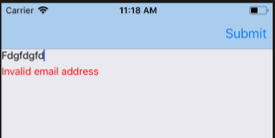
This is how I did it. Same use case by the sound of it. I wanted the submit button to be in the React Navigation header.
import React from "react";
import {
  Button,
  TextInput,
  View,
  Text,
  InteractionManager
} from "react-native";
import { withFormik } from "formik";
import Yup from "yup";

const enhancer = withFormik({
  mapPropsToValues: props => {
    return {
      email: "",
      password: ""
    };
  },
  validationSchema: Yup.object().shape({
    email: Yup.string()
      .email("Invalid email address")
      .required("Email is required!")
  }),

  handleSubmit: (values, { props, setSubmitting }) => {
    console.log(values);
  }
});

class Signup2 extends React.Component {
  static navigationOptions = ({ navigation }) => {
    return {
      headerStyle: { backgroundColor: "#ace" },
      headerRight:
        navigation.state.params && navigation.state.params.headerRight
    };
  };

  componentDidMount() {
    InteractionManager.runAfterInteractions(() => {
      this.props.navigation.setParams({
        headerRight: <Button onPress={this.props.handleSubmit} title="Submit" />
      });
    });
  }

  render() {
    return (
      <View>
        <TextInput
          keyboardType="email-address"
          autoCorrect={false}
          name="email"
          onChangeText={text => this.props.setFieldValue("email", text)}
          value={this.props.values.email}
        />
        {this.props.errors.email &&
          this.props.touched.email && (
            <Text style={{ color: "red", marginTop: 5 }}>
              {this.props.errors.email}
            </Text>
          )}
      </View>
    );
  }
}
export default enhancer(Signup2);
 pennyandsean
on 30 Jan 2018
pennyandsean
on 30 Jan 2018
@pennyandsean hi there, in your example if I want to clear error on input focus, how can I achieve that ?
 yasir-netlinks
on 14 May 2018
yasir-netlinks
on 14 May 2018
Hi,
I have similar use case, where I have "Save" button two level above Tab>Form component.
Using React 16.8.6,
@jaredpalmer Do you Live example in Formik docs, to test this use case.
Please share sample code here atleast with React.
 prajavk
on 16 Jul 2019
prajavk
on 16 Jul 2019
Related issues
 giulioambrogi
·
3Comments
giulioambrogi
·
3Comments
 ancashoria
·
3Comments
ancashoria
·
3Comments
 Jungwoo-An
·
3Comments
Jungwoo-An
·
3Comments
 emartini
·
3Comments
emartini
·
3Comments
 najisawas
·
3Comments
najisawas
·
3Comments
Most helpful comment
Lift Formik state up your state tree and pass down the
submitForm()where you need it, remember that you can render anything in Formik render. You can put your<form>and inputs as many levels down as you need to. Pass down the props.