Formik: Scroll to first invalid element
Is there nice and recommended way to scroll to first invalid form element with formik, when form is submitted?
 cassln
All 33 comments
I would go for component which will react to errors prop change.
- watch change either in
componentWillReceivePropsorcomponentDidUpdate - when change is detected, find first/topmost error message and scroll to message
 Andreyco
on 30 Aug 2017
Andreyco
on 30 Aug 2017
Yeah componentDidUpdate is probs the best way to do this as it is a sideeffect.
 jaredpalmer
on 30 Aug 2017
jaredpalmer
on 30 Aug 2017
Side effect in componentDidUpdate looks good. But how can I detect in componentDidUpdate that it was exact submit, not change. (I'm using validateOnChange option)
cassln
on 5 Sep 2017
@cassln There may be more elegant ways to do this, but I would do something like:
// ...
componentDidUpdate(prevProps) {
// if form was submitting, but now is not submitting because it is invalid
if (prevProps.isSubmitting && !this.props.isSubmitting && !this.props.isValid) {
// and assume you've added refs to each input: `ref={ i => this[name] = i}` , then...
this.[Object.keys(this.props.errors)[0]].focus()
// or do other imperative stuff that DOES NOT SET STATE
// smoothScroll(Object.keys(this.props.errors)[0].<offsetY | or whatever>)
}
}
- I think
.focus()will trigger a scroll in most browsers, maybe janky tho - Not 100% certain which order your
errorskeys will be in, would depend on your validation function. I believe Yup maintains shape-order (worth checking).
jaredpalmer
on 5 Sep 2017
@jaredpalmer this condition is working perfect. Thank you very much.
I don't use .focus(), because I have complex form components like gallery. I use div with data-scroll-anchor attribute and find first div with the attribute. But I think this is case specific part.
Issue is covered, so i'm going to close issue now. :)
cassln
on 6 Sep 2017
@jaredpalmer this solution is only available on formik enhanced forms right? Is there a similar way to implement this in render props way?
 lardissone
on 27 Feb 2018
lardissone
on 27 Feb 2018
@lardissone you can do that as well with render props I think. Just create a ScrollToError component which contain the above code and after you use it this way:
<Formik
render={formikProps => (
<form>
<ScrollToError {...formikProps} />
</form>
)}
/>
Edit: Actually to apply the same trick as the one described by Jared, you'll have to use ScrollToError inside each
class CustomField extends React.Component {
constructor(props) {
super(props);
this.inputRef = React.createRef();
}
render() {
const {
name
} = this.props;
return (
<Field
name={name}
ref={this.inputRef}
render={({
field,
form: { touched, errors, ...formikProps }
}) => (
<div>
<ScrollToError
name={name}
errors={errors}
inputRef={this.inputRef}
{...formikProps}
/>
<input {...field} />
</div>
)}
/>
);
}
}
And my ScrollToError component:
export default class ScrollToError extends React.Component {
componentDidUpdate(prevProps) {
if (prevProps.submitCount !== this.props.submitCount && !this.props.isValid) {
if (Object.keys(this.props.errors)[0] === this.props.name) {
ReactDOM.findDOMNode(this.props.inputRef.current).scrollIntoView({ behavior: 'smooth' });
}
}
}
render() {
return null;
}
}
 Grsmto
on 4 Apr 2018
Grsmto
on 4 Apr 2018
We need to be able to know at the same time about three things:
- the errors object
- the isSubmitting state
- the inputs refs
This is not actually possible at the moment, because when you submit the form, formik validate is fired, and the isSubmitting state remain false (when some field is invalid ofc)
There should be a way to know these things, I propose to:
- pass the isSubmitting state on the validate function? Like
validate(values, {isSubmitting}) - validate should not reset isSubmitting to false?
Thanks in advance!
 cloud-walker
on 15 Jun 2018
cloud-walker
on 15 Jun 2018
jaredpalmer's solution doesn't work as of latest version of Formik with withFormik HOC.
 fobdy
on 24 Jul 2018
fobdy
on 24 Jul 2018
My temporary solution is to attach an extra click handler to the submit button and check there for errors and scroll if needed. This works because of onChange + onBlur fields validation, so i have proper validation info before submitting.
fobdy
on 24 Jul 2018
I'm also trying to do this. Does anybody have any example code of how to scroll to the first error on submit using the render props version?
 jon64digital
on 10 Aug 2018
jon64digital
on 10 Aug 2018
I created this with the most recent version of Formik (1.3.1):
https://gist.github.com/dphrag/4db3b453e02567a0bb52592679554a5b
Just stick that component
<Formik>
        {({ dirty, isSubmitting, errors }) => {
          return (
            <Form>
              <Field />
              <Field />
              <ErrorFocus />
            </Form>
          );
        }}
 </Formik>
Yeah it uses DOM access directly so you don't have to write refs into every field, but it SHOULD be ok... I think... haha.
 dphrag
on 2 Nov 2018
dphrag
on 2 Nov 2018
I've modified @dphrag 's gist to work with nested errors
import React from 'react';
import { connect } from 'formik';
class ErrorFocus extends React.Component {
    isObject(value) {
        return value && typeof value === 'object' && value.constructor === Object;
    }
    getKeysRecursively = (object) => {
        if (!this.isObject(object)) {
            return ''
        }
        const currentKey = Object.keys(object)[0]
        if (!this.getKeysRecursively(object[currentKey])) {
            return currentKey
        }
        return currentKey + "." + this.getKeysRecursively(object[currentKey])
    }
    componentDidUpdate(prevProps) {
        const { isSubmitting, isValidating, errors } = prevProps.formik;
        const keys = Object.keys(errors);
        if (keys.length > 0 && isSubmitting && !isValidating) {
            const selectorKey = this.getKeysRecursively(errors)
            const selector = `[id="${selectorKey}"], [name="${selectorKey}"] `;
            const errorElement = document.querySelector(selector);
            if(errorElement){
                errorElement.focus();
            }
        }
    }
    render() {
        return null;
    }
}
export default connect(ErrorFocus);
 george-maged
on 29 Jan 2019
george-maged
on 29 Jan 2019
I wrote up a post on how we created a lib do this on some of our forms.
https://palmer.net/blog/form-field-scroll-management-in-react
The API is a bit clunky, but I think Hooks can help quite a lot for something like this. Let me know what you think!
 nathanforce
on 29 Jan 2019
nathanforce
on 29 Jan 2019
Hi, React Hooks + Typescript version how to uncollapse panels, scroll to error and focus input if can https://gist.github.com/osv/691efa00784def6f6004d31cd6108f56
 osv
on 2 Feb 2019
osv
on 2 Feb 2019
I wrote up a hooks library that can help here.
https://github.com/nathanforce/react-register-nodes
Example usage:
nathanforce
on 6 Feb 2019
All those examples does not work when the error is from fetch an api...
 MontoyaAndres
on 10 Feb 2019
MontoyaAndres
on 10 Feb 2019
@cassln @jaredpalmer Can we open this issue back up?
Reason I ask is because the suggestion to use componentDidUpdate where inside you get errors[0] and focus on that element doesn't work.
I did some of my own testing, and formik can receive errors with all sorts of ordering. In some instances, formik receives errors in the order that the programmer defines them in the validate prop. Sometimes one error will randomly come first and the rest will be in order. Sometimes the errors are in alphabetical order. It seems we cannot trust that errors returns in the exact order they are defined in.
Here is an example of what I mean
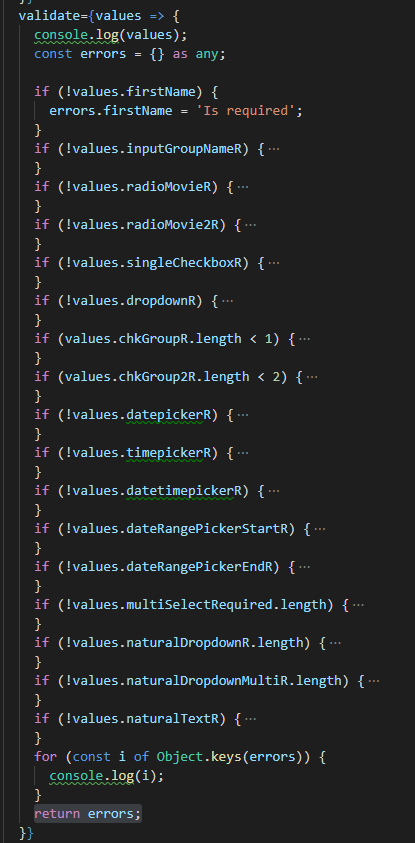
So when I create the form, and console log my errors after they are all added, they appear in the order that I added them.
However, when i console log my errors within the ErrorFocus component, using FormikContext, the errors appear out of order
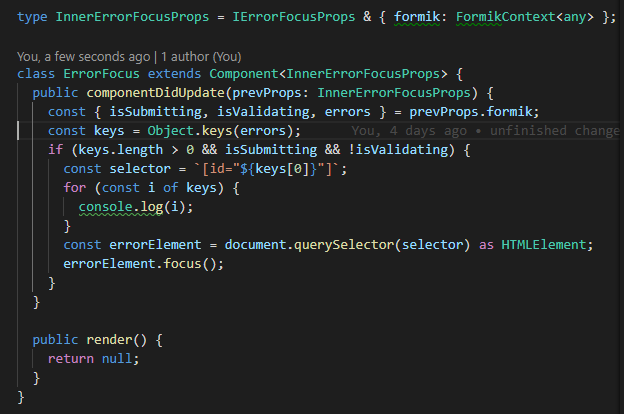
Therefore, there is no easy way to identify the first error.
Is there any way we can get support for scrolling to the first error in formik? Can we get an optional prop, like "setScrollError" where when set to true, it scrolls to first error.
The reason I think it would be better if Formik handled it, is because clearly there seems to be issues when later on getting those error values. If formik handled it internally then hopefully they would remain in order!
 sarahsmo
on 12 Feb 2019
sarahsmo
on 12 Feb 2019
@sarahsmo I don't think there's a reliable way for Formik to determine "first" error. Formik would need to know which DOM node you have rendered for your form and then query the ordering of the nodes that correspond to invalid fields. It's a bit messy and imperative and probably best left to be implemented by the user. I don't think you want to rely on the ordering of the keys in the errors object, as key ordering is generally unstable in javascript.
That said, we've recently published react-register-nodes which we think solves this problem nicely using React Hooks. There's an example in the Readme of that repo that illustrates scrolling to first error.
Let me know if that helps!
nathanforce
on 12 Feb 2019
@nathanforce Yes that helps!! Thank you!
sarahsmo
on 12 Feb 2019
One way I could resolve the problem to catch the first error and show it on its input, instead of using react-register-nodes' solution was this one (In my case):
const ErrorFocus = ({
  name,
  formik: { isSubmitting, isValidating, errors }
}) => {
  const keys = Object.keys(errors);
  if (keys.length > 0 && isSubmitting && !isValidating) {
    document.querySelector(`[name="${keys[0]}"]`).focus();
  }

  return <ErrorMessage name={name} />;
};

const ConnectErrorFocus = connect(ErrorFocus);
The preview code shows the error and focus on that element, inspired by @bphrag's solution, so I only call this component in any other component, like this:
const field = ({ name, placeholder }) => (
  <div className="field">
    <div className="control">
      <Field
        name={name}
        placeholder={placeholder}
        className="input is-hovered"
        required
      />
    </div>
    <ConnectErrorFocus name={name} />
  </div>
);
But, there's one problem, when the API sends me an error and I want to show it on any input, for example if I typed a wrong password, I want to focus on the password input. The solution I could do was (In my case) adding the document.querySelector([name="${keys[0]}"]).focus(); function, something like this:
const response = await axios.post("http://localhost:8080/", {
  password: values.password
});

if (response.data.length > 0) {
  setErrors(normalizeErrors(response.data));
  document.querySelector(`[name="${response.data[0].path}"]`).focus();
}

setSubmitting(false);
The server sends this:
[
  {
    path: "password",
    message: "Wrong password."
  }
]
And the normalizeErrors function transform that array to { password: ['error 1', 'error 2'] }.
If someone wants an example more imperative, here you go.
MontoyaAndres
on 8 Mar 2019
In case you're using v2.0 already, here's a hook version of focussing the field with the first error:
const useFocusOnError = ({fieldRef, name}) => {
  const formik = useFormikContext();
  const prevSubmitCountRef = React.useRef(formik.submitCount);
  const firstErrorKey = Object.keys(formik.errors)[0];
  React.useEffect(() => {
    if (prevSubmitCountRef.current !== formik.submitCount && !formik.isValid) {
      if (fieldRef.current && firstErrorKey === name) fieldRef.current.focus();
    }
    prevSubmitCountRef.current = formik.submitCount;
  }, [formik.submitCount, formik.isValid, firstErrorKey]);
};
you can use it like this
const Input = ({name, ...props}) => {
  const fieldRef = React.useRef();
  const [field] = useField(name);
  useFocusOnError({fieldRef, name});
  return <input ref={fieldRef} name={name} {...props} {...field} />;
};
 danielberndt
on 20 Mar 2019
danielberndt
on 20 Mar 2019
any working solutions for react-native?
 jacek213
on 10 Apr 2019
jacek213
on 10 Apr 2019
Here's my solution, assuming this is a custom field component that receives the form props:
  useEffect(() => {
    if (isValid || !isSubmitting) return;
    const firstErrorKey = Object.keys(errors)[0];
    if (!isValid && firstErrorKey === field.name) {
      fieldRef.current.focus();
    }
    // eslint-disable-next-line react-hooks/exhaustive-deps
  }, [isSubmitting, isValid, errors]);
 antoniojps
on 7 Aug 2019
antoniojps
on 7 Aug 2019
The componentDidUpdate approach worked fine for me, but I found doing a validation check in the submit button's onClick to be much cleaner. No need to add a non-rendering React element to the tree.
{/* Inside of Formik render prop function... */}

<label>
  Email address:
  <Field id={EMAIL_KEY} name={EMAIL_KEY} />
</label>

<button
  type="submit"
  disabled={formikProps.isSubmitting}
  onClick={async () => {
    const curErrors = await formikProps.validateForm();
    const curErrorsKeys = Object.keys(curErrors);

    if (curErrorsKeys.length) {
      // Assuming curErrorsKeys[0] identifies the first failing field, use that to
      // find the correct DOM element to call .focus() on.
      //
      // Since I set the id attribute on all my form's <input>s to match the error
      // keys, I just use document.getElementById(), but of course you could use refs
      const el = document.getElementById(curErrorsKeys[0]);

      if (el) el.focus();
    }
  }
/>
This doesn't prevent the default submit logic from running. I think the errored field is technically focused before Formik touches it, but it all happens so fast the user doesn't notice.
 WestonThayer
on 18 Oct 2019
WestonThayer
on 18 Oct 2019
To complete @Grsmto and @george-maged solution, I complete the script to handle Arrays
Here is the script: https://playcode.io/469441
Finally your componentDidUpdate will look like that:
public componentDidUpdate(prevProps: Props) {
  if (prevProps.submitCount !== this.props.submitCount && !this.props.isValid) {
    if (this.getFirstPath(errors).slice(1) === this.props.name && this.props.inputRef) {
      this.props.inputRef.current.scrollIntoView({behavior: "smooth"});
    }
  }
}
 alex198710
on 9 Nov 2019
alex198710
on 9 Nov 2019
Did someone find a solution to scroll on an element outside the form ? A way to scroll to the header, showing server errors.
I would like to access the form errors inside a useEffect() to trigger a scroll targeting a ref to an element.
I'm currently using a dirty workaround:
{({ errors, isValid, status, isSubmitting, setFieldValue }) => (
    <Form>
        {!isValid && scrollToElement(errorsHeaderRef.current)}
         ...
    </Form>
)
 RemyMachado
on 3 Dec 2019
RemyMachado
on 3 Dec 2019
Hi @danielberndt, your code works well but there is one issue, when i click submit button twice then it scroll up to first error. On first click, it just shows error. How can I fix this issue?
 shashankrepo
on 6 Feb 2020
shashankrepo
on 6 Feb 2020
@shashankrepo Were you able to make it on the first click?
Hi @danielberndt, your code works well but there is one issue, when i click submit button twice then it scroll up to first error. On first click, it just shows error. How can I fix this issue?
 bajajsu16
on 12 Jun 2020
bajajsu16
on 12 Jun 2020
import { useEffect } from 'react';
import isObject from 'lodash/isObject';
import { useFormikContext } from 'formik';

const getFirstErrorKey = (object, keys = []) => {
  const firstErrorKey = Object.keys(object)[0];
  if (isObject(object[firstErrorKey])) {
    return getFirstErrorKey(object[firstErrorKey], [...keys, firstErrorKey]);
  }
  return [...keys, firstErrorKey].join('.');
};

const FormikOnError = ({ children }) => {
  const formik = useFormikContext();

  useEffect(() => {
    if (!formik.isValid && formik.submitCount > 0) {
      const firstErrorKey = getFirstErrorKey(formik.errors);
      if (global.window.document.getElementsByName(firstErrorKey).length) {
        global.window.document.getElementsByName(firstErrorKey)[0].focus();
      }
    }
  }, [formik.submitCount, formik.isValid, formik.errors]);
  return children;
};

export default FormikOnError;
After:
<Formik>
  <Form>
    <FormikOnError>
        {form stuff}
    </FormikOnError>
 </Form>
</Formik>
 yrodriguezle
on 13 Aug 2020
yrodriguezle
on 13 Aug 2020
import { useEffect } from 'react';
import isObject from 'lodash/isObject';
import { useFormikContext } from 'formik';

const getFirstErrorKey = (object, keys = []) => {
  const firstErrorKey = Object.keys(object)[0];
  if (isObject(object[firstErrorKey])) {
    return getFirstErrorKey(object[firstErrorKey], [...keys, firstErrorKey]);
  }
  return [...keys, firstErrorKey].join('.');
};

const FormikOnError = ({ children }) => {
  const formik = useFormikContext();

  useEffect(() => {
    if (!formik.isValid && formik.submitCount > 0) {
      const firstErrorKey = getFirstErrorKey(formik.errors);
      if (global.window.document.getElementsByName(firstErrorKey).length) {
        global.window.document.getElementsByName(firstErrorKey)[0].focus();
      }
    }
  }, [formik.submitCount, formik.isValid, formik.errors]);
  return children;
};

export default FormikOnError;
After:
<Formik>
  <Form>
    <FormikOnError>
        {form stuff}
    </FormikOnError>
 </Form>
</Formik>
@yrodriguezle This works fine at focusing the first error item, but once you start typing into the empty input, after one or two characters, it jumps prematurely to the next available error input.
 stephenasamoah
on 16 Nov 2020
stephenasamoah
on 16 Nov 2020
@stephenasamoah I think that after focus you should call setTouched({})
yrodriguezle
on 16 Nov 2020
@stephenasamoah when you type in the empty input the formilk error bag changes and so the useEffect in FormikOnError is called again. I used the formik.submitCount to stop auto focus to the first error text field. Here is the change in @yrodriguezle's solution
import { useEffect, useState } from 'react';
import isObject from 'lodash/isObject';
import { useFormikContext } from 'formik';

const getFirstErrorKey = (object, keys = []) => {
  const firstErrorKey = Object.keys(object)[0];
  if (isObject(object[firstErrorKey])) {
    return getFirstErrorKey(object[firstErrorKey], [...keys, firstErrorKey]);
  }
  return [...keys, firstErrorKey].join('.');
};

const FormikOnError = ({ children }) => {
  const formik = useFormikContext();
  const [submitCount, setSubmitCount] = useState(formik.submitCount)

  useEffect(() => {
    if (!formik.isValid && formik.submitCount > submitCount) {
      const firstErrorKey = getFirstErrorKey(formik.errors);
      if (global.window.document.getElementsByName(firstErrorKey).length) {
        global.window.document.getElementsByName(firstErrorKey)[0].focus();
      }
      setSubmitCount(formik.submitCount)
    }
  }, [formik.submitCount, formik.isValid, formik.errors]);
  return children;
};

export default FormikOnError;
After:
<Formik>
  <Form>
    <FormikOnError>
        {form stuff}
    </FormikOnError>
 </Form>
</Formik>
 nikugogoi
on 16 Dec 2020
nikugogoi
on 16 Dec 2020
Related issues
jaredpalmer
·
3Comments
 jeffbski
·
3Comments
jeffbski
·
3Comments
 Jucesr
·
3Comments
Jucesr
·
3Comments
 outaTiME
·
3Comments
outaTiME
·
3Comments
 sibelius
·
3Comments
sibelius
·
3Comments
Most helpful comment
I created this with the most recent version of Formik (1.3.1):
https://gist.github.com/dphrag/4db3b453e02567a0bb52592679554a5b
Just stick that component inside of your Formik like:
Yeah it uses DOM access directly so you don't have to write refs into every field, but it SHOULD be ok... I think... haha.