Is there a way of handling a file input, whenever I try and do it I just get returned a C:/fakepath/... as the value. Am I missing something how do I access the file data
 samjbmason
All 34 comments
At the moment Formik doesn't directly support file inputs. :(
 jaredpalmer
on 10 Jul 2017
jaredpalmer
on 10 Jul 2017
The way I always do form uploads using Formik is, create a FileUpload component that posts the file to an endpoint - then the endpoint returns back a path or identifier string for the uploaded file. Then your FileUpload component calls Formik's onChangeValue with the path string. So Formik doesn't ever touch the File object directly - it just deals with a string value passed in from the component.
This approach works for us, but it may or may not work for what you're trying to do, depending on how your own backend endpoints behave. But hopefully it explains why directly supporting file inputs hasn't been on our radar.
 eonwhite
on 10 Jul 2017
eonwhite
on 10 Jul 2017
@eonwhite that sounds good any hints as to what a simple file upload component might look like.
samjbmason
on 10 Jul 2017
@samjbmason
import * as React from 'react';

import { AxiosRequestConfig } from 'axios';
import Image from 'components/Image';
import { Progress } from 'components/Progress';
import ToasterInstance from '../Toast/ToasterInstance';
import { axios } from 'api/axios.config';
import { toApiError } from 'utils/api';

export interface MediaUploadProps {
  id: string;
  slug: string;
  value: string;
  onChange: (field: string, mediaId: string) => void;
}

export interface MediaUploadState {
  progress: number;
  file?: File;
  error?: string;
}

export class MediaUpload extends React.Component<
  MediaUploadProps,
  MediaUploadState
> {
  state: MediaUploadState = { progress: -1 };

  handleFileChange = (e: React.ChangeEvent<HTMLInputElement>) => {
    if (!e.target.files) {
      return;
    }
    let file = e.target.files[0];
    this.setState({ file: file });

    let data = new FormData();
    data.append('file', file);

    let config: AxiosRequestConfig = {
      onUploadProgress: (p: any) => {
        this.setState({ progress: Math.round(p.loaded * 100 / p.total) });
      },
    };

    this.setState({ error: undefined, progress: 0 });

    axios.post('/v1/media?slug=' + this.props.slug, data, config).then(
      res => {
        this.setState({ error: undefined, progress: -1 });
        this.props.onChange(this.props.id, res.data.path);
      },
      err => {
        const message = toApiError(err);
        this.setState({ error: message, progress: -1 });
        ToasterInstance.show({
          message,
          iconName: 'danger',
          intent: 'danger',
        });
      }
    );
  }

  handleRemoveImage = () => {
    this.props.onChange(this.props.id, '');
  }

  render() {
    return (
      <div>
        <div>
          {this.props.value !== '' &&
            this.state.progress === -1 &&
            <Image path={this.props.value} size="lg" />}
          <div style={{ maxWidth: 144 }}>
            {this.state.progress > -1 &&
              <Progress percentage={this.state.progress} />}
          </div>
          {this.props.value &&
            <a
              style={{ marginTop: -40 }}
              className="button button--negative button--small button--secondary"
              role="button"
              onClick={this.handleRemoveImage}
            >
              Remove
            </a>}
        </div>
        <div style={{ marginTop: 10 }}>
          <label className="button button--purple button--secondary">
            Upload new picture
            <input
              className="visually-hidden"
              type="file"
              onChange={this.handleFileChange}
            />

          </label>
        </div>

      </div>
    );
  }
}
Wow thanks @jaredpalmer really helpful 👍
samjbmason
on 11 Jul 2017
Why this was closed?
 goodmind
on 10 Nov 2017
goodmind
on 10 Nov 2017
I felt like Jared Palmer provided a clear enough answer.
samjbmason
on 10 Nov 2017
Well, I thought that you wanted to see this feature in formik itself
goodmind
on 10 Nov 2017
I do but it was less a feature request and more how would I do it if I was trying to do it. You should totally create a feature request.
From: andretshurotshka notifications@github.com
Sent: Friday, November 10, 2017 1:10:55 PM
To: jaredpalmer/formik
Cc: Sam Mason; State change
Subject: Re: [jaredpalmer/formik] Handling file input (#45)
Well, I thought that you wanted to see this feature in formik itself
—
You are receiving this because you modified the open/close state.
Reply to this email directly, view it on GitHubhttps://github.com/jaredpalmer/formik/issues/45#issuecomment-343469413, or mute the threadhttps://github.com/notifications/unsubscribe-auth/AA1np0dg6O0pjyO0VttqdUJ0973f_nmFks5s1EtegaJpZM4OTU7a.
samjbmason
on 10 Nov 2017
I am trying to implement this with ES6 but the onChange event never gets called on the element
 okezieokpara
on 21 Jan 2018
okezieokpara
on 21 Jan 2018
I just ran into a similar problem as OP. I hacked around it using setValues:
<input name="document" type="file" onChange={(event) => setValues({
...values,
[event.currentTarget.name]: event.currentTarget.files
})} />
[event.currentTarget.name]:is thenameattribute from the file input. Enclosing it in [brackets] allows us to use a variable object key, kinda like usingsomeObject[somevariable]. This lets us use the same function for any file input, regardless if itsname.Unfortunately, this syntax is only available in typescript and some experimental versions of ES, so if you're using vanilla ES6, you might try something like:
<input name="document" type="file" onChange={(event) => { const newValues = { ...values }; // copy the original object newValues[event.currentTarget.name] = event.currentTarget.files; setValues(newValues); }} />event.currentTarget.filesis an array of file objects from the file input.valuesandsetValuescome from the enclosing scope:<Formik render={({ values, setValues }) => (...)} />.- I then process and upload the files in the
onSubmithandler.
 elijah-schow
on 7 Sep 2018
elijah-schow
on 7 Sep 2018
I have this input file below in a form and I want to send all data when user press submit button.
For this case, I'm taking a really simple way.
```javascript
onChange={e => {
var file = e.target.files[0];
var reader = new FileReader();
setFieldValue("attachment_filename", file.name);
reader.onload = function(item) {
setFieldValue("attachment_data", item.target.result);
};
reader.readAsDataURL(file);
}}
/>
 jonatan2m
on 15 Dec 2018
jonatan2m
on 15 Dec 2018
I provide a react-native implementation here: https://github.com/YikSanChan/react-native-formik-example-app/commit/380040f84d3e114fb2790a8cd73f2d446f670c8d
 YikSanChan
on 19 Jan 2019
YikSanChan
on 19 Jan 2019
If anyone is still looking for a way to do it, I suggest you check out this article
I'm no affiliated with author in any shape or form in case you're wondering.
 harryadel
on 16 Feb 2019
harryadel
on 16 Feb 2019
@harryadel I've tried that method it works, but I tried to change it to use the Field instead of normal input, but I got an error once file is chosen, here is my code for that
const FileUpload = ({ field, form: { setFieldValue } }) => (
<input
{...field}
type="file"
onChange={event => {
setFieldValue(field.name, event.currentTarget.files[0]);
}}
className="form-control"
/>
);
And I use it in the form with Field with component attribute
<Field name="file" component={FileUpload} />
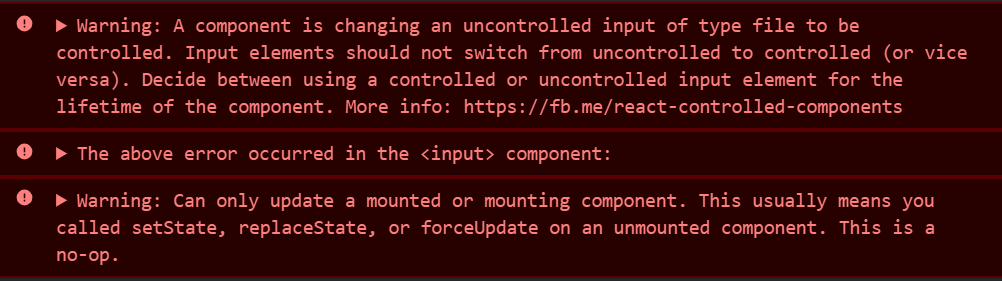
Any thoughts how to fix that ?
 mustafamagdy
on 23 Feb 2019
mustafamagdy
on 23 Feb 2019
@mustafamagdy I'm not a react expert so, please bear with me. What Field are talking about? Is a it Material-UI component? Also, it might help if actually tackle the warning in the console.
harryadel
on 28 Feb 2019
@harryadel not it's Formik's Field component
mustafamagdy
on 4 Mar 2019
@mustafamagdy: You can create one component like this.
import React from 'react';
function FileUpload(props) {
const {field, form} = props;
const handleChange = (e) => {
const file = e.currentTarget.files[0];
const reader = new FileReader();
const imgTag = document.getElementById("myimage");
imgTag.title = file.name;
reader.onload = function(event) {
imgTag.src = event.target.result;
};
reader.readAsDataURL(file);
form.setFieldValue(field.name, file);
};
return (
<div>
<input type={'file'} onChange={(o) => handleChange(o)} className={'form-control'}/>
<img src={''} alt="" id={'myimage'}/>
</div>
);
}
export default FileUpload;
And use this like this inside the form
<Field
name="image"
component={FileUpload}
/>
 Sonukr
on 14 Apr 2019
Sonukr
on 14 Apr 2019
I can't understand why this and #247 got closed. Files are definitely not an edge case of forms, so such a common thing need to be handled by Formik natively properly.
For what it's worth, redux-form handled it fine: https://github.com/erikras/redux-form/blob/e7ce5aec2bf0e24574e6f5f90bc04b9815c8e52e/src/events/getValue.js#L38
 rdsedmundo
on 15 Apr 2019
rdsedmundo
on 15 Apr 2019
@jaredpalmer answer works fine but with an exception,
this.props.onChange(this.props.id, res.data.path)
Returns the following error:
bundle.js:19297 Uncaught (in promise) TypeError: e.persist is not a function
at Object.Formik._this.handleChange [as onChange] (bundle.js:19297)
at bundle.js:97096
Usage:
<MediaUpload
onChange={handleChange}
id="avatar"
name="avatar"
dispatch={props.dispatch}
/>
 aftabnaveed
on 13 Jun 2019
aftabnaveed
on 13 Jun 2019
At the moment Formik doesn't directly support file inputs. :(
Cool...
 FabianoLothor
on 23 Jul 2019
FabianoLothor
on 23 Jul 2019
Every time I spend hours looking and using the perfect library just to find out vital features are missing.
As @rdsedmundo stated, this is not an edge case. At least update the repo README.md to clearly state it's missing this feature, so people can safely choose working alternatives such as redux-form.
For what's worth, i'm using this workaround
 Fieel
on 21 Sep 2019
Fieel
on 21 Sep 2019
@fieel sorry that you’re frustrated. This is how we build stuff at my company. feel free to submit a PR to the docs if you think this workaround should be there.
jaredpalmer
on 21 Sep 2019
@jaredpalmer not frustration, just a bit of surprise. I genuinely think the docs should address this, I'll look into a PR, thanks for the suggestion!
Fieel
on 21 Sep 2019
@Fieel what about different API(s) for file upload? So, far I have encountered at least 4 types of upload (as part of form):
- file is "uploaded" as different part of multipart HTTP request, and the rest of data is sent as JSON structure in different part (ie. nothing integrated between JSON data and uploaded file),
- file is "uploaded" as different part of multipart HTTP request, and the file is referenced from JSON structure sent as different part (ie. multipart, and file is linked from JSON),
- file is uploaded using AJAX in advance, and temporary file on server side is created, then the temporary file is referenced from JSON structure which is sent in another request,
- file is "uploaded" as base64 value stored directly within JSON structure.
And, I believe there are more solutions, which I haven't yet seen,.. (and, I'm not counting replacement of JSON with XML or form data)
These different ways of file uploading should be considered when developing a feature for formik,.. and, I would very like to see formik to have this feature (@jaredpalmer).
 kravemir
on 16 Oct 2019
kravemir
on 16 Oct 2019
I created a PR updating the Field docs about the lack of support for the file type. I think it's relevant information to have.
 codeinaire
on 18 Nov 2019
codeinaire
on 18 Nov 2019
it'd be nice of the workarounds were stored in the example directory rather than in a (closed) bug report.
 jrobeson
on 18 Nov 2019
jrobeson
on 18 Nov 2019
@samjbmason
import * as React from 'react';

import { AxiosRequestConfig } from 'axios';
import Image from 'components/Image';
import { Progress } from 'components/Progress';
import ToasterInstance from '../Toast/ToasterInstance';
import { axios } from 'api/axios.config';
import { toApiError } from 'utils/api';

export interface MediaUploadProps {
  id: string;
  slug: string;
  value: string;
  onChange: (field: string, mediaId: string) => void;
}

export interface MediaUploadState {
  progress: number;
  file?: File;
  error?: string;
}

export class MediaUpload extends React.Component<
  MediaUploadProps,
  MediaUploadState
> {
  state: MediaUploadState = { progress: -1 };

  handleFileChange = (e: React.ChangeEvent<HTMLInputElement>) => {
    if (!e.target.files) {
      return;
    }
    let file = e.target.files[0];
    this.setState({ file: file });

    let data = new FormData();
    data.append('file', file);

    let config: AxiosRequestConfig = {
      onUploadProgress: (p: any) => {
        this.setState({ progress: Math.round(p.loaded * 100 / p.total) });
      },
    };

    this.setState({ error: undefined, progress: 0 });

    axios.post('/v1/media?slug=' + this.props.slug, data, config).then(
      res => {
        this.setState({ error: undefined, progress: -1 });
        this.props.onChange(this.props.id, res.data.path);
      },
      err => {
        const message = toApiError(err);
        this.setState({ error: message, progress: -1 });
        ToasterInstance.show({
          message,
          iconName: 'danger',
          intent: 'danger',
        });
      }
    );
  }

  handleRemoveImage = () => {
    this.props.onChange(this.props.id, '');
  }

  render() {
    return (
      <div>
        <div>
          {this.props.value !== '' &&
            this.state.progress === -1 &&
            <Image path={this.props.value} size="lg" />}
          <div style={{ maxWidth: 144 }}>
            {this.state.progress > -1 &&
              <Progress percentage={this.state.progress} />}
          </div>
          {this.props.value &&
            <a
              style={{ marginTop: -40 }}
              className="button button--negative button--small button--secondary"
              role="button"
              onClick={this.handleRemoveImage}
            >
              Remove
            </a>}
        </div>
        <div style={{ marginTop: 10 }}>
          <label className="button button--purple button--secondary">
            Upload new picture
            <input
              className="visually-hidden"
              type="file"
              onChange={this.handleFileChange}
            />

          </label>
        </div>

      </div>
    );
  }
}
How to disable submit button if I have three image upload inputs and the user has selected all the images. So I want to disable submit button whiles images are getting uploaded. setSubmitting(true, false) not working because when 1st image upload is complete it sets submitting to false while other image uploads are not complete.
 topratedpvtltd
on 11 Feb 2020
topratedpvtltd
on 11 Feb 2020
@mustafamagdy: You can create one component like this.
import React from 'react';

function FileUpload(props) {
  const {field, form} = props;

  const handleChange = (e) => {
    const file  =  e.currentTarget.files[0];
    const reader = new FileReader();
    const imgTag = document.getElementById("myimage");
    imgTag.title = file.name;
    reader.onload = function(event) {
      imgTag.src = event.target.result;
    };
    reader.readAsDataURL(file);
    form.setFieldValue(field.name, file);
  };

  return (
    <div>
      <input type={'file'} onChange={(o) => handleChange(o)} className={'form-control'}/>
        <img src={''} alt="" id={'myimage'}/>
    </div>
  );
}

export default FileUpload;
And use this like this inside the form
 <Field
     name="image"
    component={FileUpload}
   />
@Sonukr could we validate it with Yup?
 dorklord23
on 19 Apr 2020
dorklord23
on 19 Apr 2020
Like others, I think it's a little odd that file uploads aren't included in the core library functionality or at least mentioned in the docs, but... it's FOSS 🤷♂️ . I still find Formik to be a super useful forms library and always reach for it.
I thought I'd contribute my solution for multiple file uploads:
// Class component
  handleAttachments = async ({ target }) => {
    this.setState({
      uploadError: '',
    })
    if (!target.files.length) {
      return false
    }

    try {
      const attachments = await Promise.all(
        // `files` is a FileList object - an "array-like" object, like NodeList, so we have to convert to an array before iteration
        Array.from(target.files).map(async (_, idx) =>
          // We need to retrieve the actual file item from the FilesList
          this.readAttachment(target.files.item(idx))
        )
      )

      this.setState({
        attachments,
      })
    } catch (e) {
      this.setState({
        uploadError: e,
      })
    }
  }

  readAttachment = async (file) => {
    const reader = new FileReader()

    return new Promise((res, rej) => {
      reader.onload = function () {
        const resultData = reader.result
        return res(resultData)
      }

      reader.onerror = function () {
        return rej('Oops! Error reading file: ', file.name)
      }

      reader.readAsDataURL(file)
    })
  }
// JSX
                    <Field
                      name="fileUpload"
                      id="fileUpload"
                      type="file"
                      multiple
                      onChange={this.handleAttachments}
                    />
 bschwartz757
on 24 Jul 2020
bschwartz757
on 24 Jul 2020
 xakplant
on 30 Jul 2020
xakplant
on 30 Jul 2020
Hey guys!
Everywhere I look, the recommendation to upload an image using formik is by getting e.target.files to get the FilesList, and then POST it. But the file object doesn't contain the file itself as bytes or base64 string, does it? it only contains name, size... so how does every example of uploading a file with formik works? It is expected that the backend searches the image in a repository using the image name, or am I lost here and the image itself is sent too?
 danidanimoraes
on 28 Oct 2020
danidanimoraes
on 28 Oct 2020
@danidanimoraes This took me a little while to figure out too, but you can indeed get a base-64 encoded string - I don't think any of the examples are using any behind-the-scenes logic to retrieve file contents. Essentially, e.target.files returns a FileList object. You need to use the .item(idx) method, where idx is the index of the file you want to read, in order to get a reference to the file representing the attachment you want to read.
In order to actually read each attachment file, you first need to create a file reader using new FileReader(), and then use the .readAsDataURL() method to read the contents of the file object you got from FileList.item(idx).
The MDN page here has a good example of this https://developer.mozilla.org/en-US/docs/Web/API/FileReader/readAsDataURL.
bschwartz757
on 28 Oct 2020
Thanks a lot @bschwartz757!! It helped me a lot!
danidanimoraes
on 29 Oct 2020
Related issues
 sibelius
·
3Comments
sibelius
·
3Comments
 Jucesr
·
3Comments
Jucesr
·
3Comments
 PeerHartmann
·
3Comments
PeerHartmann
·
3Comments
 najisawas
·
3Comments
najisawas
·
3Comments
 jeffbski
·
3Comments
jeffbski
·
3Comments
Most helpful comment
@samjbmason