Fork-ts-checker-webpack-plugin: INTERNAL ERROR: Cannot read property 'fileNames' of undefined
Current behavior
INTERNAL ERROR: Cannot read property 'fileNames' of undefined when use fork-ts-checker-webpack-plugin instead of build-in TypeScript type checker
Expected behavior
No this error
Steps to reproduce the issue
- I'll share to you my project during this issue is being opened. Please clone or download it.
- In project directory, execute
npm i && npm run developmentBuild. Once dependencies will be installed, webpack build will start. - You will see
INTERNAL ERROR: Cannot read property 'fileNames' of undefinedin your console.
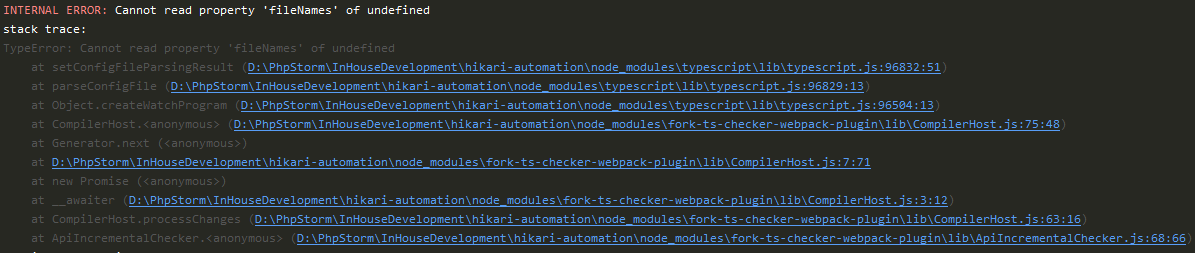
Make sure that this error will not occur without your plugin. Comment out line 48 (
transpileOnly: true), and also rows 73-76 inwebpack.config.js.Re-run
npm run developmentBuild. This time console will be clean:

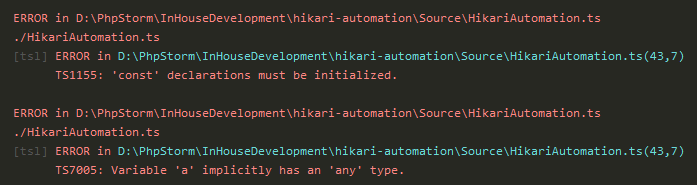
- If make somewhere the mistake intentionally, (e. g. write
const a;) and save the file, you will see the errors casted by build-in TypeScript type checker:
Environment
- fork-ts-checker-webpack-plugin: 1.6.0 (newest)
- typescript: 3.6.3
- tslint: 5.20.0 (but it is not integrated in webpack config, just for IDE highlight)
- webpack: 4.40.2
- os: Windows 10 Pro
 TokugawaTakesi
All 4 comments
Thanks for the repo. It's quite large and so that doesn't make diagnosis easy. Would you be able to confirm if your issue presents with [email protected] ? I'm curious as to whether there's a regression or if this might be user error
 johnnyreilly
on 24 Oct 2019
johnnyreilly
on 24 Oct 2019
Thank you for the quick response.
Unfortunately, nothing changed with [email protected].
It's quite large and so that doesn't make diagnosis easy.
This bug occurred also in my other smaller project. You can use this project for investigations instead. This time npm command is long, so please use copy-paste to execute it:
npm run SourceCodeCompilingAndBunding:DevelopmentBuild
Okay, this took me too long to debug. No it's not a bug.
In your webpack config, you have to set the whole path to the tsconfig, including the filename, not just the folder:
 new ForkTsCheckerWebpackPlugin({
          tsconfig: Path.resolve(__dirname)
        })
this is wrong.
 phryneas
on 25 Oct 2019
phryneas
on 25 Oct 2019
@phryneas,
You right, my mistake. Thank you for the investigation.
Well, this is not a bug, but could I call it "non-accurate error message"?
Could you please to determine the error like this in the future and output the error "Incorrect file path to 'tsconfig.json'"?
TokugawaTakesi
on 25 Oct 2019
Related issues
 ansf
·
6Comments
ansf
·
6Comments
 fabb
·
7Comments
fabb
·
7Comments
 Igogrek
·
4Comments
Igogrek
·
4Comments
 ianschmitz
·
4Comments
ianschmitz
·
4Comments
 stefanli
·
7Comments
stefanli
·
7Comments
Most helpful comment
Okay, this took me too long to debug. No it's not a bug.
In your webpack config, you have to set the whole path to the tsconfig, including the filename, not just the folder:
this is wrong.