Fontforge: RTL kerning with PUA characters doesn't seem to work?
I'm trying to make a font for a constructed script that's written from right to left, and I'm trying to kern my glyphs. I went to Font Info > Lookups > GPOS and added a lookup table with the right-to-left option set, and added a subtable as such: image. However, when I export my font, the wrong pair of glyphs seems to be kerned: image.
(Edit: almost forgot to mention that the second screenshot has an RTL override before the text.)
Version: 18:54 UTC 14-July-2018
OS: Linux (Manjaro; kernel ver. 4.14.91)
Expected behaviour: the middle two glyphs are kerned closer in the second screenshot
Actual behaviour: the first two and the last two glyphs are kerned closer
Steps to reproduce: Download this sfd, export the font
 bluebear94
All 6 comments
I don't want to be rude, but I'm always bemused when people come here looking for help with their constructed scripts, especially when those constructed scripts are supposed to be written in a complex way.
Popping up Advance Width Metrics doesn't show the kern...because just because you add an RTL kern doesn't mean that this is going to work. I set cen7c to Hebrew aleph and cen7e to Hebrew bet, and that caused it to show RTL in AWM. But the kern still doesn't show up, not sure why.
RTL barely works right in Unicode, and frequently breaks down and has many edge cases. Expecting FreeType to render your conscript correctly is quite frankly expecting too much. Force RTL mode whenever you're going to render it.
 ctrlcctrlv
on 14 Jan 2019
ctrlcctrlv
on 14 Jan 2019
(Also, sidenote. I cannot recommend enough that you please try to make a Hebrew font (or if you're daring, Arabic) before messing around with this stuff in a conscript. You'll then see how stuff is supposed to work. Then when you start fooling around and putting made-up junk in the PUA, you can recall your previous experience with how FontForge is supposed to work (FontForge was not made for the conlang community), and then figure out how to work around FontForge's (and FreeType's) expectations for your conscript. I have previously made a font that includes Hebrew that you can take a look at, it's called "Some Time Later".)
ctrlcctrlv
on 14 Jan 2019
The righttoleft flag is documented as "only applying to the cursive attachment lookup type (GPOS lookup type 3)". That's not what you're using and, given that your glyphs don't attach, most likely not what you need.
Here are some past threads related to questions in this area:
https://sourceforge.net/p/fontforge/mailman/message/27135230/
http://unicode.org/pipermail/unicode/2018-August/006876.html
Since there is no right-to-left PUA it might be quite difficult to get FontForge's internal kerning tools to work intuitively with those slots. But I mapped /cen7c to 05D0 and /cen7e to 05D1 (both are Hebrew slots) and reproduced your found kerning in the Metrics window, if not the kerning adjustment window:
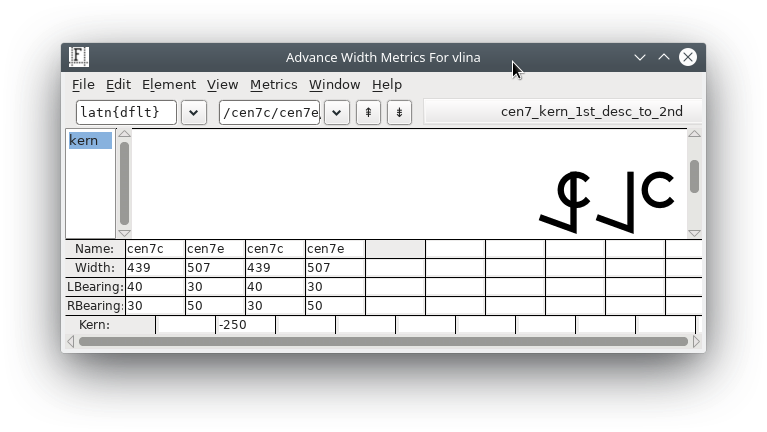
So you might be able to come up with your kerning values while mapped into Hebrew slots, and then just remap back to the PUA slots and have things work out. It's worth a try. But in any case the problem you face is learning the conventions of the kerning tables in relation to right-to-left text. the right-to-left flag is a red herring.
(Added later: Oops, it actually took a bit more work than that, because the kerning also needs to be copied into a hebrew kerning slot. I confused myself a bit in the description above.)
 skef
on 14 Jan 2019
skef
on 14 Jan 2019
Hmm, I tried remapping the glyphs to the Hebrew block with a script and it seems that the kerning preview is at fault – it seems to assume that the script goes from left to right.
Edit: Strangely enough, when I try to reproduce what you did, things display fine:
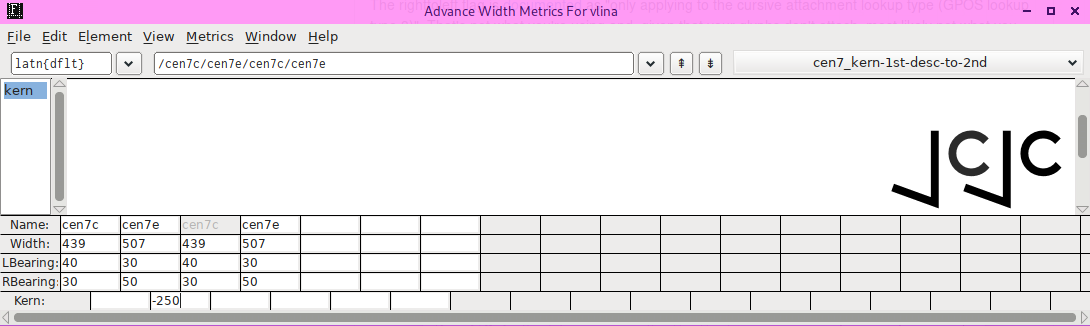
But the exported font is still off.
bluebear94
on 14 Jan 2019
The metrics window is more systemic and more likely to display correctly than the kerning window.
When you say "exported font is still off", have you verified that whatever tool you are testing the kerning with works correctly? And what "correct" means given the unusual use case? Have you compared the external tool's output with Hebrew-codepoints and PUA codepoints?
skef
on 14 Jan 2019
Well, I don't know how, but I got the font with PUA codepoints to show up properly.
bluebear94
on 14 Jan 2019
Related issues
 belluzj
·
3Comments
belluzj
·
3Comments
 zoghal
·
9Comments
zoghal
·
9Comments
 dimitre
·
7Comments
dimitre
·
7Comments
 felixhagspiel
·
6Comments
felixhagspiel
·
6Comments
 Michael-1
·
5Comments
Michael-1
·
5Comments
Most helpful comment
The righttoleft flag is documented as "only applying to the cursive attachment lookup type (GPOS lookup type 3)". That's not what you're using and, given that your glyphs don't attach, most likely not what you need.
Here are some past threads related to questions in this area:
https://sourceforge.net/p/fontforge/mailman/message/27135230/
http://unicode.org/pipermail/unicode/2018-August/006876.html
Since there is no right-to-left PUA it might be quite difficult to get FontForge's internal kerning tools to work intuitively with those slots. But I mapped /cen7c to 05D0 and /cen7e to 05D1 (both are Hebrew slots) and reproduced your found kerning in the Metrics window, if not the kerning adjustment window:

So you might be able to come up with your kerning values while mapped into Hebrew slots, and then just remap back to the PUA slots and have things work out. It's worth a try. But in any case the problem you face is learning the conventions of the kerning tables in relation to right-to-left text. the right-to-left flag is a red herring.
(Added later: Oops, it actually took a bit more work than that, because the kerning also needs to be copied into a hebrew kerning slot. I confused myself a bit in the description above.)