Font-awesome: Icon request: icon-check-all icon-uncheck-all
Examples:


I suppose you could get away with stacking the existing icons. I might give that a shot to see how it looks.
 shyndman
👍8
All 13 comments
I think there is a bad link there for one of thoughs here is another example: 
 gramx
on 20 Oct 2015
gramx
on 20 Oct 2015
+1
 wstrik
on 29 Jan 2016
wstrik
on 29 Jan 2016
+1
 suhuichen
on 2 Mar 2016
suhuichen
on 2 Mar 2016
+1
 chellberg
on 12 Jul 2016
chellberg
on 12 Jul 2016
+1
 mafk
on 18 Jul 2016
mafk
on 18 Jul 2016
+1 (two squares is better than three, IMO, especially at smaller sizes)
 jinglesthula
on 23 Aug 2016
jinglesthula
on 23 Aug 2016
+1
 dincozdemir
on 26 Dec 2016
dincozdemir
on 26 Dec 2016
+1
 glueball
on 29 Dec 2016
glueball
on 29 Dec 2016
+1
 jakubste
on 9 May 2017
jakubste
on 9 May 2017
+1
 jonatanskogsfors
on 14 Jun 2017
jonatanskogsfors
on 14 Jun 2017
+1
 clabnet
on 30 Jul 2017
clabnet
on 30 Jul 2017
Personally I use this snippet to produce "select all checkbox" :
⚠️ May use pro features
<div style="height: 1em; width: 1em;">
  <i class="far fa-square"            style="position: absolute; top: 0px; left: 0px;"/>
  <i class="fas fa-square fa-inverse" style="position: absolute; top: 2px; left: 2px;"/>
  <i class="far fa-check-square"      style="position: absolute; top: 3px; left: 3px;"/>
  <!--This line for "unselect all" icon
    <i class="far fa-square"      style="position: absolute; top: 3px; left: 3px;"/>
  -->
</div>

 ulybu
on 7 Mar 2018
ulybu
on 7 Mar 2018
👍4
Thanks man for provided solution.
JSX Bootstrap v4.0
JSX
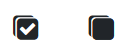
<div className="selectAllIcons" onClick={() => this.addAllGroups()} title="Wybierz wszystko">
   <i class="fa fa-square"            style={{position: "absolute", top: "0px", left: "0px"}}/>
    <i class="fa fa-square fa-inverse" style={{position: "absolute", top: "2px", left: "2px"}}/>
    <i class="fa fa-check-square"      style={{position: "absolute", top: "3px", left: "3px"}}/>
</div>
 <div className="unSelectAllIcons" onClick={() => this.generatingGroups()} title="Odznacz wszystko">
      <i class="fa fa-square"            style={{position: "absolute", top: "0px", left: "0px"}}/>
      <i class="fa fa-square fa-inverse" style={{position: "absolute", top: "2px", left: "2px"}}/>
       <i class="fa fa-check-square"      style={{position: "absolute", top: "3px", left: "3px"}}/>
      <i class="fa fa-square"            style={{position: "absolute", top: "3px", left: "3px"}}/>
</div>
.unSelectAllIcons,
    .selectAllIcons {
        height: 1em;
        width: 1em;
        position: relative;
        display: inline-block;
        margin: 0 20px 0 20px;
}
PREVIEW
 BartusZak
on 21 Mar 2018
BartusZak
on 21 Mar 2018
Was this page helpful?
0 / 5 - 0 ratings
Related issues
 jakuuub
·
3Comments
jakuuub
·
3Comments
 AndersDK12
·
3Comments
AndersDK12
·
3Comments
 brystfire08
·
3Comments
brystfire08
·
3Comments
 faithdong
·
3Comments
faithdong
·
3Comments
 omnimint
·
3Comments
omnimint
·
3Comments
Most helpful comment
Personally I use this snippet to produce "select all checkbox" :
⚠️ May use pro features