Fomantic-ui: [Form Validation] error class remove on fields when use "is valid" behavior
Bug Report
'error' class remove on fields when use "is valid" behavior
Steps to reproduce
https://jsfiddle.net/02gfdbx9/
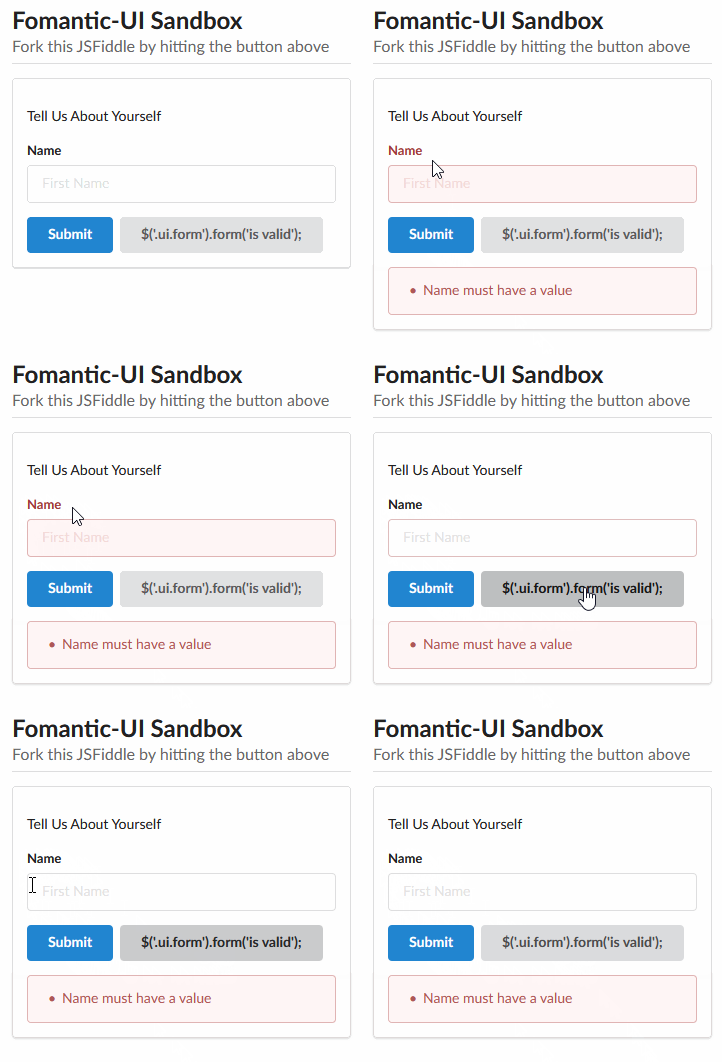
- click on submit button (the error class is set on all fields with a error)
- click on the button "$('.ui.form').form('is valid');" -> the error class is remove on all fields
Expected result
the error class on field should not be remove when we use $('.ui.form').form('is valid');
Actual result
the error class on field are remove when we use $('.ui.form').form('is valid');
Testcase
https://jsfiddle.net/02gfdbx9/
Screenshot (when possible)
Version
2.7.7
 dutrieux
All 8 comments
Please try $('.ui.form').form('validate form');
 brunotourinho
on 7 Aug 2019
brunotourinho
on 7 Aug 2019
Thx @brunotourinho but that's not what I want to do. I want to check (on my code) if there is a error on the form with $('.ui.form').form('is valid') and this behavior must not remove the error class on the field
dutrieux
on 7 Aug 2019
Oh, I got it... I don't know why 'is valid' kinda resets the form... good question!
I use both funcions...
function btnPostAnchor(sender, event) {
event.preventDefault();
var f = $('.ui.form').form('is valid')
$('.ui.form').form("validate form");
if (f === true) {
var formData = $('form').serialize();
postAjax(sender, formData);
}
};
brunotourinho
on 7 Aug 2019
Use determine isValid instead, which does what you expect.
 lubber-de
on 7 Aug 2019
lubber-de
on 7 Aug 2019
Okay, so either. I doesn't know this behavior ! It doesn't seem to be documented or ...
dutrieux
on 7 Aug 2019
don't @lubber-de think that behavior 'is valid' reset the form is not correct ?
dutrieux
on 7 Aug 2019
Yes, it unfortunately is.
I searched the source and found that while seeking for the reasons of your found behavior. 😉
We might add an option to the " is valid" behavior how to behave with the error class display. It's currently hardcoded as it is and the "determine isValid" currently does it the other way around.
The quick solution is to use the undocumented (probably because of supposed internal usage only), behavior.
lubber-de
on 7 Aug 2019
Fixed by #1615
See your adjusted jsfiddle here https://jsfiddle.net/lubber/1978duwp/4/
lubber-de
on 29 Jul 2020
Related issues
 kawaji
·
3Comments
kawaji
·
3Comments
 davekc
·
4Comments
davekc
·
4Comments
 peili0413
·
3Comments
peili0413
·
3Comments
 jamessampford
·
3Comments
jamessampford
·
3Comments
 hammy2899
·
5Comments
hammy2899
·
5Comments
Most helpful comment
Yes, it unfortunately is.
I searched the source and found that while seeking for the reasons of your found behavior. 😉
We might add an option to the " is valid" behavior how to behave with the error class display. It's currently hardcoded as it is and the "determine isValid" currently does it the other way around.
The quick solution is to use the undocumented (probably because of supposed internal usage only), behavior.